
SpringBoot(八):系统错误统一拦截器
在日常 web 开发中发生了异常,往往需要通过一个统一的 异常处理,来保证客户端能够收到友好的提示。本文将会介绍 Spring Boot 中的 全局统一异常处理。
Springboot的全局异常查是通过两个注解@ControllerAdvice和@ExceptionHandler来实现的。
只有代码出错或者throw出来的异常才会被捕捉处理,如果被catch的异常,就不会被捕捉,除非catch之后再throw异常。
@ControllerAdvice:增强型控制器,对于控制器的全局配置放在同一个位置,全局异常的注解,放在类上。

@ControllerAdvice默认只会处理controller层抛出的异常,如果需要处理service层的异常,需要定义一个自定义的MyException来继承RuntimeException类,然后@ExceptionHandler(MyException)即可。

@ExceptionHandler:指明需要处理的异常类型以及子类。注解放在方法上面。
项目设置
GlobalExceptionHandler.java
package com.dx.controller;

import java.util.HashMap;

import java.util.Map;

import javax.servlet.http.HttpServletRequest;

import org.springframework.web.bind.annotation.ControllerAdvice;

import org.springframework.web.bind.annotation.ExceptionHandler;

import org.springframework.web.bind.annotation.ResponseBody;

@ControllerAdvice(basePackages = "com.dx.controller")

public class GlobalExceptionHandler {

    @ExceptionHandler(value = Exception.class)

    @ResponseBody

    public Map<String, Object> errorResult() {

        Map<String, Object> errorResult = new HashMap<String, Object>();

        errorResult.put("errorCode", "500");

        errorResult.put("errorMsg", "AOP捕获全局异常。");

        return errorResult;

    }

    // ⒈全局异常处理返回字符串

    @ExceptionHandler(MyPageException.class)

    @ResponseBody

    public String exception(MyPageException e) {// 未知的异常做出响应

        return "MyPageException";

    }

    // ⒉全局异常处理返回JSON

    @ExceptionHandler(value = MyJsonException.class)

    @ResponseBody

    public ErrorInfo<String> jsonErrorHandler(HttpServletRequest req, MyJsonException e) throws Exception {

        ErrorInfo<String> r = new ErrorInfo<String>();

        r.setMessage(e.getMessage());

        r.setCode(ErrorInfo.ERROR);

        r.setData("Some Data");

        r.setUrl(req.getRequestURL().toString());

        return r;

    }

    // ⒊全局异常处理返回JSP

    @ExceptionHandler(MyJspException.class)

    public String exception(Exception e) {

        return "MyJspException";

    }

}
ErrorInfo.java
package com.dx.controller;

public class ErrorInfo<T> {

    public static final Integer OK = 0;

    public static final Integer ERROR = 100;

    private Integer code;

    private String message;

    private String url;

    private T data;

    public Integer getCode() {

        return code;

    }

    public void setCode(Integer code) {

        this.code = code;

    }

    public String getMessage() {

        return message;

    }

    public void setMessage(String message) {

        this.message = message;

    }

    public String getUrl() {

        return url;

    }

    public void setUrl(String url) {

        this.url = url;

    }

    public T getData() {

        return data;

    }

    public void setData(T data) {

        this.data = data;

    }

}
MyJsonException.java
package com.dx.controller;

public class MyJsonException extends Exception {

    public MyJsonException(String message) {

        super(message);

    }

}
MyJspException.java
package com.dx.controller;

public class MyJspException extends Exception {

    public MyJspException(String message) {

        super(message);

    }

}
MyPageException.java
package com.dx.controller;

public class MyPageException extends Exception {

    public MyPageException(String message) {

        super(message);

    }

}
App.java
package com.dx;

import org.springframework.boot.SpringApplication;

import org.springframework.boot.autoconfigure.SpringBootApplication;

@SpringBootApplication

public class App {

    public static void main(String[] args) {

        SpringApplication.run(App.class, args);

    }

}
测试类:
TestController.java
package com.dx.controller.member;

import org.springframework.stereotype.Controller;

import org.springframework.web.bind.annotation.RequestMapping;

import org.springframework.web.bind.annotation.ResponseBody;

import com.dx.controller.MyJsonException;

import com.dx.controller.MyJspException;

import com.dx.controller.MyPageException;

@Controller

public class TestController {

    @RequestMapping("/json")

    public String json() throws MyJsonException {

        if (1 == 1)

            throw new MyJsonException("");

        return "index";

    }

    @RequestMapping("/jsp")

    public String jsp() throws MyJspException {

        if (1 == 1)

            throw new MyJspException("");

        return "index";

    }

    @RequestMapping("/page")

    public String page() throws MyPageException {

        if (1 == 1)

            throw new MyPageException("");

        return "index";

    }

    @RequestMapping("/common1")

    public String common1() throws RuntimeException {

        if (1 == 1)

            throw new RuntimeException("");

        return "index";

    }

    @RequestMapping("/common2")

    public String common2() throws Exception {

        int i = 2 / 0;

        return "index";

    }

}
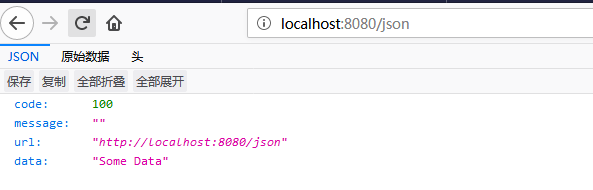
测试1 json:
http://localhost:8080/json
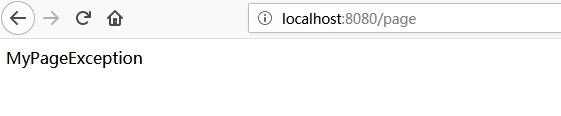
测试2 page:
http://localhost:8080/page
测试3 jsp:
http://localhost:8080/jsp
注:需要配置一下才能支持jsp
①需要在pom添加JSP的支持
        <!-- 对JSP的解析支持 -->

        <dependency>

            <groupId>org.apache.tomcat.embed</groupId>

            <artifactId>tomcat-embed-jasper</artifactId>

            <scope>provided</scope>

        </dependency> <!-- 对JSTL的支持 -->

        <dependency>

            <groupId>javax.servlet</groupId>

            <artifactId>jstl</artifactId>

        </dependency>
②需要配置application.properties
在src/main/resources下添加application.properties配置文件,并配置如下内容:
# \u9875\u9762\u9ED8\u8BA4\u524D\u7F00\u76EE\u5F55

spring.mvc.view.prefix=/WEB-INF/

# \u54CD\u5E94\u9875\u9762\u9ED8\u8BA4\u540E\u7F00

spring.mvc.view.suffix=.jsp
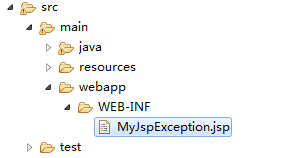
③需要添加jsp文件
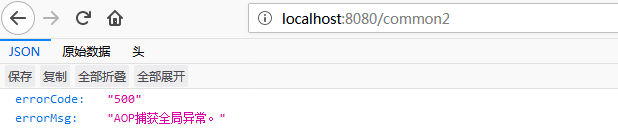
测试4 common1,common2:
http://localhost:8080/common1

http://localhost:8080/common2
SpringBoot(八):系统错误统一拦截器的更多相关文章
- SpringBoot从零单排 ------ 拦截器的使用
在项目开发中我们常常需要对请求进行验证,如登录校验.权限验证.防止重复提交等等,通过拦截器来过滤请求.自定义一个拦截器需要实现HandlerInterceptor接口.代码如下: import org ...
- springboot(五)过滤器和拦截器
前言 过滤器和拦截器二者都是AOP编程思想的提现,都能实现诸如权限检查.日志记录等.二者有一定的相似之处,不同的地方在于: Filter是servlet规范,只能用在Web程序中,而拦截器是Sprin ...
- 如何在SpringBoot项目中使用拦截器
相比springmvc,springboot中拦截器不需要在xml中配置,只需定义拦截器类 implements HandlerInterceptor 和拦截器拦截路径的配置类extends WebM ...
- springboot中配置了拦截器后,拦截器无效的解决方案之一
springboot的启动类xxxApplication不能扫描到拦截器配置类,可加上@ComponentScan(basePackages={"com.maya.common"} ...
- SpringBoot静态资源访问+拦截器+Thymeleaf模板引擎实现简单登陆
在此记录一下这十几天的学习情况,卡在模板引擎这里已经是四天了. 对Springboot的配置有一个比较深刻的认识,在此和大家分享一下初学者入门Spring Boot的注意事项,如果是初学SpringB ...
- springBoot 2.X-自定义拦截器
package com.cx.springboot.myInter; import javax.servlet.http.HttpServletRequest; import javax.servle ...
- springboot 2.0+ 自定义拦截器
之前项目的springboot自定义拦截器使用的是继承WebMvcConfigurerAdapter重写常用方法的方式来实现的. 以下WebMvcConfigurerAdapter 比较常用的重写接口 ...
- 玩转SpringBoot之整合Mybatis拦截器对数据库水平分表
利用Mybatis拦截器对数据库水平分表 需求描述 当数据量比较多时,放在一个表中的时候会影响查询效率:或者数据的时效性只是当月有效的时候:这时我们就会涉及到数据库的分表操作了.当然,你也可以使用比较 ...
- 玩转 SpringBoot 2 快速整合拦截器
概述 首先声明一下,这里所说的拦截器是 SpringMVC 的拦截器 HandlerInterceptor.使用SpringMVC 拦截器需要做如下操作: 创建拦截器类需要实现 HandlerInte ...
随机推荐
- AdvStringGrid 标题头 加粗的问题
当AdvStringGrid1.RowCount = 1的时候,会是下面这样: 当AdvStringGrid1.RowCount = 2 时 才是正确的:
- PHP魔术方法实例
PHP中把以两个下划线__开头的方法称为魔术方法,这些方法在PHP中充当了举足轻重的作用. 魔术方法包括: __construct(),类的构造函数 __destruct(),类的析构函数 __cal ...
- 使用super调用父类的构造方法
package com.bjpowernode.t02inheritance.c09; /* * 使用super调用父类的构造方法 */public class TestSuper02 { publi ...
- git的入门摸索和入门研究
git官网:https://git-scm.com/ git教程---菜鸟教程:http://www.runoob.com/git/git-tutorial.html git教程---廖雪峰:http ...
- 学习C程序设计(一)第一节总览
1.程序设计面向的问题 一切可计算问题都可以用程序的方法解决.ps:这样程序与计算有关了 1.1程序设计的五个步骤: a.确定问题可以计算:(问题是可计算) b.建立问题的数学模型:(不懂) c.设计 ...
- Python hashlib、hmac加密模块
#用于加密的相关操作,3.x里代替了md5模块和sha模块,主要提供sha1,sha224,sha256,sha384,sha512,md5算法 #sha2为主流加密算法,md5加密方式不如sha2 ...
- 关于SSH不能连接及报错的问题总结
前言 此文不涉及到因网络.防火墙设备而导致的SSH不能访问.运维常见问题,这里不做过多的讲解,主要讲讲出了大家所知道的,还有其他什么原因会导致SSH无法访问呢?好了,那么,如果想知道的话,那就继续往下 ...
- 第三章XML简介
概念:XML:提供数据交换.系统配置.内容管理等的功能,可跨平台.跨网络.跨程序的数据描述方式.XSL:依靠XPath定位,提供显示模板,且专门为了显示XML文件信息的语言.CSS(层叠样式表):在网 ...
- VS Code 配置 C/C++ 环境(转)
写作原因 微软的 VSCode 一直以来为人诟病的一个问题就是对于 C/C++ 工程的编译以及调试支持度有限,配置起来比较复杂,但是 vscode-cpptools 团队经过一段时间的 bug 修 ...
- Linux 运行Python文件,不因终端关闭而终止运行
在Linux服务器运行py文件时,有时会因为终端窗口的关闭而结束py文件的执行,这时候使用下面的命令运行py文件: $nohup python filename.py & 命令解释: nohu ...