
.NET Unity XML 配置文件(2)
本文内容
- Unity 配置示意图
- Unity 的 XML 架构
- 参考资料
研究配置文件总是很麻烦,而且很可能因为版本问题,会稍有不同。如果你不确定 Unity 是否支持以及如何支持某个元素,就看下相关文档,或是看下 Unity 源代码中的 Unity.Configuration 项目,该项目中每个支持的元素都有一个类。
Unity XML 配置文件可以用来完成依赖注入的配置,即便不通过配置文件,也可以通过代码来完成,它们是等价的。
下载 Unity 3
Unity 配置示意图
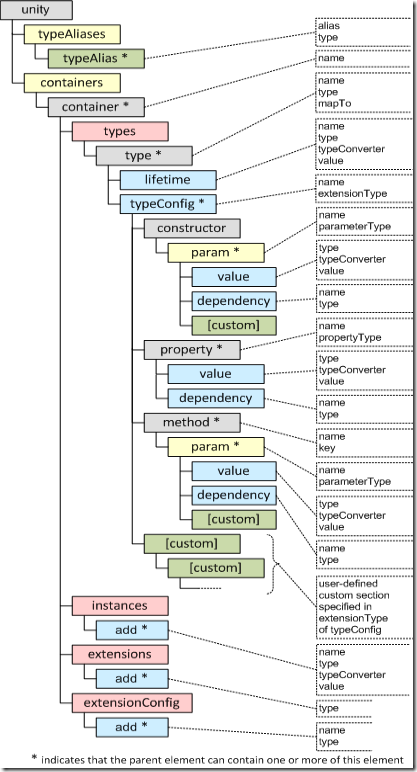
Unity 的 XML 架构
下面列出用于配置Unity Application Block(Unity)的元素和属性。配置文件具有如下 section-handler 声明:
<configSections>
<section name="unity"
type="Microsoft.Practices.Unity.Configuration.UnityConfigurationSection,
Microsoft.Practices.Unity.Configuration, Version=1.2.0.0,
Culture=neutral, PublicKeyToken=31bf3856ad364e35" />
</configSections>
section-handler 声明包含配置名称和处理配置数据的类 Microsoft.Practices.Unity.Configuration.UnityConfigurationSection。
unity 元素
unity 元素指定 Unity Application Block 配置。该元素是必须的。
<unity>
<typeAliases>
...
</typeAliases>
<containers>
<container name="containerOne">
<types>
...
</types>
<instances>
...
</instances>
<extensions>
...
</extensions>
<extensionConfig>
...
</extensionConfig>
</container>
</containers>
</unity>
其具有如下子元素:
- typeAliases
- containers
typeAliases 元素
typeAliases 元素包含可选类型别名的集合,使你可以轻松指定映射(mappings)、生命周期(lifetime)、实例(instances)、扩展(extensions),Unity 容器其他配置地方也能进行这些配置。当在扩展点(extensibility points),如 typeConfig 小节和自定义注入值上指定元素类型时,你不能使用类型别名。
该元素唯一可用的子元素是一个 typeAlias 元素的集合。
<typeAliases>
<!-- Lifetime manager types -->
<typeAlias alias="singleton"
type="Microsoft.Practices.Unity.ContainerControlledLifetimeManager,
Microsoft.Practices.Unity" />
<typeAlias alias="external"
type="Microsoft.Practices.Unity.ExternallyControlledLifetimeManager,
Microsoft.Practices.Unity" />
<typeAlias alias="perThread"
type="Microsoft.Practices.Unity.PerThreadLifetimeManager,
Microsoft.Practices.Unity" />
<!-- User-defined type aliases -->
<typeAlias alias="IMyInterface"
type="MyApplication.MyTypes.MyInterface, MyApplication.MyTypes" />
<typeAlias alias="MyRealObject"
type="MyApplication.MyTypes.MyRealObject, MyApplication.MyTypes" />
<typeAlias alias="MyCustomLifetime"
type="MyApplication.MyLifetimeManager, MyApplication.MyTypes" />
</typeAliases>
typeAlias 元素
typeAlias 元素定义一个单独的别名,你可以在配置的其他地方使用它。
typeAlias 元素的属性如表所示:
|
属性 |
描述 |
|
alias |
可以在配置的其他地方使用的别名和速记名,指代指定的类型。该属性是必须的。 |
|
type |
该别名的类型全名。该属性是必须的。 |
containers 元素
containers 元素包含 Unity 容器的集合 。唯一的子元素是 container 元素的集合。
container 元素
container 元素包含一个单独容器的细节。
<container name="containerOne">
<types>
...
</types>
<instances>
...
</instances>
<extensions>
...
</extensions>
<extensionConfig>
...
</extensionConfig>
</container>
container 元素具有如下表的属性:
|
属性 |
描述 |
|
name |
容器的名称。该属性可选。 |
container 元素具有如下子元素:
- types 元素
- register 元素。看了几个 Unity 的 XML 配置文件,貌似 register 元素 和 type 元素(types 元素的子元素)的作用是一样的,只是由于版本问题,改变了名字。
- instances 元素
- extensions 元素
- extensionConfig 元素
types 元素
types 元素包含一个已注册 type 的集合。types 元素包含如下:
- 包含一系列 type 元素,都是添加的单独 type;
- 包含描述如何完成注入的规范。
元素的唯一子元素是 type 元素。
type 元素
type 元素定义 Unity 容器的类型映射。如果你指定 name,那么 name 用于类型映射,否则,为指定类型创建一个默认映射。
你可以为每个映射指定 lifetime 管理。如果没有显式配置 lifetime,将执行 transient lifetime。
<types>
<!-- Type mapping with no lifetime — defaults to "transient" -->
<type type="Custom.MyBaseClass" mapTo="Custom.MyConcreteClass" />
<!-- Type mapping using aliases -->
<type type="IMyInterface" mapTo="MyRealObject" />
<!-- Lifetime managers specified using the type aliases -->
<type type="Custom.MyBaseClass" mapTo="Custom.MyConcreteClass">
<lifetime type="singleton" />
</type>
<type type="IMyInterface" mapTo="MyRealObject" name="RealObject">
<lifetime type="external" />
</type>
<type type="IMyInterface" mapTo="MyRealObject" name="RealObject">
<lifetime type="perThread" />
</type>
<!-- Lifetime manager specified using the full type name -->
<!-- Any initialization data specified for the lifetime manager -->
<!-- will be converted using the default type converter -->
<type type="Custom.MyBaseClass" mapTo="Custom.MyConcreteClass">
<lifetime value="sessionKey"
type="MyApplication.MyTypes.MyLifetimeManager,
MyApplication.MyTypes" />
</type>
<!-- Lifetime manager initialization using a custom TypeConverter -->
<type type="IMyInterface" mapTo="MyRealObject" name="CustomSession">
<lifetime type="MyCustomLifetime" value="ReverseKey"
typeConverter="MyApplication.MyTypes.MyTypeConverter,
MyApplication.MyTypes" />
</type>
<!-- type with injection parameters define in configuration -->
<!-- Type mapping using aliases defined above -->
<type type="IMyService" mapTo="MyDataService" name="DataService">
<typeConfig>
<constructor>
<param name="connectionString" parameterType="string">
<value value="AdventureWorks"/>
</param>
<param name="dataService" parameterType="IMyService">
<dependency />
</param>
</constructor>
<property name="MyRealObject" propertyType="IMyInterface" />
<method name="Initialize">
<param name="connectionString" parameterType="string">
<value value="contoso"/>
</param>
<param name="dataService" parameterType="IMyService">
<dependency />
</param>
</method>
</typeConfig>
</type>
</types>
下表列出 type 元素的属性:
|
属性 |
描述 |
|
name |
注册类型时使用。该属性是可选的。 |
|
type |
The source type to configure in the container. The type of the object to map from if this is a mapping registration or the type of the object if this is a singleton registration. Can be a user-defined alias specified in the typeAliases section of the configuration. 该属性是必须的。 |
|
mapTo |
The destination type for type mapping. The type of the object to map to if this is a mapping registration. 该属性是可选的。 |
type 元素具有如下子元素:
- lifetime 元素
- typeConfig 元素
lifetime 元素
lifetime 元素包含生命周期管理的细节。
<!-- Standard singleton lifetime manager specified using a type alias -->
<type type="Custom.MyBaseClass" mapTo="Custom.MyConcreteClass">
<lifetime type="singleton" />
</type>
<!-- Custom lifetime manager specified using a type alias -->
<!-- and initialized using a custom TypeConverter -->
<type type="Custom.MyBaseClass" mapTo="Custom.MyConcreteClass">
<lifetime type="MyCustomLifetime" value="ReverseKey"
name="CustomSessionLifetime"
typeConverter="MyApplication.MyTypes.MyTypeConverter, MyApplication.MyTypes" />
</type>
下表列出 lifetime 元素的属性:
|
属性 |
描述 |
|
name |
注册生命周期管理时使用的名称。该属性是可选的。 |
|
type |
The type of the lifetime manager to use for this mapping. Can be a user-defined alias specified in the typeAliases section of the configuration or one of the default aliases singleton or external. 该属性是必须的。 |
|
value |
需要初始化生命周期管理的任何值。该属性是可选的。 |
|
typeConverter |
The type converter to use to convert the value provided to match the type of the instance. If not specified, the default converter for the specified type is used. Aliases are allowed. 该属性是可选的。 |
typeConfig 元素
该元素包含如下子元素:
- constructor 元素
- property 元素
- method 元素
(略)
调试程序时,提示不支持该属性。因此,也略过如下元素:constructor 元素、property 元素、method 元素、param 元素、value 元素、dependency 元素、array 元素。
register 元素
register 元素是任何配置的基本构建块。它使你能够为一个类型指定映射和注入配置。如果你指定一个 name,那么 name 用于类型映射。否则,它会创建一个指定类型的默认映射。你也可以为每个映射指定一个生命周期管理器。如果你没有为一个类型显式配置生命周期管理器,那么它会使用瞬态生命周期管理器(transient lifetime manager)。
下表列出 register 元素的属性:
|
属性 |
描述 |
|
type |
The type that is being registered. This is the type that will be requested when calling the Resolve method. 该属性是必须的。 |
|
name |
The name of the registration; if omitted the default registration for the type will be created. 该属性是可选的。 |
|
mapTo |
Type which will actually be created and returned when Resolve is called. This sets up a type mapping. It can be a user-defined alias or one of the default aliases. 该属性是可选的。 |
下面 XML 文档说明 register 元素的一般用法:
<container>
<register type="MyService"> ... </register> <!-- Default registration for type MyService -->
<register type="ILogger" mapTo="EventLogLogger" /> <!-- type mapping -->
<register type="ILogger" mapTo="PageAdminLogger" name="emergency" /> <!-- named registration -->
</container>
在运行时注册类型,使用 RegisterType 方法。下面代码段在运行时注册 EventLogLogger 类:
// Register a default (un-named) type mapping with a transient lifetime
// Specify the registered type as an interface or object type
// and the target type you want returned for that type
myContainer.RegisterType<ILogger, EventLogLogger>();
register 元素具有如下子元素:
- lifetime 元素
constructor 元素property 元素
method 元素
instances 元素
instances 元素包含容器中已存在对象实例的集合。这些对象都是用 RegisterInstance 方法注册的。 instances 元素包含一系列添加单独实例的 add 元素。
<instances>
<add name="MyInstance1" type="System.String" value="Some value" />
<add name="MyInstance2" type="System.DateTime" value="2008-02-05T17:50:00" />
</instances>
instances 元素的唯一子元素是 add 元素的集合。
add 元素定义了一个实例映射,插入到 Unity 容器中。
下表列出 add 元素的属性:
|
属性 |
描述 |
|
name |
The name to use when registering this instance. 该属性是可选的。 |
|
type |
The type of this instance. This attribute is optional. Can be a user-defined alias specified in the typeAliases section of the configuration. If omitted, the assumed type is System.String. |
|
value |
A string representation of the desired instance that is used to convert from one instance to another.该属性是必须的。 |
|
typeConverter |
The type converter to use to convert the value provided to match the type of the instance. If not specified, the default converter for the specified type is used. 该属性是可选的。 |
extensions 元素和 extensionConfig 元素
(略)
调试程序时,提示不支持该属性。
interceptors 元素
interceptors 元素包含配置中的拦截器列表,其中包含了一系列的指定单独拦截器的 interceptor 元素。
interceptor 元素
interceptors 元素中的每个 interceptor 元素指定了一个单独的拦截器配置。interceptor 元素具有以下子元素:
- key
- default
定义 interceptors 的方式与定义 lifetime 管理一样。
下表列出 interceptor 元素的属性:
|
属性 |
描述 |
|
name |
The name to use when registering this interceptor. This attribute is required only when there are two or more entries for the same interceptor type. |
|
type |
The type of the interceptor. 该属性是必须的。 |
|
typeConverter |
The type converter to use to convert the value provided to match the type of the instance. If not specified, the default converter for the specified type is used. Aliases are allowed. 该属性是可选的。 |
|
Value |
Any value required to initialize the interceptor. 该属性是可选的。 |
default 元素
default 子元素设置一个类型的默认拦截器。它具有唯一的 type 属性。type 属性指定 interceptor 的类型。
key 元素
interceptor 元素的 key 子元素用于设置指定生成秘钥的 interceptor。
下表列出 key 元素的属性:
|
属性 |
描述 |
|
name |
The name to use when registering the build key. 该属性是可选的。 |
|
type |
The type for the build key. The type of the object to map from if this is a mapping registration or the type of the object if this is a singleton registration. Can be a user-defined alias specified in the typeAliases section of the configuration. 该属性是必须的。 |
policies 元素
policies 元素包含一系列策略列表,其包含了一系列指定单独策略的 policy 元素。
下面 XML 例子说明 policies 元素及其子元素。
<policies>
<policy name="foot">
<matchingRules>
<matchingRule name="rule1">
<lifetime type="singleton" />
</matchingRule>
</matchingRules>
<callHandlers>
<callHandler name="handler1" type="GlobalCountCallHandler">
<lifetime type="singleton" />
</callHandler>
<callHandler name="handler2" type="GlobalCountCallHandler">
</callHandler>
</callHandlers>
</policy>
</policies>
policy Element
policies 元素中的每个 policy 元素通过两个子元素 matchingRules 和 callHandlers 指定一个单独策略的完成配置。
下表列出 policy 元素的属性:
|
属性 |
描述 |
|
name |
The name to use when registering this policy. This attribute is required. |
|
type |
The type of the policy. Can be a user-defined alias specified in the typeAliases section of the configuration. The extension must contain a class that can read the contents of the policy configuration. This attribute is required. |
matchingRules 元素
matchingRules 元素包含了一系列政策的匹配规则,其中包含了一系列指定单独匹配规则的 matchingRule 元素。matchingRules 元素内的匹配规则组合必须为 True才能应用。
matchingRule 元素
matchingRules 元素中的每个 matchingRule 元素指定一个单独的匹配规则的细节。matchingRule 元素具有 injection 和 lifetime 两个子元素。
下表列出 matchingRule 元素的属性:
|
属性 |
描述 |
|
name |
The name by which code in the application block and the configuration tools will refer to this matching rule. |
|
type |
The name of the matching rule class, the name of the containing assembly, the version, the culture information, and the public key token. |
matchingRule 元素具有如下子元素:
- injection
- lifetime
lifetime 元素指定队形的生命周期行为。它具有唯一的 type 属性,指定生命周期管理。
下面 XML 说明 matchingRule 元素及其子元素。
<matchingRules>
<matchingRule name="rule1">
<lifetime type="singleton" />
</matchingRule>
</matchingRules>
injection 元素
injection 元素描述了如何在 matchingRule 元素的情况下,创建一个指定的元素。它很像 typeConfig 元素,除了 injection 元素配置一个实例的注入外,而 typeConfig 是一个扩展点。injection 元素与 typeConfig 的默认情况具有相同的子元素。
callHandlers 元素
callHandlers 元素包含一个策略的调用句柄,其中包含一系列指定单独调用句柄的 callHandler 元素。
callHandler 元素
callHandlers 元素中的每个 callHandler 元素指定一个单独调用句柄的细节。callHandler 元素具有 injection 和 lifetime 子元素。
下表列出 callHandler 元素的属性:
|
属性 |
描述 |
|
name |
The name by which code in the application block and the configuration tools will refer to this call handler. |
|
type |
The type of the callhandler. Can be a user-defined alias specified in the typeAliases section of the configuration. |
ChildcallHandler 元素具有如下子元素:
- injection
- lifetime
下面 XML 文件说明带 injection 子元素的 callHandler 元素。该例子注入一个属性。
<callHandlers>
<callHandler name="handler1" type="GlobalCountCallHandler">
<injection>
<constructor>
<param name="name" parameterType="string">
<value value="handler1" />
</param>
</constructor>
<--sets the position of the callhandlers
<-- within the policy handler chain/>
<property name="Order" propertyType="int">
<value value="10" type="int"/>
</property>
</injection>
</callHandler>
</callHandlers>
参考资料
- Unity Application Block 1.2 - October 2008
- Unity Application Block Methods(RegisterType、Resolve、BuildUp)
- Source Schema for the Unity Application Block
- The Unity Configuration Schema
以上链接虽然不再更新,但还是有一定参考价值。关于最新的 Unity 信息在 Unity Application Block site
.NET 用 Unity 依赖注入——概述注册和解析类型(1)
.NET Unity XML 配置文件(2)的更多相关文章
- (转)Unity 导出XML配置文件,动态加载场景
参考:http://www.xuanyusong.com/archives/1919 http://www.omuying.com/article/48.aspx 主要功能: 1.导出场景的配置文 ...
- Mybatis 源码分析--Configuration.xml配置文件加载到内存
(补充知识点: 1 byte(字节)=8 bit(位) 通常一个标准英文字母占一个字节位置,一个标准汉字占两个字节位置:字符的例子有:字母.数字系统或标点符号) 1.创建SqlSessionFacto ...
- 转-springAOP基于XML配置文件方式
springAOP基于XML配置文件方式 时间 2014-03-28 20:11:12 CSDN博客 原文 http://blog.csdn.net/yantingmei/article/deta ...
- xml 配置文件规范 校验
背景:做的数据同步框架,数据同步种类通过xml配置文件添加.为了系统的稳定性,我们只能认为将来写这个运行配置xml的人是一个傻瓜,那么对xml格式校验就很重要. 通过dom4j,是可以完成对xml格式 ...
- Spring中加载xml配置文件的六种方式
Spring中加载xml配置文件的六种方式 博客分类: Spring&EJB XMLSpringWebBeanBlog 因为目前正在从事一个项目,项目中一个需求就是所有的功能都是插件的形式装 ...
- 史上最全web.xml配置文件元素详解
一.web.xml配置文件常用元素及其意义预览 <web-app> <!--定义了WEB应用的名字--> <display-name></display-na ...
- Spring XML配置文件示例(二)——web.xml
<?xml version="1.0" encoding="UTF-8"?> <web-app id="WebApp_ID" ...
- hibernate.cfg.xml配置文件和hbm.xml配置文件
http://blog.sina.com.cn/s/blog_a7b8ab2801014m0e.html hibernate.cfg.xml配置文件格式 <?xml version=" ...
- struts2中struts.xml配置文件详解【未整理】
1. 深入Struts2的配置文件 本部分主要介绍struts.xml的常用配置. 1.1. 包配置: Struts2框架中核心组件就是Action.拦截器等,Struts2框架使用包来管 ...
随机推荐
- laravel 事件广播
Laravel 5.1 之中新加入了事件广播的功能,作用是把服务器中触发的事件通过websocket服务通知客户端,也就是浏览器,客户端js根据接受到的事件,做出相应动作.本文会用简单的代码展示一个事 ...
- poj1511,线段树扫描线面积
经典题,线段树扫描线其实类似区间更新,一般的做法是想象一根扫描线从上扫到下或者从左扫到右,本题的做法是从上扫到下 只要扫到了一根水平线,就将其更新到线段树对应区间中,区间和它的子区间是独立更新的 #i ...
- python 全栈开发,Day137(爬虫系列之第4章-scrapy框架)
一.scrapy框架简介 1. 介绍 Scrapy一个开源和协作的框架,其最初是为了页面抓取 (更确切来说, 网络抓取 )所设计的,使用它可以以快速.简单.可扩展的方式从网站中提取所需的数据.但目前S ...
- openstack学习-创建一台云主机(七)
一.创建基础环境 1.检查网络是否正常 [root@linux-node1 ~]# openstack network agent list +---------------------------- ...
- python学习之for循环
Python for循环可以遍历任何序列的项目,如一个列表或者一个字符串. 实例: #!/usr/bin/env python for letter in 'Python': # 第一个实例 prin ...
- Storm中关于Topology的设计
一:介绍Storm设计模型 1.Topology Storm对任务的抽象,其实 就是将实时数据分析任务 分解为 不同的阶段 点: 计算组件 Spout Bolt 边: 数据流向 数据从上 ...
- 图论之二分图-HihoCoder1121
题目链接:https://hihocoder.com/problemset/problem/1121 二分图的相关概念:https://blog.csdn.net/qq_36345036/articl ...
- 大数据系列博客之 --- 深入简出 Shell 脚本语言(基础篇)
首先声明,此系列shell系列博客分为四篇发布,分别是: 基础篇:https://www.cnblogs.com/lsy131479/p/9914747.html 提升篇:https://www.cn ...
- SQLite中SELECT基本形式
SQLite中SELECT基本形式 每个数据库通常都包含多个表,而每个表又包含多条数据.要获取数据库中的数据,就需要SQL语言提供的查询语句SELECT.本章将讲解和SELECT语句相关的内容,其中包 ...
- 多臂机测试, AB测试
bandit 强盗,土匪:恶棍:敲诈者 ['bændɪt] 多臂机 multi-armed bandit MAB 简写. one-arm bandit tiger ji 是一种自动AB测试的方 ...