
怎样使用EOS.JS的API
https://medium.com/coinmonks/how-to-use-eosjs-api-1-770b037b22ad
https://blog.csdn.net/mongo_node/article/details/82751747
https://github.com/EOSIO/eosjs-api/blob/master/docs/api.md#eos--object
注意:由于每个BP端点具有不同的速度及可靠性,建议使用最适合您的BP。
Greetings, this is Dongjun Kwon from ITAM Network. In a previous post on ‘Getting Started with EOSJS,’ we went over how to use EOSJS. In this post, we will be going over the commonly used APIs on EOSJS and testing them.
Click here to see the list of APIs
Preparation
We will be making all codes available to use. In order to make useable, preparation is needed. The preparations are as follows:
- Node.js
- EOSJS
Please install the above two and put the following at the top of the javascript file.
After you have done this, code the api examples below and run javascript with node.js to get the value.
Because each BP Endpoint has different speed and/or reliability, we recommend you use the BP that is most suitable for you.
getBlock(blockNumOrId)
Used to bring the information of an applicable block.
params

Code
Result
{ timestamp: '2018-06-08T08:08:08.500',
  producer: '',
  confirmed: 1,
  previous:
   '0000000000000000000000000000000000000000000000000000000000000000',
  transaction_mroot:
   '0000000000000000000000000000000000000000000000000000000000000000',
  action_mroot:
   'aca376f206b8fc25a6ed44dbdc66547c36c6c33e3a119ffbeaef943642f0e906',
  schedule_version: 0,
  new_producers: null,
  header_extensions: [],
  producer_signature:
   'SIG_K1_111111111111111111111111111111111111111111111111111111111111111116uk5ne',
  transactions: [],
  block_extensions: [],
  id:
   '00000001405147477ab2f5f51cda427b638191c66d2c59aa392d5c2c98076cb0',
  block_num: 1,
  ref_block_prefix: 4126519930 }
To see the activities that took place in the applicable block, look at the transactions. To view transactions, do the following:
If you look at the transactions by using the above value, there are actions. By looking at the actions, you can have a deeper look at the activities that took place.
getAccount(accountName)
Used to get an EOS account’s information.
Params

Code
Result
{ account_name: 'itamnetwork1',
  head_block_num: 8516805,
  head_block_time: '2018-07-30T07:34:52.500',
  privileged: false,
  last_code_update: '1970-01-01T00:00:00.000',
  created: '2018-07-09T02:24:58.500',
  core_liquid_balance: '12.6131 EOS',
  ram_quota: 14976,
  net_weight: 201000,
  cpu_weight: 10401000,
  net_limit: { used: 1679786, available: 11108657, max: 12788443 },
  cpu_limit: { used: 7950353, available: 6356380, max: 14306733 },
  ram_usage: 10934,
  permissions:
   [ { perm_name: 'active', parent: 'owner', required_auth: [Object] },
     { perm_name: 'owner', parent: '', required_auth: [Object] } ],
  total_resources:
   { owner: 'itamnetwork1',
     net_weight: '20.1000 EOS',
     cpu_weight: '1040.1000 EOS',
     ram_bytes: 14976 },
  self_delegated_bandwidth:
   { from: 'itamnetwork1',
     to: 'itamnetwork1',
     net_weight: '0.1000 EOS',
     cpu_weight: '0.1000 EOS' },
  refund_request: null,
  voter_info:
   { owner: 'itamnetwork1',
     proxy: '',
     producers: [],
     staked: 4000,
     last_vote_weight: '0.00000000000000000',
     proxied_vote_weight: '0.00000000000000000',
     is_proxy: 0 } }
I’ll explain some of the above result values.
- account_name: as you all probably already know, it is the EOS account name.
- ram_quota: the amount of RAM I hold, measured in byte.
- net_limit: the total amount of net, useable net, and used net of an account, measured in byte.
- cpu_limit: the total amount of CPU, available CPU, and used CPU of an account, measured in us.
- ram_usage: amount of RAM used of an account, measured in byte.
- total_resources: the EOS of the resource allocated to me.
- self_delegated_bandwidth: the information I delegated to myself.
- voter_info: information regarding votes. Keep an eye on the ‘staked’ part, which shows the amount I staked. More specifically, it is the value that includes what I delegated to myself and what others delegated.
getKeyAccounts(publicKey)
Gets the accounts of a public key.
Params

Code
Result
{ account_names: [ 'itamnetwork1' ] }
It is possible to make many accounts with one EOS public key. This is why the value of account_name is an array in the form of a string.
getCurrencyBalance(code, account, symbol)
Gets the Token corresponding to the symbol of a code.
Params
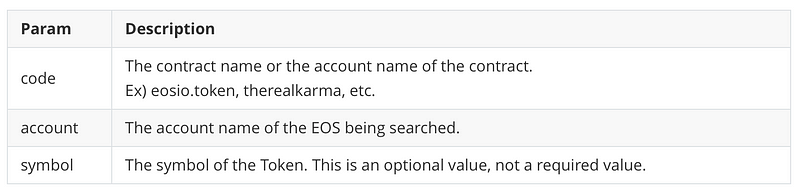
Code
Result
[ '12.6131 EOS' ]
If you look at the result value, you can see an array in the form of a string. This is because there could be tokens with many different symbols in the account. On the EOS testnet, Jungle Net, if you search eosio.token excluding symbol, you can see 2 tokens.
getCurrencyStats(code, symbol)
Get the token information of the symbol.
Params

Code
Result
{ EOS:
   { supply: '1006148640.3388 EOS',
     max_supply: '10000000000.0000 EOS',
     issuer: 'eosio' } }
Below are the descriptions of the result values.
- supply: the number of tokens supplied currently.
- max_supply: the total number of tokens.
- issuer: the issuer
Conclusion
We went over the 5 most frequently used EOSJS APIs. There are still numerous APIs that we have not covered, and I am planning to go over these in a later post. Thank you.
The above examples can be found on github.
Subscribe to ITAM Network and receive the latest info.
Visit the ITAM Network Telegram to communicate regarding ITAM Network and Blockchain. Join by clicking the link below!
怎样使用EOS.JS的API的更多相关文章
- 原生JS实战:写了个一边玩游戏,一边记JS的API的游戏
本文是苏福的原创文章,转载请注明出处:苏福CNblog:http://www.cnblogs.com/susufufu/p/5878913.html 本程序[一边玩游戏,一边记JS的API]是本人的个 ...
- [转载]fullPage.js中文api 配置参数~
fullPage.js中文api 配置参数 选项 类型 默认值 说明 verticalCentered 字符串 true 内容是否垂直居中 resize 布尔值 false 字体是否随着窗口缩放而缩放 ...
- AngularJS 授权 + Node.js REST api
作者好屌啊,我不懂的他全都懂. Authentication with AngularJS and a Node.js REST api 几个月前,我开始觉得 AngularJS 好像好牛逼的样子,于 ...
- Node.js RESTful API
什么是REST架构? REST表示代表性状态传输.REST是一种基于Web标准的架构,并使用HTTP协议. 它都是围绕着资源,其中每一个组件是资源和一个资源是由一个共同的接口使用HTTP的标准方法获得 ...
- Practical Node.js (2018版) 第8章:Building Node.js REST API Servers
Building Node.js REST API Servers with Express.js and Hapi Modern-day web developers use an architec ...
- jQuery-全屏滚动插件【fullPage.js】API 使用方法总结
jQuery-全屏滚动插件[fullPage.js]API 使用方法总结 jQuery-全屏滚动插件fullPage.js使用方法总结 作者github及下载地址:https://github.c ...
- Node.js 常用 API
Node.js v6.11.2 Documentation(官方文档) Buffer Prior to the introduction of TypedArray in ECMAScript 20 ...
- 十个书写Node.js REST API的最佳实践(上)
收录待用,修改转载已取得腾讯云授权 原文:10 Best Practices for Writing Node.js REST APIs 我们会通过本文介绍下书写Node.js REST API的最佳 ...
- 十个书写Node.js REST API的最佳实践(下)
收录待用,修改转载已取得腾讯云授权 5. 对你的Node.js REST API进行黑盒测试 测试你的REST API最好的方法之一就是把它们当成黑盒对待. 黑盒测试是一种测试方法,通过这种方法无需知 ...
随机推荐
- C# 反射(Reflection)
什么是反射 发射是 .net framework 提供的一个帮助类库,用于读取和使用元数据. 用到的类:System.Reflection,System.Type.System.Type 类对于反射起 ...
- 10.24CRM完成
2018-10-24 16:16:59 已经完成了crm项目: 项目做完了,这几天可以安静整理Django啦!!!把博客整理一下! 然后再过几天针就可以回学校啦!! 今天程序员节 节日快乐!hell ...
- day_5.27python网络编程
开始进行python网络编程2018-5-27 20:27:30 Tcp/Ip协议
- 设备重力感应 window.DeviceOrientationEvent
设备屏幕方向与运动 https://developers.google.cn/web/fundamentals/native-hardware/device-orientation/ MDN devi ...
- jquery-1.11.2.min.js
/*! jQuery v1.11.2 | (c) 2005, 2014 jQuery Foundation, Inc. | jquery.org/license */ !function(a,b){& ...
- Docker多主机网络
网络术语概念 二层交换技术:工作在OSI七层网络模型的第二层,通过MAC地址进行帧转发 三层交换技术:也称为IP交换技术,工作在OSI七层网络模型的第三层,通过IP地址进行包转发.它解决了局域网中网段 ...
- css学习_css复合选择器
css复合选择器 a.交集选择器 (即...又...:选择器之间不能有空格) p.one{color:red;] b.并集选择器(中间由逗号隔开) p,div{color:red;} c.后代选择器 ...
- zookeeper集群扩容/下线节点实践
环境:zookeeper版本 3.4.6jdk版本 1.7.0_8010.111.1.29 zk110.111.1.44 zk210.111.1.45 zk310.111.1.46 zk410.111 ...
- linux 记录所有用户bash操作日志
记录所有用户登录系统的任何操作日志,以便有据可查. 1.编辑 /etc/profile文件. 1 # vim /etc/profil 2. 在其后添加如下内容 1 2 3 4 5 6 7 8 ...
- zabbix监控Windows-server
官网下载客户端 https://www.zabbix.com/download 2.创建自定义文件夹(路径任意),我创建的为C:\zabbix 3.将下载的文件存放至该目录,注意操作系统位数,去对应b ...