
搭建springboot环境
1.前戏准备:
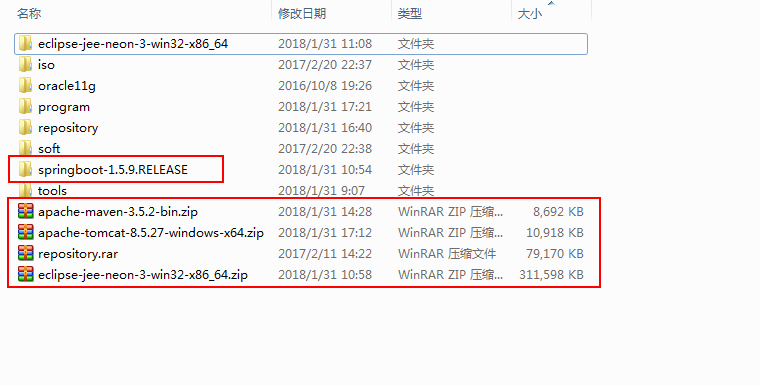
SpringBoot核心jar包:这里直接从Spring官网下载了1.5.9版本.
jdk:jdk1.8.0_45.
maven项目管理工具:3.5版本.
tomcat:8.5版本.
本地仓库:注意settings.xml里面的设置"<localRepository>E:/SpringBoot/repository</localRepository>"红色部分代表仓库的位置.
eclipse:jee-neon3版本.
2.环境设置
1)将jdk以及maven的环境变量配置好,配好后在dos窗口进行测试:命令为java -version 和 mvn -v
JAVA_HOME:jdk所在目录
path:%JAVA_HOME%\bin
clathpath:%JAVA_HOME%\lib;%JAVA_HOME%\lib\tools.jar
MAVEN_HOME:maven所在目录
path:%MAVEN_HOME%\bin
2)eclipse设置
jre替换成1.8版本:Windows-->Preferences-->java-->Installed JREs
maven仓库及路径设置:Windows-->Preferences-->maven-->installations 新建一个maven
:Windows-->Preferences-->maven-->user settings 路径都设为仓库的settings.xml所在路径
server:Windows-->Preferences-->server-->RunTime Environments 添加tomcat8.5
3.创建简单的maven项目
创建一个maven start项目
pom.xml配置,红色部分为重要部分
<project xmlns="http://maven.apache.org/POM/4.0.0" xmlns:xsi="http://www.w3.org/2001/XMLSchema-instance"
xsi:schemaLocation="http://maven.apache.org/POM/4.0.0 http://maven.apache.org/xsd/maven-4.0.0.xsd">
<modelVersion>4.0.0</modelVersion>
<groupId>com.sinosoft</groupId>
<artifactId>HelloSpring</artifactId>
<version>0.0.1-SNAPSHOT</version>
<packaging>jar</packaging>
<name>HelloSpring</name>
<url>http://maven.apache.org</url>
<properties>
<project.build.sourceEncoding>UTF-8</project.build.sourceEncoding>
</properties>
<parent>
<groupId>org.springframework.boot</groupId>
<artifactId>spring-boot-starter-parent</artifactId>
<version>1.5.9.RELEASE</version>
</parent>
<dependencies>
<dependency>
<groupId>junit</groupId>
<artifactId>junit</artifactId>
<version>3.8.1</version>
<scope>test</scope>
</dependency>
<dependency>
<groupId>org.springframework.boot</groupId>
<artifactId>spring-boot-starter-web</artifactId>
</dependency>
</dependencies>
</project>
在src/main/java下新建一个Controller类
package com.sinosoft.HelloSpring;
import java.io.IOException;
import javax.servlet.http.HttpServletResponse;
import org.springframework.boot.SpringApplication;
import org.springframework.boot.autoconfigure.SpringBootApplication;
import org.springframework.web.bind.annotation.RequestMapping;
import org.springframework.web.bind.annotation.RestController;
@RestController
@SpringBootApplication
public class HelloSpring {
@RequestMapping("/app")
void index(HttpServletResponse res) throws IOException{
res.getWriter().println("Hello World!");
}
public static void main(String[] args) {
SpringApplication.run(HelloSpring.class, args);
}
}
运行main方法,在浏览器中输入http://localhost:8080/app就能得到 Hello World! 的结果
4.浏览器差异可能导致的问题
最开始用的IE8浏览器,代码及报错如下:
@RestController
@SpringBootApplication
public class HelloSpring {
@RequestMapping("/app")
String index(){
return "Hello World!";
}
public static void main(String[] args) {
SpringApplication.run(HelloSpring.class, args);
}
}
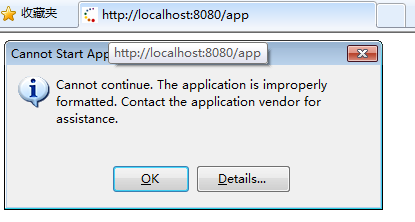
可是我在360浏览器上却可以正常运行并出结果,后来经查询资料,得到这是ie8不支持
所以将红色部分方法替换为
void index(HttpServletResponse res) throws IOException{
res.getWriter().println("Hello World!");
}
便可在ie8上完美运行
这只是个开始...
搭建springboot环境的更多相关文章
- Java秒杀简单设计一:搭建springboot环境
项目参考:慕课网 https://www.imooc.com/learn/587 Java秒杀 开发环境 JDK1.8.Maven.Mysql.Eclipse.SpringBoot2.0.5.myb ...
- 搭建 springboot 2.0 mybatis 读写分离 配置区分不同环境
最近公司打算使用springboot2.0, springboot支持HTTP/2,所以提前先搭建一下环境.网上很多都在springboot1.5实现的,所以还是有些差异的.接下来咱们一块看一下. 文 ...
- SpringBoot + Vue + ElementUI 实现后台管理系统模板 -- 后端篇(一): 搭建基本环境、整合 Swagger、MyBatisPlus、JSR303 以及国际化操作
相关 (1) 相关博文地址: SpringBoot + Vue + ElementUI 实现后台管理系统模板 -- 前端篇(一):搭建基本环境:https://www.cnblogs.com/l-y- ...
- SpringCloud系列二:Restful 基础架构(搭建项目环境、创建 Dept 微服务、客户端调用微服务)
1.概念:Restful 基础架构 2.具体内容 对于 Rest 基础架构实现处理是 SpringCloud 核心所在,其基本操作形式在 SpringBoot 之中已经有了明确的讲解,那么本次为 了清 ...
- (A)eclipse搭建springboot项目入门
网上许多资料都是用idea的,但是我个人用eclipse习惯了,所以就在eclipse里面自己尝试着写了一个hello. 然而项目建好后却迟迟不能访问!!!网上搜了许多资料都不靠谱! 虽然最后能看到h ...
- 搭建Springboot
这几天一直在研究IDEA上面怎么搭建一个web-mvc的SpringBoot项目,看网上的教程一步步的搭建,可是还是出现一堆的问题. 为了让大家以后少走一些弯路,我在这里分享一下我这几天研究的成果,也 ...
- 聊聊SpringBoot | 第一章:快速搭建SpringBoot第一个应用
快速搭建SpringBoot第一个应用 1.简介 本章仅介绍如何快速搭建第一个SpringBoot应用,细节内容下一章再做讲解,如果有需要,各位可以直接到Spring官网去了解. 从 Spring B ...
- Flume1 初识Flume和虚拟机搭建Flume环境
前言: 工作中需要同步日志到hdfs,以前是找运维用rsync做同步,现在一般是用flume同步数据到hdfs.以前为了工作简单看个flume的一些东西,今天下午有时间自己利用虚拟机搭建了 ...
- 搭建LNAMP环境(七)- PHP7源码安装Memcached和Memcache拓展
上一篇:搭建LNAMP环境(六)- PHP7源码安装MongoDB和MongoDB拓展 一.安装Memcached 1.yum安装libevent事件触发管理器 yum -y install libe ...
随机推荐
- Jersey入门——对Json的支持
Jersey rest接口对POJO的支持如下: package com.coshaho.learn.jersey; import java.net.URI; import javax.ws.rs.C ...
- 【javascript】获取 格式化时间
function getDate() { var myDate = new Date(); var month = myDate.getMonth() + 1; var day = myDate.ge ...
- html5水平方向重力感应
html5图片随手机重力感应而移动 <!DOCTYPE html> <html lang="zh-cn"><head><meta http ...
- Python爬虫与数据图表的实现
要求: 1. 参考教材实例20,编写Python爬虫程序,获取江西省所有高校的大学排名数据记录,并打印输出. 2. 使用numpy和matplotlib等库分析数据,并绘制南昌大学.华东交通大学.江西 ...
- echarts遇到的问题
X轴无偏移: axisTick: { alignWithLabel: true }, x轴显示所有数据项且避免拥挤在xAxis设置: axisLabel: { interval: 0, rotate: ...
- SQL Server 2008 R2 常用系统函数学习
/******************************************* * 聚合函数 *******************************************/ SEL ...
- Sqring核心概念
Spring 是大规模企业级框架,用户数量多,数据规模大,功能众多,业务复杂, 性能和安全要求高 灵活多变 Spring框架是轻量级的框架,javaEE的春天,当前主流的框架,一站式的企业应用开 ...
- await
单个的task await task 多个await asyncio.wait(tasks)
- Scrapy小技巧-MySQL存储, MYSQL拼接
这两天上班接手,别人留下来的爬虫发现一个很好玩的 SQL脚本拼接. 只要你的Scrapy Field字段名字和 数据库字段的名字 一样.那么恭喜你你就可以拷贝这段SQL拼接脚本.进行MySQL入库处理 ...
- Forword(请求转发)与Redirect(重定向) 区别
1.从数据共享上 Forword是一个请求的延续,可以共享request的数据 Redirect开启一个新的请求,不可以共享request的数据 2.从地址栏 Forword转发地址栏不发生变化 Re ...