
vue子父组件的通信
Element使用的是Vue2.0版本,众所周知在Vue 1.0升级到2.0中去除了$broadcast和$dispatch方法。
1、父组件向子组件传值
a、app.vue父组件
<template>

  <div id="app">

    <h1>{{title}}</h1>

    <h1 v-text="title"></h1>

    <h1 v-html="title"></h1>

    <input type="text" v-model="newItem" v-on:keyup.enter="addNew">

    <ul>

        <li v-for="item in items" v-bind:class="{finished:item.isFinished}" v-on:click="toggleFinish(item)">

        {{item.label}}

        </li>

    </ul>

  <componentA msgfromfather='hongMaJu'></componentA>

   <component-a></component-a>

  </div>

</template>

<script>

import Store from './Store'

import componentA from './components/componentA'

//console.log(Store)

export default {

   data () {

    return {

      title: '<span>?</span>this is a todolist',

      items:Store.fetch(),

      // items:[

      //     {

      //       label:'coding',

      //       isFinished:false

      //     },

      //     {

      //       label:'walking',

      //       isFinished:true

      //     }

      // ],

      newItem:''

    }

  },

  components:{componentA},

  watch:{

    items:{

      handler:function(items){

        // console.log(val,oldVal)

         // console.log(items);

        Store.save(items);

         // console.log(items);

      }

    },

    deep:true

  },

  methods:{

    toggleFinish:function(item){

      // console.log(item);

      item.isFinished=!item.isFinished;

      console.log(this.items);

    },

    addNew:function(){

      // this.newItem;

      // console.log(this.newItem);

      this.items.push({

        label:this.newItem,

        isFinished:false

      })

      this.newItem='';

    }

  }

}

</script>

<style>

.finished{

  text-decoration:underline;

}

#app {

  font-family: 'Avenir', Helvetica, Arial, sans-serif;

  -webkit-font-smoothing: antialiased;

  -moz-osx-font-smoothing: grayscale;

  text-align: center;

  color: #2c3e50;

  margin-top: 60px;

}

</style>
b、componentA.vue子组件
 <<template>

<div class="hello">

    <h1>{{msg}}</h1>

    <button v-on:click="onClickMe">click me!</button>

    <h1>{{msgfromfather}}</h1>

</div>

 </template>

 <script>

     export    default{

         data:function(){

             return{

                 msg:'hello from component a'

             }

         },

         props:['msgfromfather'],

         methods:{

             onClickMe:function(){

console.log(this.msgfromfather);

             }

         }

     }

 </script>

 <style>

h1{

    color: #42b983;

}

 </style>
c、效果
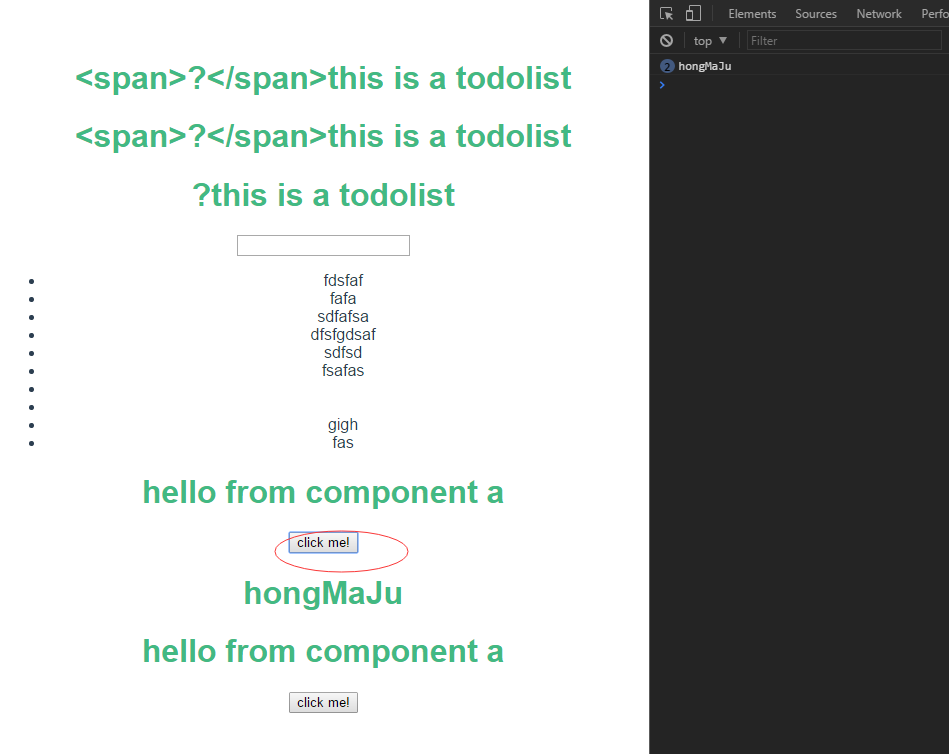
2、子组件向父组件传值
a、app.vue父组件
<template>

  <div id="app">

    <h1>{{title}}</h1>

    <h1 v-text="title"></h1>

    <h1 v-html="title"></h1>

    <input type="text" v-model="newItem" v-on:keyup.enter="addNew">

    <ul>

        <li v-for="item in items" v-bind:class="{finished:item.isFinished}" v-on:click="toggleFinish(item)">

        {{item.label}}

        </li>

    </ul>

    <p>child tells me:{{childwords}}</p>

  <componentA msgfromfather='hongMaJu' v-on:child-tell-me-something='listenToMyBoy'></componentA>

 <!--   <component-a></component-a> -->

  </div>

</template>

<script>

import Store from './Store'

import componentA from './components/componentA'

//console.log(Store)

export default {

   data () {

    return {

      title: '<span>?</span>this is a todolist',

      items:Store.fetch(),

      // items:[

      //     {

      //       label:'coding',

      //       isFinished:false

      //     },

      //     {

      //       label:'walking',

      //       isFinished:true

      //     }

      // ],

      newItem:'',

      childwords:''

    }

  },

  components:{componentA},

  watch:{

    items:{

      handler:function(items){

        // console.log(val,oldVal)

         // console.log(items);

        Store.save(items);

         // console.log(items);

      }

    },

    deep:true

  },

  methods:{

    toggleFinish:function(item){

      // console.log(item);

      item.isFinished=!item.isFinished;

      console.log(this.items);

    },

    addNew:function(){

      // this.newItem;

      // console.log(this.newItem);

      this.items.push({

        label:this.newItem,

        isFinished:false

      })

      this.newItem='';

    },

    listenToMyBoy:function(msg){

      this.childwords=msg;

    }

  }

}

</script>

<style>

.finished{

  text-decoration:underline;

}

#app {

  font-family: 'Avenir', Helvetica, Arial, sans-serif;

  -webkit-font-smoothing: antialiased;

  -moz-osx-font-smoothing: grayscale;

  text-align: center;

  color: #2c3e50;

  margin-top: 60px;

}

</style>
b、componentA.vue子组件
 <<template>

<div class="hello">

    <h1>{{msg}}</h1>

    <button v-on:click="onClickMe">click me!</button>

    <h1>{{msgfromfather}}</h1>

</div>

 </template>

 <script>

     export    default{

         data:function(){

             return{

                 msg:'hello from component a'

             }

         },

         props:['msgfromfather'],

         methods:{

             onClickMe:function(){

            // console.log(this.msgfromfather);

            this.$emit('child-tell-me-something',this.msg)

             }

         }

     }

 </script>

 <style>

h1{

    color: #42b983;

}

 </style>
c、效果


vue子父组件的通信的更多相关文章
- vue子父组件通信
之前在用vue写子父组件通信的时候,老是遇到问题!!! 子组件传值给父组件: 子组件:通过emit方法给父组件传值,这里的upparent是父组件要定义的方法 模板: <div v-on:cli ...
- Vue子父组件方法互调
讲干货,不啰嗦,大家在做vue开发过程中经常遇到父组件需要调用子组件方法或者子组件需要调用父组件的方法的情况,现做一下总结,希望对大家有所帮助. 父组件调用子组件方法: 1.设置子组件的ref,父组件 ...
- Day10-微信小程序实战-交友小程序-实现删除好友信息与子父组件间通信
回顾:上一次已经把消息的布局以及样式做好了 效果图: 在removeList.js文件中,messageId就是发起这个消息的用户了 先查看一下自定义组件的生命周期 https://developer ...
- vue --子父组件传值
1.父组件可以使用 props 把数据传给子组件. 2.子组件可以使用 $emit 触发父组件的自定义事件. vm.$emit( event, arg ) //触发当前实例上的事件 vm.$on( e ...
- vue子父组件传值
https://blog.csdn.net/weixin_38888773/article/details/81902789 https://blog.csdn.net/jsxiaoshu/artic ...
- Vue子->父组件传值
父组件引入: Import Test from'' 父页面使用: <Test ref="test" @m1="m2"><Test/> 子 ...
- Vue.js组件的通信之父组件向子父组件的通信
<!DOCTYPE html> <html lang="en"> <head> <meta charset="UTF-8&quo ...
- vue 子父组件之间的通信,及在调用组件的地方
这里是用了 element ui 你们也可以看一下管方的文档 http://element.eleme.io/#/zh-CN/component/installation 组件html <div ...
- vue之子父组件通信
一. 子-父组件间通信: let children = { # 定义子组件 template: `<div> <button @click="send"&g ...
随机推荐
- C++ 的static 与 const
1.static成员变量(非const)必须在类外定义,在类中只是作为声明(声明其scope为该类),不能使用类初始化成员列表来初始化,只能在定义的时候初始化. 2.static const的成员变量 ...
- Brute-Force算法
#include <iostream> #include <string> using namespace std; int BF(const string& fath ...
- 设置cookie,获取cookie,删除cookie,修改cookie
怎么设置cookie,怎么设置cookie以及删除cookie和cookie详解 在操作cookie之前,先来看一下cookie长什么样. 可以看到,cookie是一个个键值对(“键=值”的形式)加上 ...
- POJ 1222 熄灯问题【高斯消元】
<题目链接> 题目大意: 有一个5*6的矩阵,每一位是0或者1. 没翻转一位,它的上下左右的数字也为改变.(0变成1,1变成0).要把矩阵中所有的数都变成0.求最少翻转次数的方案,输出矩阵 ...
- HDU 5391 Zball in Tina Town【威尔逊定理】
<题目链接> Zball in Tina Town Problem Description Tina Town is a friendly place. People there care ...
- 【*】Redis实战场景中相关问题
一.Redis简介 redis主要解决的问题 分布式缓存是分布式系统中的重要组件,主要解决高并发.大数据场景下,热点数据访问的性能问题,提供高性能的数据快速访问. 使用缓存常见场景 项目中部分数据访问 ...
- MongoDB——权限管理
MongoDB--权限管理 MongoDB默认是没有权限验证的,但生产环境中,没有权限控制是很不安全的. 我们先不详谈太多概念,直接动手创建两个典型的账号: 超级管理员,类似sql server的sa ...
- 更新 是 可用的 针对 安卓 软件开发包和工具 Updates are available for android software development packages and tools
作者:韩梦飞沙 Author:han_meng_fei_sha 邮箱:313134555@qq.com E-mail: 313134555 @qq.com 更新 是 可用的 针对 安卓 软件开发包和工 ...
- oracle data integrator与大数据平台的集成
在最新版本的ODI中,通过使用各种知识模块,可在统一的界面上实现对传统数据库.hive, pig, spark, hdfs等的ETL操作,满足在同一系统或采用相同的方式实现ETL功能. 详细的内容可参 ...
- 用vue的自定义组件写了一个拖拽 组件,局部的 只能在自定义元素内的
简单实现 没有做兼容<!DOCTYPE html> <html lang="en"> <head> <meta charset=" ...