
vue子父组件的通信
Element使用的是Vue2.0版本,众所周知在Vue 1.0升级到2.0中去除了$broadcast和$dispatch方法。
1、父组件向子组件传值
a、app.vue父组件
<template>

  <div id="app">

    <h1>{{title}}</h1>

    <h1 v-text="title"></h1>

    <h1 v-html="title"></h1>

    <input type="text" v-model="newItem" v-on:keyup.enter="addNew">

    <ul>

        <li v-for="item in items" v-bind:class="{finished:item.isFinished}" v-on:click="toggleFinish(item)">

        {{item.label}}

        </li>

    </ul>

  <componentA msgfromfather='hongMaJu'></componentA>

   <component-a></component-a>

  </div>

</template>

<script>

import Store from './Store'

import componentA from './components/componentA'

//console.log(Store)

export default {

   data () {

    return {

      title: '<span>?</span>this is a todolist',

      items:Store.fetch(),

      // items:[

      //     {

      //       label:'coding',

      //       isFinished:false

      //     },

      //     {

      //       label:'walking',

      //       isFinished:true

      //     }

      // ],

      newItem:''

    }

  },

  components:{componentA},

  watch:{

    items:{

      handler:function(items){

        // console.log(val,oldVal)

         // console.log(items);

        Store.save(items);

         // console.log(items);

      }

    },

    deep:true

  },

  methods:{

    toggleFinish:function(item){

      // console.log(item);

      item.isFinished=!item.isFinished;

      console.log(this.items);

    },

    addNew:function(){

      // this.newItem;

      // console.log(this.newItem);

      this.items.push({

        label:this.newItem,

        isFinished:false

      })

      this.newItem='';

    }

  }

}

</script>

<style>

.finished{

  text-decoration:underline;

}

#app {

  font-family: 'Avenir', Helvetica, Arial, sans-serif;

  -webkit-font-smoothing: antialiased;

  -moz-osx-font-smoothing: grayscale;

  text-align: center;

  color: #2c3e50;

  margin-top: 60px;

}

</style>
b、componentA.vue子组件
 <<template>

<div class="hello">

    <h1>{{msg}}</h1>

    <button v-on:click="onClickMe">click me!</button>

    <h1>{{msgfromfather}}</h1>

</div>

 </template>

 <script>

     export    default{

         data:function(){

             return{

                 msg:'hello from component a'

             }

         },

         props:['msgfromfather'],

         methods:{

             onClickMe:function(){

console.log(this.msgfromfather);

             }

         }

     }

 </script>

 <style>

h1{

    color: #42b983;

}

 </style>
c、效果
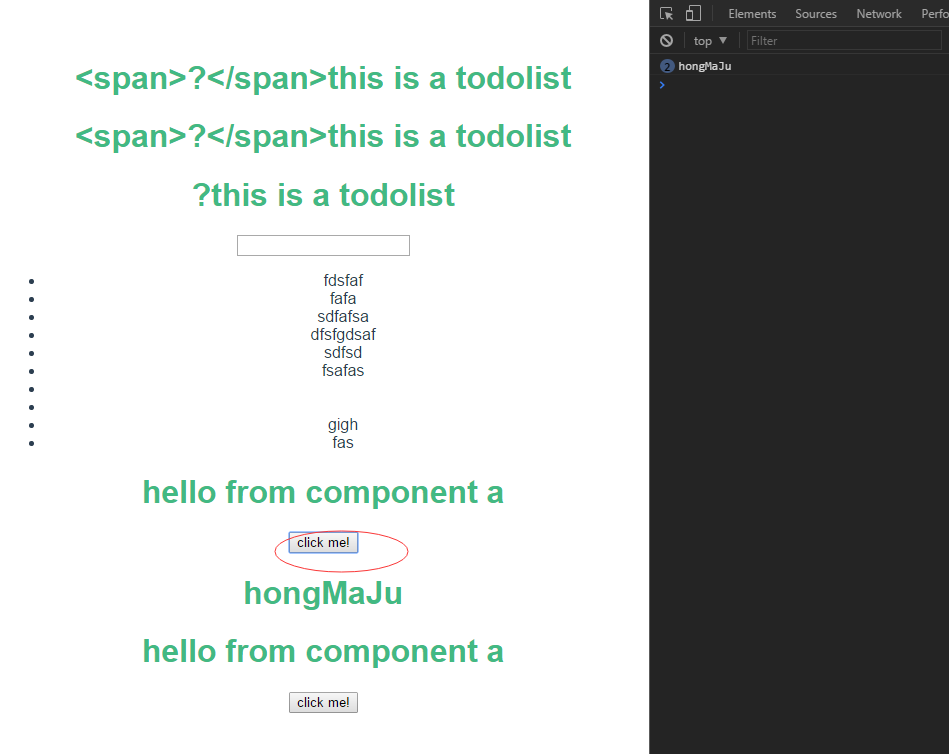
2、子组件向父组件传值
a、app.vue父组件
<template>

  <div id="app">

    <h1>{{title}}</h1>

    <h1 v-text="title"></h1>

    <h1 v-html="title"></h1>

    <input type="text" v-model="newItem" v-on:keyup.enter="addNew">

    <ul>

        <li v-for="item in items" v-bind:class="{finished:item.isFinished}" v-on:click="toggleFinish(item)">

        {{item.label}}

        </li>

    </ul>

    <p>child tells me:{{childwords}}</p>

  <componentA msgfromfather='hongMaJu' v-on:child-tell-me-something='listenToMyBoy'></componentA>

 <!--   <component-a></component-a> -->

  </div>

</template>

<script>

import Store from './Store'

import componentA from './components/componentA'

//console.log(Store)

export default {

   data () {

    return {

      title: '<span>?</span>this is a todolist',

      items:Store.fetch(),

      // items:[

      //     {

      //       label:'coding',

      //       isFinished:false

      //     },

      //     {

      //       label:'walking',

      //       isFinished:true

      //     }

      // ],

      newItem:'',

      childwords:''

    }

  },

  components:{componentA},

  watch:{

    items:{

      handler:function(items){

        // console.log(val,oldVal)

         // console.log(items);

        Store.save(items);

         // console.log(items);

      }

    },

    deep:true

  },

  methods:{

    toggleFinish:function(item){

      // console.log(item);

      item.isFinished=!item.isFinished;

      console.log(this.items);

    },

    addNew:function(){

      // this.newItem;

      // console.log(this.newItem);

      this.items.push({

        label:this.newItem,

        isFinished:false

      })

      this.newItem='';

    },

    listenToMyBoy:function(msg){

      this.childwords=msg;

    }

  }

}

</script>

<style>

.finished{

  text-decoration:underline;

}

#app {

  font-family: 'Avenir', Helvetica, Arial, sans-serif;

  -webkit-font-smoothing: antialiased;

  -moz-osx-font-smoothing: grayscale;

  text-align: center;

  color: #2c3e50;

  margin-top: 60px;

}

</style>
b、componentA.vue子组件
 <<template>

<div class="hello">

    <h1>{{msg}}</h1>

    <button v-on:click="onClickMe">click me!</button>

    <h1>{{msgfromfather}}</h1>

</div>

 </template>

 <script>

     export    default{

         data:function(){

             return{

                 msg:'hello from component a'

             }

         },

         props:['msgfromfather'],

         methods:{

             onClickMe:function(){

            // console.log(this.msgfromfather);

            this.$emit('child-tell-me-something',this.msg)

             }

         }

     }

 </script>

 <style>

h1{

    color: #42b983;

}

 </style>
c、效果


vue子父组件的通信的更多相关文章
- vue子父组件通信
之前在用vue写子父组件通信的时候,老是遇到问题!!! 子组件传值给父组件: 子组件:通过emit方法给父组件传值,这里的upparent是父组件要定义的方法 模板: <div v-on:cli ...
- Vue子父组件方法互调
讲干货,不啰嗦,大家在做vue开发过程中经常遇到父组件需要调用子组件方法或者子组件需要调用父组件的方法的情况,现做一下总结,希望对大家有所帮助. 父组件调用子组件方法: 1.设置子组件的ref,父组件 ...
- Day10-微信小程序实战-交友小程序-实现删除好友信息与子父组件间通信
回顾:上一次已经把消息的布局以及样式做好了 效果图: 在removeList.js文件中,messageId就是发起这个消息的用户了 先查看一下自定义组件的生命周期 https://developer ...
- vue --子父组件传值
1.父组件可以使用 props 把数据传给子组件. 2.子组件可以使用 $emit 触发父组件的自定义事件. vm.$emit( event, arg ) //触发当前实例上的事件 vm.$on( e ...
- vue子父组件传值
https://blog.csdn.net/weixin_38888773/article/details/81902789 https://blog.csdn.net/jsxiaoshu/artic ...
- Vue子->父组件传值
父组件引入: Import Test from'' 父页面使用: <Test ref="test" @m1="m2"><Test/> 子 ...
- Vue.js组件的通信之父组件向子父组件的通信
<!DOCTYPE html> <html lang="en"> <head> <meta charset="UTF-8&quo ...
- vue 子父组件之间的通信,及在调用组件的地方
这里是用了 element ui 你们也可以看一下管方的文档 http://element.eleme.io/#/zh-CN/component/installation 组件html <div ...
- vue之子父组件通信
一. 子-父组件间通信: let children = { # 定义子组件 template: `<div> <button @click="send"&g ...
随机推荐
- x,y
x,y在二维里,横纵坐标容易反,有关处理要小心.
- SQL Server中查找包含某个文本的存储过程
SELECT name,text from sysobjects o,syscomments s where o.id=s.id and text LIKE '%text%' and o.xtype= ...
- 用postcss cli运行postcss
一.验证autoprefixer插件1.新建项目 新建文件夹postcss: 在postcss目录中,新建package.json文件,新建css文件夹: 在css文件夹新建outfile.css,i ...
- JS-排序详解-选择排序
说明 时间复杂度指的是一个算法执行所耗费的时间 空间复杂度指运行完一个程序所需内存的大小 稳定指,如果a=b,a在b的前面,排序后a仍然在b的前面 不稳定指,如果a=b,a在b的前面,排序后可能会交换 ...
- Python3练习题系列(04)
题目: 制作一个游戏 知识点: 函数.if_elif_else, while, exit 游戏图谱: 游戏代码: from sys import exit def gold_room(): print ...
- 20172302《程序设计与数据结构》实验三 敏捷开发与XP实践报告
课程:<程序设计与数据结构> 班级: 1723 姓名: 侯泽洋 学号:20172302 实验教师:王志强老师 实验日期:2018年5月16日 必修/选修: 必修 1.实验内容 (1)代码规 ...
- Java svnkit check update commit
import java.io.File; import org.apache.log4j.Logger;import org.tmatesoft.svn.core.SVNCommitInfo;impo ...
- Reactor 3 学习笔记(1)
Reactor 3 与之前学习的RxJava是同一类(反应式编程)框架,基本概念大致差不多,简单记录一下: Reactor 3 利用了java 8中的CompletableFuture.Stream. ...
- 偷懒啦!button多了,这样写既简洁又高效
在日常的项目中,我最喜欢用button了,但是button多了,写起来又枯燥又费时,今天学到一方法,绝对简单高效! 看看以前: 看吧,这还只是声明,接下来还有: 等等……,是不是很麻烦?现在找到新方法 ...
- eclim CSearch macro 问题的解决过程备忘录
问题: CSearch 宏时. RuntimeException: Could not find file with URI because it is a relative path, and no ...