
自己写的运用bootstrap和angulajs框架写的demo
登录html:
<body ng-app="mainapp">
<div class="container">
<div class="col-sm-6 col-sm-offset-3 form-box">
<div class="form-top">
<div class="form-top-left col-sm-offset-4" style="margin-bottom: 30px;">
<h3>登 录</h3>
</div>
</div>
<div class="form-bottom" ng-controller="maincontroller">
<form class="form-horizontal" role="form" name="myForm" novalidate>
<div class="form-group has-feedback">
<label for="Username" class="col-sm-2 control-label">账 号:</label>
<div class="col-sm-6">
<input type="text" class="form-control" id="Username" name="inputUsername" placeholder="请输入用户名" ng-model="inputUsername" required>
<span class="glyphicon glyphicon-user form-control-feedback"></span>
<span style="color:red" ng-show="myForm.inputUsername.$dirty && myForm.inputUsername.$invalid">
<span ng-show="myForm.inputUsername.$error.required">用户名是必须的</span>
</span>
</div>
</div>
<div class="form-group has-feedback">
<label for="Password" class="col-sm-2 control-label">密 码:</label>
<div class="col-sm-6">
<input type="password" class="form-control" id="Password" name="inputPassword" placeholder="请输入密码" ng-model="inputPassword" required>
<span class="glyphicon glyphicon-lock form-control-feedback"></span>
<span style="color:red" ng-show="myForm.inputPassword.$dirty && myForm.inputPassword.$invalid">
<span ng-show="myForm.inputPassword.$error.required">密码至少六位</span>
</span>
</div>
</div>
<div class="form-group">
<div class="col-sm-offset-3 col-sm-6">
<div class="checkbox">
<label>
<input type="checkbox"> 请记住我
</label>
</div>
</div>
</div>
<div class="form-group">
<div class="col-sm-offset-3 col-sm-6">
<button type="submit" ng-click="login()" class="btn btn-primary"><span class="glyphicon glyphicon-lock"></span> 登 录</button>
<span class="col-sm-offset-2"><a href="./sign.html">注 册</a></span>
<div class="col-sm-6 col-sm-offset-2" style="margin-top: 15px;">
<a href="./forgetpassword.html"><strong>忘记密码?</strong></a>
</div>
</div>
</div>
</form>
</div>
</div>
</body>
login.js:
angular.module("mainapp", [])
.controller("maincontroller", function($scope,$http) {
$scope.inputUsername = "";
$scope.inputPassword = "";
//登录
$scope.login = function() {
if(checkFirst() != false) {
login_ajax($scope.inputUsername, $scope.inputPassword);
} else {
alert("请将信息填写完整...");
};
};
function checkFirst() {
if($scope.inputUsername != null && $scope.inputUsername != "" &&
$scope.inputPassword != null && $scope.inputPassword != "") {
return true;
} else {
return false;
}
};
function login_ajax(username, password) {
this.username = username;
this.password = password;
console.log("username:" + this.username);
console.log("password:" + this.password);
/* 方式一:*/
$http({
method: 'post',
url: 'http://192.168.1.220:8080/ph4/user.action?method=mobiLogin1&encodeVersion=4',
data: $.param({
"loginName": this.username,
"loginPassword": this.password
}),
headers: {
'Content-type': 'application/x-www-form-urlencoded'
},
cache: false,
}).then(function(response) {
//成功时执行
console.log(response);
$scope.data = response.data;
if($scope.data.error == 1 && $scope.data.error_msg == "loginName_not_exist") {
$scope.inputUsername = "";
$scope.inputPassword = "";
alert("该用户不存在!");
} else if($scope.data.error == 1 && $scope.data.error_msg == "Password_error") {
$scope.inputUsername = "";
$scope.inputPassword = "";
alert("密码错误!");
} else if($scope.data.user !== null) {
alert("登录成功!");
$(function() {
window.location.href = "main.html";
})
}
}, function(response) {
alert("请求失败!");
//失败时执行
console.log(response);
});
/* 方式二:
$.ajax({
type: "post",
url: "http://192.168.1.220:8080/ph4/user.action?method=mobiLogin1&encodeVersion=4",
data: {
"loginName": this.username,
"loginPassword": this.password
},
contentType: "application/x-www-form-urlencoded;charset=utf-8",
dataType: "json",
async: true, //异步请求
cache: false, //不缓存
success: function(data) {
console.log("data:" + data);
$scope.$apply(function() {
console.log("data.error:" + data.error);
console.log("data.error_msg:" + data.error_msg);
console.log("user:" + data.user);
if(data.error == 1 && data.error_msg == "loginName_not_exist") {
$scope.inputUsername = "";
$scope.inputPassword = "";
alert("该用户不存在!");
} else if(data.error == 1 && data.error_msg == "Password_error") {
$scope.inputUsername = "";
$scope.inputPassword = "";
alert("密码错误!");
} else if(data.user !== null) {
alert("登录成功!");
$(function () {
window.location.href = "main.html";
})
}
});
},
error: function(XMLHttpRequest, textStatus, errorThrown) {
alert("登录失败!");
alert(XMLHttpRequest.status);
alert(XMLHttpRequest.readyState);
alert(textStatus);
alert(errorThrown);
}
});*/
};
})
界面: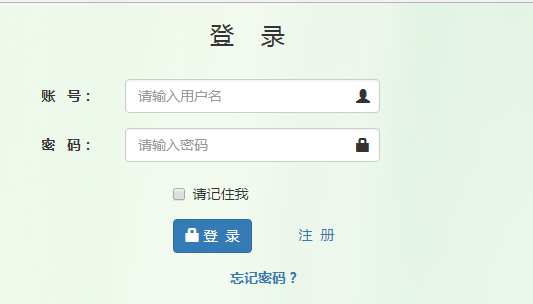
注册html:
<body ng-app="regist">
<div class="container">
<div class="col-sm-6 col-sm-offset-3 form-box">
<div class="form-top">
<div class="form-top-left col-sm-offset-4" style="margin-bottom: 30px;">
<h3>注 册</h3>
</div>
</div>
<div class="form-bottom" ng-controller="registcontroller">
<form class="form-horizontal" role="form" name="myForm" novalidate>
<div class="form-group">
<label class="col-sm-2 control-label" for="userName">账 号:</label>
<div class="col-sm-6">
<input type="number" id="userName" class="form-control" ng-minlength="11" ng-maxlength="11" name="inputUsername" placeholder="请输入手机号" ng-model="inputUsername" required>
<span style="color:red" ng-show="myForm.inputUsername.$dirty && myForm.inputUsername.$invalid">
<span ng-show="myForm.inputUsername.$error.required">账号是必须的</span>
</span>
</div>
</div>
<div class="form-group">
<label class="col-sm-2 control-label" for="nickName">昵 称:</label>
<div class="col-sm-6">
<input type="text" id="nickName" class="form-control" placeholder="请填写昵称" ng-model="inputNickname">
</div>
</div>
<div class="form-group">
<label class="col-sm-2 control-label" for="username">性 别:</label>
<div class="col-sm-6">
<label class="radio-inline">
<input type="radio" name="selectState" ng-value=0 ng-model="inputSex" ng-checked="true"> 男
</label>
<label class="radio-inline">
<input type="radio" name="selectState" ng-value=1 ng-model="inputSex" > 女
</label>
</div>
</div>
<div class="form-group">
<label class="col-sm-2 control-label" for="password">密 码:</label>
<div class="col-sm-6">
<input type="password" id="password" class="form-control" ng-minlength="6" ng-maxlength="18" name="password" placeholder="请输入密码" ng-model="password" required>
<span style="color:red" ng-show="myForm.password.$invalid">
<span ng-show="myForm.password.$error.minlength">密码长度小于6位</span>
<span ng-show="myForm.password.$error.maxlength">密码长度不超过20位</span>
</span>
</div>
</div>
<div class="form-group">
<label class="col-sm-2 control-label" for="password">再次确认密码:</label>
<div class="col-sm-6">
<input type="password" id="password" class="form-control" name="inputPassword" placeholder="请在输入一遍密码" ng-model="inputPassword" required>
<span style="color:red" ng-show="myForm.inputPassword.$valid">
<span ng-show="inputPassword!=password">两次密码输入不一致</span>
</span>
</div>
</div>
<div class="form-group">
<label class="col-sm-2 control-label" for="birthday">生 日:</label>
<div class="col-sm-6">
<input type="date" id="birthday" class="form-control" placeholder="请填写生日" ng-model="inputBirthday">
</div>
</div>
<div class="form-group">
<label class="col-sm-2 control-label" for="birthday">邮 箱:</label>
<div class="col-sm-6">
<input type="email" id="email" class="form-control" name="inputEmail" placeholder="请填写邮箱" ng-model="inputEmail" required>
<span style="color:red" ng-show="myForm.inputEmail.$dirty && myForm.inputEmail.$invalid">
<span ng-show="myForm.inputEmail.$error.required">邮箱是必须的</span>
<span ng-show="myForm.inputEmail.$error.email">email地址不正确</span>
</span>
</div>
</div>
<div class="form-group">
<div class="col-sm-offset-4 col-sm-6">
<button type="submit" ng-click="register()" class="btn btn-success" ng-disabled="myForm.inputUsername.$invalid||myForm.password.$invalid||inputPassword!=password">注 册</button>
</div>
</div>
</form>
</div>
</div>
</div>
</body>
regist.js:
angular.module("regist", [])
.controller("registcontroller", function($scope,$http) {
$scope.inputUsername = "";
$scope.inputNickname = "";
$scope.inputSex = "";
$scope.inputPassword = "";
$scope.inputBirthday = "";
$scope.inputEmail = "";
function checkFirst() {
if($scope.inputUsername != null && $scope.inputUsername != "" &&
$scope.inputSex != null &&
$scope.inputPassword != null && $scope.inputPassword != "" &&
$scope.inputPassword == $scope.password &&
$scope.inputBirthday != null && $scope.inputBirthday != "") {
return true;
} else {
return false;
}
};
//注册
$scope.register = function() {
if(checkFirst() != false) {
$scope.inputPassword = hex_md5($scope.inputPassword);
$scope.password = hex_md5($scope.password);
/* 方式一:
$.ajax({
type:"POST",
url:"http://192.168.1.220:8080/ph4/user.action?method=saveMobiUser1&encodeVersion=4",
data:{"loginName":$scope.inputUsername,"nickName":$scope.inputNickname,"sex":$scope.inputSex,"password":$scope.inputPassword,"birthday":$scope.inputBirthday,"email":$scope.inputEmail},
contentType:"application/x-www-form-urlencoded;charset=utf-8",
dataType:"json",
async: true, //异步请求
cache: false, //不缓存
success:function(data){
alert("注册成功!!");
alert("userId:"+data.userId);
$(function () {
window.location.href = "login.html";
})
},
error: function(XMLHttpRequest, textStatus, errorThrown) {
alert("注册失败!");
alert(XMLHttpRequest.status);
alert(XMLHttpRequest.readyState);
alert(textStatus);
alert(errorThrown);
}
});*/
/* 方式二:*/
$http({
method: 'post',
url: 'http://192.168.1.220:8080/ph4/user.action?method=saveMobiUser1&encodeVersion=4',
data: $.param({
"loginName":$scope.inputUsername,
"nickName":$scope.inputNickname,
"sex":$scope.inputSex,
"password":$scope.inputPassword,
"birthday":$scope.inputBirthday,
"email":$scope.inputEmail
}),
headers: {
'Content-type': 'application/x-www-form-urlencoded'
},
cache: false, //避免多次请求后台数据
}).then(function(response) {
//成功时执行
console.log(response);
$scope.data = response.data;
alert("注册成功!!");
alert("userId:" + $scope.data.userId);
$(function() {
window.location.href = "login.html";
})
}, function(response) {
alert("注册失败!");
//失败时执行
console.log(response);
});
} else {
alert("请将信息填写完整...");
alert("loginName:" + $scope.inputUsername);
alert("nickName:" + $scope.inputNickname);
alert("sex:" + $scope.inputSex);
alert("password:" + $scope.inputPassword);
alert("birthday:" + $scope.inputBirthday);
}
};
})
界面截图: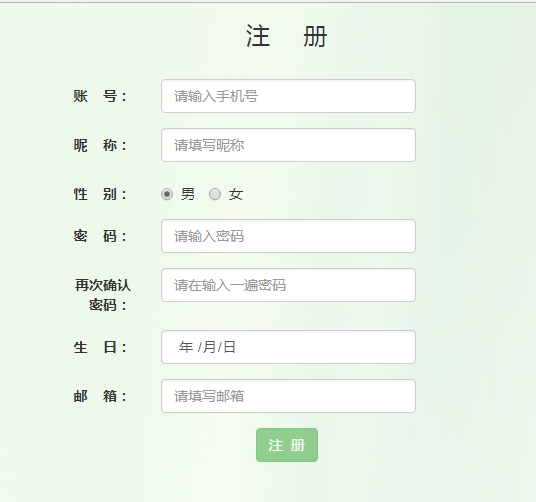
登录成功跳转的主页面main.html:
<body ng-app="main">
<div class="container">
<ul class="nav nav-pills"><!--导航-->
<li> <a href="#/home">主页</a></li>
<li> <a href="#/log">日志</a></li>
<li> <a href="#/photo">相册</a></li>
<li> <a href="#/music">音乐</a></li>
<li> <a href="#/comment">留言板</a></li>
<li> <a href="#/article">说说</a></li>
</ul>
<!--ng-view指令告诉Angular把匹配到的视图载入到此处-->
<div ng-view class="fill-parent"></div>
</div>
</body>
app.js:
var app = angular.module('main',['ngRoute']);
app.config(['$routeProvider', function($routeProvider){
$routeProvider
.when('/',{
templateUrl:'views/home.html',
controller:'homeCtrl'
})
.when('/home',{
templateUrl:'views/home.html',
controller:'homeCtrl'
})
.when('/log',{
templateUrl:'views/log.html',
controller:'logCtrl'
})
.when('/photo',{
templateUrl:'views/photo.html',
controller:'photoCtrl'
})
.when('/music',{
templateUrl:'views/music.html',
controller:'musicCtrl'
})
.when('/comment',{
templateUrl:'views/comment.html',
controller:'commentCtrl'
})
.when('/article',{
templateUrl:'views/article.html',
controller:'articleCtrl'
})
.otherwise({redirectTo:'/'});
}]);
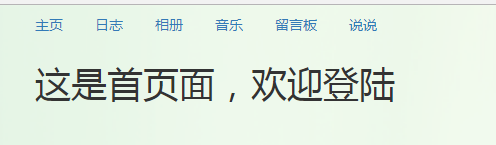
界面截图:
md5.js:
/*
* A JavaScript implementation of the RSA Data Security, Inc. MD5 Message
* Digest Algorithm, as defined in RFC 1321.
* Version 2.1 Copyright (C) Paul Johnston 1999 - 2002.
* Other contributors: Greg Holt, Andrew Kepert, Ydnar, Lostinet
* Distributed under the BSD License
* See http://pajhome.org.uk/crypt/md5 for more info.
*/
/*
* Configurable variables. You may need to tweak these to be compatible with
* the server-side, but the defaults work in most cases.
*/
var hexcase = 0; /* hex output format. 0 - lowercase; 1 - uppercase */
var b64pad = ""; /* base-64 pad character. "=" for strict RFC compliance */
var chrsz = 8; /* bits per input character. 8 - ASCII; 16 - Unicode */
/*
* These are the functions you'll usually want to call
* They take string arguments and return either hex or base-64 encoded strings
*/
function hex_md5(s){ return binl2hex(core_md5(str2binl(s), s.length * chrsz));}
function b64_md5(s){ return binl2b64(core_md5(str2binl(s), s.length * chrsz));}
function str_md5(s){ return binl2str(core_md5(str2binl(s), s.length * chrsz));}
function hex_hmac_md5(key, data) { return binl2hex(core_hmac_md5(key, data)); }
function b64_hmac_md5(key, data) { return binl2b64(core_hmac_md5(key, data)); }
function str_hmac_md5(key, data) { return binl2str(core_hmac_md5(key, data)); }
/*
* Perform a simple self-test to see if the VM is working
*/
function md5_vm_test()
{
return hex_md5("abc") == "900150983cd24fb0d6963f7d28e17f72";
}
/*
* Calculate the MD5 of an array of little-endian words, and a bit length
*/
function core_md5(x, len)
{
/* append padding */
x[len >> 5] |= 0x80 << ((len) % 32);
x[(((len + 64) >>> 9) << 4) + 14] = len;
var a = 1732584193;
var b = -271733879;
var c = -1732584194;
var d = 271733878;
for(var i = 0; i < x.length; i += 16)
{
var olda = a;
var oldb = b;
var oldc = c;
var oldd = d;
a = md5_ff(a, b, c, d, x[i+ 0], 7 , -680876936);
d = md5_ff(d, a, b, c, x[i+ 1], 12, -389564586);
c = md5_ff(c, d, a, b, x[i+ 2], 17, 606105819);
b = md5_ff(b, c, d, a, x[i+ 3], 22, -1044525330);
a = md5_ff(a, b, c, d, x[i+ 4], 7 , -176418897);
d = md5_ff(d, a, b, c, x[i+ 5], 12, 1200080426);
c = md5_ff(c, d, a, b, x[i+ 6], 17, -1473231341);
b = md5_ff(b, c, d, a, x[i+ 7], 22, -45705983);
a = md5_ff(a, b, c, d, x[i+ 8], 7 , 1770035416);
d = md5_ff(d, a, b, c, x[i+ 9], 12, -1958414417);
c = md5_ff(c, d, a, b, x[i+10], 17, -42063);
b = md5_ff(b, c, d, a, x[i+11], 22, -1990404162);
a = md5_ff(a, b, c, d, x[i+12], 7 , 1804603682);
d = md5_ff(d, a, b, c, x[i+13], 12, -40341101);
c = md5_ff(c, d, a, b, x[i+14], 17, -1502002290);
b = md5_ff(b, c, d, a, x[i+15], 22, 1236535329);
a = md5_gg(a, b, c, d, x[i+ 1], 5 , -165796510);
d = md5_gg(d, a, b, c, x[i+ 6], 9 , -1069501632);
c = md5_gg(c, d, a, b, x[i+11], 14, 643717713);
b = md5_gg(b, c, d, a, x[i+ 0], 20, -373897302);
a = md5_gg(a, b, c, d, x[i+ 5], 5 , -701558691);
d = md5_gg(d, a, b, c, x[i+10], 9 , 38016083);
c = md5_gg(c, d, a, b, x[i+15], 14, -660478335);
b = md5_gg(b, c, d, a, x[i+ 4], 20, -405537848);
a = md5_gg(a, b, c, d, x[i+ 9], 5 , 568446438);
d = md5_gg(d, a, b, c, x[i+14], 9 , -1019803690);
c = md5_gg(c, d, a, b, x[i+ 3], 14, -187363961);
b = md5_gg(b, c, d, a, x[i+ 8], 20, 1163531501);
a = md5_gg(a, b, c, d, x[i+13], 5 , -1444681467);
d = md5_gg(d, a, b, c, x[i+ 2], 9 , -51403784);
c = md5_gg(c, d, a, b, x[i+ 7], 14, 1735328473);
b = md5_gg(b, c, d, a, x[i+12], 20, -1926607734);
a = md5_hh(a, b, c, d, x[i+ 5], 4 , -378558);
d = md5_hh(d, a, b, c, x[i+ 8], 11, -2022574463);
c = md5_hh(c, d, a, b, x[i+11], 16, 1839030562);
b = md5_hh(b, c, d, a, x[i+14], 23, -35309556);
a = md5_hh(a, b, c, d, x[i+ 1], 4 , -1530992060);
d = md5_hh(d, a, b, c, x[i+ 4], 11, 1272893353);
c = md5_hh(c, d, a, b, x[i+ 7], 16, -155497632);
b = md5_hh(b, c, d, a, x[i+10], 23, -1094730640);
a = md5_hh(a, b, c, d, x[i+13], 4 , 681279174);
d = md5_hh(d, a, b, c, x[i+ 0], 11, -358537222);
c = md5_hh(c, d, a, b, x[i+ 3], 16, -722521979);
b = md5_hh(b, c, d, a, x[i+ 6], 23, 76029189);
a = md5_hh(a, b, c, d, x[i+ 9], 4 , -640364487);
d = md5_hh(d, a, b, c, x[i+12], 11, -421815835);
c = md5_hh(c, d, a, b, x[i+15], 16, 530742520);
b = md5_hh(b, c, d, a, x[i+ 2], 23, -995338651);
a = md5_ii(a, b, c, d, x[i+ 0], 6 , -198630844);
d = md5_ii(d, a, b, c, x[i+ 7], 10, 1126891415);
c = md5_ii(c, d, a, b, x[i+14], 15, -1416354905);
b = md5_ii(b, c, d, a, x[i+ 5], 21, -57434055);
a = md5_ii(a, b, c, d, x[i+12], 6 , 1700485571);
d = md5_ii(d, a, b, c, x[i+ 3], 10, -1894986606);
c = md5_ii(c, d, a, b, x[i+10], 15, -1051523);
b = md5_ii(b, c, d, a, x[i+ 1], 21, -2054922799);
a = md5_ii(a, b, c, d, x[i+ 8], 6 , 1873313359);
d = md5_ii(d, a, b, c, x[i+15], 10, -30611744);
c = md5_ii(c, d, a, b, x[i+ 6], 15, -1560198380);
b = md5_ii(b, c, d, a, x[i+13], 21, 1309151649);
a = md5_ii(a, b, c, d, x[i+ 4], 6 , -145523070);
d = md5_ii(d, a, b, c, x[i+11], 10, -1120210379);
c = md5_ii(c, d, a, b, x[i+ 2], 15, 718787259);
b = md5_ii(b, c, d, a, x[i+ 9], 21, -343485551);
a = safe_add(a, olda);
b = safe_add(b, oldb);
c = safe_add(c, oldc);
d = safe_add(d, oldd);
}
return Array(a, b, c, d);
}
/*
* These functions implement the four basic operations the algorithm uses.
*/
function md5_cmn(q, a, b, x, s, t)
{
return safe_add(bit_rol(safe_add(safe_add(a, q), safe_add(x, t)), s),b);
}
function md5_ff(a, b, c, d, x, s, t)
{
return md5_cmn((b & c) | ((~b) & d), a, b, x, s, t);
}
function md5_gg(a, b, c, d, x, s, t)
{
return md5_cmn((b & d) | (c & (~d)), a, b, x, s, t);
}
function md5_hh(a, b, c, d, x, s, t)
{
return md5_cmn(b ^ c ^ d, a, b, x, s, t);
}
function md5_ii(a, b, c, d, x, s, t)
{
return md5_cmn(c ^ (b | (~d)), a, b, x, s, t);
}
/*
* Calculate the HMAC-MD5, of a key and some data
*/
function core_hmac_md5(key, data)
{
var bkey = str2binl(key);
if(bkey.length > 16) bkey = core_md5(bkey, key.length * chrsz);
var ipad = Array(16), opad = Array(16);
for(var i = 0; i < 16; i++)
{
ipad[i] = bkey[i] ^ 0x36363636;
opad[i] = bkey[i] ^ 0x5C5C5C5C;
}
var hash = core_md5(ipad.concat(str2binl(data)), 512 + data.length * chrsz);
return core_md5(opad.concat(hash), 512 + 128);
}
/*
* Add integers, wrapping at 2^32. This uses 16-bit operations internally
* to work around bugs in some JS interpreters.
*/
function safe_add(x, y)
{
var lsw = (x & 0xFFFF) + (y & 0xFFFF);
var msw = (x >> 16) + (y >> 16) + (lsw >> 16);
return (msw << 16) | (lsw & 0xFFFF);
}
/*
* Bitwise rotate a 32-bit number to the left.
*/
function bit_rol(num, cnt)
{
return (num << cnt) | (num >>> (32 - cnt));
}
/*
* Convert a string to an array of little-endian words
* If chrsz is ASCII, characters >255 have their hi-byte silently ignored.
*/
function str2binl(str)
{
var bin = Array();
var mask = (1 << chrsz) - 1;
for(var i = 0; i < str.length * chrsz; i += chrsz)
bin[i>>5] |= (str.charCodeAt(i / chrsz) & mask) << (i%32);
return bin;
}
/*
* Convert an array of little-endian words to a string
*/
function binl2str(bin)
{
var str = "";
var mask = (1 << chrsz) - 1;
for(var i = 0; i < bin.length * 32; i += chrsz)
str += String.fromCharCode((bin[i>>5] >>> (i % 32)) & mask);
return str;
}
/*
* Convert an array of little-endian words to a hex string.
*/
function binl2hex(binarray)
{
var hex_tab = hexcase ? "0123456789abcdef" : "0123456789ABCDEF";
var str = "";
for(var i = 0; i < binarray.length * 4; i++)
{
str += hex_tab.charAt((binarray[i>>2] >> ((i%4)*8+4)) & 0xF) +
hex_tab.charAt((binarray[i>>2] >> ((i%4)*8 )) & 0xF);
}
return str;
}
/*
* Convert an array of little-endian words to a base-64 string
*/
function binl2b64(binarray)
{
var tab = "ABCDEFGHIJKLMNOPQRSTUVWXYZabcdefghijklmnopqrstuvwxyz0123456789+/";
var str = "";
for(var i = 0; i < binarray.length * 4; i += 3)
{
var triplet = (((binarray[i >> 2] >> 8 * ( i %4)) & 0xFF) << 16)
| (((binarray[i+1 >> 2] >> 8 * ((i+1)%4)) & 0xFF) << 8 )
| ((binarray[i+2 >> 2] >> 8 * ((i+2)%4)) & 0xFF);
for(var j = 0; j < 4; j++)
{
if(i * 8 + j * 6 > binarray.length * 32) str += b64pad;
else str += tab.charAt((triplet >> 6*(3-j)) & 0x3F);
}
}
return str;
}
自己写的运用bootstrap和angulajs框架写的demo的更多相关文章
- 写自己的ASP.NET MVC框架(上)
http://www.cnblogs.com/fish-li/archive/2012/02/12/2348395.html 阅读目录 开始 ASP.NET程序的几种开发方式 介绍我的MVC框架 我的 ...
- bootstrap 中是通过写less文件来生成css文件,用什么工具来编写呢?
bootstrap 中是通过写less文件来生成css文件,用什么工具来编写呢? 如果用sublime的话如何实现代码保存后浏览器刷新成最新的代码样式? 或者有什么其他好用的工具? 从网上找了很多方法 ...
- 为了支持AOP的编程模式,我为.NET Core写了一个轻量级的Interception框架[开源]
ASP.NET Core具有一个以ServiceCollection和ServiceProvider为核心的依赖注入框架,虽然这只是一个很轻量级的框架,但是在大部分情况下能够满足我们的需要.不过我觉得 ...
- 8个强大的基于Bootstrap的CSS框架
做过前端开发的小伙伴们应该对Bootstrap不会陌生,它是由Twitter推出的开源CSS框架,其中包含了很多Web前端开发的工具包和应用组件.当然,和jQuery一样,Bootstrap同时也是一 ...
- 使用Strust2框架写HelloWorld
使用Strust2框架写HelloWorld 一.创建JavaWeb项目 二.搭建Stust2 FrameWork开发环境 三步完成Struts2 FrameWork开发环境的搭建 1.加入搭建Str ...
- 写自己的ASP.NET MVC框架(下)
上篇博客[写自己的ASP.NET MVC框架(上)] 我给大家介绍我的MVC框架对于Ajax的支持与实现原理.今天的博客将介绍我的MVC框架对UI部分的支持. 注意:由于这篇博客是基于前篇博客的,因此 ...
- 从零开始写一个武侠冒险游戏-0-开发框架Codea简介
从零开始写一个武侠冒险游戏-0-开发框架Codea简介 作者:FreeBlues 修订记录 2016.06.21 初稿完成. 2016.08.03 增加对 XCode 项目文件的说明. 概述 本游戏全 ...
- 使用 Flask 框架写用户登录功能的Demo时碰到的各种坑(五)——实现注册功能
使用 Flask 框架写用户登录功能的Demo时碰到的各种坑(一)——创建应用 使用 Flask 框架写用户登录功能的Demo时碰到的各种坑(二)——使用蓝图功能进行模块化 使用 Flask 框架写用 ...
- 使用 Flask 框架写用户登录功能的Demo时碰到的各种坑(四)——对 run.py 的调整
使用 Flask 框架写用户登录功能的Demo时碰到的各种坑(一)——创建应用 使用 Flask 框架写用户登录功能的Demo时碰到的各种坑(二)——使用蓝图功能进行模块化 使用 Flask 框架写用 ...
随机推荐
- Git 补丁操作
补丁是文本文件,其内容是相似于Git diff,但随着代码,它也有元数据有关提交,如提交ID,日期,提交信息等,我们可以创建补丁提交和其他人可以将它们应用到自己的资料库. Jerry 为他们的项目实现 ...
- openCV函数
1.cvInitFont ,, ); font 被初始化的字体结构体. font_face 字体名称标识符.只是Hershey 字体集( http://sources.isc.org/utils/mi ...
- 错误:OSError: [Errno 1] Operation not permitted: 'lib/python/six-1.4.1-py2.7.egg-info'
解决办法: $ $ pip install mock --ignore-installed six --user 问题:安装mock时报错: (venv)➜ test git:(master) pip ...
- 大数据学习笔记03-HDFS-HDFS组件介绍及Java访问HDFS集群
HDFS组件概述 NameNode 存储数据节点信息及元文件,即:分成了多少数据块,每一个数据块存储在哪一个DataNode中,每一个数据块备份到哪些DataNode中 这个集群有哪些DataNode ...
- 树莓派集群实践——nfs
1.安装 apt-get install nfs-common nfs-kernel-server 省略(sudo apt-get install portmap --->install rp ...
- win8 下 TortoiseSVN 不显示图标
如果你安装 TortoiseSVN 之后,功能使用正常,但是文件夹或文件左上角就是不显示图标,那么你可能 1. 64bit 系统上装了 32bit 的 TortoiseSVN 解决方法是,再安装 64 ...
- Kafka 1.1新功能:数据的路径间迁移
经常有小伙伴有这样的疑问:为什么线上Kafka机器各个磁盘间的占用不均匀,经常出现“一边倒”的情形? 这是因为Kafka只保证分区数量在各个磁盘上均匀分布,但它无法知晓每个分区实际占用空间,故很有可能 ...
- Spring Boot 集成 Redis 实现缓存机制
本文章牵涉到的技术点比较多:spring Data JPA.Redis.Spring MVC,Spirng Cache,所以在看这篇文章的时候,需要对以上这些技术点有一定的了解或者也可以先看看这篇文章 ...
- day_5.21 py 高级编程
1.禁止模块之间的循环调用 2.浅拷贝 只拷贝引用!!\ 3. 深拷贝 只要里面有引用就继续拷贝 4.copy,copy() 5. '''2018-5-21 11:39:52就业班 py高级 ...
- G - SDOI
The Annual National Olympic of Information(NOI) will be held.The province of Shandong hold a Select( ...