
winfrom 动态添加控件,以及删除
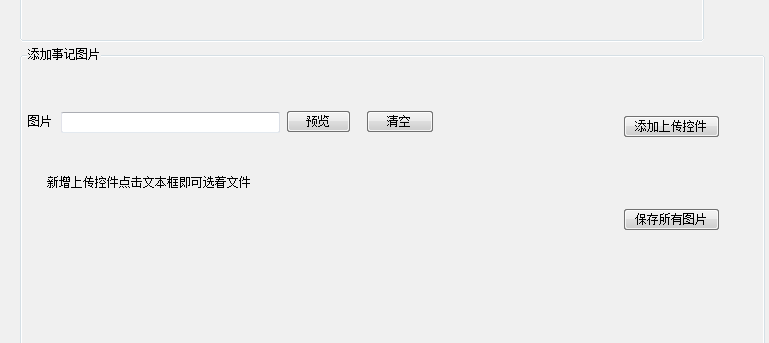
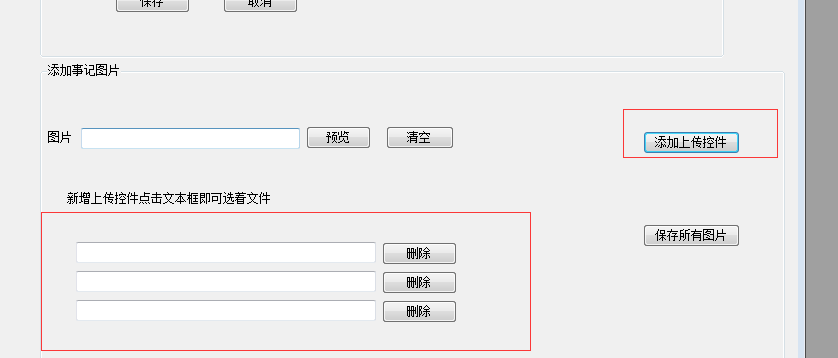
  private void btnadd_Click(object sender, EventArgs e)

        {

            int fileCount = 0;

            foreach (Control c in this.flowLayoutPanel1.Controls)

            {

                if (c is TextBox)

                {

                    ++fileCount;

                }

            }

            if (fileCount >= 4)

            {

                MessageBox.Show("最多添加5张图!");

                return;

            }

            string controlMark = Guid.NewGuid().ToString();

            TextBox t1 = new TextBox();

            t1.Name = "txt_" + controlMark;

            t1.Click += new EventHandler(btnClickEvent);

            t1.Width = 300;

            flowLayoutPanel1.Controls.Add(t1);

            Button btnDel = new Button();

            btnDel.Name = "del_" + controlMark;

            btnDel.Text = "删除";

            btnDel.Click += new EventHandler(delFileControl);

            flowLayoutPanel1.Controls.Add(btnDel);

        }
///点击删除按钮删除生成的控件

        public void delFileControl(object sender, EventArgs e)

        {

            Button btnAction = sender as Button;

            string id = btnAction.Name.Split('_')[1];

            foreach (Control c in this.flowLayoutPanel1.Controls)

            {

                if (c.Name == "txt_" + id)

                {

                    flowLayoutPanel1.Controls.Remove(c);

                }

            }

            foreach (Control c in this.flowLayoutPanel1.Controls)

            {

                if (c.Name == "del_" + id)

                {

                    flowLayoutPanel1.Controls.Remove(c);

                }

            }

            pictureBox1.Image = null;

        }

        public void btnClickEvent(object sender, EventArgs e)

        {

            pictureBox1.Image = null;

            TextBox txtAction = sender as TextBox;

            OpenFileDialog openFileDialogTemp = new OpenFileDialog();

            DialogResult dr = openFileDialogTemp.ShowDialog();

            if (dr == DialogResult.OK)

            {

                string id = txtAction.Name.Split('_')[1];

                foreach (Control c in this.flowLayoutPanel1.Controls)

                {

                    if (c.Name == "txt_" + id)

                    {

                        c.Text = openFileDialogTemp.FileName;

                        pictureBox1.Image = Image.FromFile(openFileDialogTemp.FileName);

                    }

                }

            }

        }

///保存
 foreach (Control c in this.flowLayoutPanel1.Controls)

                    {

                        if (c is TextBox)

                        {

                            if (File.Exists(c.Text.Trim()))

                            {

                                string time = DateTime.Now.ToString("yyyy-MM");

                                if (!Directory.Exists(AppDomain.CurrentDomain.BaseDirectory + @"File\" + time + @"\"))

                                {

                                    Directory.CreateDirectory(AppDomain.CurrentDomain.BaseDirectory + @"File\" + time + @"\");

                                }

                                string FileName = time + @"\" + Guid.NewGuid().ToString() + ".jpg";

                                string tempFileName = AppDomain.CurrentDomain.BaseDirectory + @"File\" + FileName;

                                File.Copy(c.Text.Trim(), tempFileName);

                            }

                        }

                    }
winfrom 动态添加控件,以及删除的更多相关文章
- VC中动态添加控件
VC中动态添加控件 动态控件是指在需要时由Create()创建的控件,这与预先在对话框中放置的控件是不同的. 一.创建动态控件: 为了对照,我们先来看一下静态控件的创建. 放置静态控件时必须先建立一个 ...
- 怎样在不对控件类型进行硬编码的情况下在 C#vs 中动态添加控件
文章ID: 815780 最近更新: 2004-1-12 这篇文章中的信息适用于: Microsoft Visual C# .NET 2003 标准版 Microsoft Visual C# .NET ...
- JQuery动态添加控件并取值
<!doctype html> <html> <head> <meta charset="utf-8"> <title> ...
- WPF 动态添加控件以及样式字典的引用(Style introduction)
原文:WPF 动态添加控件以及样式字典的引用(Style introduction) 我们想要达到的结果是,绑定多个Checkbox然后我们还可以获取它是否被选中,其实很简单,我们只要找到那几个关键的 ...
- winform导入导出excel,后台动态添加控件
思路: 导入: 1,初始化一个OpenFileDialog类 (OpenFileDialog fileDialog = new OpenFileDialog();) 2, 获取用户选择文件的后缀名(s ...
- Android 在布局容器中动态添加控件
这里,通过一个小demo,就可以掌握在布局容器中动态添加控件,以动态添加Button控件为例,添加其他控件同样道理. 1.addView 添加控件到布局容器 2.removeView 在布局容器中删掉 ...
- jQuery EasyUI动态添加控件或者ajax加载页面后不能自动渲染问题的解决方法
博客分类: jquery-easyui jQueryAjax框架HTML 现象: AJAX返回的html无法做到自动渲染为EasyUI的样式.比如:class="easyui-layout ...
- asp.net动态添加控件学习
看了老师的教程后,自己一点感悟记录下来: 1.在页面提交后,动态生成的控件会丢失, 但如果生成控件的代码在pageload中,就可以,原理是每次生成页面都执行生成. 2.动态按件或页面原来控件, 在页 ...
- WPF:理解ContentControl——动态添加控件和查找控件
WPF:理解ContentControl--动态添加控件和查找控件 我认为WPF的核心改变之一就是控件模型发生了重要的变化,大的方面说,现在窗口中的控件(大部分)都没有独立的Hwnd了.而且控件可以通 ...
随机推荐
- centos误删mysql root用户找回办法
一天,我进入mysql后,查看所有用户 select host,user from mysql.user; 发现好多用户名, 太乱了,删除..... delete from user where us ...
- 获取RadioButton选中的值
1.RadioButtonList的RepeatDirection="Horizontal"可以设置按扭选项横对齐: 2.获取选中的RadioButton值; $("#& ...
- python简说(十六)第三方模块安装
安装第三模块 1.pip install xxx pip问题 1.提示没有pip命令的, 把python的安装目录. 安装目录下面的scripts目录加入到环境变量里面 2.Unknown or un ...
- windows安装 php-redis redis 扩展
1.查看phpinfo(),确定要下载的扩展版本,扩展的下载地址在:https://pecl.php.net/package/redis 上图对应是是以下版本 2.把下载包里的文件放到php的ext文 ...
- ubuntu查看文件和文件夹大小
在实际使用ubuntu时候,经常要碰到需要查看文件以及文件夹大小的情况. 有时候,自己创建压缩文件,可以使用 ls -hl 查看文件大小.参数-h 表示Human-Readable,使用GB,MB等易 ...
- echarts自定义图例legend文字和样式
话不多说,先上效果图. 要完成这个图并不难,主要是下面那个图例比较难,需要定制. 让我们从官方文档找找思路,官方文档关于legend.formatter是这样的:链接在这 难点在于: 1.这里的图例文 ...
- Android 系统(64)---Android中m、mm、mmm、mma、mmma的区别【转】
本文转载自:https://blog.csdn.net/zhangbijun1230/article/details/80196379 Android中m.mm.mmm.mma.mmma的区别 m ...
- (转)Awesome Knowledge Distillation
Awesome Knowledge Distillation 2018-07-19 10:38:40 Reference:https://github.com/dkozlov/awesome-kno ...
- Tutorials on training the Skip-thoughts vectors for features extraction of sentence.
Tutorials on training the Skip-thoughts vectors for features extraction of sentence. 1. Send emails ...
- jlink的SWD与JTAG下载模式的对应接线方法
参考博客:http://blog.csdn.net/qq_26093511/article/details/59484249 (1)如果用jtag模式下载的话需要接线: jlink ...