
软件测试第二周个人作业:WordCount
github地址:https:/github.com/muzhailong/wc.git
第一次写博客很不容易,也算是一个好的开始吧。
1. 个人作业要求
作业简述:根据WordCount的需求描述,先编程实现,再编写单元测试,最后撰写博客。
参数及其约定如下:
基本功能:
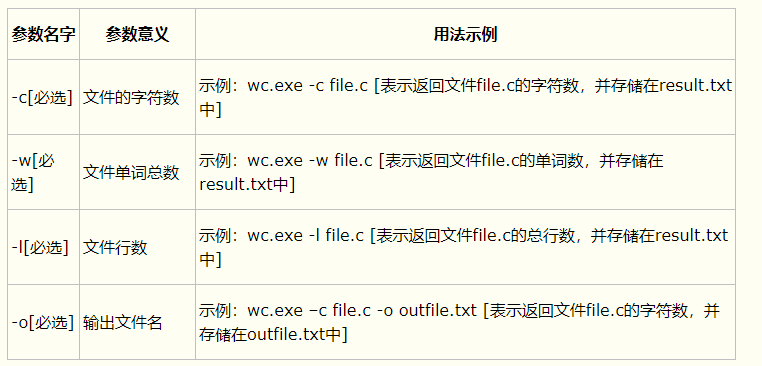
扩展功能:
wc.exe -s            //递归处理目录下符合条件的文件

wc.exe -a file.c     //返回更复杂的数据(代码行 / 空行 / 注释行)

wc.exe -e stopList.txt  // 停用词表,统计文件单词总数时,不统计该表中的单词
高级功能:
wc.exe -x //该参数单独使用,如果命令行有该参数,则程序会显示图形界面,用户可以通过界面选取单个文件,程序就会显示文件的字符数、单词数、行数等全部统计信息。
2. 完成作业过程:
1.写PSP,根据自己的能力还有任务量写就ok
| PSP阶段 | 预计耗时(分钟) | 实际耗时(分钟) |
| 计划 | 10h | 15h |
| .估计这个任务需要时间 | 10h | 15h |
| 开发 | 9h | 13h |
| .需求分析(包括学习新技术) | 5 | 20 |
| .生成设计文档 | 15 | 30 |
| .设计复审 | 10 | 15 |
| .代码规范 | 10 | 10 |
| .具体设计 | 7h | 10 |
| .具体编码 | 10 | 10h |
| .代码复审 | 30 | 15 |
| .测试 | 40 | 80 |
| 报告 | 1h | 2h |
| .测试报告 | 25 | 1.5h |
| .计算工作量 | 15 | 10 |
| .事后总结并提出改进计划 | 20 | 20 |
| 合计 | 10h | 15h |
2.解题思路
我刚看到题目的时候,感觉很简单(确实很简单除了需求不清楚以外没有太难的地方),我就按照文档写,我就先写了Parameter这个类(同时调试),
然后我就看是写Parameter这个类,一边写一边调试就ok,然后我又把ui加上也就是View这个类。其中就是在从控制台到ui对接的时候出现了一点问题(需求不 明),就是这样很快的就完成了。(没有找资料)
3.实现过程
我使用的是java,总体上来说在编写代码的过程中没有遇到障碍,就按照需求文档无脑实现就ok。
说一下自己的代码:
先说一下代码的总体结构:
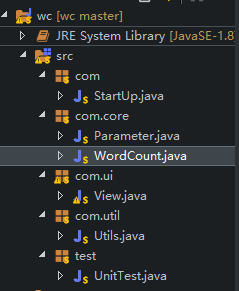
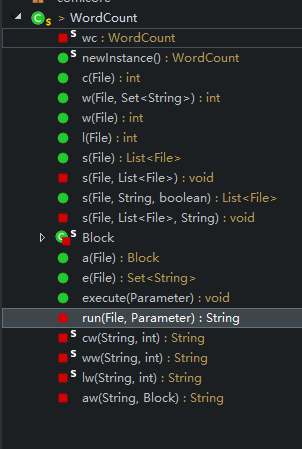
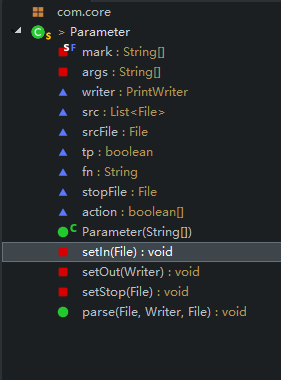
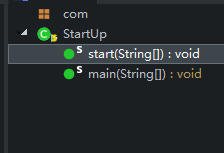
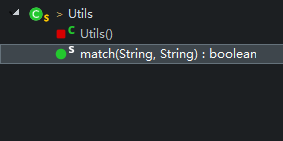
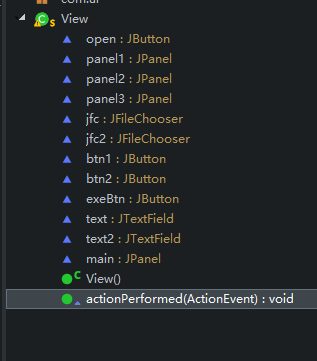
类:
StartUp.java:程序的启动类,没什么其他功能
main调用StartUp
Parameter.java:解析参数类
setIn:设置输入流
setOut:设置输出流
setStop:设置停用词文件
parse:调用上面的三个方法,实现解析参数
WordCount.java:实现具体的功能
方法的名字和参数的名字一样。例如:c:就是字符记数
其中的execute方法最终调用已经解析过Parameter对象
View.java:没什么用就是提供一个界面罢了
actionPerformed:事件处理
Utils.java:提供工具方法(后面会看到我在里面用到了一个动态规划算法来解决通配符的匹配问题)
match:通配符的匹配
关键方法:
com.core.Parameter.parse();
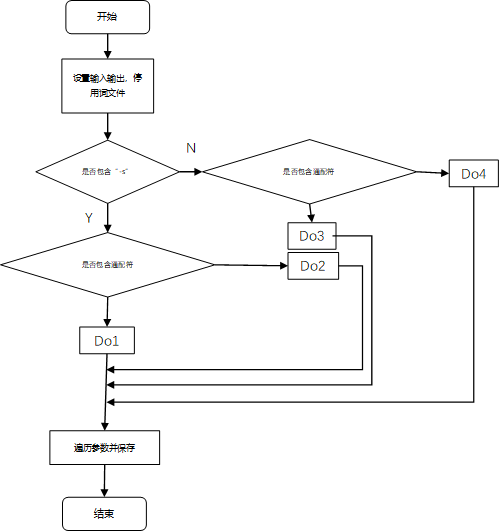
4.代码说明
先介绍一下具体功能的实现(也就是Parameter.java)
参数“-c”:很简单,就是将指定文件读出来然后一行一行的读计数就ok,贴一下自己的代码
 public int c(File f) {

         if (!f.exists())

             return -1;

         BufferedReader reader = null;

         int res = 0;

         try {

             reader = new BufferedReader(new FileReader(f));

             String s = null;

             while ((s = reader.readLine()) != null) {

                 res += s.length();

             }

         } catch (FileNotFoundException e2) {

             e2.printStackTrace();

         } catch (IOException e1) {

             e1.printStackTrace();

         } finally {

             try {

                 reader.close();

             } catch (IOException e1) {

                 // TODO Auto-generated catch block

                 e1.printStackTrace();

             }

         }

         return res;

     }
参数“-w”,单词记数也很easy,就是最开始的时候需求说的不是很清楚(空格和“,”是分隔符号,回车换行是不是分隔符号没有说,自己很纠结)实现原理和字符计数差不多,就是在每一行读出来之后是有那个split方法将字符串 切割,然后遍历这个数组,结合到后面的停用词表,可以在遍历的时候进行判断,代码:
 public int l(File f) {

         if (!f.exists())

             return -1;

         BufferedReader reader = null;

         int res = 0;

         try {

             reader = new BufferedReader(new FileReader(f));

             while (reader.readLine() != null) {

                 ++res;

             }

         } catch (FileNotFoundException e) {

             e.printStackTrace();

         } catch (IOException e) {

             e.printStackTrace();

         } finally {

             try {

                 reader.close();

             } catch (IOException e) {

                 // TODO Auto-generated catch block

                 e.printStackTrace();

             }

         }

         return res;

     }
参数“-l”这个就跟简单了,不多说上代码:
public int l(File f) {

        if (!f.exists())

            return -1;

        BufferedReader reader = null;

        int res = 0;

        try {

            reader = new BufferedReader(new FileReader(f));

            while (reader.readLine() != null) {

                ++res;

            }

        } catch (FileNotFoundException e) {

            e.printStackTrace();

        } catch (IOException e) {

            e.printStackTrace();

        } finally {

            try {

                reader.close();

            } catch (IOException e) {

                // TODO Auto-generated catch block

                e.printStackTrace();

            }

        }

        return res;

    }
参数“-o”:就是将输出流对象改变一下。
参数“-s”:递归查找目录下的所有文件,也比较简单是一个最基本的递归,上代码
 private void s(File dir, List<File> list, String pattern) {

         if (dir == null)

             return;

         if (dir.isFile()) {

             if (Utils.match(pattern, dir.getName()))

                 ;

             {

                 list.add(dir);

             }

             return;

         }

         for (File temp : dir.listFiles()) {

             if (temp.isFile() && Utils.match(pattern, temp.getName())) {

                 list.add(temp);

             } else if (temp.isDirectory()) {

                 s(temp, list, pattern);

             }

         }

     }
参数“-a”:不多说上代码
     private static class Block {

         int codeLine;

         int emptyLine;

         int noteLine;

         public Block(int codeLine, int emptyLine, int noteLine) {

             this.codeLine = codeLine;

             this.emptyLine = emptyLine;

             this.noteLine = noteLine;

         }

     }

     public Block a(File f) {

         int codeLine = 0, emptyLine = 0, noteLine = 0;

         BufferedReader reader = null;

         try {

             reader = new BufferedReader(new FileReader(f));

             String s = null;

             while ((s = reader.readLine()) != null) {

                 s = s.trim();

                 if (s.length() == 0) {

                     ++emptyLine;

                 } else {

                     if (s.startsWith("//")) {

                         ++noteLine;

                     } else {

                         ++codeLine;

                     }

                 }

             }

         } catch (FileNotFoundException e) {

             e.printStackTrace();

         } catch (IOException e) {

             e.printStackTrace();

         } finally {

             try {

                 reader.close();

             } catch (IOException e) {

                 e.printStackTrace();

             }

         }

         return new Block(codeLine, emptyLine, noteLine);

     }
参数“-e”:思路也很简单,就是先把停用词表中的每一个词保存到HashSet中然后遍历的时候判断一下,代码如下:
 public Set<String> e(File f) {

         Set<String> set = new HashSet<String>();

         BufferedReader reader = null;

         if (!f.exists())

             return set;

         try {

             reader = new BufferedReader(new FileReader(f));

             String s = null;

             while ((s = reader.readLine()) != null) {

                 set.add(s);

             }

         } catch (FileNotFoundException e1) {

             // TODO Auto-generated catch block

             e1.printStackTrace();

         } catch (IOException e1) {

             // TODO Auto-generated catch block

             e1.printStackTrace();

         } finally {

             try {

                 reader.close();

             } catch (IOException e1) {

                 // TODO Auto-generated catch block

                 e1.printStackTrace();

             }

         }

         return set;

     }
参数“-x”:就是解析参数的时候发现了“-x”启动UI界面。
参数解析的具体实现:
我的思路是这样的从main函数中有一个String数组类型的args参数就是我们敲的命令行,使用一个action数组,通过查找args是否存在已有的“-c”,“-w”等然后设置action相应位表示拥有具体参数。当然也可以查找“-o” 然后它 之后就是输出文件,“-e”他之后就是停用词文件,命令行必须保证先输入文件在其他文件参数之前。ok上代码:
     private static final String[] mark =

             new String[] "-c", "-w", "-l", "-o", "-a", "-s", "-e", "-x" };
boolean[] action = new boolean[mark.length];
     public void parse(File in, Writer out, File stopFile) {

         Arrays.fill(action, false);

         List<String> list = Arrays.asList(args);

         setIn(in);

         setOut(out);

         setStop(stopFile);

         if (list.contains(mark[5])) {

             if (!tp) {

                 File t=srcFile.getAbsoluteFile().getParentFile();

                 src = WordCount.newInstance().s(t, srcFile.getName(), true);

             } else {

                 src = WordCount.newInstance().s(new File("./").getAbsoluteFile(), fn, true);

             }

         } else {

             if (!tp) {

                 src.add(srcFile);

             } else {

                 src = WordCount.newInstance().s(new File("./").getAbsoluteFile(), fn, false);

             }

         }

         Set<String> st = new HashSet<String>();

         st.addAll(Arrays.asList(args));

         for (int i = 0; i < mark.length; ++i) {

             if (st.contains(mark[i])) {

                 action[i] = true;

             }

         }

     }
通过解析参数准备环境(例如输入输出文件,停用词文件等)然后最后转到WordCount.java去实现
 public void execute(Parameter p) {

         StringBuilder res = new StringBuilder();

         for (File f : p.src) {

             res.append(run(f, p));

         }

         p.writer.write(res.toString());

         p.writer.flush();

     }

 private String run(File f, Parameter p) {

         StringBuilder sb = new StringBuilder();

         if (p.action[0]) {

             sb.append(cw(f.getName(), c(f)));

         }

         if (p.action[1]) {

             if(!p.action[6]) {

                 sb.append(ww(f.getName(), w(f)));

             }else {

                 sb.append(ww(f.getName(), w(f,e(p.stopFile))));

             }

         }

         if (p.action[2]) {

             sb.append(lw(f.getName(), l(f)));

         }

         if (p.action[4]) {

             sb.append(aw(f.getName(), a(f)));

         }

         return sb.toString();

 }
在贴一下UI界面的代码吧(界面布局的代码省略了):
 public void actionPerformed(ActionEvent e) {

         if (e.getSource().equals(btn1)) {

             jfc.setFileSelectionMode(0);

             int state = jfc.showOpenDialog(null);

             if (state == 1) {

                 return;

             } else {

                 File f = jfc.getSelectedFile();

                 text.setText(f.getAbsolutePath());

             }

         } else if (e.getSource().equals(btn2)) {

             jfc2.setFileSelectionMode(0);

             int state = jfc2.showOpenDialog(null);

             if (state == 1) {

                 return;

             } else {

                 File f = jfc2.getSelectedFile();

                 text2.setText(f.getAbsolutePath());

             }

         } else if (e.getSource().equals(exeBtn)) {

             String fp = text.getText();

             String st = text2.getText();

             File in = new File(fp);

             BufferedWriter writer;

             try {

                 writer = new BufferedWriter(new FileWriter(st));

                 String cmd = "wc.exe -c -l - w -a";

                 Parameter p = new Parameter(cmd.split(" "));

                 p.parse(in, writer, null);

                 WordCount.newInstance().execute(p);

             } catch (IOException e1) {

                 // TODO Auto-generated catch block

                 e1.printStackTrace();

             }finally {

                 System.exit(0);

             }

         }

     }
最后最后说一下Utils中的一个算法
问题:一个字符串S包含“*”(其中“*”表示匹配0个或者多个字符)另一个字符串 T不包含“*”,判断他们是否匹配。
例如:
S="abc*a",T=“abcccca” 匹配
S=“abc*a” T=“acbccca” 不匹配
具体算法使用动态规划dp[i][j]表示S的前i个字符与T的前j个字符是否匹配,关键是状态转移方程是
dp[i][j]=dp[i-1][j-1]&&S[i-1]==T[j-1] (S[i-1]!='*')
dp[i][j]=dp[i][j-1]||dp[i-1][j] (S[i-1]=='*')
 public static boolean match(String p,String t) {

         int len1=p.length();

         int len2=t.length();

         boolean[][]dp=new boolean[len1+1][len2+1];

         dp[0][0]=true;

         for(int i=1;i<=len1;++i) {

             char pc=p.charAt(i-1);

             dp[i][0]=dp[i-1][0]&&pc=='*';

             for(int j=1;j<=len2;++j) {

                 char tc=t.charAt(j-1);

                 if(pc=='*') {

                     dp[i][j]=dp[i-1][j]||dp[i][j-1];

                 }else {

                     dp[i][j]=dp[i-1][j-1]&&pc==tc;

                 }

             }

         }

         return dp[len1][len2];

     }
5.测试设计过程
进行单元测试示例代码如下(可以直接看注释)
高风险的地方:通配符匹配算法,字符、行数、单词计数
 package test;

 import java.io.File;

 import com.StartUp;

 import com.core.WordCount;

 public class UnitTest {

     // WordCount.c();

     public static void testC() {

         System.out.println(WordCount.newInstance()

                 .c(new File("1.txt")));//文件存在

     }

     public static void testC2() {//文件不存在

         System.out.println(WordCount.

                 newInstance().c(new File("131.txt")));

     }

     public static void testC3() {//文件为null

         System.out.println(WordCount.

                 newInstance().c(null));

     }

     //WordCount.w()测试

     public static void testW1() {//没有停用词表

         System.out.println(WordCount.

                 newInstance().w(new File("1.txt"),null));

     }

     public static void testW2() {//文件不存在

         System.out.println(WordCount.

                 newInstance().w(new File("2112.txt"),null));

     }

     public static void testW3() {

         System.out.println(WordCount.//文件为空

                 newInstance().w(null,null));

     }

     //WordCount.l()测试

     public static void testl1() {

         System.out.println(WordCount.//ok

                 newInstance().l(new File("1.txt")));

     }

     public static void testl2() {

         System.out.println(WordCount.//文件不存在

                 newInstance().l(new File("1dfdas.txt")));

     }

     public static void testl3() {

         System.out.println(WordCount.//文件不存在

                 newInstance().l(null));

     }

     //WordCount.a()测试

     public static void testa1() {

         System.out.println(WordCount.//ok

                 newInstance().a(new File("1.txt")));

     }

     public static void testa2() {

         System.out.println(WordCount.//文件不存在

                 newInstance().a(new File("1dfdas.txt")));

     }

     public static void testa3() {

         System.out.println(WordCount.//文件为null

                 newInstance().a(null));

     }

     public static void main(String[] args) {

         testC();

         testC2();

         testC3();

         testW1();

         testW2();

         testW3();

         testl1();

         testl2();

         testl3();

         testa1();

         testa2();

         testa3();

     }

 }
6.测试脚本
 package test;

 public class TestScript {

     static String f = "D:\\project\\homework\\wc\\wc\\wcProject\\BIN\\wc.exe";//可执行文件的位置

     public static void test(String cmd) {

         Runtime rt = Runtime.getRuntime();

         try {

             rt.exec(f + " " + cmd);

         } catch (IOException e) {

             // TODO Auto-generated catch block

             e.printStackTrace();

         }

     }

     public static void testC() {//测试字符的数目

         String cmd = "wc.exe -c 1.txt";

         test(cmd);

     }

     public static void testL() {//测试字符的数目、行数

         String cmd = "wc.exe -c -l 1.txt";

         test(cmd);

     }

     public static void testW() {//测试字符的数目、行数、单词数

         String cmd = "wc.exe -c -l -w 1.txt";

         test(cmd);

     }

     public static void testO() {//测试字符的数目、行数、单词数、输出文件

         String cmd = "wc.exe -c -l -w 1.txt -o 2.txt";

         test(cmd);

     }

     public static void testS() {//测试字符的数目、行数、单词数、输出文件、递归目录

         String cmd = "wc.exe -c -l -w -s *.txt -o 2.txt";

         test(cmd);

     }

     public static void testA() {//测试字符的数目、行数、单词数、输出文件、递归目录、特殊结构

         String cmd = "wc.exe -c -l -w -a -s *.txt -o 2.txt";

         test(cmd);

     }

     public static void testE() {//测试字符的数目、行数、单词数、输出文件、递归目录、特殊结构、停用词表

         String cmd = "wc.exe -c -l -w -a -s *.txt -e stop.txt -o 2.txt";

         test(cmd);

     }

     public static void testX() {//测试字符的数目、行数、单词数、输出文件、递归目录、特殊结构、停用词表、图形界面

         String cmd = "wc.exe -x";

         test(cmd);

     }

     public static void main(String[] args) {

 //        testC();

 //        testL();

 //        testW();

 //        testO();

 //        testS();

 //        testA();

 //        testE();

         testX();

     }

 }
7.引用链接(没有引用别人的代码)
3.总结报告:
感觉自己好菜呀,需要努力!
软件测试第二周个人作业:WordCount的更多相关文章
- 第二周个人作业WordCount
1.Github地址 https://github.com/JingzheWu/WordCount 2.PSP表格 PSP2.1 PSP阶段 预估耗时 (分钟) 实际耗时 (分钟) Planning ...
- java第二周的作业
package java第二周学习; import javax.swing.JOptionPane; public class 数学题 { private int a; private int b; ...
- 软件测试第二周作业 WordCount
本人github地址: https://github.com/wenthehandsome23 psp阶段 预估耗时 (分钟) 实际耗时 (分钟) 计划 30 10 估计这个任务需要多少时间 20 ...
- 第二周个人作业:WordCount
github地址 https://github.com/lzwk/WordCount PSP表格 PSP2.1 PSP阶段 预估耗时(分钟) 实际耗时(分钟) Planning 计划 20 40 · ...
- 第二次结对作业-WordCount进阶需求
原博客 队友博客 github项目地址 目录 具体分工 需求分析 PSP表格 解题思路描述与设计实现说明 爬虫使用 代码组织与内部实现设计(类图) 算法的关键与关键实现部分流程图 附加题设计与展示 设 ...
- Coursera-AndrewNg(吴恩达)机器学习笔记——第二周编程作业
一.准备工作 从网站上将编程作业要求下载解压后,在Octave中使用cd命令将搜索目录移动到编程作业所在目录,然后使用ls命令检查是否移动正确.如: 提交作业:提交时候需要使用自己的登录邮箱和提交令牌 ...
- Coursera-AndrewNg(吴恩达)机器学习笔记——第二周编程作业(线性回归)
一.准备工作 从网站上将编程作业要求下载解压后,在Octave中使用cd命令将搜索目录移动到编程作业所在目录,然后使用ls命令检查是否移动正确.如: 提交作业:提交时候需要使用自己的登录邮箱和提交令牌 ...
- JAVA学习第二周课后作业
Java 的基本运行单位是类.类由数据成员和函数成员组成.变量之间可以相互转换.String是一个类.static是静态.全局的意思.经过测试,Java的枚举类型定义的Size与String一样都不是 ...
- 16级第二周寒假作业H题
快速幂(三) TimeLimit:2000MS MemoryLimit:128MB 64-bit integer IO format:%I64d Problem Description 计算( AB ...
随机推荐
- UIPath工具来取得邮件里面的添付文件及邮件内容
下图是得到Outlook邮件附件的示意图 下面的图是对UIPath的属性的设定.最重要的是两个文件夹要保持一致.
- golang 切片扩容, 时间复杂度
在切片扩容时,如果原来的底层数组足够大,能放的下 append 的数据,就不会新建底层数组.而如果不够的话,则会分配一个新的数组.也因此是 O(n) 的时间复杂度
- MySql8.0 安装重要的两步。
1.去官网下载mysql社区版 windows安装包. 2.在安装包 安装的过程中,有一步就是启动mysql 会失败: 然后修改服务后,再次回到安装界面点击:execute,就会成功了. 先去配置一下 ...
- Eureka服务注册于发现之Client搭建
Eureka在Server端的搭建已经有很多介绍的文章,同时也是学习Eureka的第一步. 搭建好注册中心后怎么进行服务注册和服务调用,是我们要讲的主要内容. 开发环境:IDEA2018.3+Spri ...
- FlowPortal BPM 验证组的使用方法
1.在表单上指定验证组 2.在流程上指定验证组 3.启用多个验证组 流程审批线上设置验证组时可以设置多个验证组,多个验证组之间以分号分割,如:AAA;BBB.
- stm32 待机模式
低功耗模式 降低系统时钟速度 不使用APBx和AHB外设时,将对应的外设时钟关闭 睡眠模式(Cortex™-M3内核停止,所有外设包括Cortex-M3核心的外设,如NVIC.系统时钟(SysTick ...
- 1.NoSQL入门和概述
入门概述: 1.为什么要用到NoSQL a) 单机MySQL的美好年代,在90年代,一个网站的访问量一般都不大,用单个数据库完全可以轻松应付.在那个时候,更多的都是静态网页,动态交互类型的网站不多. ...
- XML文件解析之DOM4J解析
1.DOM4J介绍 dom4j的官网是http://www.dom4j.org/dom4j-1.6.1/,最新的版本是1.6.1,根据官网介绍可知.dom4j是一个易用的.开源的库,应用于Java平台 ...
- CentOS7安装Oracle11g数据库
1.关闭防火墙systemctl stop firewalled servicesystemctl disable firewalled service 2.关闭selinuxvim /etc/sel ...
- springboot系列(五) 静态资源处理
转载:https://www.cnblogs.com/magicalSam/p/7189476.html 1.静态资源路径是指系统可以直接访问的路径,且路径下的所有文件均可被用户通过浏览器直接读取. ...