
Java学习之==>Java8 新特性详解
一、简介
Java 8 已经发布很久了,很多报道表明Java 8 是一次重大的版本升级。Java 8是 Java 自 Java 5(发布于2004年)之后的最重要的版本。这个版本包含语言、编译器、库、工具和JVM等方面的十多个新特性。在本文中我们将学习这些新特性,并用实际的例子说明在什么场景下适合使用。
- 语言
- 编译器
- 库
- 工具
- JVM
二、Java语言的新特性
1、Lambda表达式
Lambda 表达式(也称为闭包)是Java 8中最大和最令人期待的语言改变。它允许我们将函数当成参数传递给某个方法,或者把代码本身当作数据处理,函数式开发者非常熟悉这些概念。
Lambda 表达式的组成:
- 参数列表部分, 位于表达式左侧的括号内
- (o1,o2)->{}
- ()->{}
- x ->{}
- 语法标识符,或参数与代码体分隔符
- ->
- 代码块,代码体
- 一般多行代码使用括号包起来;
- 如果只有一行代码,可以省略括号不写;
- 有return则需写return带有返回值,如果没有则不写;
- (params) -> code-body
举例:
public void test1(){

  // 原始代码

  new Thread(new Runnable() {

    @Override

    public void run() {

      System.out.println("I love lambda");

    }

  }).start();

  // 使用lambda之后的效果

  new Thread(() -> System.out.println("I love lambda")).start();

}
Lambda表达式-函数式接口:
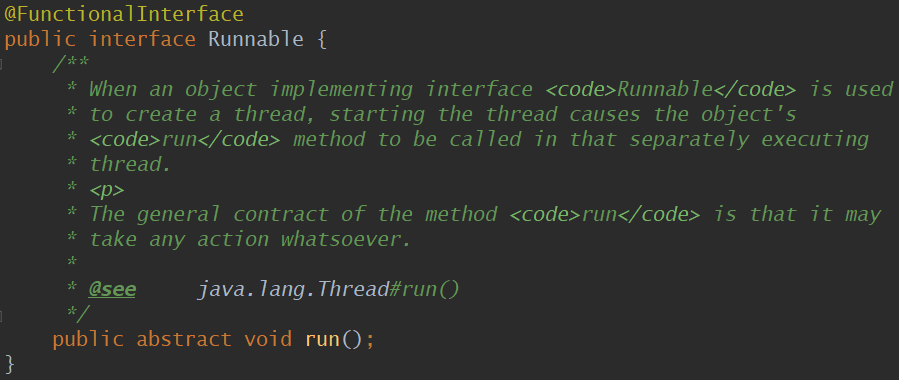
函数接口指的是只有一个函数的接口,这样的接口可以隐式转换为Lambda表达式。在实践中,函数式接口非常脆弱:只要某个开发者在该接口中添加一个函数,则该接口就不再是函数式接口进而导致编译失败。为了克服这种代码层面的脆弱性,并显式说明某个接口是函数式接口,Java 8 提供了一个特殊的注解@FunctionalInterface(Java 库中的所有相关接口都已经带有这个注解了),上面代码中的 Runnable 就是函数式接口,源码如下:
自定义函数式接口
/**

 * 自定义函数式接口

 */

@FunctionalInterface

public interface FooIface<R, T, S, U> {

  R foo(T t, S s, U u);

  static void test2() {

  }

  default void test1() {

  }

}
值得注意的是,默认方法和静态方法不会破坏函数式接口的定义,因此以上的代码是合法的。
Lambda表达式-四大类函数式接口:
消费型
- java.util.function.Consumer
public void testConsumer() {

  /**

   * 消费型

   * 有参,无返回值

   */

  Consumer<String> consumer1 = new Consumer<String>() {

     @Override

     public void accept(String s) {

       System.out.println(s);

     }

   };

  Consumer<String> consumer2 = s -> System.out.println(s);

}
供给型
- java.util.function.Supplier
public void testSupplier() {

  /**

   * 供给型

   * 无参,有返回值

   * () -> "hello";

   */

  Supplier<String> supplier1 = new Supplier<String>() {

    @Override

    public String get() {

      return "hello";

    }

  };

  Supplier<String> supplier2 = () -> "hello";

}
断言型
- java.util.function.Predicate
public void testPredicate() {

  /**

   * 断言型

   * 有参数,返回值是boolean类型

   */

  Predicate<String> predicate1 = new Predicate<String>() {

    @Override

    public boolean test(String s) {

      return s.startsWith("abc_");

    }

  };

  Predicate<String> predicate2 = s -> s.startsWith("abc_");

}
转化型
- java.util.function.Function
public void testFunction() {

  /**

   * 转化型

   * 有参数,有返回,但是参数和返回是不同的数据类型

   */

  Function<String, Integer> function1 = new Function<String, Integer>() {

    @Override

    public Integer apply(String s) {

      return s.length();

    }

  };

  Function<String, Integer> function2 = s -> s.length();

  Function<String, Integer> function3 = String::length;

}
2、方法引用
方法引用使得开发者可以直接引用现存的方法、Java类的构造方法或者实例对象。方法引用和Lambda表达式配合使用,使得java类的构造方法看起来紧凑而简洁,没有很多复杂的模板代码。先来看一下下面这段代码:
public void test4() {

  /**

   * 方法引用

   interface Comparator<T>

   int compare(T o1, T o2);

   Integer#compare(int x, int y)

   public static int compare(int x, int y) {

   return (x < y) ? -1 : ((x == y) ? 0 : 1);

   }

   */

  // 原始写法,java8之前

  Comparator<Integer> comparator1 = new Comparator<Integer>() {

    @Override

    public int compare(Integer o1, Integer o2) {

      return Integer.compare(o1, o2);

    }

  };

  // 基于lambda改写后的,第一种写法,但是有冗余代码,比如return和代码块的大括号

  Comparator<Integer> comparator2 = (x, y) -> { return Integer.compare(x, y); };

  // 再一次改写,去掉了return,因为我明明知道就是要return,还需要你再写吗?

  Comparator<Integer> comparator3 = (x, y) -> Integer.compare(x, y);

  // 最终,这两个形参x,y其实只是一个占位而已,接受者Integer::compare就知道有这样两个参数传进来,大家心知肚明的事情, 就省略嘛

  Comparator<Integer> comparator4 = Integer::compare;

  int x = 10;

  int y = 20;

  System.out.println(comparator1.compare(x, y));

  System.out.println(comparator2.compare(x, y));

  System.out.println(comparator3.compare(x, y));

  System.out.println(comparator4.compare(x, y));

}
以上这段代码写了从最原始的写法到使用 Lambda 改写后的写法再到最终的方法引用。
方法引用包括四类:
构造方法引用
- Supplier supplier = String::new;
- Function<String, String> function = String::new;
- Function<Integer, List> function = ArrayList::new;
- BiFunction<Integer, Float, HashMap> biFunction = HashMap::new;
- Function<Integer, String[]> function = String[]::new;
静态方法引用
- class::statisMethod
- Comparator comparator = Integer::compare;
成员方法引用
- class::Method
- BiPredicate<String, String> predicate = String::equals;
示例对象的方法引用
- class::instanceMethod
- Supplier supplier = linkedList::pop;
自定义类实现方法引用
public class StringLengthCompare {

  public static int abc(String o1, String o2) {

    return o1.length() > o2.length() ? 1 : -1;

  }

  public int bcd(String o1, String o2) {

    return o1.length() > o2.length() ? 1 : -1;

  }

}
StringLengthCompare 类
public void test5() {

  /**

   * 第一种,原始写法

   */

  Comparator<String> comparator = new Comparator<String>() {

    @Override

    public int compare(String o1, String o2) {

      return o1.length() > o2.length() ? 1 : -1;

    }

  };

  int res = comparator.compare("abc", "ab");

  System.out.println(res);

  /**

   * 第二种,使用lambda改写

   */

  Comparator<String> comparator1 = (str1, str2) -> str1.length() > str2.length() ? 1 : -1;

  res = comparator1.compare("abc", "ab");

  System.out.println(res);

  /**

   * 第三种,自定义StringLengthCompare类实现方法引用

   */

  // abc为静态方法,直接用类名调用

  Comparator<String> comparator2 = StringLengthCompare::abc;

  System.out.println("comparator2 = " + comparator2);

  // bcd为非静态方法,需要用对象来调用

  StringLengthCompare stringLengthCompare = new StringLengthCompare();

  Comparator<String> comparator3 = stringLengthCompare::bcd;

  System.out.println("comparator3 = " + comparator3);

}
3、接口的静态方法和默认方法
Java 8 使用两个新概念扩展了接口的含义:默认方法和静态方法。默认方法使得开发者可以在不破坏二进制兼容性的前提下,往现存接口中添加新的方法,即不强制那些实现了该接口的类也同时实现这个新加的方法。默认方法和抽象方法之间的区别在于抽象方法需要实现,而默认方法不需要。接口提供的默认方法会被接口的实现类继承或者覆写,例子代码如下:
private interface Defaulable {

    // Interfaces now allow default methods, the implementer may or

    // may not implement (override) them.

    default String notRequired() {

        return "Default implementation";

    }

}
Defaulable
private static class DefaultableImpl implements Defaulable {

}
DefaultableImpl
private static class OverridableImpl implements Defaulable {

    @Override

    public String notRequired() {

        return "Overridden implementation";

    }

}
OverridableImpl
Defaulable 接口使用关键字 default 定义了一个默认方法 notRequired()。DefaultableImpl 类实现了这个接口,同时默认继承了这个接口中的默认方法;OverridableImpl 类也实现了这个接口,但覆写了该接口的默认方法,并提供了一个不同的实现。
Java 8带来的另一个有趣的特性是在接口中可以定义静态方法,例子代码如下:
private interface DefaulableFactory {

    // Interfaces now allow static methods

    static Defaulable create( Supplier< Defaulable > supplier ) {

        return supplier.get();

    }

}
DefaulableFactory
下面的代码片段整合了默认方法和静态方法的使用场景:
public static void main( String[] args ) {

    Defaulable defaulable = DefaulableFactory.create( DefaultableImpl::new );

    System.out.println( defaulable.notRequired() );

    defaulable = DefaulableFactory.create( OverridableImpl::new );

    System.out.println( defaulable.notRequired() );

}
这段代码输入结果如下:
Default implementation
Overridden implementation
由于JVM上的默认方法的实现在字节码层面提供了支持,因此效率非常高。默认方法允许在不打破现有继承体系的基础上改进接口。该特性在官方库中的应用是:给java.util.Collection接口添加新方法,如stream()、parallelStream()、forEach() 和removeIf() 等等。尽管默认方法有这么多好处,但在实际开发中应该谨慎使用:在复杂的继承体系中,默认方法可能引起歧义和编译错误。
注意:实现接口的类或者子接口不会继承接口中的静态方法
4、重复注解
在 Java学习之==>注解这篇文章中有关于重复注解的介绍和使用。重复注解也是在 Java 8 中才开始支持的。
三、Java 官方库的新特性
1、Streams
新增的 Stream API(java.util.stream)将函数式编程引入了 Java 库中。这是目前为止最大的一次对 Java 库的完善,以便开发者能够写出更加有效、更加简洁和紧凑的代码。Steam API 极大的简化了集合操作(后面我们会看到不止是集合)。
Stream概述
- 非主流式定义: 像写SQL一样来处理集合;
- 理解类定义: 流式处理;
- 流式处理学习路线: 创建,操作(中间操作,终止操作);
Stream创建
- Collection等集合接口实现的stream()方法和parallelStream()方法;
- Arrays提供的数组流;
- Stream类提供的静态创建方法of();
public class Demo {

  public static void main(String[] args) {

    /**

     * 创建Stream流,有三种方式

     */

    // 第一种,集合类自带的方法

    List<String> list = new ArrayList<>();

    Stream<String> stream = list.stream();

    Set<String> set = null;

    Stream<String> stream1 = set.stream();

    // 第二种,数组类流的创建

    int[] arr = new int[]{1, 2, 3};

    IntStream stream2 = Arrays.stream(arr);

    /**

     * public static<T> Stream<T> of(T... values) {

     *   return Arrays.stream(values);

     *  }

     */

    // 第三种,Stream接口自己提供的of方法,从实现来看是和第二种是一样的

    Stream<String> stream3 = Stream.of("", "", "");

  }

}
创建Stream流的三种方式
Stream中间操作
- 过滤::filter;
- 切片 & 分页:sklip , limit;
- 去重:distinct(去重的对象需要实现hashCode和equals);
- 映射:map, flatMap;
- 排序:sort;
Stream终止操作
- 匹配
- allMatch:检查是否匹配所有元素;
- anyMatch:检查是否匹配至少一个元素;
- noneMatch:检查是否没有匹配所有元素
- 查找
- findFirst:查找找到的第一个元素;
- findAny:查找找到的任意一个元素
- 计算流中元素个数:count();
- 计算流中元素的最大/最小值:max() , min();
- 内部迭代:forEach;
- 收集:collect;
下面我们来举例操作一下:
首先定义两个实体类 Account 和 User
@Setter

@Getter

@ToString

public class Account {

  private int id;

  private String accountName;

  private boolean isInner;

  private boolean isA;

  private boolean isB;

  private boolean isC;

  private String type;

  private List<User> users;

  private Account() {

  }

  private Account(int id, String accountName, boolean isInner, String type, List<User> users) {

    this.id = id;

    this.accountName = accountName;

    this.isInner = isInner;

    this.type = type;

    this.users = users;

  }

  public Account(int id, String accountName, boolean isInner, boolean isA, boolean isB, boolean isC,

      String type) {

    this.id = id;

    this.accountName = accountName;

    this.isInner = isInner;

    this.isA = isA;

    this.isB = isB;

    this.isC = isC;

    this.type = type;

  }

  public static Account of(int id, String accountName, boolean isInner, String type,

      List<User> users) {

    return new Account(id, accountName, isInner, type, users);

  }

  public static Account of(int id, String accountName, boolean isInner, boolean isA, boolean isB,

      boolean isC,

      String type) {

    return new Account(id, accountName, isInner, isA, isB, isC, type);

  }

  @Override

  public boolean equals(Object o) {

    if (this == o) {

      return true;

    }

    if (o == null || getClass() != o.getClass()) {

      return false;

    }

    Account account = (Account) o;

    if (id != account.id) {

      return false;

    }

    return accountName != null ? accountName.equals(account.accountName)

        : account.accountName == null;

  }

  @Override

  public int hashCode() {

    int result = id;

    result = 31 * result + (accountName != null ? accountName.hashCode() : 0);

    return result;

  }

}
Account
@Setter

@Getter

@ToString

public class User {

  private int id;

  private String name;

  private User() {

  }

  private User(int id, String name) {

    this.id = id;

    this.name = name;

  }

  public static User of(int id, String name) {

    return new User(id, name);

  }

  // @Override

  // public boolean equals(Object o) {

  //   if (this == o) {

  //     return true;

  //   }

  //   if (o == null || getClass() != o.getClass()) {

  //     return false;

  //   }

  //   User user = (User) o;

  //   return id == user.id &&

  //       Objects.equal(name, user.name);

  // }

  //

  // @Override

  // public int hashCode() {

  //   return Objects.hashCode(id, name);

  // }

  @Override

  public boolean equals(Object o) {

    if (this == o) {

      return true;

    }

    if (o == null || getClass() != o.getClass()) {

      return false;

    }

    User user = (User) o;

    return id == user.id;

  }

  @Override

  public int hashCode() {

    return Objects.hashCode(id);

  }

}
User
生成 Account 对象集合的类 AccountFactory
public class AccountFactory {

  public static List<Account> getSimpleAccounts() {

    List<Account> accounts = new ArrayList<>();

    accounts.add(Account.of(1, "微信支付1账户", false, "出款", UserFactory.getSimpleUsers(true)));

    accounts.add(Account.of(2, "微信支付2账户", false, "入款", UserFactory.getSimpleUsers(true)));

    accounts.add(Account.of(3, "微信支付3账户", true, "出款", UserFactory.getSimpleUsers(false)));

    accounts.add(Account.of(4, "微信支付4账户", true, "入款", UserFactory.getSimpleUsers(true)));

    accounts.add(Account.of(5, "微信支付5账户", false, "出款", UserFactory.getSimpleUsers(false)));

    accounts.add(Account.of(6, "微信支付6账户", false, "入款", UserFactory.getSimpleUsers(true)));

    accounts.add(Account.of(7, "微信支付7账户", false, "出款", UserFactory.getSimpleUsers(false)));

    accounts.add(Account.of(8, "微信支付8账户", true, "出款", UserFactory.getSimpleUsers(true)));

    accounts.add(Account.of(9, "微信支付9账户", true, "入款", UserFactory.getSimpleUsers(false)));

    accounts.add(Account.of(10, "微信支付10账户", true, "出款", UserFactory.getSimpleUsers(true)));

    accounts.add(Account.of(11, "微信支付11账户", true, "入款", UserFactory.getSimpleUsers(true)));

    accounts.add(Account.of(12, "微信支付12账户", false, "出款", UserFactory.getSimpleUsers(true)));

    return accounts;

  }

  public static List<Account> getSimpleABCAccounts() {

    List<Account> accounts = new ArrayList<>();

    accounts.add(Account.of(1, "微信支付1账户", false, false, true, true, "出款"));

    accounts.add(Account.of(2, "微信支付2账户", false, false, false, true, "入款"));

    accounts.add(Account.of(3, "微信支付3账户", true, false, true, false, "出款"));

    accounts.add(Account.of(4, "微信支付4账户", true, false, true, true, "入款"));

    accounts.add(Account.of(5, "微信支付5账户", false, false, false, false, "出款"));

    accounts.add(Account.of(6, "微信支付6账户", false, false, true, true, "入款"));

    accounts.add(Account.of(7, "微信支付7账户", false, false, false, false, "出款"));

    accounts.add(Account.of(8, "微信支付8账户", true, false, false, true, "出款"));

    accounts.add(Account.of(9, "微信支付9账户", true, false, true, true, "入款"));

    accounts.add(Account.of(10, "微信支付10账户", true, false, false, false, "出款"));

    accounts.add(Account.of(11, "微信支付11账户", true, false, false, true, "入款"));

    accounts.add(Account.of(12, "微信支付12账户", false, false, true, true, "出款"));

    return accounts;

  }

  public static void printAccount(List<Account> accounts) {

    for (Account account : accounts) {

      System.out.println("account = " + account);

    }

  }

  public static void printAccount(Map<String, List<Account>> accounts) {

    accounts.forEach((key, val) -> {

      System.out.println("groupName:" + key);

      for (Account account : val) {

        System.out.println("\t\t account:" + account);

      }

    });

  }

}
AccountFactory
生成 User 对象集合的类 UserFactory
public class UserFactory {

  public static List<User> getSimpleUsers(boolean type) {

    List<User> users = Lists.newArrayList();

    if (type) {

      users.add(User.of(1, "张三"));

      users.add(User.of(1, "李四"));

      users.add(User.of(1, "王五"));

    } else {

      users.add(User.of(1, "张三"));

      users.add(User.of(1, "李四"));

      users.add(User.of(1, "王五"));

      users.add(User.of(1, "王二麻子"));

      users.add(User.of(1, "小淘气"));

    }

    return users;

  }

  public static List<User> getSimpleUsers() {

    List<User> users = Lists.newArrayList();

    users.add(User.of(1, "张三"));

    users.add(User.of(1, "李四"));

    users.add(User.of(1, "王五"));

    users.add(User.of(1, "王五"));

    users.add(User.of(1, "王五"));

    users.add(User.of(1, "王五"));

    users.add(User.of(1, "王五"));

    users.add(User.of(1, "王二麻子"));

    users.add(User.of(1, "小淘气"));

    return users;

  }

}
UserFactory
以下为测试代码:
public class StreamDemo1 {

  /**

   * 过滤:原始写法

   */

  @Test

  public void test1() {

    List<Account> accounts = AccountFactory.getSimpleAccounts();

    List<Account> accs = new ArrayList<>();

    for (Account account : accounts) {

      if (account.isInner()) {

        accs.add(account);

      }

    }

    AccountFactory.printAccount(accs);

  }

  /**

   * 过滤:java8写法

   */

  @Test

  public void test2() {

    List<Account> accounts = AccountFactory.getSimpleAccounts();

    List<Account> accs = accounts

        .stream() // 创建流

        .filter(Account::isInner) // 中间操作

        .collect(Collectors.toList()); // 终止操作

    AccountFactory.printAccount(accs);

  }

  /**

   * 分组:原始写法

   */

  @Test

  public void test3() {

    List<Account> accounts = AccountFactory.getSimpleAccounts();

    Map<String, List<Account>> group = new HashMap<>();

    for (Account account : accounts) {

      if (group.containsKey(account.getType())) {

        group.get(account.getType()).add(account);

      } else {

        List<Account> acc = new ArrayList<>();

        acc.add(account);

        group.put(account.getType(), acc);

      }

    }

    AccountFactory.printAccount(group);

  }

  /**

   * 分组:java8的写法

   */

  @Test

  public void test4() {

    List<Account> accounts = AccountFactory.getSimpleAccounts();

    Map<String, List<Account>> group = accounts

        .stream()

        .collect(Collectors.groupingBy(Account::getType));

    AccountFactory.printAccount(group);

  }

  /**

   * 分组, 对内部账户进行分组

   */

  @Test

  public void test5() {

    List<Account> accounts = AccountFactory.getSimpleAccounts();

    Map<String, List<Account>> group = new HashMap<>();

    for (Account account : accounts) {

      if (!account.isInner()) {

        continue;

      }

      if (account.isA()) {

        continue;

      }

      if (!account.isB()) {

        continue;

      }

      if (group.containsKey(account.getType())) {

        group.get(account.getType()).add(account);

      } else {

        List<Account> acc = new ArrayList<>();

        acc.add(account);

        group.put(account.getType(), acc);

      }

    }

    AccountFactory.printAccount(group);

  }

  /**

   * 基于java8的分组,对内部账户进行分组

   */

  @Test

  public void test6() {

    List<Account> accounts = AccountFactory.getSimpleAccounts();

    Map<String, List<Account>> group = accounts

        .stream()

        .filter(Account::isInner)

        .filter(account -> !account.isB())

        .filter(Account::isC)

        .collect(Collectors.groupingBy(Account::getType));

    AccountFactory.printAccount(group);

  }

  @Test

  public void test7() {

    /**

     * filter是中间操作

     * filter操作完以后Stream对象类型不变

     */

    Stream<String> stream = Stream.of("abc_d", "ef", "abc_123")

        .filter(str -> str.startsWith("abc_"));

    /**

     * collect是终止操作

     * collect操作完以后Stream对象类型变成其他类型了

     */

    List<String> collect = Stream.of("abc_d", "ef", "abc_123")

        .filter(str -> str.startsWith("abc_"))

        .collect(Collectors.toList());

    for (String s : collect) {

      System.out.println(s);

    }

  }

}
StreamDemo1
public class StreamDemo2 {

  /**

   * map:映射,获取对象的某个属性

   * 返回所有内部账户的账户名

   */

  @Test

  public void testMap() {

    List<Account> accounts = AccountFactory.getSimpleAccounts();

    List<String> list = accounts.stream()

        .filter(Account::isInner)

        .map(Account::getAccountName)

        .collect(Collectors.toList());

    for (String s : list) {

      System.out.println(s);

    }

  }

  /**

   * skip:切片,去除前面几条

   */

  @Test

  public void testSkip() {

    List<Account> accounts = AccountFactory.getSimpleAccounts();

    List<Account> list = accounts

            .stream()

            .skip(5)

            .collect(Collectors.toList());

    for (Account account : list) {

      System.out.println(account);

    }

  }

  /**

   * skip:切片,去除调前面几条

   * limit:分页,控制结果的数量

   */

  @Test

  public void testLimit() {

    List<Account> accounts = AccountFactory.getSimpleAccounts();

    List<Account> list = accounts

            .stream()

            .skip(3)

            .limit(5)

            .collect(Collectors.toList());

    for (Account account : list) {

      System.out.println(account);

    }

  }

  /**

   * 拿出account中user列表的名字

   *

   * 去重

   */

  @Test

  public void testflatMap() {

    List<Account> accounts = AccountFactory.getSimpleAccounts();

    // 这个搞不定

    List<List<String>> res = accounts.stream()

        .map(account -> {

          List<User> users = account.getUsers();

          return users.stream().map(User::getName).collect(Collectors.toList());

        })

        .distinct()

        .collect(Collectors.toList());

    System.out.println("res:" + res);

    List<String> res2 = accounts.stream()

        // [[1,2],[1,2,3],[1,2,3,4]]

        .flatMap(account -> account.getUsers().stream())

        //[1,2,1,2,3,1,2,3,4]

        .map(User::getName)

        .distinct()

        .collect(Collectors.toList());

    System.out.println("res2:" + res2);

  }

}
StreamDemo2
public class StreamDemo3 {

  @Test

  public void testMaxOrMin() {

    List<Account> accounts = AccountFactory.getSimpleAccounts();

    Optional<Integer> optional = accounts.stream()

        .filter(Account::isInner)

        .map(Account::getId)

            /**

             * peek,调试时输出值

             */

        .peek(System.out::println)

        .max(Integer::compare);

    Integer maxId = optional.get();

    System.out.println("maxId = " + maxId);

  }

  @Test

  public void testForeach() {

    List<Account> accounts = AccountFactory.getSimpleAccounts();

    accounts.stream()

        .filter(Account::isInner)

        .map(Account::getId)

        .forEach(System.out::println);

  }

  @Test

  public void testFind() {

    List<Account> accounts = AccountFactory.getSimpleAccounts();

    Optional<Integer> optional = accounts.stream()

        .filter(Account::isInner)

        .map(Account::getId)

        .findAny();

    System.out.println("optional.get() = " + optional.get());

  }

  @Test

  public void testMatch() {

    List<Account> accounts = AccountFactory.getSimpleAccounts();

    boolean match = accounts.stream()

        .anyMatch(Account::isInner);

    System.out.println("match = " + match);

  }

  @Test

  public void testMapForeach() {

    Map<String, String> mapData = Maps.newHashMap();

    mapData.put("hello", "hi");

    mapData.put("yes", "no");

    mapData.forEach((key, val) -> {

      System.out.println(key + "," + val);

    });

  }

}
StreamDemo3
public class StreamDemo4 {

  /**

   * 我以accountName作为key,来划分Account

   *

   * list<account> = [account,account]

   *

   * map<string,account> = {(accountName,account),(accountName,account)} map<string,account.id> =

   * {(accountName,account),(accountName,account)}

   */

  @Test

  public void test1() {

    List<Account> accounts = AccountFactory.getSimpleAccounts();

     Map<String, Account> map = accounts

         .stream()

         .collect(Collectors.toMap(Account::getAccountName, account -> account));

     map.forEach((key, val) -> {

       System.out.println(key + "," + val);

     });

  }

  @Test

  public void test2(){

    List<Account> accounts = AccountFactory.getSimpleAccounts();

    Map<String, Integer> map = accounts

            .stream()

            .collect(Collectors.toMap(Account::getAccountName, Account::getId));

    map.forEach((key, val) -> {

      System.out.println(key + "," + val);

    });

  }

}
StreamDemo4
2、Date/Time API(JSR 310)
3、Optional
简介
- Optional 类是一个可以为 null 的容器对象。如果值存在则 isPresent() 方法会返回true,调用get()方法会返回该对象。
- Optional 是个容器:它可以保存类型T的值,或者仅仅保存null。Optional提供很多有用的方法,这样我们就不用显式进行空值检测。
- Optional 类的引入很好的解决空指针异常。
类的属性和方法
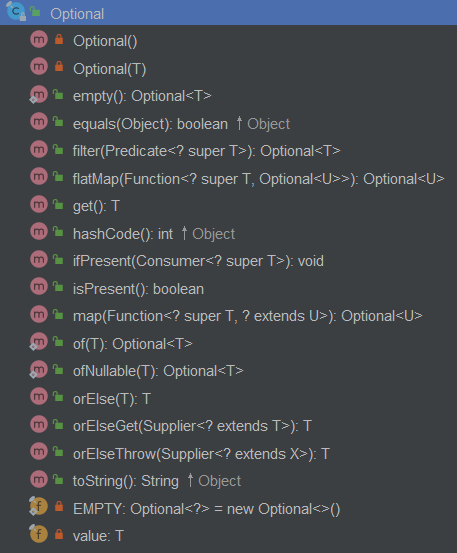
从图中我们可以看出,它的构造方法都是private修饰的,其实是一个单例模式的应用。
下面我们主要来讲一下 filter() 和 map() 方法:
filter 方法
该方法是过滤方法,过滤符合条件的 Optional 对象,这里的条件用 Lambda 表达式来定义,源码如下:
    public Optional<T> filter(Predicate<? super T> predicate) {

        //如果入参predicate对象为null将抛NullPointerException异常

        Objects.requireNonNull(predicate);

        //如果Optional对象的值为null,将直接返回该Optional对象

        if (!isPresent())

            return this;

        //如果Optional对象的值符合限定条件(Lambda表达式来定义),返回该值,否则返回空的Optional对象

        else

            return predicate.test(value) ? this : empty();

    }
map 方法
map方法用于修改该值,并返回修改后的Optional对象,一般会在多级取值的时候用到,源码如下:
    public<U> Optional<U> map(Function<? super T, ? extends U> mapper) {

        //如果入参mapper对象为null将抛NullPointerException异常

        Objects.requireNonNull(mapper);

        //如果Optional对象的值为null,将直接返回该Optional对象

        if (!isPresent())

            return empty();

        //执行传入的lambda表达式,并返回经lambda表达式操作后的Optional对象

        else {

            return Optional.ofNullable(mapper.apply(value));

        }

    }
举例:
判断不为null然后进行操作
public class Demo {

  /**

   * 不为null时进行操作

   * 原始写法

   */

  public static void doThing(String name) {

    if (name != null) {

      System.out.println(name);

    }

  }

  // 使用Optional的写法

  public static void doThingOptional(String name) {

    Optional.ofNullable(name).ifPresent(System.out::println);

  }

}
多层级取值
public class Demo {

  // 原始写法

  public static String getAddress(User user) {

    if (user != null) {

      AddressEntity addressEntity = user.getAddressEntity();

      if (addressEntity != null) {

        String address = addressEntity.getAddress();

        if (address != null && address.length() > 3) {

          return address;

        }

      }

    }

    return null;

  }

  // 使用Optional的写法

  public static String getAddressOptional(User user) {

    return Optional.ofNullable(user)

            .map(u -> u.getAddressEntity())

            .map(a -> a.getAddress())

            .filter(s -> s.length() > 3)

            .orElse(null);

  }

}
四、JVM 的新特性
使用Metaspace(JEP 122)代替持久代(PermGen space)。在JVM参数方面,使用-XX:MetaSpaceSize和-XX:MaxMetaspaceSize代替原来的-XX:PermSize和-XX:MaxPermSize。
Java学习之==>Java8 新特性详解的更多相关文章
- java8新特性详解(转)
原文链接. 前言: Java 8 已经发布很久了,很多报道表明Java 8 是一次重大的版本升级.在Java Code Geeks上已经有很多介绍Java 8新特性的文章,例如Playing with ...
- javaSE高级篇5 — java8新特性详解———更新完毕
java8新特性 在前面已经见过一些东西了,但是:挖得有坑儿 1.lambda表达式 lambda表达式是jdk1.8引入的全新语法特性 它支持的是:只有单个抽象方法的函数式接口.什么意思? 就是说: ...
- 点击--》java9 新特性 详解
引言: 点击-->java9 新特性 详解 点击-->java8 新特性 详解 正题: 1.局部变量var 将前端思想var关键字引入java后段,自动检测所属于类型,一种情况除外,不能为 ...
- java10 新特性 详解
引言: 点击-->java9 新特性 详解 点击-->java8 新特性 详解 正题: 1.局部变量var 将前端思想var关键字引入java后段,自动检测所属于类型,一种情况除外,不能为 ...
- Java基础学习总结(33)——Java8 十大新特性详解
Java8 十大新特性详解 本教程将Java8的新特新逐一列出,并将使用简单的代码示例来指导你如何使用默认接口方法,lambda表达式,方法引用以及多重Annotation,之后你将会学到最新的API ...
- Java8 Stream新特性详解及实战
Java8 Stream新特性详解及实战 背景介绍 在阅读Spring Boot源代码时,发现Java 8的新特性已经被广泛使用,如果再不学习Java8的新特性并灵活应用,你可能真的要out了.为此, ...
- Java9 新特性 详解
作者:木九天 < Java9 新特性 详解 > Java9 新特性 详解 摘要: 1.目录结构 2.repl工具 jShell命令 3.模块化 4.多版本兼容jar包 5.接口方 ...
- Java学习-007-Log4J 日志记录配置文件详解及实例源代码
此文主要讲述在初学 Java 时,常用的 Log4J 日志记录配置文件详解及实例源代码整理.希望能对初学 Java 编程的亲们有所帮助.若有不足之处,敬请大神指正,不胜感激!源代码测试通过日期为:20 ...
- Android群英传笔记——第十二章:Android5.X 新特性详解,Material Design UI的新体验
Android群英传笔记--第十二章:Android5.X 新特性详解,Material Design UI的新体验 第十一章为什么不写,因为我很早之前就已经写过了,有需要的可以去看 Android高 ...
随机推荐
- TextView跑马灯
TextView跑马灯 textView跑马灯实现:1.定义textView标签的4个属性:android:singleLine="true"//使其只能单行android:ell ...
- 使用TextView和Textedit
1.TextView res/layout 中设置布局文件 hint属性:提示输入信息text属性:与hint的区别---hint仅仅是提示:text是实际的内容讲布局xml文件引入到activit ...
- [ZOJ 3076] Break Standard Weight
题目连接:http://acm.zju.edu.cn/onlinejudge/showProblem.do?problemId=5009 题意:给你两个数字,可以把其中一个拆成两个数字,计算这三个数字 ...
- SAP笔记
1,负数的表示增强 负号从数字后更改到数字前面 适用于字符型字段: CALL FUNCTION 'CLOI_PUT_SIGN_IN_FRONT' CHANGING VALUE = gt_table-c ...
- JS 获取和返填单选按钮Value值
1.获取Radio值 $('input[name="sex"]:checked ').val(); 2.返填Radio值 $('input[name="sex" ...
- AVL树的介绍和实现
一.AVL树 AVL树是一种自平衡二叉查找树,因此在了解AVL树之前先介绍一下平衡二叉树.所谓平衡二叉树即该树中的任一个节点的左子树和右子树高度差不会超过1.如下图左是平衡二叉树,而右图则不是.节点4 ...
- 洛谷-p5410-扩展KMP模板
链接: https://www.luogu.org/problem/P5410#submit 题意: 有两个字符串aa,bb,要求输出bb与aa的每一个后缀的最长公共前缀 思路: 扩展kmp模板, 上 ...
- Spring Security 解决X-Frame-Options deny
错误信息: Refused to display 'https://github.com/hwclass/awesome-sound' in a frame because it set 'X-Fra ...
- C# 常用方法——base64字符串转图片
其他常用方法详见:https://www.cnblogs.com/zhuanjiao/p/12060937.html /// <summary> /// base64编码的文本转为图片 / ...
- Python基础之Python语言类型
编程语言主要从以下几个角度进行分类: 编译型和解释型 静态语言和动态语言 强类型定义语言和弱类型定义语言 编译和解释的区别是什么? 编译器把源程序的每一条语句都编译成机器语言,并保存成二进制文件,这样 ...