
IfcAxis2Placement3D IFC构件的位置和方向
IfcAxis2Placement3D定义了三维空间中物体的位置和方向,由三部分组成:
The attribute Axis defines the Z direction, RefDirection the X direction. The Y direction is derived.
注:Y轴方向由X轴和Z轴方向通过外积计算获得。
当Axis和RefDirection未定义时,X轴为P[1] ,默认值 [1.,0.,0.]。Y轴为P[2],默认值为[0.,1.,0.]。Z轴为P[3] ,默认值为[0.,0.,1.]。
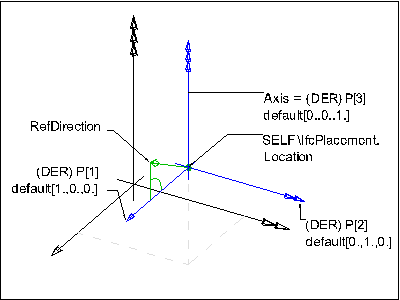
属性定义
| # | Attribute | Type | Cardinality | Description | C |
|---|---|---|---|---|---|
| 2 | Axis | IfcDirection | [0:1] | The exact direction of the local Z Axis. | X |
| 3 | RefDirection | IfcDirection | [0:1] | The direction used to determine the direction of the local X Axis. If necessary an adjustment is made to maintain orthogonality to the Axis direction. If Axis and/or RefDirection is omitted, these directions are taken from the geometric coordinate system. | X |
| P :=IfcBuildAxes(Axis, RefDirection) |
IfcDirection | L[3:3] | The normalized directions of the placement X Axis (P[1]) and the placement Y Axis (P[2]) and the placement Z Axis (P[3]). | X |
| Rule | Description |
|---|---|
| LocationIs3D | The dimensionality of the placement location shall be 3. |
| AxisIs3D | The Axis when given should only reference a three-dimensional IfcDirection. |
| RefDirIs3D | The RefDirection when given should only reference a three-dimensional IfcDirection. |
| AxisToRefDirPosition | The Axis and RefDirection shall not be parallel or anti-parallel. |
| AxisAndRefDirProvision | Either both, Axis and RefDirection are not given and therefore defaulted, or both shall be given. |
继承关系:
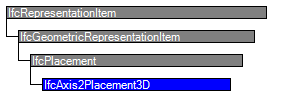
属性
| # | Attribute | Type | Cardinality | Description | C |
|---|---|---|---|---|---|
| IfcRepresentationItem | |||||
| LayerAssignment | IfcPresentationLayerAssignment @AssignedItems |
S[0:1] | Assignment of the representation item to a single or multiple layer(s). The LayerAssignments can override a LayerAssignments of the IfcRepresentation it is used within the list of Items. | X | |
| StyledByItem | IfcStyledItem @Item |
S[0:1] | Reference to the IfcStyledItem that provides presentation information to the representation, e.g. a curve style, including colour and thickness to a geometric curve. | X | |
| IfcGeometricRepresentationItem | |||||
| IfcPlacement | |||||
| 1 | Location | IfcCartesianPoint | [1:1] | The geometric position of a reference point, such as the center of a circle, of the item to be located. | X |
| Dim :=Location.Dim |
IfcDimensionCount | [1:1] | The space dimensionality of this class, derived from the dimensionality of the location. | X | |
| IfcAxis2Placement3D | |||||
| 2 | Axis | IfcDirection | [0:1] | The exact direction of the local Z Axis. | X |
| 3 | RefDirection | IfcDirection | [0:1] | The direction used to determine the direction of the local X Axis. If necessary an adjustment is made to maintain orthogonality to the Axis direction. If Axis and/or RefDirection is omitted, these directions are taken from the geometric coordinate system. | X |
| P :=IfcBuildAxes(Axis, RefDirection) |
IfcDirection | L[3:3] | The normalized directions of the placement X Axis (P[1]) and the placement Y Axis (P[2]) and the placement Z Axis (P[3]). | X | |
ENTITY IfcAxis2Placement3D

 SUBTYPE OF (IfcPlacement);

  Axis : OPTIONAL IfcDirection;

  RefDirection : OPTIONAL IfcDirection;

 DERIVE

  P : LIST [:] OF IfcDirection := IfcBuildAxes(Axis, RefDirection);

 WHERE

  LocationIs3D : SELF\IfcPlacement.Location.Dim = ;

  AxisIs3D : (NOT (EXISTS (Axis))) OR (Axis.Dim = );

  RefDirIs3D : (NOT (EXISTS (RefDirection))) OR (RefDirection.Dim = );

  AxisToRefDirPosition : (NOT (EXISTS (Axis))) OR (NOT (EXISTS (RefDirection))) OR (IfcCrossProduct(Axis,RefDirection).Magnitude > 0.0);

  AxisAndRefDirProvision : NOT ((EXISTS (Axis)) XOR (EXISTS (RefDirection)));

END_ENTITY;
DATA;

#= IFCORGANIZATION($,'Autodesk Revit 2015 (CHS)',$,$,$);

#= IFCAPPLICATION(#,'','Autodesk Revit 2015 (CHS)','Revit');

#= IFCCARTESIANPOINT((.,.,.));

#= IFCCARTESIANPOINT((.,.));

#= IFCDIRECTION((.,.,.));

#= IFCDIRECTION((-.,.,.));

#= IFCDIRECTION((.,.,.));

#= IFCDIRECTION((.,-.,.));

#= IFCDIRECTION((.,.,.));

#= IFCDIRECTION((.,.,-.));

#= IFCDIRECTION((.,.));

#= IFCDIRECTION((-.,.));

#= IFCDIRECTION((.,.));

#= IFCDIRECTION((.,-.));

#= IFCAXIS2PLACEMENT3D(#,$,$);

#= IFCAXIS2PLACEMENT3D(#,$,$);

#= IFCLOCALPLACEMENT($,#);

#= IFCLOCALPLACEMENT(#,#);

#= IFCAXIS2PLACEMENT3D(#,$,$);

#= IFCLOCALPLACEMENT(#,#);

#= IFCCARTESIANTRANSFORMATIONOPERATOR3D($,$,#,.,$);

#= IFCSHAPEREPRESENTATION(#,'Body','SweptSolid',(#));

#= IFCAXIS2PLACEMENT3D(#,$,$);

#= IFCREPRESENTATIONMAP(#,#);

#= IFCMAPPEDITEM(#,#);

#= IFCSHAPEREPRESENTATION(#,'Body','MappedRepresentation',(#));

#= IFCPRODUCTDEFINITIONSHAPE($,$,(#));

#= IFCCARTESIANPOINT((1325.86888709244,31631.0676658748,.));

#= IFCAXIS2PLACEMENT3D(#,$,$);

#= IFCLOCALPLACEMENT(#,#);

#= IFCCOLUMN('2ILfSTle57UhpKxVJ8Mj7L',#,'\X2\7EFC5408697C\X0\-\X2\6DF751DD571F77E95F6267F1\X0\:450 x 600 mm:365232',$,'450 x 600 mm',#,#,'');
计算构件y轴方向
# = IfcDirection((0.,.,.));   //z轴

# = IfcDirection((.,.,.));    //x轴

# = IfcAxis2Placement3D($,#,#);   //叉积计算出y轴 (0 ,1, 0)

# = IfcLocalPlacement($,#);

# = IfcDirection((.,.,.));  //z轴

# = IfcDirection((.,.,.));   //x轴

# = IfcAxis2Placement3D($,#,#);  //叉积计算出y轴(1, 0, -1)

# = IfcLocalPlacement(#,#);   //矩阵相乘(注意顺序)结果:x轴(0,0,1)y轴(1,0,0)z轴(0,1,0)
向量叉积计算
#include <iostream>

using namespace std;

struct Vec {

    double x;

    double y;

    double z;

};

Vec ThreeCross(const Vec& a, const Vec& b)

{

    Vec C;

    C.x = a.y * b.z - a.z * b.y;

    C.y = a.z * b.x - a.x * b.z;

    C.z = a.x * b.y - a.y * b.x;

    return C;

}

int main()

{

    Vec v1;

    v1.x = ;

    v1.y = ;

    v1.z = ;

    Vec v2;

    v2.x = ;

    v2.y = ;

    v2.z = ;

    Vec v3 = ThreeCross(v1,v2);

    cout << v3.x << "  " << v3.y << "  " << v3.z << endl;

    system("pause");

    return ;

}
向量叉积计算公式:
a=(X1,Y1,Z1),b=(X2,Y2,Z2),
a×b=(Y1Z2 - Y2Z1,Z1X2 - Z2X1,X1Y2 - X2Y1)
V1(1,2,3)
V2(4,5,6)
V1 * V2=(12-15,12-6,5-8)=(-3,6,-3)
参考:https://blog.csdn.net/liyazhen2011/article/details/82347074
IfcAxis2Placement3D IFC构件的位置和方向的更多相关文章
- 获取IFC构件的位置数据、方向数据
获取IFC构件的位置数据.方向数据 std::map<int, shared_ptr<BuildingEntity>> map_buildingEntity = b_model ...
- IFC构件位置数据与revit模型中对应构件位置数据对比
IFC构件位置数据与revit模型中对应构件位置数据对比
- iOS使用位置和方向服务(来自苹果apple官方)
版权声明:本文为博主原创文章,未经博主允许不得转载. 目录(?)[+] 本文章来自苹果官方文档,特此声明--------禚 Core Location框架为定位用户当前位置和方向(Headin ...
- Unity 中动态修改碰撞框(位置,大小,方向)
在Unity中,玩家处于不同的状态,要求的碰撞框的 位置/大小/方向 会有所改变,怎么动态的修改碰撞框呢? 下面是Capsure Collider(胶囊体)的修改: CapsuleCollider.d ...
- 不规则形状的Ifc构件顶点坐标获取
不规则形状的Ifc构件顶点坐标获取 今天有人问我,ifc构件的顶点坐标怎么获取,自己前年的时候写过类似的程序,但有点记不清了,最近一直用C++解析ifc,慎重起见,还是重新再写一次,java版本的获取 ...
- IFC构件位置信息—ObjectPlacement
在IFC标准中,采用相对坐标系对构件定位.如柱(IfcColumn)的定位信息(局部坐标系及参考坐标系)由ObjectPlacement描述.ObjectPlacement由两部分组成: (1)Pla ...
- ios的位置和方向(来自苹果官方文档,仅供简单参考)
取得用户的当前位置 Core Location框架使您可以定位设备的当前位置,并将这个信息应用到程序中.该框架利用设备内置的硬件,在已有信号的基础上通过三角测量得到固定位置,然后将它报告给您的代码.在 ...
- 不规则的Ifc构件顶点提取方法
BIM模型中有很多不规则的构件,在IFC中这些不规则的构件一般用顶点的形式表示,顶点坐标提取路径: IfcObject->IfcProductDefinitionShape->IfcSh ...
- ifc构件加载到树形控件中
void IfcTreeWidget::setParentCheckState(QTreeWidgetItem *item) { if(!item) return; ; int childCount ...
随机推荐
- PAT基础级-钻石段位样卷2-7-3 大笨钟 (10 分)
微博上有个自称“大笨钟V”的家伙,每天敲钟催促码农们爱惜身体早点睡觉.不过由于笨钟自己作息也不是很规律,所以敲钟并不定时.一般敲钟的点数是根据敲钟时间而定的,如果正好在某个整点敲,那么“当”数就等于那 ...
- c++第五次博客作业
C++虚函数,纯虚函数,抽象类以及虚基类的区别 Part1.C++中的虚函数 什么是虚函数: 直观表达就是,如果一个函数的声明中有 virtual 关键字,那么这个函数就是虚函数. ...
- Jenkins+jmeter+ant+Git 持续集成(六、代码提交到Gitlab即自动构建)
实现原理: 利用jenkins和gitlab的webhook结合,实现提交代码之后,自动触发jenkins的构建. 1.Jenkins的插件安装: 需要安装两个gitlab的插件:Gitlab Hoo ...
- msaa mrt load store action unity
unity buildin renderpipeline 和lightweight rp 对于开了msaa的rt 的load store action设置失效 buildin的时候set render ...
- MyBatsi学习
深入浅出Mybatis系列(一)---Mybatis入门 深入浅出Mybatis系列(二)---配置简介(mybatis源码篇) 深入浅出Mybatis系列(三)---配置详解之properties与 ...
- 如何学好java?
忻州seo:如何学好java?想必对于任何一个在学习java的朋友们,都会在学习过程中遇到一些问题.例如:Java反射机制是什么?小编也是学习java编程的,现在给大家简单介绍一下:Java反射机制就 ...
- c++面向对象模型---c++如何管理类,对象以及它们之间的联系
首先我们随意定义4个类结构 class cl1 { private: int age; string name; static int addr; public: cl1() { } void iwa ...
- Hdu 4312-Meeting point-2——哈夫曼距离与切比雪夫距离
题意 从 $n$ 个点中选择一点,使得其他点到其的切比雪夫距离最小($0 < n \leq 1e5$). 分析 定理:$(x_1, y_1)$ 与 $(x_2, y_2)$ 的曼哈顿距离等于 $ ...
- 如何使用python内置的request发送JSON格式的数据
使用步骤如下: 一.如果想发送json格式的数据,需要使用request模块中的Request类来创建对象,作为urlopen函数的参数 二.header中添加content-type为applica ...
- bzoj 3420: Poi2013 Triumphal arch 树形dp+二分
给一颗树,$1$ 号节点已经被染黑,其余是白的,两个人轮流操作,一开始 $B$ 在 $1$ 号节点,$A$ 选择 $k$ 个点染黑,然后 $B$ 走一步,如果 $B$ 能走到 $A$ 没染的节点则 $ ...