
图像处理---《在图片上打印文字 windows+GDI+TrueType字体》
图像处理---《在图片上打印文字 windows+GDI+TrueType字体》
刚开始使用的是putText()函数做,缺陷是只能显示非中文; 接着,看大多数推荐Freetype库来做,尝试了,可以的,适合图像输入的是IPLImage格式,其他格式需要转换一下;现在,看到可以不使用Freetype库做的,也尝试了,好用:
上接前几篇,(3)“采用windows的GDI显示系统的TrueType字体,没有封装,就两个函数,分成了h和cpp文件,可以自己编辑文件名和函数名,亦可以直接将cpp的代码复制到你需要的程序中。”
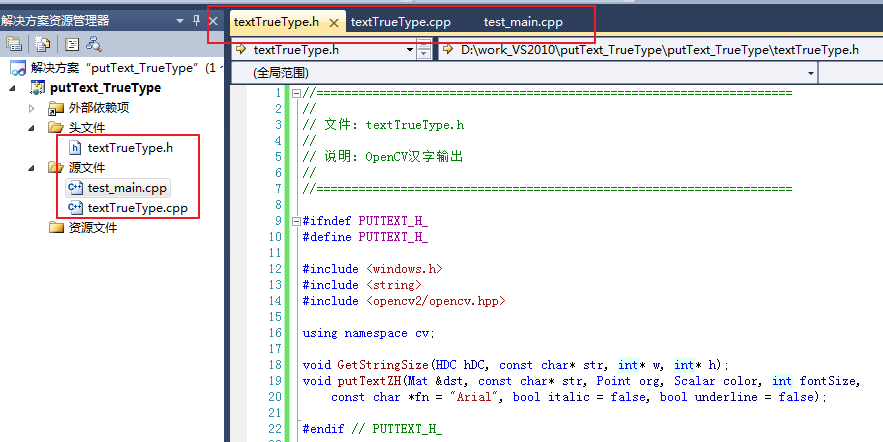
//====================================================================

//

// 文件: textTrueType.h

//

// 说明: OpenCV汉字输出

//

//====================================================================

#ifndef PUTTEXT_H_

#define PUTTEXT_H_

#include <windows.h>

#include <string>

#include <opencv2/opencv.hpp>

using namespace cv;

void GetStringSize(HDC hDC, const char* str, int* w, int* h);

void putTextZH(Mat &dst, const char* str, Point org, Scalar color, int fontSize,

    const char *fn = "Arial", bool italic = false, bool underline = false);

#endif // PUTTEXT_H_
//====================================================================

//

// 文件: textTrueType.cpp

//

// 说明: OpenCV汉字输出

//

//====================================================================

//#include "putText.h"

#include "textTrueType.h"

void GetStringSize(HDC hDC, const char* str, int* w, int* h)

{

    SIZE size;

    GetTextExtentPoint32A(hDC, str, strlen(str), &size);

    if (w != ) *w = size.cx;

    if (h != ) *h = size.cy;

}

void putTextZH(Mat &dst, const char* str, Point org, Scalar color, int fontSize, const char* fn, bool italic, bool underline)

{

    CV_Assert(dst.data !=  && (dst.channels() ==  || dst.channels() == ));

    int x, y, r, b;

    if (org.x > dst.cols || org.y > dst.rows) return;

    x = org.x <  ? -org.x : ;

    y = org.y <  ? -org.y : ;

    LOGFONTA lf;

    lf.lfHeight = -fontSize;

    lf.lfWidth = ;

    lf.lfEscapement = ;

    lf.lfOrientation = ;

    lf.lfWeight = ;

    lf.lfItalic = italic;   //斜体

    lf.lfUnderline = underline; //下划线

    lf.lfStrikeOut = ;

    lf.lfCharSet = DEFAULT_CHARSET;

    lf.lfOutPrecision = ;

    lf.lfClipPrecision = ;

    lf.lfQuality = PROOF_QUALITY;

    lf.lfPitchAndFamily = ;

    strcpy_s(lf.lfFaceName, fn);

    HFONT hf = CreateFontIndirectA(&lf);

    HDC hDC = CreateCompatibleDC();

    HFONT hOldFont = (HFONT)SelectObject(hDC, hf);

    int strBaseW = , strBaseH = ;

    int singleRow = ;

    char buf[ << ];

    strcpy_s(buf, str);

    char *bufT[ << ];  // 这个用于分隔字符串后剩余的字符,可能会超出。

    //处理多行

    {

        int nnh = ;

        int cw, ch;

        const char* ln = strtok_s(buf, "\n",bufT);

        while (ln != )

        {

            GetStringSize(hDC, ln, &cw, &ch);

            strBaseW = max(strBaseW, cw);

            strBaseH = max(strBaseH, ch);

            ln = strtok_s(, "\n",bufT);

            nnh++;

        }

        singleRow = strBaseH;

        strBaseH *= nnh;

    }

    if (org.x + strBaseW <  || org.y + strBaseH < )

    {

        SelectObject(hDC, hOldFont);

        DeleteObject(hf);

        DeleteObject(hDC);

        return;

    }

    r = org.x + strBaseW > dst.cols ? dst.cols - org.x -  : strBaseW - ;

    b = org.y + strBaseH > dst.rows ? dst.rows - org.y -  : strBaseH - ;

    org.x = org.x <  ?  : org.x;

    org.y = org.y <  ?  : org.y;

    BITMAPINFO bmp = {  };

    BITMAPINFOHEADER& bih = bmp.bmiHeader;

    int strDrawLineStep = strBaseW *  %  ==  ? strBaseW *  : (strBaseW *  +  - ((strBaseW * ) % ));

    bih.biSize = sizeof(BITMAPINFOHEADER);

    bih.biWidth = strBaseW;

    bih.biHeight = strBaseH;

    bih.biPlanes = ;

    bih.biBitCount = ;

    bih.biCompression = BI_RGB;

    bih.biSizeImage = strBaseH * strDrawLineStep;

    bih.biClrUsed = ;

    bih.biClrImportant = ;

    void* pDibData = ;

    HBITMAP hBmp = CreateDIBSection(hDC, &bmp, DIB_RGB_COLORS, &pDibData, , );

    CV_Assert(pDibData != );

    HBITMAP hOldBmp = (HBITMAP)SelectObject(hDC, hBmp);

    //color.val[2], color.val[1], color.val[0]

    SetTextColor(hDC, RGB(, , ));

    SetBkColor(hDC, );

    //SetStretchBltMode(hDC, COLORONCOLOR);

    strcpy_s(buf, str);

    const char* ln = strtok_s(buf, "\n",bufT);

    int outTextY = ;

    while (ln != )

    {

        TextOutA(hDC, , outTextY, ln, strlen(ln));

        outTextY += singleRow;

        ln = strtok_s(, "\n",bufT);

    }

    uchar* dstData = (uchar*)dst.data;

    int dstStep = dst.step / sizeof(dstData[]);

    unsigned char* pImg = (unsigned char*)dst.data + org.x * dst.channels() + org.y * dstStep;

    unsigned char* pStr = (unsigned char*)pDibData + x * ;

    for (int tty = y; tty <= b; ++tty)

    {

        unsigned char* subImg = pImg + (tty - y) * dstStep;

        unsigned char* subStr = pStr + (strBaseH - tty - ) * strDrawLineStep;

        for (int ttx = x; ttx <= r; ++ttx)

        {

            for (int n = ; n < dst.channels(); ++n){

                double vtxt = subStr[n] / 255.0;

                int cvv = vtxt * color.val[n] + ( - vtxt) * subImg[n];

                subImg[n] = cvv >  ?  : (cvv <  ?  : cvv);

            }

            subStr += ;

            subImg += dst.channels();

        }

    }

    SelectObject(hDC, hOldBmp);

    SelectObject(hDC, hOldFont);

    DeleteObject(hf);

    DeleteObject(hBmp);

    DeleteDC(hDC);

}
//====================================================================

//

// 文件: test_main.cpp

//

// 说明: OpenCV汉字输出,测试主函数

//

//====================================================================

#include "opencv2/opencv.hpp"

//#include "putText.h"

#include "textTrueType.h"

using namespace std;

using namespace cv;

/*int main()

{

    Mat img = imread("D:\\005_test_4\\testImg\\road_6.png");

    putTextZH(img, "Arial字体换...\n行显示!", Point(50, 50), Scalar(0, 0, 255), 30, "Arial");

    putTextZH(img, "Times New Roman字体换...\n行显示!", Point(50, 50), Scalar(0, 0, 255), 30, "Times New Roman");

    putTextZH(img, "微软雅黑字体换...\n行,斜体,下划线,显示!", Point(50, 100), Scalar(0, 255, 0), 30, "微软雅黑", true, true);

    putTextZH(img, "楷体字体换...\n行,斜体,下划线,显示!", Point(50, 200), Scalar(128, 255, 0), 30, "楷体", true, true);

    imshow("test", img);

    waitKey();

    return 0;

}*/

void main()

{

    //Mat img(150,600,CV_8UC3,Scalar(255,255,255));//初始化图像

    Mat img = imread("D:\\005_test_4\\testImg\\road_6.png");

    putTextZH(img, "打印汉字,汉字,汉字!", Point(, ), Scalar(, , ), , "华文行楷");

    imwrite("1.png", img);

    imshow("", img);

    waitKey();

}

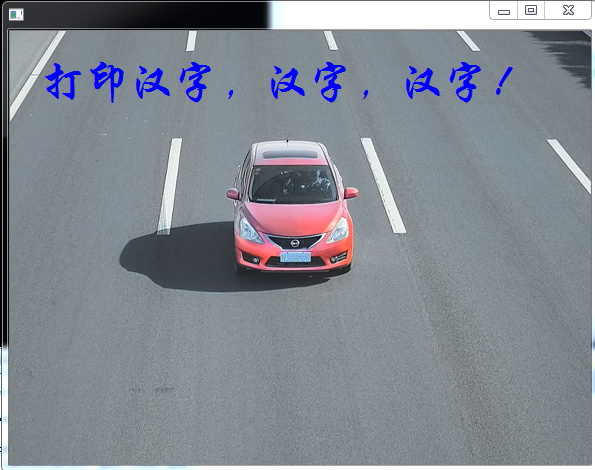
致谢:https://blog.csdn.net/wanggao_1990/article/details/52955056;https://blog.csdn.net/weixinhum/article/details/84074594;
图像处理---《在图片上打印文字 windows+GDI+TrueType字体》的更多相关文章
- 图像处理---《在图片上打印文字 FreeType库》
图像处理---<在图片上打印文字 FreeType库> 目的:想在处理之后的图像上打印输出结果.方法: (1)只在图像上打印 数字.字母的话: 1.Mat格式 ...
- 图像处理---《在图片上打印文字 putText()》
图像处理---<在图片上打印文字 putText()> 目的:想在处理之后的图像上打印输出结果. 方法: (1)只在图像上打印 数字.字母的话: 1.Mat ...
- C#图像处理(1):在图片上加文字和改变文字的方向
C#在图片上加文字,代码如下: /// <summary> /// 图片上方加文字,文字将会被180度反转 /// </summary> /// <param name= ...
- Python3.x:如何识别图片上的文字
Python3.x:如何识别图片上的文字 安装pytesseract库,必须先安装其依赖的PIL及tesseract-ocr,其中PIL为图像处理库,而后面的tesseract-ocr则为google ...
- C#实现图片叠加,图片上嵌入文字,文字生成图片的方法
/// <summary> /// 图片叠加 /// </summary> /// <param name="sender"& ...
- python 图片上添加文字
import PIL from PIL import ImageFont from PIL import Image from PIL import ImageDraw #设置字体,如果没有,也可以不 ...
- 使用Qpaint在图片上写文字
开发过程中需要实现在图片上叠加文字,可以采用Qpaint在图片上写文字,然后将图片显示在上面.再将Qlabel加到Qwidget中.效果如下 //创建对象,加载图片 QPixmap pix; pix. ...
- 函数putText()在图片上写文字
#include <iostream> #include <opencv2/opencv.hpp> using namespace std; using namespace c ...
- 把图片上的文字转换成word文字?
转换后的文字不是很如意,但是免费方便. 1.打开Office办公软件自带的OneNote工具.随便新建一个笔记页面,以方便我们接下来的操作. 2.插入图片.在菜单栏里点击[插入],选择插入[图片],找 ...
随机推荐
- 10.Windows远程管理工具RAT----Metasploit基础----Metasploit模块----fsociety工具包
Windows远程管理工具RAT QuasarRAT github.com/quasar/QuasarRAT 命令环境 MINGW64 (GCC编译器) mkdir RAT cd RAT git cl ...
- Python_小林的爬取QQ空间相册图片链接程序
前言 昨天看见某人的空间有上传了XXXX个头像,然后我就想着下载回来[所以本质上这是一个头像下载程序],但是一个个另存为太浪费时间了,上网搜索有没有现成的工具,居然要注册码,还卖45一套.你们的良心也 ...
- 【VS开发】文件共享内存2
在32位的Windows系统中,每一个进程都有权访问他自己的4GB(232=4294967296)平面地址空间,没有段,没有选择符,没有near和far指针,没有near和far函数调用,也没有内存模 ...
- Mysql批量插入返回Id错乱(原因分析)
在项目中经常会有如下场景: 往数据库中批量插入一批数据后,需要知道哪些插入成功,哪些插入失败了. 这时候往往会有两种思路,一个是在插入之前判断相同的记录是否存在,过滤掉重复的数据:另外一种就是边插入边 ...
- Java编程思想(三)控制程序流程
3.1.10逗号运算符 我们可以使用一系列由逗号分隔的语句,而且哪些语句均会独立执行. 3.1.15复习计算顺序
- lua数据类型的的操作(三)
上一章我们学习了lua的数据类型,以及语法的定义,今天我们学习lua的数据类型操作,其实就是lua库一些api的操作,遇到对数据类型处理时,可以根据lua库提供的操作来实现. 一.字符串操作 1.字符 ...
- oracle分区表原理学习
1.创建普通表 create table normal_shp(id number,day date,city_number number,note varchar2(100)) tablespace ...
- Codeforces contest 1277 E. Beautiful Rectangle
- Kubernetes-Service(服务)
⒈引用 在Kubernetes中,pod通常需要对来自集群内部的其他pod或来自集群外部的客户端的HTTP请求做出响应.pod需要一种寻找其他pod的方法来使用其他pod提供的服务,不像在没有Kube ...
- Windows 证书签名的伪造
Windows 系统中的一些非常重要文件通常会被添加数字签名,其目的是用来防止被篡改,能确保用户通过互联网下载时能确信此代码没有被非法篡改和来源可信,从而保护了代码的完整性.保护了用户不会被病毒.恶意 ...