
【Python】【基础知识】【内置函数】【print的使用方法】
原英文帮助文档:
print(*objects, sep=' ', end='\n', file=sys.stdout, flush=False)
Print objects to the text stream file, separated by sep and followed by end. sep, end, file and flush, if present, must be given as keyword arguments.
All non-keyword arguments are converted to strings like str() does and written to the stream, separated by sep and followed by end. Both sep and end must be strings; they can also be None, which means to use the default values. If no objects are given, print() will just write end.
The file argument must be an object with a write(string) method; if it is not present or None, sys.stdout will be used. Since printed arguments are converted to text strings, print() cannot be used with binary mode file objects. For these, use file.write(...) instead.
Whether output is buffered is usually determined by file, but if the flush keyword argument is true, the stream is forcibly flushed.
Changed in version 3.3: Added the flush keyword argument.
————————(我是分割线)————————
中文解释:
print(*objects, sep=' ', end='\n', file=sys.stdout, flush=False)
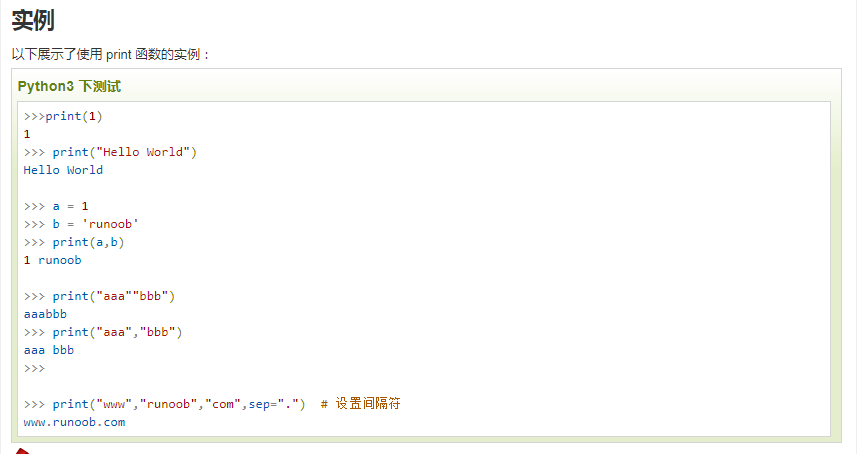
将对象打印到文本流文件中,用sep分隔,后跟end。sep、end、file和flush(如果存在)必须作为关键字参数给定。
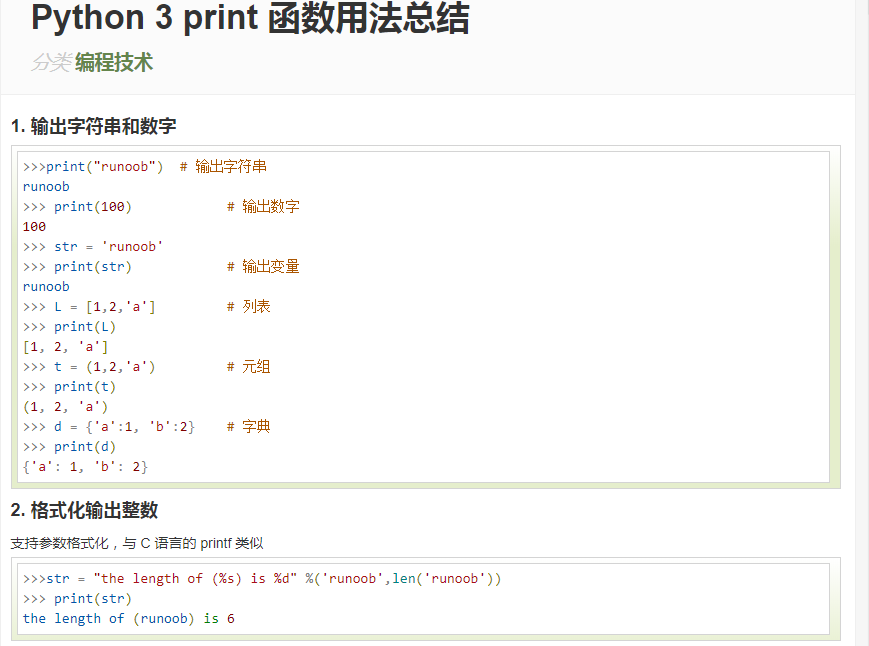
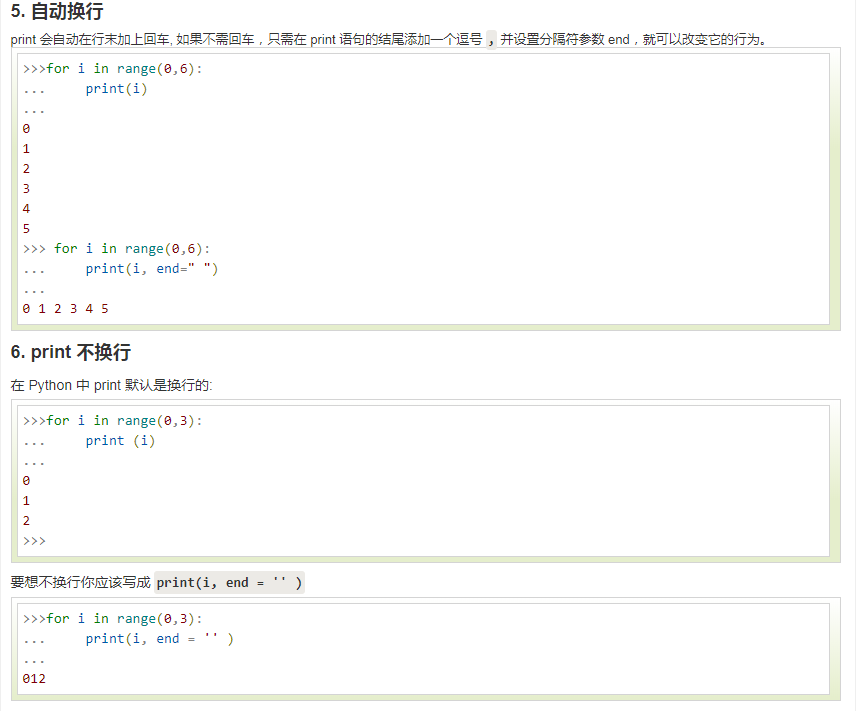
所有非关键字参数都转换为str()那样的字符串,并写入流中,用sep分隔,后跟end。sep和end都必须是字符串;它们也可以是none,这意味着使用默认值。如果没有给定对象,print()将只写结束。
file参数必须是具有write(string)方法的对象;如果不存在或没有,则将使用sys.stdout。由于打印的参数被转换为文本字符串,print()不能用于二进制模式的文件对象。对于这些,请改用file.write(…)。
输出是否缓冲通常由文件决定,但如果flush关键字参数为true,则强制刷新流。
在版本3.3中更改:添加了flush关键字参数。
————————(我是分割线)————————


python print输出延时,让其立刻输出
一句print("ni hao"),很久看不见,怎么让python print能立刻输出呢。
因为python默认是写入stdout缓冲的,使用-u参数启动python,就会立刻输出了。
python3 -u driver.py
————————(我是分割线)————————
参考:
1. Python 3.7.2 documentation
2. RUNOOB.COM:
https://www.runoob.com/python/python-func-print.html
https://www.runoob.com/w3cnote/python3-print-func-b.html
3.
备注:
初次编辑时间:2019年9月22日17:04:59
环境:Windows 7 / Python 3.7.2
【Python】【基础知识】【内置函数】【print的使用方法】的更多相关文章
- 十六. Python基础(16)--内置函数-2
十六. Python基础(16)--内置函数-2 1 ● 内置函数format() Convert a value to a "formatted" representation. ...
- 十五. Python基础(15)--内置函数-1
十五. Python基础(15)--内置函数-1 1 ● eval(), exec(), compile() 执行字符串数据类型的python代码 检测#import os 'import' in c ...
- python基础(15):内置函数(一)
1. 内置函数 什么是内置函数? 就是python给你提供的,拿来直接⽤的函数,比如print,input等等,截⽌到python版本3.6.2 python⼀共提供了68个内置函数.他们就是pyth ...
- python基础(内置函数+文件操作+lambda)
一.内置函数 注:查看详细猛击这里 常用内置函数代码说明: # abs绝对值 # i = abs(-123) # print(i) #返回123,绝对值 # #all,循环参数,如果每个元素为真,那么 ...
- Python基础:内置函数
本文基于Python 3.6.5的标准库文档编写,罗列了英文文档中介绍的所有内建函数,并对其用法进行了简要介绍. 下图来自Python官网:展示了所有的内置函数,共计68个(14*4+12),大家可以 ...
- 第六篇:python基础_6 内置函数与常用模块(一)
本篇内容 内置函数 匿名函数 re模块 time模块 random模块 os模块 sys模块 json与pickle模块 shelve模块 一. 内置函数 1.定义 内置函数又被称为工厂函数. 2.常 ...
- Python基础编程 内置函数
内置函数 内置函数(一定记住并且精通) print()屏幕输出 int():pass str():pass bool():pass set(): pass list() 将一个可迭代对象转换成列表 t ...
- Python基础_内置函数
Built-in Functions abs() delattr() hash() memoryview() set() all() dict() help() min() setat ...
- python基础(16):内置函数(二)
1. lamda匿名函数 为了解决⼀些简单的需求⽽设计的⼀句话函数 # 计算n的n次⽅ def func(n): return n**n print(func(10)) f = lambda n: n ...
- 学习PYTHON之路, DAY 4 - PYTHON 基础 4 (内置函数)
注:查看详细请看https://docs.python.org/3/library/functions.html#next 一 all(), any() False: 0, Noe, '', [], ...
随机推荐
- 使用WinDbg内核调试[转]
Technorati 标签: windbg,内核调试 WINDOWS调试工具很强大,但是学习使用它们并不容易.特别对于驱动开发者使用的WinDbg和KD这两个内核调试器(CDB和NTSD是用户态调试器 ...
- SRS之SrsTsContext::encode_pes详解
1. SrsTsContext::encode_pes 该函数位于 srs_kernel_ts.cpp 中.下面的分析基于假设当前要封装的消息是视频. /* * @msg: 要写入到 ts 文件中的音 ...
- how to force git to overwritten local files
最佳解决方法 重要提示:如果您有任何本地更改,将会丢失.无论是否有--hard选项,任何未被推送的本地提交都将丢失. 如果您有任何未被Git跟踪的文件(例如上传的用户内容),这些文件将不会受到影响. ...
- Qt控制台输出QString
有时候想在控制台输出我们想要的QString变量. 1.qDebug可以实现在控制台终端打印,但我们还是想使用C++中的std::cout<<variable This function ...
- Video Captioning 综述
1.Unsupervised learning of video representations using LSTMs 方法:从先前的帧编码预测未来帧序列 相似于Sequence to sequen ...
- golang中mysql建立连接超时时间timeout 测试
本文测试连接mysql的超时时间. 这里的"连接"是建立连接的意思. 连接mysql的超时时间是通过参数timeout设置的. 1.建立连接超时测试 下面例子中,设置连接超时时间为 ...
- c++ STL之map
map内部自建一颗红黑树(一 种非严格意义上的平衡二叉树),这颗树具有对数据自动排序的功能,所以在map内部所有的数据都是有序的,map中的元素是自动按Key升序排序,所以不能对map用sort函数: ...
- kubernetes介绍(1)
一.Kubernetes 介绍: kubernetes起源 Kubernetes (K8s) 是 Google 在 2014 年发布的一个开源项目. 据说 Google 的数据中心里运行着超过 20 ...
- Python3 循环_break和continue语句及循环中的else子句
break和continue语句及循环中的else子句break语句可以跳出for和while的循环体.如果你从for或while循环中终止,任何对应的循环else块将不执行. continue语句被 ...
- wxPython在frame窗口修改图标
self.m_panel4 = wx.Panel( self.m_notebook5, wx.ID_ANY, wx.DefaultPosition, wx.DefaultSize, wx.TAB_TR ...