
WPF DataGrid控件中某一列根据另一个文本列的值显示相应的模板控件
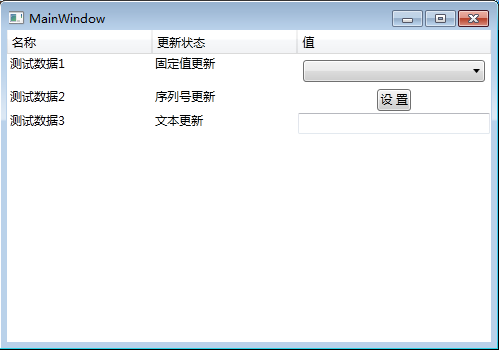
之前做项目的时候需要实现这样一个功能。WPF DataGrid有两列,一列为"更新状态”列,一列为"值"列,如果"更新状态"列的值为“固定值更新”,则"值"列显示下拉列表框控件。如果"更新状态"列的值为"序列号更新",则"值"列显示按钮控件。如果"更新状态"列的值为“文本值更新”,则"值"列显示文本控件。实现如下:
1、模型类
public class UpdateDataModel:INotifyPropertyChanged

    {

        public string Name { get; set; }

        public string UpdateStatus { get; set; }

        public string Value { get; set; }

        public List<string> ValueList { get; set; }

        public event PropertyChangedEventHandler PropertyChanged;

        private void OnPropertyChanged(string name)

        {

            if (this.PropertyChanged != null)

            {

                this.PropertyChanged(this, new PropertyChangedEventArgs(name));

            }

        }

    }
模型类
2、实现模板选择器
public class ValueSelector : DataTemplateSelector

    {

        public override DataTemplate SelectTemplate(object item, DependencyObject container)

        {

            DataTemplate dt = new DataTemplate();

            if (item != null && item is UpdateDataModel)

            {

                UpdateDataModel model = item as UpdateDataModel;

                Window window = Application.Current.MainWindow;

                if (model.UpdateStatus.Equals("固定值更新"))

                {

                    //实例化下拉列表框控件

                    FrameworkElementFactory comboBox = new FrameworkElementFactory(typeof(ComboBox));

                    comboBox.SetBinding(ComboBox.ItemsSourceProperty, new Binding()

                    {

                        Path = new PropertyPath("ValueList"),

                        Mode = BindingMode.TwoWay,

                        UpdateSourceTrigger = UpdateSourceTrigger.PropertyChanged

                    });

                    comboBox.SetValue(ComboBox.MarginProperty, new Thickness());

                    dt.VisualTree = comboBox;

                }

                else if (model.UpdateStatus.Equals("序列号更新"))

                {

                    //实例化按钮控件

                    FrameworkElementFactory button = new FrameworkElementFactory(typeof(Button));

                    button.SetBinding(Button.ContentProperty, new Binding()

                    {

                        Path = new PropertyPath("Value"),

                        Mode = BindingMode.TwoWay,

                        UpdateSourceTrigger = UpdateSourceTrigger.PropertyChanged

                    });

                    button.SetValue(Button.ForegroundProperty, Brushes.Black);

                    button.SetValue(Button.HorizontalAlignmentProperty, HorizontalAlignment.Center);

                    //button.SetValue(Button.PaddingProperty, new Thickness(5, 0, 0, 0));

                    //button.SetValue(Button.BackgroundProperty, new SolidColorBrush((Color)ColorConverter.ConvertFromString("#218aff")));

                    dt.VisualTree = button;

                }

                else

                {

                    //实例化文本控件

                    FrameworkElementFactory txtBox = new FrameworkElementFactory(typeof(TextBox));

                    txtBox.SetBinding(TextBox.TextProperty, new Binding()

                    {

                        Path = new PropertyPath("Value"),

                        Mode = BindingMode.TwoWay,

                        UpdateSourceTrigger = UpdateSourceTrigger.PropertyChanged

                    });

                    txtBox.SetValue(TextBox.ForegroundProperty, Brushes.White);

                    txtBox.SetValue(TextBox.BackgroundProperty, new SolidColorBrush(Colors.Transparent));

                    dt.VisualTree = txtBox;

                }

            }

            return dt;

        }

    }
模板选择器
3、界面
<Window x:Class="WpfApplication1.MainWindow"

        xmlns="http://schemas.microsoft.com/winfx/2006/xaml/presentation"

        xmlns:x="http://schemas.microsoft.com/winfx/2006/xaml"

        xmlns:u="clr-namespace:WpfApplication1" Width="500" Height="350"

        Title="MainWindow" Loaded="Window_Loaded">

    <Window.Resources>

        <u:ValueSelector x:Key="selector"></u:ValueSelector>

    </Window.Resources>

    <Grid>

        <DataGrid Name="datagrid" Background="Transparent" Foreground="Black" SelectionMode="Single" BorderThickness="0"

                  AutoGenerateColumns="False" RowHeaderWidth="0" CanUserAddRows="False" AlternationCount="2" MinWidth="420"

                  ScrollViewer.HorizontalScrollBarVisibility="Disabled" GridLinesVisibility="None" HeadersVisibility="Column">

            <DataGrid.Columns>

                <DataGridTextColumn Header="名称" Width="3*" Binding="{Binding Path=Name,Mode=TwoWay,UpdateSourceTrigger=PropertyChanged}" IsReadOnly="True"></DataGridTextColumn>

                <DataGridTextColumn Header="更新状态"  Width="3*" Binding="{Binding Path=UpdateStatus,Mode=TwoWay,UpdateSourceTrigger=PropertyChanged}" IsReadOnly="True"></DataGridTextColumn>

                <DataGridTemplateColumn Header="值" Width="4*" CellTemplateSelector="{StaticResource selector}" IsReadOnly="True"></DataGridTemplateColumn>

            </DataGrid.Columns>

        </DataGrid>

    </Grid>

</Window>
MainWindow.xaml
4、后台代码
/// <summary>

    /// MainWindow.xaml 的交互逻辑

    /// </summary>

    public partial class MainWindow : Window

    {

        public MainWindow()

        {

            InitializeComponent();

        }

        private void Window_Loaded(object sender, RoutedEventArgs e)

        {

            List<string> ValueList = new List<string>() { "项1", "项2", "项3", "项4" };

            List<UpdateDataModel> list = new List<UpdateDataModel>() {

                new UpdateDataModel(){Name="测试数据1",UpdateStatus="固定值更新",ValueList=ValueList},

                new UpdateDataModel(){Name="测试数据2",UpdateStatus="序列号更新",Value="设 置"},

                new UpdateDataModel(){Name="测试数据3",UpdateStatus="文本更新"}

            };

            datagrid.ItemsSource = list;

        }

    }
MainWindow.xaml.cs
5、运行效果
示例代码:http://files.cnblogs.com/files/xiaomianyang/WpfApplication1.rar
WPF DataGrid控件中某一列根据另一个文本列的值显示相应的模板控件的更多相关文章
- Excel-判断一个文本字符串中是否包含数字! 判断一个文本字符串是否是纯汉字!
0.判断一个文本字符串中是否包含数字!/判断一个文本字符串是否是纯汉字! 公式=IF(LENB(A1)=2*LEN(A1),"都是汉字","含有非汉字字符") ...
- C# WPF DataGrid在Grid中自适应窗体大小
XAML 中设置 例如 <DataGrid AutoGenerateColumns="False" Margin="6" Name="dgV ...
- ch8 CSS 3列(等高文本列)
css 3可以创建等高文本列,通过column-count.column-width.column-gap属性实现.假设标记如下: <h1>Socrates</h1> < ...
- 服务器控件中使用<%#...>, JS和html控件中使用<%=...>
//在服务器控件的属性中,需要用<%#...>来绑定其他控件的ID, 并且要在页面初始方法中,执行Page.DataBind(); <asp:ImageButton ID=" ...
- C# WPF DataGrid 隔行变色及内容居中对齐
C# WPF DataGrid 隔行变色及内容居中对齐. dqzww NET学习0 先看效果: 前台XAML代码: <!--引入样式文件--> <Window.Resourc ...
- ASP.NET自定义控件组件开发 第五章 模板控件开发
原文:ASP.NET自定义控件组件开发 第五章 模板控件开发 第五章 模板控件开发 系列文章链接: ASP.NET自定义控件组件开发 第一章 待续 ASP.NET自定义控件组件开发 第一章 第二篇 接 ...
- 获取wpf datagrid当前被编辑单元格的内容
原文 获取wpf datagrid当前被编辑单元格的内容 确认修改单元个的值, 使用到datagrid的两个事件 开始编辑事件 BeginningEdit="dataGrid_Beginni ...
- 关于使用MVVM模式在WPF的DataGrid控件中实现ComboBox编辑列
最近在做一个组态软件的项目,有一个需求需要在建立IO设备变量的时候选择变量的类型等. 建立IO变量的界面是一个DataGrid实现的,可以一行一行的新建变量,如下如所示: 这里需要使用带有ComboB ...
- WPF DataGrid列设置为TextBox控件的相关绑定
在wpf的DataGrid控件中,某一列的数据模板为TextBox控件的话,绑定Text="{Binding TxtSn, UpdateSourceTrigger=PropertyChang ...
随机推荐
- Qt读写Json格式配置文件
头文件Config.h #pragma once #include <QVariantMap> class Config { public: Config(const QString &a ...
- [BJOI2019]光线——递推
题目链接: [BJOI2019]光线 设$F_{i}$表示从第$1$面玻璃上面向下射入一单位光线,穿过前$i$面玻璃的透光率. 设$G_{i}$表示从第$i$面玻璃下面向上射入一单位光线,穿过前$i$ ...
- [题解] [BZOJ4144] 「AMPPZ2014」Petrol
题面 怎么是权限题啊 题解 有一次考过, 但是不记得了 如果每个点都是加油站的话, 这道题就是货车运输 考虑如何转化 我们可以设
- elasticsearch _bulk api
https://www.elastic.co/guide/cn/elasticsearch/guide/current/bulk.htmlbulk API 允许在单个步骤中进行多次 create . ...
- Leetcode题目292.Nim游戏(脑筋急转弯)
题目描述: 你和你的朋友,两个人一起玩 Nim 游戏:桌子上有一堆石头,每次你们轮流拿掉 1 - 3 块石头. 拿掉最后一块石头的人就是获胜者.你作为先手. 你们是聪明人,每一步都是最优解. 编写一个 ...
- jQuery 的on()方法
jQuery 的on()方法 一.总结 一句话总结: 1.普通添加事件:$("a").on("click", function () {执行的代码}) 2.未创 ...
- <JavaScript> 稳妥构造函数模式与工厂模式的区别
稳妥构造函数模式的代码应该是这样的: function Person(name, age, job) { var o = new Object(); // private members var na ...
- [drf]源码和序列化梳理
drf源码继承管理 # drf继承关系 View APIView as_view: 执行父类的as_view 调用dispatch dispatch init_request request.quer ...
- C之自定义类型
声明自定义数据类型,配合各种原有数据类型来达到简化编程的目的的类型定义关键字. #include<stdio.h> #include<stdlib.h> typedef int ...
- [Scikit-learn] 1.1 Generalized Linear Models - Logistic regression & Softmax
二分类:Logistic regression 多分类:Softmax分类函数 对于损失函数,我们求其最小值, 对于似然函数,我们求其最大值. Logistic是loss function,即: 在逻 ...