
如何画svg路径图
在画路径图之前,首先得在package.json引入2个依赖

废话不多说,直接上代码
 <style>

   .green {

     position: absolute;

   }

   .blue {

     position: absolute;

   }

   .yellow {

     position: absolute;

   }

   .red {

     position: absolute;

   }

   .orange {

     position: absolute;

   }

   .path {

     width: 300px;

     height: 150px;

     stroke: pink;

     stroke-width: 10;

     stroke-dasharray: 15, 5;

     fill: transparent;

     display: block;

     position: absolute;

   }

   .article {

     display: flex;

     flex-direction: column;

     position: relative;

     width: 100%;

     min-height: 8rem;

     margin-bottom: 1rem;

     padding: 1rem;

   }

 </style>

 <template>

   <div>

     <section style="display: flex;

     flex-direction: column;

     position: relative;

     width: 100%;

     max-width: 30rem;

     margin: auto;

     text-align: center;">

       <article class="article">

         <svg version="1.1" class="svg" height="400px">

           <!--下右下-->

           <path d="M100 0 L 100 65 , 180 65,180 115" class="path"/>

           <path fill="none" stroke="" d="M95 -5 L 95 60,175 60,175 110" id="yellow"/>

           <!--下左下-->

           <path d="M300 0 L 300 65 , 220 65,220 115" class="path"/>

           <path fill="none" stroke="" d="M295 -5 L 295 60,215 60,215 110" id="red"/>

           <!--下左-->

           <path d="M0 275 L 150 275 , 150 235" class="path"/>

           <path fill="none" stroke="" d="M145 230 L 145 270,-5 270" id="orange"/>

           <!--上左-->

           <path d="M0 300 L 150 300 , 150 340" class="path"/>

           <path fill="none" stroke="" d="M145 335 L 145 295,-5 295" id="green"/>

           <!--左上-->

           <path d="M390 275 L 220 275 , 220 235" class="path"/>

           <path fill="none" stroke="" d="M385 270 L 215 270 , 215 230" id="blue"/>

         </svg>

         <div class="yellow" style="background-color: yellow;width: 10px;height: 10px"></div>

         <div class="red" style="background-color: red;width: 10px;height: 10px"></div>

         <div class="orange" style="background-color: orange;width: 10px;height: 10px"></div>

         <div class="green" style="background-color: green;width: 10px;height: 10px"></div>

         <div class="blue" style="background-color: blue;width: 10px;height: 10px"></div>

       </article>

     </section>

     <Button @click="stop">停止</Button>

     <Button @click="start">开始</Button>

     <Button @click="reset">重置</Button>

   </div>

 </template>

 <script>

 import anime from 'animejs'

 export default {

   data () {

     return {

       yellow: undefined,

       red: undefined,

       orange: undefined,

       green: undefined,

       blue: undefined

     }

   },

   methods: {

     stop () {

       const self = this

       self.yellow.pause()

       self.red.pause()

       self.orange.pause()

       self.green.pause()

       self.blue.pause()

     },

     start () {

       const self = this

       self.yellow.play()

       self.red.play()

       self.orange.play()

       self.green.play()

       self.blue.play()

     },

     reset () {

       const self = this

       self.yellow.reset()

       self.red.reset()

       self.orange.reset()

       self.green.reset()

       self.blue.reset()

     }

   },

   mounted () {

     const self = this

     let yellowPath = anime.path('#yellow')

     let redPath = anime.path('#red')

     let orangePath = anime.path('#orange')

     let greenPath = anime.path('#green')

     let bluePath = anime.path('#blue')

     self.yellow = anime({

       targets: '.yellow',

       // 沿着路径对象的x值

       translateX: yellowPath('x'),

       // 沿着路径对象的y值

       translateY: yellowPath('y'),

       easing: 'linear',

       duration: 10000,

       loop: true

     })

     self.red = anime({

       targets: '.red',

       // 沿着路径对象的x值

       translateX: redPath('x'),

       // 沿着路径对象的y值

       translateY: redPath('y'),

       easing: 'linear',

       duration: 10000,

       loop: true

     })

     self.orange = anime({

       targets: '.orange',

       // 沿着路径对象的x值

       translateX: orangePath('x'),

       // 沿着路径对象的y值

       translateY: orangePath('y'),

       easing: 'linear',

       duration: 10000,

       loop: true

     })

     self.green = anime({

       targets: '.green',

       // 沿着路径对象的x值

       translateX: greenPath('x'),

       // 沿着路径对象的y值

       translateY: greenPath('y'),

       easing: 'linear',

       duration: 10000,

       loop: true

     })

     self.blue = anime({

       targets: '.blue',

       // 沿着路径对象的x值

       translateX: bluePath('x'),

       // 沿着路径对象的y值

       translateY: bluePath('y'),

       easing: 'linear',

       duration: 10000,

       loop: true

     })

     self.blue.pause()

     self.yellow.pause()

     self.red.pause()

     self.orange.pause()

     self.green.pause()

   }

 }

 </script>
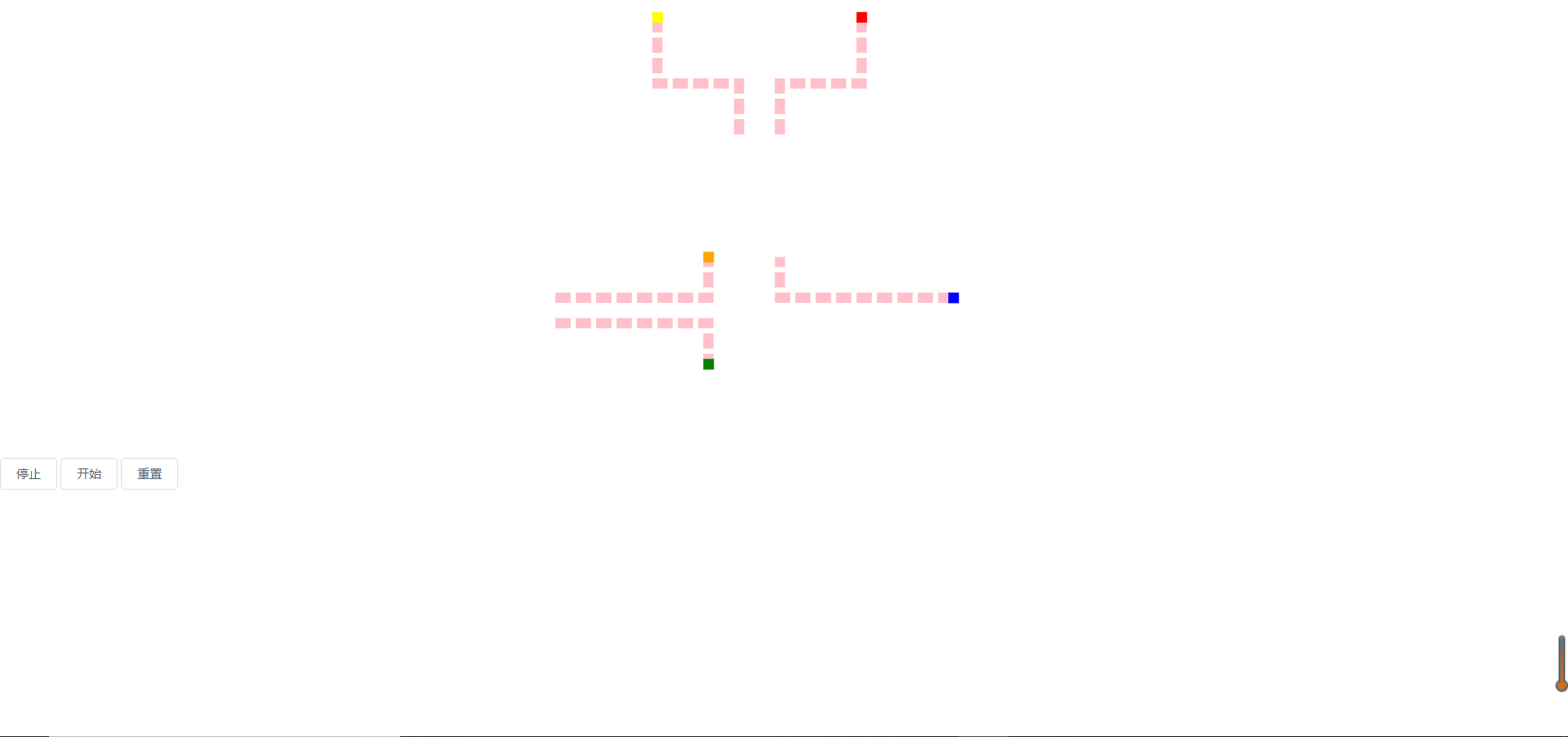
通过以上代码,最终可以生成如下图所示,点击开始,点就会跟着模拟路径跑,流动方向请看代码注释。
如何画svg路径图的更多相关文章
- SVG路径动画解密
原文:SVG路径动画解密 原文链接:http://www.gbtags.com/gb/share/5581.htm SVG路径动画效果现在貌似越来越多网站都使用了,给我的感觉就像是一段时间的流行而已, ...
- 【机器学习】【条件随机场CRF-3】条件随机场的参数化形式详解 + 画出对应的状态路径图 + 给出对应的矩阵表示
1.条件随机场概念CRF,Conditional Random Field,是给定一组输入随机变量条件下另一组输出随机变量的条件概率分布模式,其特点是假设输出随机变量构成马尔可夫随机场. 条件随机场用 ...
- R数据分析:如何给结构方程画路径图,tidySEM包详解
之前一直是用semPlot这个包给来进行结构方程模型的路径绘制,自从用了tidySEM这个包后就发现之前那个包不香了,今天就给大家分享一下tidySEM. 这个包的很大特点就是所有的画图原始都是存在数 ...
- 深度掌握SVG路径path的贝塞尔曲线指令
一.数字.公式.函数.变量,哦,NO! 又又一次说起贝塞尔曲线(英语:Bézier curve,维基百科详尽中文释义戳这里),我最近在尝试实现复杂的矢量图形动画,发现对贝塞尔曲线的理解馒头那么厚,是完 ...
- SVG路径PATH
SVG路径PATH 在使用之前建议下个PS或者FLASH玩玩里面的钢笔工具(FLASH里的钢笔工具比PS里的好用) PATH用到的指令: M----(X Y):移动到 Z----(none):关闭路径 ...
- Android中使用SVG矢量图(一)
SVG矢量图介绍 首先要解释下什么是矢量图像,什么是位图图像? 1.矢量图像:SVG (Scalable Vector Graphics, 可伸缩矢量图形) 是W3C 推出的一种开放标准的文本式矢量图 ...
- SVG路径
前面的话 本文将详细介绍SVG路径 path字符串 路径(path)是一个非常强大的绘图工具,可以用path元素绘制矩形(直角矩形或者圆角矩形).圆形.椭圆.折线形.多边形,以及一些其他的形状,例如贝 ...
- svg矢量图
svg简介 Scalable Vector Graphics 可缩放矢量图形 SVG 图像在放大或改变尺寸的情况下其图形质量不会有所损失 svg知识点 svg如何绘图 svg和cnavas区别 svg ...
- GDI+编程(画笔/画刷/路径/区域)
构造Graphics对象 Graphics类是GDI+程序设计的核心,Graphics类能够完成大部分的绘图,文本输出,几何图形的填充及坐标系统的转换等各种操作.在功能上,它与GDI的设备环境(DC) ...
随机推荐
- 论文翻译 DOTA:A Large-scale Dataset for Object Detection in Aerial Images
简介:武大遥感国重实验室-夏桂松和华科电信学院-白翔等合作做的一个航拍图像数据集 摘要: 目标检测是计算机视觉领域一个重要且有挑战性的问题.虽然过去的十几年中目标检测在自然场景已经有了较重要的成就 ...
- poi导出excel2007版本
/** * 导出excel2007版本 * * @param titles * 表头集合 * @param sheetNames * sheet名称 * @param datas * 数据集合 * @ ...
- linux下的进程间通信之消息队列
概念: 进程彼此之间可以通过IPC消息进行通信.进程产生的每条消息都被发送到一个IPC消息队列中,这条消息一直存放在队列中,直到另一个进程将其读走为止. 优点:可以通过发送消息来几乎完全避免命名管道的 ...
- 机器学习第一章——NFL的个人理解
第一篇博客,想给自己的学习加深记忆.看到书中第一个公式时,本来想直接看证明结果就好,然鹅...作者在备注上写:这里只用到一些非常基础的数学知识,只准备读第一章且有“数学恐惧”的读者可跳过...嘤嘤嘤, ...
- webpack简单配置
1.代理配置 需要修改一下配置文件 config里的index.js,根据接口特点自主选取 2.解决图标显示路径错误问题 项目在打包完成后如果出现图片显示不了的问题,需要进行如下配置
- python面向对象学习笔记(一)
粘贴一些自学过程中的笔记大纲,源文本在pycharm里面写的,有点乱整理一下,部分内容有待补充,书写不一定100%正确,全当数据备份了. 1.面向对象的特性 #你写代码时什么使用面向对象 #处理比较复 ...
- Dapper.NET—轻量ORM
Dapper.NET使用 本文目录 Dapper.NET使用 1.为什么选择Dapper 2.以Dapper(4.0)为例. 2.1 在数据库中建立几张表. 2.2实体类. 3.使用方法 3.1 一 ...
- Loaded plugins: fastestmirror, refresh-packagekit, security
问题描述 最近在用Centos 6.7的时候出现了这种情况 Loaded plugins: fastestmirror, refresh-packagekit, security Loading mi ...
- Supported orientations has no common orientation with the application, and [UIAlertController shouldAutorotate] is returning YES
某一个页面横屏时会出现崩溃的问题描述,原因是当你在AppDelegate中返回的设备方向是UIInterfaceOrientationMaskLandscapeLeft.但是你在视图控制器中返回支持自 ...
- 【leetcode算法-简单】35. 搜索插入位置
[题目描述] 给定一个排序数组和一个目标值,在数组中找到目标值,并返回其索引.如果目标值不存在于数组中,返回它将会被按顺序插入的位置. 你可以假设数组中无重复元素. 示例 1: 输入: [1,3,5, ...