
Android_(控件)使用AlertDialog实现点击Button显示出多选框
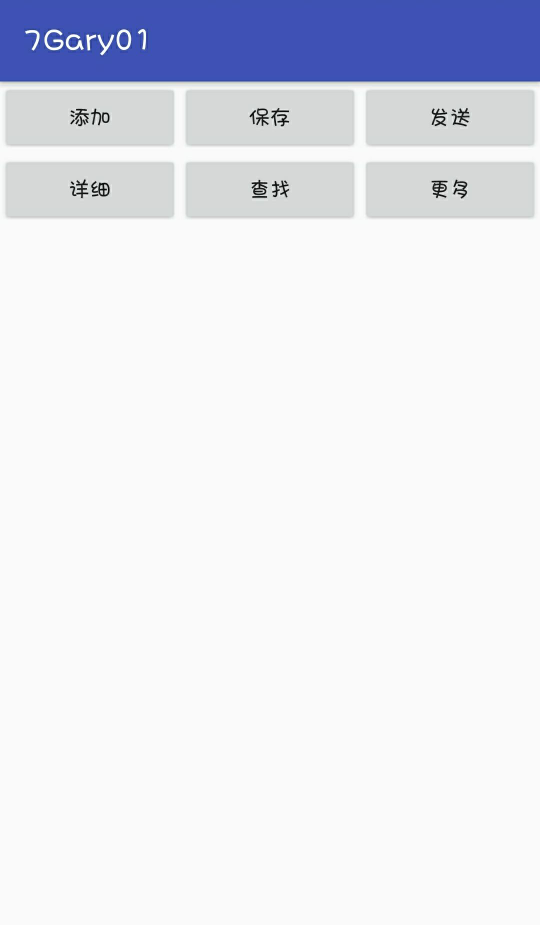
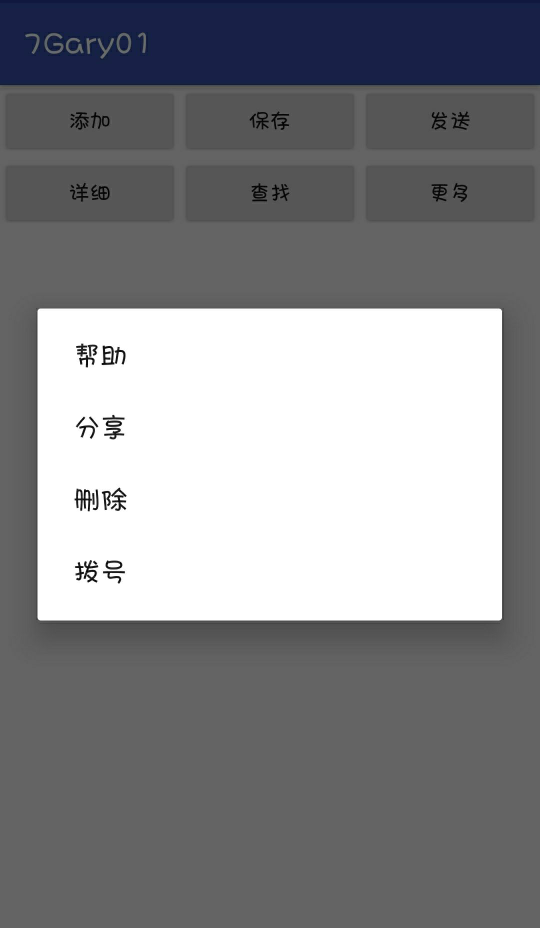
单击"更多"按钮,显示出多选框
运行截图:
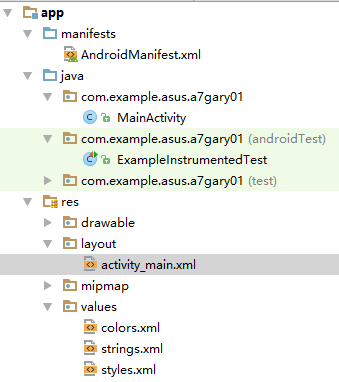
程序结构
(本想通过Button中android:background使用drawable资源下的图片作为按钮背景,设计太丑就去掉了Σ(= = !))
package com.example.asus.a7gary01;

import android.content.DialogInterface;

import android.support.v7.app.AlertDialog;

import android.support.v7.app.AppCompatActivity;

import android.os.Bundle;

import android.view.View;

import android.view.View.OnClickListener;

import android.widget.Button;

public class MainActivity extends AppCompatActivity {

    private Button button;

    @Override

    protected void onCreate(Bundle savedInstanceState) {

        super.onCreate(savedInstanceState);

        setContentView(R.layout.activity_main);

        button = (Button) findViewById(R.id.更多);

        button.setOnClickListener(new OnClickListener() {

            @Override

            public void onClick(View v) {

                AlertDialog.Builder builder = new AlertDialog.Builder(MainActivity.this);

                builder.setItems(getResources().getStringArray(R.array.Gary), new DialogInterface.OnClickListener() {

                    @Override

                    public void onClick(DialogInterface dialog, int which) {

                    }

                });

                builder.show();

            }

        });

    }

}
MainActivity
<?xml version="1.0" encoding="utf-8"?>

<TableLayout xmlns:android="http://schemas.android.com/apk/res/android"

    xmlns:app="http://schemas.android.com/apk/res-auto"

    xmlns:tools="http://schemas.android.com/tools"

    android:layout_width="match_parent"

    android:layout_height="match_parent"

    tools:context="com.example.asus.a7gary01.MainActivity">

    <TableRow

        android:layout_width="match_parent"

        android:layout_height="match_parent"

        android:orientation="horizontal">

        <Button

            android:id="@+id/添加"

            android:layout_width="wrap_content"

            android:layout_height="match_parent"

            android:layout_weight="1"

            android:text="添加" />

        <Button

            android:id="@+id/保存"

            android:layout_width="wrap_content"

            android:layout_height="wrap_content"

            android:layout_weight="1"

            android:text="保存" />

        <Button

            android:id="@+id/发送"

            android:layout_width="wrap_content"

            android:layout_height="wrap_content"

            android:layout_weight="1"

            android:text="发送" />

    </TableRow>

    <TableRow

        android:layout_width="match_parent"

        android:layout_height="wrap_content"

        android:orientation="horizontal">

        <Button

            android:id="@+id/详细"

            android:layout_width="wrap_content"

            android:layout_height="wrap_content"

            android:layout_weight="1"

            android:text="详细" />

        <Button

            android:id="@+id/查找"

            android:layout_width="wrap_content"

            android:layout_height="wrap_content"

            android:layout_weight="1"

            android:text="查找" />

        <Button

            android:id="@+id/更多"

            android:layout_width="wrap_content"

            android:layout_height="wrap_content"

            android:layout_weight="1"

            android:text="更多" />

    </TableRow>

</TableLayout>
activity_main.xml
<resources>

    <string name="app_name">7Gary01</string>

    <array name="Gary">

        <item>帮助</item>

        <item>分享</item>

        <item>删除</item>

        <item>拨号</item>

    </array>

</resources>
strings.xml
一、界面布局
使用表格布局,放置六个按钮
二、功能实现
添加对Button的点击事件响应
 button.setOnClickListener(new OnClickListener() {

            @Override

            public void onClick(View v) {

                // 创建构建器

                AlertDialog.Builder builder = new AlertDialog.Builder(MainActivity.this);

                //在点击侦听器上建立新的对话框接口

                //getResources()获得资源

                builder.setItems(getResources().getStringArray(R.array.Gary), new DialogInterface.OnClickListener() {

                    @Override

                    public void onClick(DialogInterface dialog, int which) {

                    }

                });

                //显示多选框

                builder.show();

            }

        });
AlertDialog的六种创建方式:传送门
创建AlertDialog的步骤:
1、创建AlertDialog.Builder对象
2、调用Builder对象的setTitle方法设置标题,setIcon方法设置图标
3、调用Builder相关方法如setMessage方法、setItems方法、setSingleChoiceItems方法、setMultiChoiceItems方法、setAdapter方法、setView方法设置不同类型的对话框内容。
4、调用setPositiveButton、setNegativeButton、setNeutralButton设置多个按钮
5、调用Builder对象的create()方法创建AlertDialog对象
6、调用AlertDialog对象的show()方法将对话框显示出来
Android_(控件)使用AlertDialog实现点击Button显示出多选框的更多相关文章
- Qt树形控件QTreeView使用1——节点的添加删除操作 复选框的设置
QtreeView是ui中最常用的控件,Qt中QTreeWidget比QTreeView更简单,但没有QTreeView那么灵活(QTreeWidget封装的和MFC的CTreeCtrl很类似,没有m ...
- VS编程,编辑WPF过程中,点击设计器中界面某一控件,在XAML中高亮突出显示相应的控件代码的设置方法。
原文:VS编程,编辑WPF过程中,点击设计器中界面某一控件,在XAML中高亮突出显示相应的控件代码的设置方法. 版权声明:我不生产代码,我只是代码的搬运工. https://blog.csdn.net ...
- WPF解决按钮上被透明控件遮盖时无法点击问题
原文:WPF解决按钮上被透明控件遮盖时无法点击问题 IsHitTestVisible="False" 在控件上设置如上属性即可,即可让透明控件不触发点击效果
- 背水一战 Windows 10 (31) - 控件(按钮类): ButtonBase, Button, HyperlinkButton, RepeatButton, ToggleButton, AppBarButton, AppBarToggleButton
[源码下载] 背水一战 Windows 10 (31) - 控件(按钮类): ButtonBase, Button, HyperlinkButton, RepeatButton, ToggleButt ...
- 控件(按钮类): ButtonBase, Button, HyperlinkButton, RepeatButton, ToggleButton, AppBarButton, AppBarToggleButton
介绍背水一战 Windows 10 之 控件(按钮类) ButtonBase Button HyperlinkButton RepeatButton ToggleButton AppBarButton ...
- [控件]unigui移动端下Unidatepicker时间显示解决方案
[控件]unigui移动端下Unidatepicker时间显示解决方案 http://tz10000.com/kong-jian-unigui-yi-dong-duan-xia-unidatepick ...
- WPF 控件被禁用,悬浮提示不显示问题
原文:WPF 控件被禁用,悬浮提示不显示问题 版权声明:本文为博主原创文章,未经博主允许不得转载. https://blog.csdn.net/BYH371256/article/details/89 ...
- easyui combobox下拉框复制后再禁用,点击不会出现下拉框
easyui combobox下拉框禁用,点击不会出现下拉框 需要做到,在给easyui combobox赋值后,再禁用easyui combobox 解决办法: $("#time-sele ...
- js进阶 12-15 jquery如何实现点击button显示列表,点击其它位置隐藏列表
js进阶 12-15 jquery如何实现点击button显示列表,点击其它位置隐藏列表 一.总结 一句话总结:在button中阻止事件冒泡. 1.如何咋button中阻止事件冒泡(两种方法)? ev ...
随机推荐
- 《深入实践C++模板编程》之五——容器与迭代器
1.容器的定义 容器:专门用于某种形式组织及存储数据的类称为“容器”. 2.容器与迭代器 迭代器:封装了对容器虚拟数据序列的操作并按约定提供统一界面以遍历容器内容的代理类即为迭代器. 举例理解 ...
- golang(8):channel读写 & goroutine 通信
goroutine 1.进程和线程 A. 进程是程序在操作系统中的一次执行过程,系统进行资源分配和调度的一个独立单位 B. 线程是进程的一个执行实体,是CPU调度和分派的基本单位,它是比进程更小的能独 ...
- JS基础_对象的简介、对象的基本操作
<!DOCTYPE html> <html> <head> <meta charset="UTF-8"> <title> ...
- MFC 下调试 出现 warning : fail to load indicator string 0x0069
MFC 下调试 出现 warning : fail to load indicator string 0x0069 就是程序状态栏每一个标识列中至少有一个值没有初始值 或初始值为空 导致程序没有获取到 ...
- shell 中的 set -e 和 set +e的区别
区别: set -e : 执行的时候如果出现了返回值为非零,整个脚本 就会立即退出 set +e: 执行的时候如果出现了返回值为非零将会继续执行下面的脚本 set -e 命令用法总结如下:1. 当命令 ...
- O055、Detach Volume 操作
参考https://www.cnblogs.com/CloudMan6/p/5636510.html 本节我们开始学习 Volume Detach 操作,就是将Volume从Instance上 ...
- 关于spring中AOP的几件小事
0.AOP简介 AOP(Aspect-Oriented Programming,面向切面编程):是一种新的方法论,是穿透OOP的补充. AOP的主要编程对象是切面(aspect),而切面模块化横切关注 ...
- Windows命令行命令总结
转载地址:https://www.cnblogs.com/accumulater/p/7110811.html 1. gpedit.msc-----组策略 2. sndrec32-------录音 ...
- Redis教程(REmote DIctionary Server)——一个高性能的key-value数据库
redis(REmote DIctionary Server)是什么? Redis是一个开源的使用ANSI C语言编写.支持网络.可基于内存亦可持久化的日志型.Key-Value数据库,并提供多种语言 ...
- Hadoop入门到实战全套大数据Hadoop学习视频
资料获取方式,关注公总号RaoRao1994,查看往期精彩-所有文章或者后台回复[Hadoop]获取,即可获取资源下载链接 更多资源获取,请关注公总号RaoRao1994