
HANA数据库无法停止
Symptom:
使用命令HDB stop多次,每次报错为timeout
sdpadm@PRDDB01:/usr/sap/SDP/HDB66/prderpdb01/trace/DB_PDP> HDB stop
hdbdaemon will wait maximal 300 seconds for NewDB services finishing.
Stopping instance using: /usr/sap/SDP/SYS/exe/hdb/sapcontrol -prot NI_HTTP -nr 66 -function Stop 400
13.07.2019 14:34:14
Stop
OK
Waiting for stopped instance using: /usr/sap/PDP/SYS/exe/hdb/sapcontrol -prot NI_HTTP -nr 66 -function WaitforStopped 600 2
13.07.2019 14:44:15
WaitforStopped
FAIL: Timeout
SAP NOTE:
2349144 - HANA instance does not stop – kill.sap file not found
Reproducing the Issue:
HANA Studio
Open the SAP HANA Administration Console.
In the Systems view, right-click the system you want to stop and choose Configuration and Monitoring > Stop System...
Specify how you want to stop the system (i.e. Soft, Hard) under Shutdown Type, then click OK.
The Administration Console will open in diagnosis mode but the services will continue showing as Active and status Running:
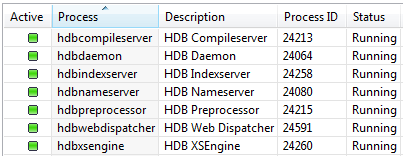
Console
Using command line access logon to HANA DB system with <sid>adm user.

Execute any of the following commands:

/usr/sap/hostctrl/exe/sapcontrol -nr <instance_number> -function StopSystem HDB

/usr/sap/hostctrl/exe/sapcontrol -nr <instance_number> -function Stop

/usr/sap/<SID>/HDB<instance number>/HDB stop

Function Stop tries to execute for some time until eventually times out with the error:

<DD.MM.YYYY HH:MM:00>

    Stop

    OK

    Waiting for stopped instance using: /usr/sap/<SID>/SYS/exe/hdb/sapcontrol -prot NI_HTTP -nr <nr> -function WaitforStopped 600 2

    <DD.MM.YYYY HH:MM:00>

    WaitforStopped

    FAIL: Timeout
Cause:
The kill.sap file is missing in the DIR_HOME directory (i.e. /usr/sap/<SID>/HDB<instance>/host/trace). SAP HANA does not delete this file therefore if the file is missing in DIR_HOME this was most likely caused by manual, possibly accidental, deletion.
Resolution:
Run HDB proc in the console to determine what processes are currently running.
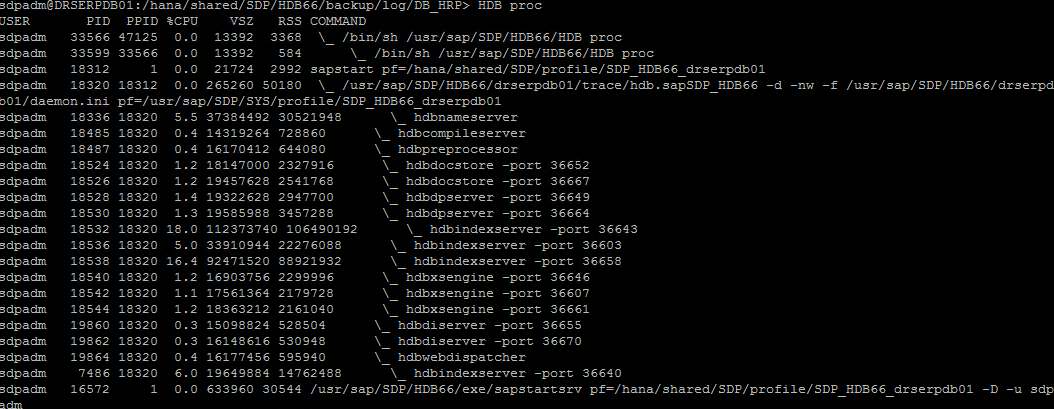
If sapstart is still running then execute kill -2 <PID of sapstart>

Alternatively, if the hdbdaemon process is running, you can execute kill -2 <PID of hdbdaemon>

Note:

    Any of the two commands above will implicitly stop the database.

    After restarting the sapstartsrv Service command HDB stop works as usual.

    The kill.sap file will be re-created next time the database is started, either from the Studio or from the console (i.e. HDB start).
HANA数据库无法停止的更多相关文章
- SAP HANA SLT 将Oracle表 数据同步到HANA数据库
简单介绍SLT 同步数据的整个配置过程: 在SLT系统中创建与Oracle的链接 在HANA监控平台上,创建Configuration 创建表的同步作业 ——————————————BEGIN———— ...
- 测试Oracle 11gr2 RAC 非归档模式下,offline drop数据文件后的数据库的停止与启动测试全过程
测试Oracle 11gr2 RAC 非归档模式下,offline drop数据文件后的数据库的停止与启动测试全过程 最近系统出现问题,由于数据库产生的日志量太大无法开启归档模式,导致offline的 ...
- SAP连接HANA数据库
既然都用HANA了,为什么还要在SAP端,连接HANA数据库,做数据库处理..... 因为HANA数据库,没个用户在STADIO上建的数据库表...只能这个用户使用,而做Universe 设计的时候, ...
- 如何使用命令行备份SAP HANA数据库
SAP HANA是一个在in-memory内存中的数据平台,部署为内部部署应用. 这是一个革命性的平台,它最适合进行实时分析,并开发和部署实时应用程序. 请点击这里了解更多有关SAP HANA. 通过 ...
- SAP HANA数据库架构部署方法
HANA作为内存数据库,在实现高性能访问的同时,必须也要有稳定的架构,今天我们就来看看企业部署SAP HANA时应该如何来设计数据库的架构. HANA数据库在安装时,有以下几种选择方法,为方便大家理解 ...
- 使用ABAP(ADBC)和Java(JDBC)连接SAP HANA数据库
在表DBCON里维护一条记录,指向HANA数据库.con_ENV里填入HANA数据库的主机名和端口号.如vmXXXX:30015 DATA: ls_new TYPE DBCON. ls_new-con ...
- 使用Eclipse连接SAP云平台上的HANA数据库实例
SAP云平台(Cloud Platform)上的HANA数据库实例有两种方式访问: 1. 通过SAP云平台的基于网页版的Development Tool:SAP HANA Web-Based Deve ...
- 使用JDBC操作SAP云平台上的HANA数据库
本文假设您对JDBC(Java Database Connectivity)有最基本的了解.您也可以将其同ADBC(ABAP Database Connectivity)做对比,细节请参考我的博客AD ...
- 利用Veeam保护SAP HANA数据库
利用Veeam保护SAP HANA数据库 前言 针对越来越多的SAP HANA备份需求,我们Team翻译.整理.借鉴了Veeam 的SAP HANA 大神 Clemens Zerbe 和 Ali Sa ...
随机推荐
- Python3入门(十三)——常用内置模块之集合模块collections
1.namedtuple 主要用来定义一种数据类型:它具有Tuple的不变性,而且又能通过属性来访问 例如定义坐标: from collections import namedtuple Point ...
- Spring cloud微服务安全实战-4-5搭建OAuth2认证服务器
现在可以访问我们的认证服务器,应用我们已经配置好了. 下面配置让用户可以访问我的认证服务器.再来重写一个方法. EndpointConfigure端点的配置. authenticationManage ...
- HTTP1.1新增了五种请求方法:OPTIONS、PUT、PATCH、DELETE、TRACE 、 CONNECT
200 (成功) 服务器已成功处理了请求. 通常,这表示服务器提供了请求的网页. 201 (已创建) 请求成功并且服务器创建了新的资源. 202 (已接受) 服务器已接受请求,但尚未处理. 203 ( ...
- Qt编写气体安全管理系统8-曲线监控
一.前言 曲线监控模块用的很少,主要就是用来观察某个设备的实时采集的数据和历史采集的数据,可以回放数据,在右侧可以选择对应的通信端口和控制器,然后选择指定的探测器进行观察,从选择的时候开始计时,每个数 ...
- Qt编写自定义控件61-通用移动
一.前言 通用移动类,目标就是为了实现放入任意的控件以后,支持鼠标拖动,在容器中或者父类中拖动,这个应用场景非常多,比如在地图上放置的设备,需要用户自行按下拖动到指定的合适的位置,然后保存设备的位置坐 ...
- build doris 0.11.5 on centos 7/ubuntu
doris has envolved many thirdparty components since v0.9. so the build progress has changed a lot si ...
- 【kubernetes 自带监控】 container级别cadvisor+kubelet,集群级别apiserver
apiserver https://feisky.gitbooks.io/kubernetes/components/apiserver.html kube-apiserver 支持同时提供 http ...
- [转]Office 安装卸载太麻烦?用这个工具帮你解决:Office Tool Plus
原文链接:https://sspai.com/post/43839 Office Tool官方网站:https://otp.landian.vip/zh-cn/ 真的很好用,发一个安装的截图:
- log4net使用简明教程,快看看哟
在项目当中经常会遇到各种各样的问题,如何可以尽快找到问题,那么就只能靠日志了,所以一个系统的日志是否完备合理就尤为重要. 在日志管理插件中log4net相当流行,下面就简单说明一下使用方法. log4 ...
- nodejs应用转换png,jpg,gif为webp图片格式
本博客列表缩略图在支持webp格式的浏览器下,使用的是webp格式图片,不支持webp图片下使用的是原图片(如png,gif,jpg等) webp使用指南,请参考 https://www.imqian ...