
在Google Maps 上点击标签后显示说明
JS如下:
(function() {
window.onload = function() {
// Creating an object literal containing the properties
// you want to pass to the map
var options = {
zoom: 3,
center: new google.maps.LatLng(37.09, -95.71),
mapTypeId: google.maps.MapTypeId.ROADMAP
};
// Creating the map
var map = new google.maps.Map(document.getElementById('map'), options);
// Creating an array which will contain the coordinates
// for New York, San Francisco and Seattle
var places = [];
// Adding a LatLng object for each city
places.push(new google.maps.LatLng(40.756, -73.986));
places.push(new google.maps.LatLng(37.775, -122.419));
places.push(new google.maps.LatLng(47.620, -122.347));
// Creating a variable that will hold the InfoWindow object
var infowindow;
// Looping through the places array
for (var i = 0; i < places.length; i++) {
// Adding the markers
var marker = new google.maps.Marker({
position: places[i],
map: map,
title: 'Place number '
+ i
});
// Wrapping the event listener inside an anonymous function
// that we immediately invoke and passes the variable i to.
(function(i, marker) {
// Creating the event listener. It now has access to the values of
// i and marker as they were during its creation
google.maps.event.addListener(marker, 'click', function() {
if (!infowindow) {
infowindow = new google.maps.InfoWindow();
}
// Setting the content of the InfoWindow
infowindow.setContent('Place number '
+ i);
// Tying the InfoWindow to the marker
infowindow.open(map, marker);
});
})(i, marker);
}
};
})();
CSS如下:
body
{
font-family:
Verdana,
Geneva,
Arial,
Helvetica,
sans-serif;
font-size:
small;
background:
#fff;
}
#map
{
width:
100%;
height:
500px;
border:
1px
solid
#000;
}
.info
{
width:
250px;
}
HTML如下:
<html xmlns="http://www.w3.org/1999/xhtml">
<head>
<meta http-equiv="Content-Type" content="text/html; charset=UTF-8" />
<title>My first map</title>
<link type="text/css" href="css/style.css" rel="stylesheet" media="all" />
<script type="text/javascript" src="http://maps.google.com/maps/api/js?sensor=false"></script>
<script type="text/javascript" src="js/map.js"></script>
</head>
<body>
<h1>My first map</h1>
<div id="map"></div>
</body>
</html>
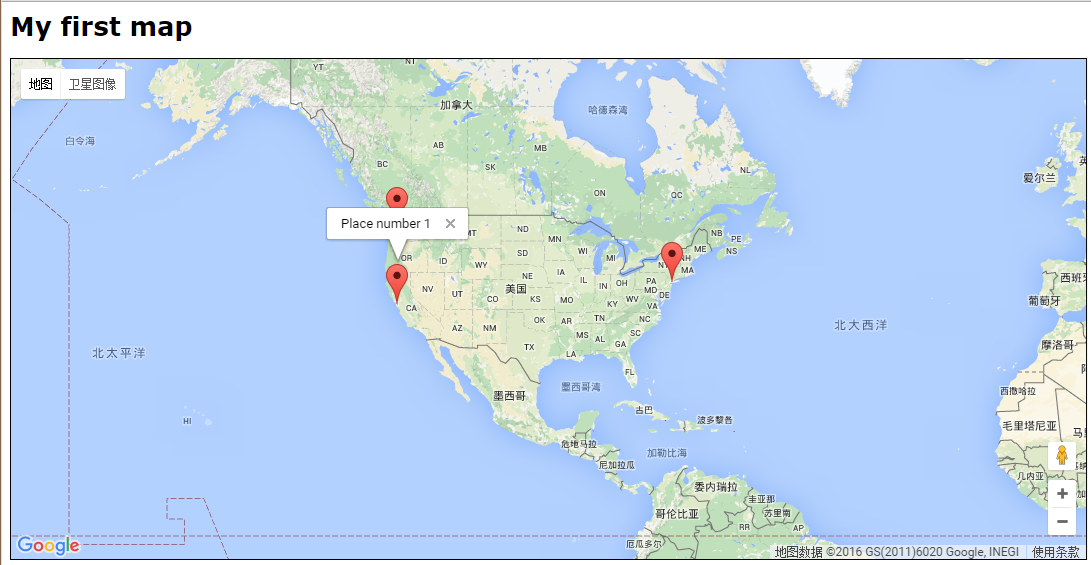
效果如下:
在Google Maps 上点击标签后显示说明的更多相关文章
- 在Google Maps 上点击标签显示说明并保持不消失
JS如下: (function() { window.onload = function() { // Creating an object literal containin ...
- MyEclipse导入主题文件epf后xml及jsp等页面中点击标签之后显示灰白
MyEclipse导入主题文件epf后xml及jsp等页面中点击标签之后显示灰白,症状例如以下: watermark/2/text/aHR0cDovL2Jsb2cuY3Nkbi5uZXQvVVAxOT ...
- HTML5获取地理位置信息并在Google Maps上显示
<!DOCTYPE HTML> <html lang="en-US"> <head> <meta charset="UTF-8& ...
- google浏览器打开新的标签页显示http://www.google.com.hk/url?sa=p&hl=zh-CN&……
chrome的版本:51.0.2704.106 m使用该版本的chrome后,每次打开新标签页,都会提示“无法访问此网站”.并自动跳转到一个地址“http://www.google.com.hk/ur ...
- swift 如何实现点击view后显示灰色背景
有这样一种场景,当我们点击view的时候,需要过0.几秒显示一个灰色或者别的颜色的背景 用button来实现,只有按下去的时候才会出现,往往在快速按下,快速抬起的时候是看不出这个变化的 下边是解决方案 ...
- Google Maps API V3 之绘图库 信息窗口
Google官方教程: Google 地图 API V3 使用入门 Google 地图 API V3 针对移动设备进行开发 Google 地图 API V3 之事件 Google 地图 API V3 ...
- Google maps library的使用
公司的项目中用到了google地图API, 使用Google API开发就会用到Marker, 用来在google 地图上标注位置 但是google marker使用过程中也有个问题,就是如果在goo ...
- [Google Maps API 3]Marker从Clusterer中分离及Marker置于Cluster上一层的解决办法
在Google Maps API的使用中,经常用到Clusterer来避免过密的Marker显示.但仔细看一下Clusterer的设置参数中并没有直接将某些Marker除外的方法,那遇到这样的需求,怎 ...
- google maps js v3 api教程(2) -- 在地图上添加标记
原文链接 google maps javascript官方文档:https://developers.google.com/maps/documentation/javascript/ 我们在创建地图 ...
随机推荐
- 浅谈 JDBC 中 CreateStatement 和 PrepareStatement 的区别与优劣
先说下这俩到底是干啥的吧.其实这俩干的活儿都一样,就是创建了一个对象然后去通过对象调用executeQuery方法来执行sql语句.说是CreateStatement和PrepareStatement ...
- 对称加密、非对称加密、数字签名、数字证书、SSL是什么
非对称密钥加解密 对于一份数据,通过一种算法,基于传入的密钥(一串由数字或字符组成的字符串,也称key),将明文数据转换成了不可阅读的密文,这就是“加密”,同样的,密文到达目的地后,需要再以相应的算法 ...
- redis单机连接池
一.配置文件 1. db.properties配置文件#IP地址 redis.ip = 127.0.0.1 #端口号 redis.port= #最大连接数 redis.max.total= #最大空闲 ...
- 把人都送到房子里的最小花费--最小费用最大流MCMF
题意:http://acm.hdu.edu.cn/showproblem.php?pid=1533 相邻的容量为inf,费用为1,S到m容量为1,费用为0 ,H到T容量为1,费用为0. 建图跑-最小费 ...
- 下载HTMLTestRunner 地址
通过pip安装 HTMLTestRunne失败 则需要通过手动下载. 下载地址: http://tungwaiyip.info/software/HTMLTestRunner.html 下载后,把H ...
- Devexpress WinForm GridControl实现单元格可编辑状态更改
之前做项目的时候,需要实现这样的功能.在gridcontrol中,根据是否修改(checkbox)列的选中和未选中状态来联动另外一列的编辑状态.实现如下: private void gridView1 ...
- 编写并提取简易 ShellCode
ShellCode 通常是指一个原始的可执行代码的有效载荷,ShellCode 这个名字来源于攻击者通常会使用这段代码来获得被攻陷系统上的交互 Shell 的访问权限,而现在通常用于描述一段自包含的独 ...
- docker 入门1 - 方向 【翻译】
开始,第 1 部分:方向和设置 欢迎!我们很高兴您想学习 Docker.Docker 入门教程将教您如何: 设置 Docker 环境(当前步骤) 生成映像并将其作为一个容器运行 缩放应用以运行多个容器 ...
- Scala学习十三——集合
一.本章要点 所有集合都扩展自Iterable特质; 集合有三大类,分别为序列,集和映射; 对于几乎所有集合类,Scala都同时提供可变和不可变的版本; Scala列表要么是空的,要么拥有一头一尾,其 ...
- .js文件中文乱码解决办法
描述:.js文件里的中文内容在网页中显示乱码 解决办法:把JS文件的编码改为utf-8 VS2013解决步骤:文件——高级保存选项——Unicode (UTF-8带签名) 代码页 65001