
【记录】Python3|用百度语音 API 朗读你的小说TXT
简单地写了一个按段落朗读文本的demo:DEMO链接_gitee.com。
有时候会请求不到数据,不知道是网络原因还是什么,已添加自动重新请求。
config.ini:
;关于语音合成的相关配置

[default]

api_key = Your api key

secret_key = Your secret key

;发音人选择, 基础音库:0为度小美,1为度小宇,3为度逍遥,4为度丫丫,

;精品音库:5为度小娇,103为度米朵,106为度博文,110为度小童,111为度小萌,默认为度小美

per = 3

;语速,取值0-15,默认为5中语速

spd = 4

;音调,取值0-15,默认为5中语调

pit = 5

;音量,取值0-9,默认为5中音量

vol = 5

# 下载的文件格式, 3:mp3(default) 4: pcm-16k 5: pcm-8k 6. wav

aue = 3

;下载的文件格式, 可选项:mp3(default), pcm-16k, pcm-8k, wav

format = mp3

cuid = 123456PYTHON

tts_url = http://tsn.baidu.com/text2audio

token_url = http://openapi.baidu.com/oauth/2.0/token

;有此scope表示有tts能力,没有请在网页里勾选

scope = audio_tts_post

[追风筝的人.txt]

text_lct = 12
main.py
# coding=utf-8

import os

import json

from configparser import ConfigParser

from playsound import playsound

from urllib.request import urlopen

from urllib.request import Request

from urllib.error import URLError

from urllib.error import HTTPError

from urllib.parse import urlencode

from urllib.parse import quote_plus

TEXT = "欢迎使用百度语音合成。"

ini_file = "./config.ini"

cfg_name = "default"

book = "D:/总要删的/追风筝的人.txt"

def load_config(ini, name):

    cfg = ConfigParser()

    # 读取文件内容

    cfg.read(ini, encoding="gbk")

    # cfg.items()返回list,元素为tuple

    return dict(cfg.items(name))

class DemoError(Exception):

    pass

def fetch_token(dft_cfg):

    # print("fetch token begin")

    params = {'grant_type': 'client_credentials',

              'client_id': dft_cfg['api_key'],

              'client_secret': dft_cfg['secret_key']}

    post_data = urlencode(params)

    post_data = post_data.encode('utf-8')

    req = Request(dft_cfg['token_url'], post_data)

    try:

        f = urlopen(req, timeout=5)

        result_str = f.read()

    except URLError as err:

        print('token http response http code : ' + str(err.code))

        result_str = err.read()

    result_str = result_str.decode()

    # print(result_str)

    result = json.loads(result_str)

    # print(result)

    if 'access_token' in result.keys() and 'scope' in result.keys():

        if not dft_cfg['scope'] in result['scope'].split(' '):

            raise DemoError('scope is not correct')

        # print('SUCCESS WITH TOKEN: %s ; EXPIRES IN SECONDS: %s' % (result['access_token'], result['expires_in']))

        return result['access_token']

    else:

        raise DemoError('MAYBE API_KEY or SECRET_KEY not correct: access_token or scope not found in token response')

def update_text(file, book_title, ini):

    # 读取配置文件

    cfg = ConfigParser()

    # 读取文件内容

    cfg.read(ini, encoding="gbk")

    if cfg.has_option(book_title, "text_lct"):

        now_lct = int(cfg.get(book_title, "text_lct"))

    else:

        cfg.add_section(book_title)

        now_lct = 0

    if len(file) <= now_lct:

        return "已经读到最后一句啦!换本书吧~!"

    else:

        while not len(file[now_lct].strip()):

            now_lct = now_lct + 1

        # 更新配置文件

        cfg.set(book_title, "text_lct", str(now_lct + 1))

        cfg.write(open(ini, "r+"))

        return file[now_lct]

def request_api(params):

    data = urlencode(params)

    req = Request(dft_cfg['tts_url'], data.encode('utf-8'))

    try:

        f = urlopen(req)

        result_str = f.read()

        headers = dict((name.lower(), value) for name, value in f.headers.items())

        has_error = ('content-type' not in headers.keys() or headers['content-type'].find('audio/') < 0)

    except Exception as e:

        print('asr http response http code : ' + str(e))

        result_str = str(e)

        has_error = True

    if has_error:

        print("tts api  error:" + str(result_str, 'utf-8'))

        request_api(params)

    else:

        # Step 3.4: 保存请求的音频结果并输出成temp.mp3,朗读完毕后删除

        save_file = "error.txt" if has_error else 'temp.' + dft_cfg['format']

        with open(save_file, 'wb') as of:

            of.write(result_str)

        playsound(save_file)

        os.remove(save_file)

if __name__ == '__main__':

    # Step 1: 载入配置文件

    dft_cfg = load_config(ini_file, cfg_name)

    # Step 2: 获取Token

    token = fetch_token(dft_cfg)

    # Step 3: 向API发起请求

    # Step 3.1: 初始化请求参数params、书籍标题

    params = {'tok': token, 'tex': '', 'per': dft_cfg['per'], 'spd': dft_cfg['spd'], 'pit': dft_cfg['pit'],

              'vol': dft_cfg['vol'], 'aue': dft_cfg['aue'], 'cuid': dft_cfg['cuid'],

              'lan': 'zh', 'ctp': 1}  # lan ctp 固定参数

    book_title = (book.split('/'))[-1]

    # 打开指定书籍, 并按行读取

    with open(book, "r", encoding='utf-8') as f:

        file = f.readlines()

    # Step 3.2: 不断获取文本并朗读请求得到的音频

    while 1:

        # Step 3.2.1: 根据上次阅读的位置,更新需要合成的文本内容

        TEXT = update_text(file, book_title, ini_file)

        print(TEXT)

        params['tex'] = quote_plus(TEXT)  # 此处TEXT需要两次urlencode

        # Step 3.2.2: 将参数打包,并向指定URL请求,并朗读

        request_api(params)
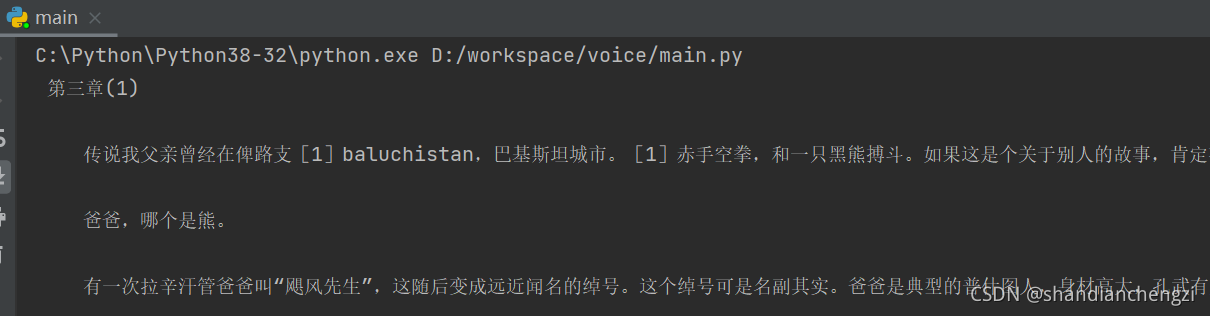
目前的结果:
【记录】Python3|用百度语音 API 朗读你的小说TXT的更多相关文章
- 利用百度语音API进行语音识别。
由于项目需要,这几天都在试图利用百度语音API进行语音识别.但是识别到的都是“啊,哦”什么的,我就哭了. 这里我只是分享一下这个过程,错误感觉出现在Post语音数据那一块,可能是转换问题吧. API请 ...
- 记录开发基于百度地图API实现在地图上绘制轨迹并拾取轨迹对应经纬度的工具说明
前言: 最近一直在做数据可视化方面的工作,其中平面可视化没什么难度,毕竟已经有很多成熟的可供使用的框架,比如百度的echart.js,highcharts.js等.还有就是3D可视化了,整体来说难度也 ...
- python3调取百度地图API输出某地点的经纬度信息
1. 查看API接口说明 地址:http://lbsyun.baidu.com/index.php?title=webapi/guide/webservice-geocoding 注:callback ...
- 调用百度语音AI实现语音的识别和合成
#coding:utf-8 ## 先去ffmpeg官网下载(https://ffmpeg.zeranoe.com/builds/),好了之后解压缩,配一下环境变量 ## 打开cmd,运行命令,安装如下 ...
- [python]百度语音rest api
百度语音识别提供的api范例只有java, c, php. 如果使用Python, 需要注意: 语音文件长度是指bytes大小 可以通过len(file.read())获得 使用requests.po ...
- QT调用百度语音REST API实现语音合成
QT调用百度语音REST API实现语音合成 1.首先点击点击链接http://yuyin.baidu.com/docs/tts 点击access_token,获取access_token,里面有详细 ...
- python编程之API入门: (二)python3中使用新浪微博API
回顾API使用的流程 通过百度地图API的使用,我理解API调用的一般流程为:生成API规定格式的url->通过urllib读取url中数据->对json格式的数据进行解析.下一步,开始研 ...
- 依图语音API的C#封装以及调用进行语音转写的处理
对于语音识别,一般有实时语音识别和语音文件的识别处理等方式,如在会议.培训等场景中,可以对录制的文件进行文字的转录,对于转录文字的成功率来说,如果能够转换90%以上的正确语音内容,肯定能减轻很多相关语 ...
- 百度地图API的使用
------------------自说自话----------------------------- 好奇怪,习惯性使用有道云笔记记录心得与知识后就很少用博客园来记录了. 但是后来想想,有些东西还是 ...
- 利用百度词典API和Volley网络库开发的android词典应用
关于百度词典API的说明,地址在这里:百度词典API介绍 关于android网络库Volley的介绍说明,地址在这里:Android网络通信库Volley 首先我们看下大体的界面布局!
随机推荐
- 多线程之lamda表达式
代码简化过程 public class TestLambda1 { //3.静态内部类 static class Like2 implements ILike{ ...
- 发那科FANUC机器人A06B-0652-B212电机维修基本流程
发那科FANUC机器人以其卓越的性能和可靠性赢得了广泛的认可.然而,就像其他任何机械设备一样,长时间的运行和复杂的工作环境都可能使伺服电机面临维修的需求.为了确保您的发那科FANUC机器人A06B-0 ...
- Springboot集成easypoi实现excel多sheet导出
1.环境配置 <!--easypoi依赖,excel导入导出--> <dependency> <groupId>cn.afterturn</groupId&g ...
- Scala查看源码
package com.wyh.day01 /** * 1.代码格式化的快捷键 ctrl+alt+L\ * 2.scala查看源代码的快捷键 ctrl+b */ object ScalaLookSou ...
- SM系列国密算法
其中SM1.SM4.SM7.祖冲之密码(ZUC)是对称算法:SM2.SM9是非对称算法:SM3是哈希算法.目前,这些算法已广泛应用于各个领域中,期待有一天会有采用国密算法的区块链应用出现. 一.SM1 ...
- Windows 提权-UAC 绕过
本文通过 Google 翻译 UAC-Bypass – Windows Privilege Escalation 这篇文章所产生,本人仅是对机器翻译中部分表达别扭的字词进行了校正及个别注释补充. 导航 ...
- Python脚本 | 提取pdf页面为jpg
功能: 提取pdf文件中的每一页,输出为jpg文件 以markdown语法写入文本文件 将该文本复制到剪贴板 # python 3.10 # ! 运行在 conda-myv虚拟环境 import fi ...
- 搭建个人多机器ssh连接平台
最近新配了个主机,有了多个设备,ssh连接的功能可以优化很多体验,便又开始鼓捣.以前都是windows连各种linux,比较方便:这次是在windows之间,还是小查了好一会儿,留个记录 SSH连接的 ...
- mac 触控板 三指拖动
1. 打开系统偏好设置 点击屏幕左上角的苹果图标(),选择"系统设置". 2. 打开指针控制 在系统偏好设置窗口左侧栏中,点击"辅助功能",然后在右侧列表中, ...
- go 逐行读取文件
前言 文件 I/O,特别是对文件的读写是编程语言中重要的功能.通常,我们需要逐行读取文件. GO 提供了 bufio 软件包,实现了有缓冲的 I/O.它包装一个 io.Reader 或 io.Writ ...