
使用 electron 实现类似新版 QQ 的登录界面效果(阴影、背景动画、窗体3D翻转)
上文《使用 VS2017 和 js 进行桌面程序开发 - electron 之 Hello Word》介绍了如何使用 VS2017 开发 electron 桌面程序,今天来点有看头的,但是没什么技术含量,囧~~
现在什么都讲究追赶潮流,觉得 QQ 登录窗口做的效果不错,既然刚学习 electron ,那么就用 electron 模仿一下。其实主要用到的就是 CSS3 的效果:边框圆角、阴影,3D变换。对,就这么简单。先上效果:
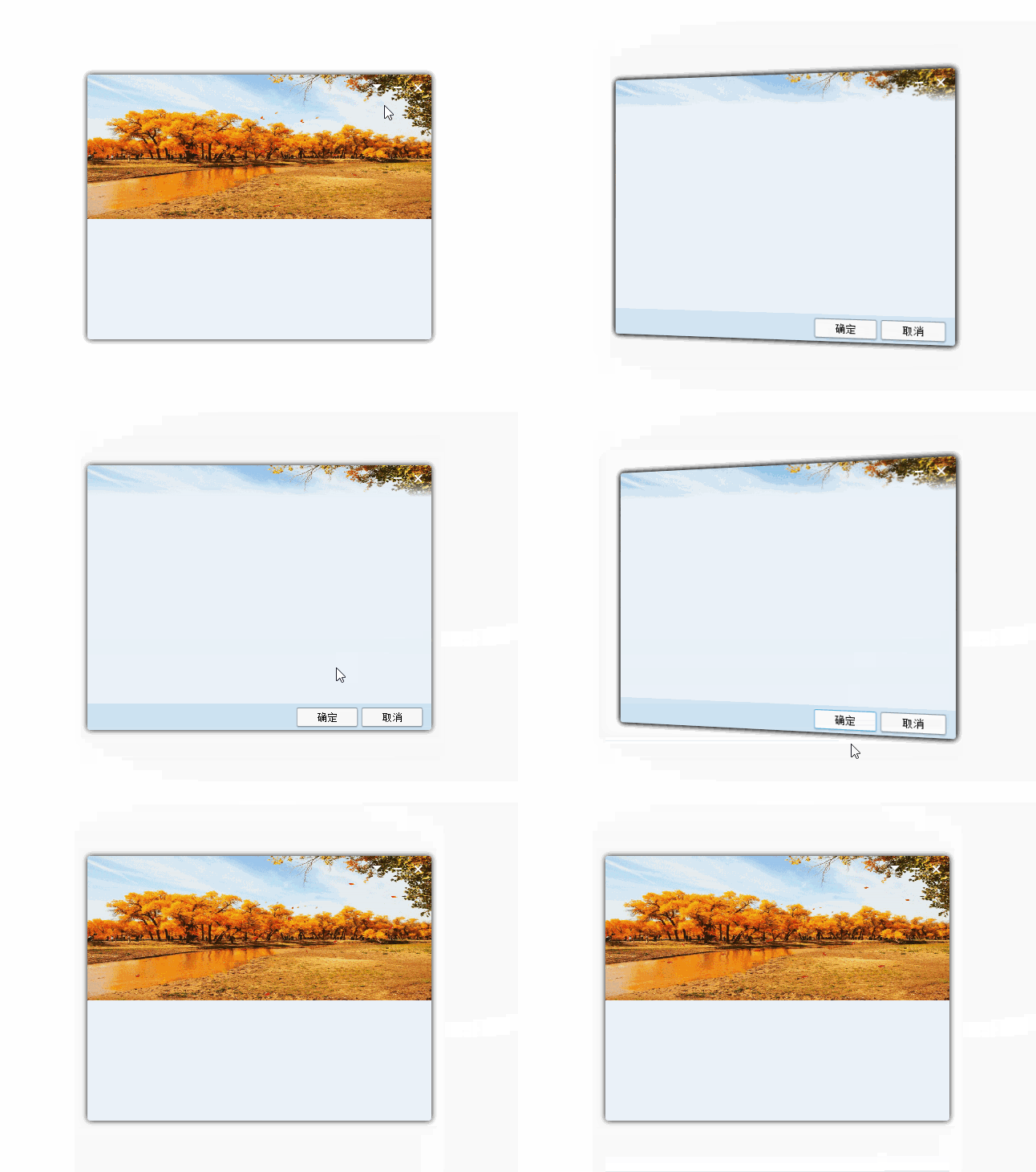
下面是关键代码:
app.js
'use strict';

const { app, BrowserWindow } = require('electron')

const path = require('path')

const url = require('url')

// Keep a global reference of the window object, if you don't, the window will

// be closed automatically when the JavaScript object is garbage collected.

let win

function createWindow() {

    // Create the browser window.

    win = new BrowserWindow({

        width: 495, height: 470, /*skipTaskbar: true,*/ frame: false,

        resizable: false, transparent: true, show: false, alwaysOnTop: true

    })

    win.once('ready-to-show', () => {

        win.show()

    })

    // and load the index.html of the app.

    win.loadURL(url.format({

        pathname: path.join(__dirname, '/app/index.html'),

        protocol: 'file:',

        slashes: true

    }))

    // Open the DevTools.

    //win.webContents.openDevTools()

    // Emitted when the window is closed.

    win.on('closed', () => {

        // Dereference the window object, usually you would store windows

        // in an array if your app supports multi windows, this is the time

        // when you should delete the corresponding element.

        win = null

    })

}

//app.disableHardwareAcceleration();

// This method will be called when Electron has finished

// initialization and is ready to create browser windows.

// Some APIs can only be used after this event occurs.

app.on('ready', createWindow)

// Quit when all windows are closed.

app.on('window-all-closed', () => {

    // On macOS it is common for applications and their menu bar

    // to stay active until the user quits explicitly with Cmd + Q

    if (process.platform !== 'darwin') {

        app.quit()

    }

})

app.on('activate', () => {

    // On macOS it's common to re-create a window in the app when the

    // dock icon is clicked and there are no other windows open.

    if (win === null) {

        createWindow()

    }

})

// In this file you can include the rest of your app's specific main process

// code. You can also put them in separate files and require them here.
index.html
<!DOCTYPE html>

<html style="margin:0; padding:0;height:100%;">

<head>

    <meta charset="UTF-8">

    <title>QQ Login</title>

    <style>

        html, body {

            margin: 0;

            padding: 0;

            width: 100%;

            height: 100%;

        }

        body {

            perspective: 800px;

            -webkit-app-region: drag;

            -webkit-user-select: none;

        }

        input[type="submit"],

        input[type="reset"],

        input[type="button"],

        input[type="text"],

        button,

        textarea {

            -webkit-app-region: no-drag;

        }

        .shadow {

            box-shadow: 0 0 10px rgba(0, 0, 0, 1);

            position: absolute;

            width: 100%;

            height: 100%;

            border-radius: 4px;

        }

        #login-back {

            position: relative;

            border-radius: 3px 3px 0 0;

            left: 0;

            right: 0;

            height: 180px;

        }

        #card {

            left: 33px;

            top: 70px;

            right: 33px;

            bottom: 70px;

            background-color: #ebf2f9;

            position: absolute;

            -webkit-transition: -webkit-transform .6s ease-in-out;

            transition: transform .6s ease-in-out;

            -webkit-transform-style: preserve-3d;

            transform-style: preserve-3d;

            border-radius: 4px;

        }

            #card.flipped {

                -webkit-transform: rotateY( 180deg );

                transform: rotateY( 180deg );

            }

            #card .front {

                background: url(imgs/login-back.gif) no-repeat;

                background-size: 100% 180px;

                position: absolute;

                transform: rotateY(0deg);

            }

            #card .back {

                position: absolute;

                background: url(imgs/login-back.gif) no-repeat;

                background-size: 100% 180px;

                -webkit-transform: rotateY( -180deg );

                transform: rotateY( -180deg );

                -webkit-backface-visibility: hidden;

                backface-visibility: hidden;

                z-index:2;

            }

        .sys-control-box {

            float:right;

            width:84px;

            border-radius: 0 3px 0 0;

        }

        .sys-btn {

            width: 28px;

            height: 28px;

            border: none;

            outline: none;

            margin: 0;

        }

        .sys-btn-mini {

            background: url(imgs/btn_mini_normal.png) no-repeat;

        }

            .sys-btn-mini:hover {

                background: url(imgs/btn_mini_highlight.png) no-repeat;

            }

            .sys-btn-mini:active {

                background: url(imgs/btn_mini_down.png) no-repeat;

            }

        .sys-btn-close {

            border-radius: 0 3px 0 0;

            background: url(imgs/btn_close_normal.png) no-repeat;

        }

            .sys-btn-close:hover {

                background: url(imgs/btn_close_highlight.png) no-repeat;

            }

            .sys-btn-close:active {

                background: url(imgs/btn_close_down.png) no-repeat;

            }

        .sys-btn-set {

            background: url(imgs/btn_set_normal.png) 1px 0 no-repeat;

        }

            .sys-btn-set:hover {

                background: url(imgs/btn_set_hover.png) 1px 0 no-repeat;

            }

            .sys-btn-set:active {

                background: url(imgs/btn_set_press.png) 1px 0 no-repeat;

            }

        .btn {

            width: 78px;

            height: 28px;

            background: url(imgs/setting_btn_normal.png) no-repeat;

            background-size: 100% 100%;

            border: none;

            outline: none;

            margin: 0;

        }

            .btn:hover, .btn:active {

                background: url(imgs/setting_btn_hover.png) no-repeat;

                background-size: 100% 100%;

            }

            .btn:focus {

                background: url(imgs/setting_btn_hover.png) no-repeat;

                background-size: 100% 100%;

            }

    </style>

</head>

<body>

    <div id="card">

        <div id="front" class="front shadow">

            <div class="sys-control-box">

                <button id="btn-set" class="sys-btn sys-btn-set" title="设置"></button><button class="sys-btn sys-btn-mini" title="最小化"></button><button class="sys-btn sys-btn-close" title="关闭"></button>

            </div>

        </div>

        <div id="back" class="back shadow">

            <div style="width:100%;height:100%; border-radius: 4px;background:-webkit-linear-gradient(top, rgba(0, 0, 0, 0.00) 0%, rgba(0, 0, 0, 0.00) 6%, #ebf2f9 12%, #ebf2f9 90%, #cde2f2 90%, #cde2f2 100%);">

                <div class="sys-control-box" style="width:56px;">

                    <button class="sys-btn sys-btn-mini" title="最小化"></button><button class="sys-btn sys-btn-close" title="关闭"></button>

                </div>

                <button id="btn-ok" style="position:absolute; right:91px; bottom:2px;" class="btn">确定</button>

                <button id="btn-cancel" style="position:absolute; right:10px; bottom:2px;" class="btn">取消</button>

            </div>

        </div>

    </div>

    <script>

        Element.prototype.hasClassName = function (a) {

            return new RegExp("(?:^|\\s+)" + a + "(?:\\s+|$)").test(this.className);

        };

        Element.prototype.addClassName = function (a) {

            if (!this.hasClassName(a)) {

                this.className = [this.className, a].join(" ");

            }

        };

        Element.prototype.removeClassName = function (b) {

            if (this.hasClassName(b)) {

                var a = this.className;

                this.className = a.replace(new RegExp("(?:^|\\s+)" + b + "(?:\\s+|$)", "g"), " ");

            }

        };

        Element.prototype.toggleClassName = function (a) {

            this[this.hasClassName(a) ? "removeClassName" : "addClassName"](a);

        };

        //var init = function () {

        //    var card = document.getElementById('card');

        //    document.getElementById('front').addEventListener('click', function () {

        //        card.toggleClassName('flipped');

        //    }, false);

        //    document.getElementById('back').addEventListener('click', function () {

        //        card.toggleClassName('flipped');

        //    }, false);

        //};

        //window.addEventListener('DOMContentLoaded', init, false);

        (function () {

            const remote = require('electron').remote;

            function init() {

                function flip() {

                    if (frontShow == 2) {

                        document.getElementById('front').style.display = 'block';

                    }

                    else {

                        document.getElementById('back').style.display = 'block';

                    }

                    card.toggleClassName('flipped');

                };

                var btn_minis = document.getElementsByClassName("sys-btn-mini");

                for (var i = 0; i < btn_minis.length; i++) {

                    btn_minis[i].addEventListener("click", function (e) {

                        const window = remote.getCurrentWindow();

                        window.minimize();

                    });

                }

                //document.getElementById("sys-btn-maxi").addEventListener("click", function (e) {

                //    const window = remote.getCurrentWindow();

                //    if (!window.isMaximized()) {

                //        window.maximize();

                //    } else {

                //        window.unmaximize();

                //    }

                //});

                var btn_closes = document.getElementsByClassName("sys-btn-close");

                for (var i = 0; i < btn_closes.length; i++) {

                    btn_closes[i].addEventListener("click", function (e) {

                        const window = remote.getCurrentWindow();

                        window.close();

                    });

                }

                var card = document.getElementById('card');

                var frontShow = 1;

                var btn_sets = document.getElementsByClassName("sys-btn-set");

                for (var i = 0; i < btn_sets.length; i++) {

                    btn_sets[i].addEventListener('click', function () { flip(); }, false);

                }

                card.addEventListener('transitionend', function () {

                    if (frontShow == 1) {

                        frontShow = 2;

                        document.getElementById('front').style.display = 'none';

                    }

                    else {

                        document.getElementById('back').style.display = 'none';

                        frontShow = 1;

                    }

                }, false);

                document.getElementById('btn-ok').addEventListener('click', function () { flip(); }, false);

                document.getElementById('btn-cancel').addEventListener('click', function () { flip(); }, false);

            };

            document.onreadystatechange = function () {

                if (document.readyState == "complete") {

                    init();

                }

            };

        })();

    </script>

</body>

</html>
最后整个项目的源代码:https://github.com/starts2000/ElectronQQLogin
使用 electron 实现类似新版 QQ 的登录界面效果(阴影、背景动画、窗体3D翻转)的更多相关文章
- iOS开发UI篇—模仿ipad版QQ空间登录界面
iOS开发UI篇—模仿ipad版QQ空间登录界面 一.实现和步骤 1.一般ipad项目在命名的时候可以加一个HD,标明为高清版 2.设置项目的文件结构,分为home和login两个部分 3.登陆界面的 ...
- 采用CSS3设计的登录界面,动态效果(动画)
与上一篇的“采用CSS3设计的登陆界面”的相同,只是样式style添加了CSS3的动画元素. style内容如下: <style> html,body,div{ margin:0; pad ...
- Android菜鸟的成长笔记(3)——给QQ登录界面说So Easy
原文:Android菜鸟的成长笔记(3)--给QQ登录界面说So Easy 上一篇:Android菜鸟的成长笔记(2)--第一个Android应用 我们前面已经做了第一个Android应用程序,虽然有 ...
- QQ联合登录(基于Oauth2.0协议)
1. 获取授权码Authorization Code https://graph.qq.com/oauth2.0/authorize?response_type=code&client_id= ...
- swing实现QQ登录界面1.0( 实现了同一张图片只加载一次)、(以及实现简单的布局面板添加背景图片控件的标签控件和添加一个关闭按钮控件)
swing实现QQ登录界面1.0( 实现了同一张图片只加载一次).(以及实现简单的布局面板添加背景图片控件的标签控件和添加一个关闭按钮控件) 代码思路分析: 1.(同一张图片仅仅需要加载一次就够了,下 ...
- iOS中三种方式实现登录界面播放视频或gif效果
现在app都做的越来越炫酷,各种动画效果,各种特效很好的提高了用户的体验.很多app在登录界面都使用了动画效果,比如Uber,Keep,QQ等等.这些动画效果基本都是使用gif或者MP4来实现的. 效 ...
- android内部培训视频_第五节(1)_OA实战之登录界面
第五节(1):OA实战之登录界面 一.登录界面布局 1.背景图片 2.文本框 3.checkbox 4.按钮 暂未实现点击切换图片效果 <RelativeLayout xmlns:androi ...
- 注册表----修改Win7登录界面
在进行操作前,需要准备好背景图片.对背景图片的要求有三点: (1)图片必须是JPG格式: (2)必须将图片命名为backgroundDefault; (3)图片的体积必须小于256KB. 按下[Win ...
- 用bootstrap做一个背景可轮转的登录界面
用bootstrap做一个背景可轮转的登录界面 一.总结 一句话总结:用css3的动画的 @keyframes 规则,制作轮转图. 1.用bootstrap做一个背景可轮转的登录界面? a.动画部分用 ...
随机推荐
- Vue.js高仿饿了么WebApp
介绍 学习Vue.js也有一阵子了,为了加深对Vue的理解及运用,做了一个小项目.这是一个高仿饿了么外卖WebApp,现已完成商品预览.商品详情.商家预览.添加购物.查看评论等功能. 部分截图 项目预 ...
- Winform调用WebKitBrowser,基于chrome内核WebKit的浏览器控件
在C#中,默认的WebBrowser控件默认使用的是IE的core,而IE的种种遭人吐槽的诟病使我不敢轻易使用WebBrowser,因此,打算使用Chrome的内核替换IE.Chrome的内核使用的是 ...
- Web开发安全小贴士
想要开发出一个安全的.健壮的Web应用其实是非常困难的, 如果你想要快速开发出一款集使用价值.用户体验度.以及安全性为一身的产品,以下安全步骤很必要!!! 数据库 1.对类似访问令牌.电子邮箱 ...
- npm 一条命令更换淘宝源
一条命令更换淘宝源 npm config set registry https://registry.npm.taobao.org
- laytpl : 一款非常轻量的JavaScript模板引擎
//假设你得到了这么一段数据 var data = { title: '前端圈', intro: '一群码js的骚年,幻想改变世界,却被世界改变.', list: [{name: '贤心', city ...
- 【论文:麦克风阵列增强】An Algorithm For Linearly Constrained Adaptive Array Processing
作者:桂. 时间:2017-06-03 15:06:37 链接:http://www.cnblogs.com/xingshansi/p/6937635.html 原文链接:http://pan.ba ...
- angular.js添加自定义服务依赖项方法
<!DOCTYPE html> <html lang="en" ng-app="myapp"> <head> <met ...
- 学习总结------Servlet控制器的简单运用
前言: 今天将简单的模拟 MVC模式 对Servlet控制器运行 若有不好或不对的地方,欢迎各位大神进行指导! 1.MVC模式(图) MVC全名是Model View Controller,是模型(m ...
- [1] 插件架构(PLUG-IN)
网上的一种比较好对插件的定义是:插件(Plug-in,又称addin.add-in.addon或add-on,又译外挂)也称为扩展,是一种遵循一定规范的应用程序接口编写出来的程序,主要是用来扩展软件功 ...
- Navicat连接Oracle报错_Cannot load OCI DLL 87
原因: Oracle需要装client才能让第三方工具通过OCI(Oracle Call Interface)来连接. 解决方案: 1. 去oracle官网下载Instant Client 11, 或 ...