
vb代码之------画一个半透明矩形
入吾QQ群183435019 (学习 交流+唠嗑)、
废话不说,咱们来看代码吧
程序结果运行如下
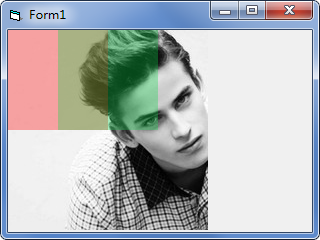
需要如下API
1:GdipCreateFromHDC
功能:创建设备场景相对应的绘图区域(相当于给设备场景创建一个画板),我们所需要画图的地方就是这个API所创建的
声明Private Declare Function GdipCreateFromHDC Lib "gdiplus" (ByVal hDC As Long, graphics As Long) As GpStatus
2:GdipCreateSolidFill
功能:创建一个纯色刷子,最重要支持半透明呦
声明Private Declare Function GdipCreateSolidFill Lib "gdiplus" (ByVal argb As Long, Brush As Long) As GpStatus
其中参数1是颜色值,a代表透明度,那么创建一个半透明刷子所需要传的值就是半 (透明度值+R+G+B)参数2是返回给我们的刷子句柄
例如&HFFFF0000
第一个FF表示透明度。FF是255 也就是不透明,后面的代码RGB颜色
3:GdipFillRectangle
功能,填充一个矩形
声明Private Declare Function GdipFillRectangle Lib "gdiplus" (ByVal Graphics As Long, ByVal Brush As Long, ByVal X As Single, ByVal Y As Single, ByVal Width As Single, ByVal Height As Single) As GpStatus
参数很简单,参数一 GdipCreateFromHDC所创建的dc,参数2 刷子句柄,参数3456,矩形的大小及位置
4:GdiplusStartup
功能:函数初始化GDI+,执行GDI+函数时,必须调用此函数
声明Private Declare Function GdiplusStartup Lib "gdiplus" (token As Long, inputbuf As GdiplusStartupInput, Optional ByVal outputbuf As Long = 0) As GpStatus
5:GdiplusShutdown
功能:清理资源
必须在创建任意的GDI+对象之前使用GdiplusStartup函数。且必须在使用该函数之前删除所有的GDI+的对象
声明Private Declare Sub GdiplusShutdown Lib "gdiplus" (ByVal token As Long)
参数token 为GdiplusStartup调用时的第一个参数
6:GdipDeleteBrush
功能:删除画刷
声明 Private Declare Function GdipDeleteBrush Lib "gdiplus" (ByVal Brush As Long) As GpStatus
不用这个画刷时要记得删除
7:GdipDeleteGraphics
功能:删除一个Graphics ,也就是GdipCreateFromHDC所创建的
声明Private Declare Function GdipDeleteGraphics Lib "gdiplus" (ByVal Graphics As Long) As GpStatus
还有一个GdiplusStartupInput结构体
声明
Private Type GdiplusStartupInput
GdiplusVersion As Long
DebugEventCallback As Long
SuppressBackgroundThread As Long
SuppressExternalCodecs As Long
End Type
一个枚举
Private Enum GpStatus
Ok = 0
GenericError = 1
InvalidParameter = 2
OutOfMemory = 3
ObjectBusy = 4
InsufficientBuffer = 5
NotImplemented = 6
Win32Error = 7
WrongState = 8
Aborted = 9
FileNotFound = 10
ValueOverflow = 11
AccessDenied = 12
UnknownImageFormat = 13
FontFamilyNotFound = 14
FontStyleNotFound = 15
NotTrueTypeFont = 16
UnsupportedGdiplusVersion = 17
GdiplusNotInitialized = 18
PropertyNotFound = 19
PropertyNotSupported = 20
End Enum
程序所有代码如下
Private Type GdiplusStartupInput
GdiplusVersion As Long
DebugEventCallback As Long
SuppressBackgroundThread As Long
SuppressExternalCodecs As Long
End Type
Private Enum GpStatus
Ok = 0
GenericError = 1
InvalidParameter = 2
OutOfMemory = 3
ObjectBusy = 4
InsufficientBuffer = 5
NotImplemented = 6
Win32Error = 7
WrongState = 8
Aborted = 9
FileNotFound = 10
ValueOverflow = 11
AccessDenied = 12
UnknownImageFormat = 13
FontFamilyNotFound = 14
FontStyleNotFound = 15
NotTrueTypeFont = 16
UnsupportedGdiplusVersion = 17
GdiplusNotInitialized = 18
PropertyNotFound = 19
PropertyNotSupported = 20
End Enum
Private Declare Function GdipCreateFromHDC Lib "gdiplus" (ByVal hDC As Long, Graphics As Long) As GpStatus
Private Declare Function GdipCreateSolidFill Lib "gdiplus" (ByVal argb As Long, Brush As Long) As GpStatus
Private Declare Function GdiplusStartup Lib "gdiplus" (token As Long, inputbuf As GdiplusStartupInput, Optional ByVal outputbuf As Long = 0) As GpStatus
Private Declare Sub GdiplusShutdown Lib "gdiplus" (ByVal token As Long)
Private Declare Function GdipDeleteBrush Lib "gdiplus" (ByVal Brush As Long) As GpStatus
Private Declare Function GdipDeleteGraphics Lib "gdiplus" (ByVal Graphics As Long) As GpStatus
Dim mToken As Long, Graphics As Long, Brush As Long
Private Declare Function GdipFillRectangle Lib "gdiplus" (ByVal Graphics As Long, ByVal Brush As Long, ByVal X As Single, ByVal Y As Single, ByVal Width As Single, ByVal Height As Single) As GpStatus
Private Sub Form_Load()
Me.AutoRedraw = True
Dim GdipInput As GdiplusStartupInput
GdipInput.GdiplusVersion = 1
GdiplusStartup mToken, GdipInput
GdipCreateFromHDC Me.hDC, Graphics
GdipCreateSolidFill &H55FF0000, Brush
GdipCreateSolidFill &H550ED64B, Brush1
GdipFillRectangle Graphics, Brush, 0, 0, 100, 100 '画一个红色半透明矩形
GdipFillRectangle Graphics, Brush1, 50, 0, 100, 100 '画一个绿色半透明矩形
GdipDeleteBrush Brush '删除画刷 Brush
GdipDeleteBrush Brush1 '删除画刷 Brush1
GdipDeleteGraphics Graphics
GdiplusShutdown mToken
End Sub
vb代码之------画一个半透明矩形的更多相关文章
- 用css以写代码形式画一个皮卡丘
我的个人网站是通过写代码的形式来形成一个网站的,前一阵子在某个大神的github上看到他用写代码的形式来完成一个皮卡丘,于是心血来潮花了半个小时,也完成了一个作品. 这其中涉及到的知识点也不是很复杂, ...
- WPF 画一个3D矩形并旋转
具体的代码还是线性代数. 主要是旋转和平移. 这个例子的中模型是在世界原点建立.所以旋转会以自身轴心旋转. 如果不在世界原点建立模型,还想以自身为旋转轴旋转. 则是需要以下步骤: 模型的中心点为V1( ...
- Qt 怎么画一个圆角矩形对话框,或者圆角控件
1. 2. 在自定义控件的 构造函数中加入如下一段断码 this->setWindowFlags(Qt::Dialog | Qt::FramelessWindowHint); //隐藏对话框标题 ...
- 用CSS画一个带阴影的三角形的示例代码
1. 思路 怎么用CSS3画一个带阴影的三角形呢 ? 有童鞋说, 这还不简单吗 网上有很多解决方案, 但其实大多都是实现不太完美的, 存在一些问题 假设我们做一个向下的三角形箭头 常见的方法大致有两种 ...
- 看opengl 写代码(4) 画一个圆
opengl 编程指南 P30 以下代码 是 用 直线 连起来 画一个圆. // circle.cpp : 定义控制台应用程序的入口点. // #include "stdafx.h" ...
- [C#绘图]在半透明矩形上绘制字符串
首先要绘制一个半透明的矩形,用到的方法当然是FillRectangle().这个函数在调用的时候除了要指明要绘制的矩形外,还要指明填充矩形的背景色.具体的方法就是在绘制矩形的时候传给它一个画刷Brus ...
- C# winform开发:Graphics、pictureBox同时画多个矩形
C#的System.Drawing 命名空间提供了对 GDI+ 基本图形功能的访问 重点在于获取Graphics对象,例如: Graphics g = panel1.CreateGraphics 事实 ...
- 手把手带你画一个漂亮蜂窝view Android自定义view
上一篇做了一个水波纹view 不知道大家有没有动手试试呢点击打开链接 这个效果做起来好像没什么意义,如果不加监听回调 图片就能直接替代.写这篇博客的目的是锻炼一下思维能力,以更好的面多各种自定义vi ...
- 手把手带你画一个 时尚仪表盘 Android 自定义View
拿到美工效果图,咱们程序员就得画得一模一样. 为了不被老板喷,只能多练啊. 听说你觉得前面几篇都so easy,那今天就带你做个相对比较复杂的. 转载请注明出处:http://blog.csdn.ne ...
随机推荐
- MPSOC之4——petalinux提取源码
petalinux使用太不方便,捆绑的太死板,也不通用,还不如直接用编译器来的简单高效. 本文说明从petalinux中提取出源代码的过程,前提是已经petalinux-build完成. 1. ubo ...
- Not++规范格式(格式化)
Notepad++功能比Windows中的 Notepad(记事本)强大,除了可以用来制作一般的纯文字说明文件,也十分适合编写计算机程序代码.Notepad++ 有语法高亮度显示和语法折叠功能,并且支 ...
- 《编程语言实现模式》【PDF】下载
<编程语言实现模式> 编程语言实现模式旨在传授构建语言应用(工具)的经验和理念,教读者构建自己的语言应用.这里的语言应用并非特指用编译器或解释器实现编程语言,而是泛指任何处理.分析.翻译输 ...
- Python中import机制
Python语言中import的使用很简单,直接使用import module_name语句导入即可.这里我主要写一下"import"的本质. Python官方定义:Python ...
- cors解决Web跨域访问问题
首先了解一下什么是跨域以及解决的几种常见方式. 跨域,指的是浏览器不能执行其他网站的脚本.它是由浏览器的同源策略造成的,是浏览器施加的安全限制. 所谓同源是指,域名,协议,端口均相同. 举例: 相对于 ...
- VMware的一些总结
一.虚拟主机联网的三种方式: 1.仅主机(Host Only),虚拟主机只能与宿主机联网通信,无法访问外网和宿主机所在局域网的其它主机. 2.桥接(Bridge),在桥接模式下,虚拟主机就像是宿主机所 ...
- boost::format(字符串格式化库)
这段时间学习boost库的使用,撰文一方面留以备用,另一方面就是shared精神. format主要是用来格式化std::string字符串以及配合std::cout代替C语言printf() 使用f ...
- Hibernate缓存和状态
缓存是介于应用程序和物理数据源之间,其作用是为了降低应用程序对物理数据源访问的频次,从而提高了应用的运行性能. 缓存的介质一般是内存,所以读写速度很快.但如果缓存中存放的数据量非常大时,也会用硬盘 ...
- Ryz的鬼题
蚂蚁(ant)[题目描述] 小 R 种了一棵苹果树,这棵树上有 n 个节点(标号从 0 到 n-1),有 n-1 条树枝连接这 n 个节点,这 n 个节点相互连通.每条树枝的长度为 1. 苹果树 ...
- rm 命令详解
rm 作用: 删除一个目录中的一个或多个文件或目录,也可以将某个目录及下属的所有文件及子目录均删除掉, 对于连接文件只是删除整个连接文件,而保持原有文件. 注意: 使用rm 命令要格外小心,因为一旦 ...