
Vue组件模板形式实现对象数组数据循环为树形结构
数据结构为数组中包含对象--树形结构,用Vue组件的写法实现以下的效果:
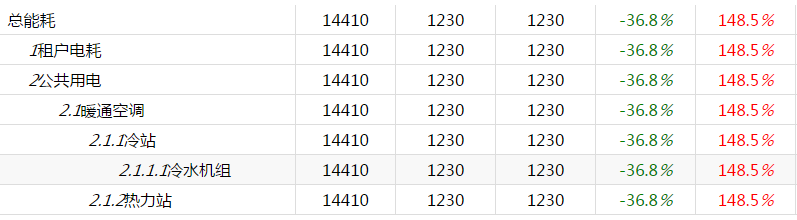
树形列表,缩进显示层级,第5级数据加底色,数据样式显色,点击展开折叠数据。本文为用Vue实现方式,另有一篇为用knockout.js的实现方法。
html代码
 <div id="table-component-div">

     <table-component  v-for="item in data1" v-bind:list="item"></table-component>

 </div>
组件模板代码
 <script type="text/x-template" id="table-component-template">

     <div class="tem">

         <div class="tem-p">

             <div v-on:click="toggleClick"><i v-bind:style="{'visibility':list.number!=0?'visible':'hidden'}">{{list.number}}</i><span>{{list.name}}</span></div>

             <!--绑定数据-->

             <div><span>{{list.energyone}}</span></div>

             <div><span>{{list.energytwo}}</span></div>

             <div><span>{{list.energythree}}</span></div>

             <!--绑定class,使数值显示出区分-->

             <div><span v-bind:class="{'isgreen':list.huanRatio<0,'isred':list.huanRatio>100}">{{list.huanRatio}}<em>%</em></span></div>

             <div><span v-bind:class="{'isgreen':list.tongRatio<0,'isred':list.tongRatio>100}">{{list.tongRatio}}<em>%</em></span></div>

         </div>

         <div class="tem-c">

             <!-- 子组件 -->

             <table-component v-for="itemc in list.child" :list="itemc"></table-component>

         </div>

     </div>

 </script>
JavaScript代码
 /* 数据结构 */

         var ko_vue_data=[

             {

                 name: "总能耗",

                 number:"0",

                 energyone: 14410,

                 energytwo: 1230,

                 energythree: 1230,

                 huanRatio: -36.8,

                 tongRatio: 148.5,

                 child: [

                     {

                         name: "租户电耗",

                         number:"1",

                         energyone: 14410,

                         energytwo: 1230,

                         energythree: 1230,

                         huanRatio: -36.8,

                         tongRatio: 148.5,

                         child: []

                     },

                     {

                         name: "公共用电",

                         number:"2",

                         energyone: 14410,

                         energytwo: 1230,

                         energythree: 1230,

                         huanRatio: -36.8,

                         tongRatio: 148.5,

                         child: [

                             {

                                 name: "暖通空调",

                                 number:"2.1",

                                 energyone: 14410,

                                 energytwo: 1230,

                                 energythree: 1230,

                                 huanRatio: -36.8,

                                 tongRatio: 148.5,

                                 child: [

                                     {

                                         name: "冷站",

                                         number:"2.1.1",

                                         energyone: 14410,

                                         energytwo: 1230,

                                         energythree: 1230,

                                         huanRatio: -36.8,

                                         tongRatio: 148.5,

                                         child: [

                                             {

                                                 name: "冷水机组",

                                                 number:"2.1.1.1",

                                                 energyone: 14410,

                                                 energytwo: 1230,

                                                 energythree: 1230,

                                                 huanRatio: -36.8,

                                                 tongRatio: 148.5,

                                                 child: []

                                             }

                                         ]

                                     },

                                     {

                                         name: "热力站",

                                         number: "2.1.2",

                                         energyone: 14410,

                                         energytwo: 1230,

                                         energythree: 1230,

                                         huanRatio: -36.8,

                                         tongRatio: 148.5,

                                         child: []

                                     }

                                 ]

                             }

                         ]

                     }

                 ]

             }

         ];

         /* 注册组件 */

         Vue.component('table-component', {

             template:"#table-component-template",//模板

             props:['list'],//传递数据

             computed:{//计算属性

                 isFolder: function () {//判断数据有没有子集,此效果中暂没用到,有需要的可以看下具体使用方式

                     return this.list.child && this.list.child.length > 0;

                 }

             },

             methods:{

                 /* 展开折叠操作 */

                 toggleClick:function(event){

                     event.stopPropagation();//阻止冒泡

                     var _this = $(event.currentTarget);//点击的对象

                     if (_this.parent().next().is(":visible")) {

                         _this.parent().next().slideUp();

                     } else {

                         _this.parent().next().slideDown();

                     }

                 }

             }

         });

         /* 创建实例 */

         new Vue({

             el:"#table-component-div",//挂载dom

             data:{

                 data1:ko_vue_data//数据

             }

         })
数据显示完毕,接下来是样式效果,缩进显示层级及底色显示。
css代码
 .tem-p{

             clear: both;

             border-bottom: 1px solid #dddddd;

             height: 30px;

             line-height: 30px;

             -webkit-box-sizing: border-box;

             -moz-box-sizing: border-box;

             box-sizing: border-box;

         }

         .tem-p>div{

             float: left;

             width:100px;

             box-sizing: border-box;

             -ms-text-overflow: ellipsis;

             text-overflow: ellipsis;

             white-space:nowrap;

             overflow: hidden;

             text-align: center;

             -webkit-box-sizing: border-box;

             -moz-box-sizing: border-box;

             box-sizing: border-box;

             height: 100%;

             border-right: 1px solid #dddddd;

         }

         .tem-p>div:first-of-type{

             width: 298px;

             text-align: left;

         }

         .tem>.tem-c .tem-p>div:first-of-type{

             padding-left: 30px;

         }

         .tem>.tem-c .tem-c .tem-p>div:first-of-type{

             padding-left: 60px;

         }

         .tem>.tem-c .tem-c .tem-c .tem-p>div:first-of-type{

             padding-left: 90px;

         }

         .tem>.tem-c .tem-c .tem-c .tem-c .tem-p>div:first-of-type{

             padding-left: 120px;

         }

         .tem>.tem-c .tem-c .tem-c .tem-c .tem-p{

             background-color: #f8f8f8;

         }

         .tem>.tem-c .tem-c .tem-c .tem-c .tem-c .tem-p>div:first-of-type{

             padding-left: 150px;

         }

         .lastChild{

             background: #f8f8f8;

         }

         .isred{

             color: red;

         }

         .isgreen{

             color: green;

         }
好了,到这里就所有的都写完了,希望可以帮助有需要的人,如果有更好建议,请留言,谢谢。
Vue组件模板形式实现对象数组数据循环为树形结构的更多相关文章
- vue组件详解——使用props传递数据
每天学习一点点 编程PDF电子书.视频教程免费下载:http://www.shitanlife.com/code 在 Vue 中,父子组件的关系可以总结为 props向下传递,事件向上传递.父组件通过 ...
- nuxtjs在vue组件中使用window对象编译报错的解决方法
我们知道nuxtjs是做服务端渲染的,他有很多声明周期是运行在服务端的,以及正常的vue声明周期mounted之前均是在服务端运行的,那么服务端是没有比如window对象的location.navag ...
- 关于mysql中数据存储复合树形结构,查询时结果按树形结构输出
1.主要思想:根据已有数据,规则性的造数据 select * FROM(select lId,strName,lId as lParentId,-1 as orderIdx from tbClassi ...
- C# 把带有父子关系的数据转化为------树形结构的数据 ,以及 找出父子级关系的数据中里面的根数据Id
紧接上一篇,将List<Menu>的扁平结构数据, 转换成树形结构的数据 返回给前端 , 废话不多说,开撸! --------------------- 步骤: 1. 建 Menu ...
- vue对象数组数据变化,页面不渲染
很多时候,我们习惯于这样操作数组和对象: data() { // data数据 return { arr: [1,2,3], obj:{ a: 1, b: 2 } }; }, // 数据更新 数组视图 ...
- vue 组件 模板input双向数据数据
<!DOCTYPE html><html> <head> <meta charset="UTF-8"> <title>T ...
- vue 组件 模板中根数据绑定需要指明路径并通信父
<!DOCTYPE html><html> <head> <meta charset="UTF-8"> <title>T ...
- 微信小程序 自定义组件 多列选择器 对象数组 ObjectArray 自关联 三级联动
使用方法 在 Page.json 注册组件 { "usingComponents": { "address-picker": "/component/ ...
- webpack+vue+.vue组件模板文件 所需要的包
{ "name": "webpack-study02", "version": "1.0.0", "de ...
随机推荐
- redis可视化客户端工具
TreeNMS是一款redis,Memcache可视化客户端工具,采用JAVA开发,实现基于WEB方式对Redis, Memcached数据库进行管理.维护. 功能包括:NoSQL数据库的展示,库表的 ...
- Sql行列转换参考
行列转换:SELECT max(case type when 0 then jine else 0 end) a,max(case type when 1 then jine else 0 end) ...
- 自己编写的 C++ 超轻量级日志类
[自己编写的 C++ 超轻量级日志类(兼容vc++6.0.vs2010.vs2015)] 先来看效果: [测试文件:test.cpp] /* 作者:闫文山 时间:2017/07/02 介绍: 本日志类 ...
- Vue.js 基础指令实例讲解(各种数据绑定、表单渲染大总结)——新手入门、高手进阶
Vue.js 是一套构建用户界面的渐进式框架.他自身不是一个全能框架--只聚焦于视图层.因此它非常容易学习,非常容易与其它库或已有项目整合.在与相关工具和支持库一起使用时,Vue.js 也能完美地驱动 ...
- IE的hack问题浅谈
*我一直以为是IE7的专属选择. 开始,我以为是bug ,怎么可能会有+号.一定是哪位同事写错了.找了度娘才知道自己的不足.原来也是可以的. 后来,通过ie8和ie7来调整自己的css.也感觉不用ha ...
- CSS自定义动画
动画名称 animation-name : (动画名称必须与@keyfarmes的名称相对应,因为动画名称是由@keyfarmes定义的) 例如:animation-name:AA:则 @ ...
- xhr.readyState就绪状态
0:初始化,XMLHttpRequest对象还没有完成初始化 1:载入,XMLHttpRequest对象开始发送请求 2:载入完成,XMLHttpRequest对象的请求发送完成 3:解析,XMLHt ...
- POJ 2502 Subway-经过预处理的最短路
Description You have just moved from a quiet Waterloo neighbourhood to a big, noisy city. Instead of ...
- Vue.js学习笔记(三) - 修饰符
本篇将简单介绍常用的修饰符. 在上一篇中,介绍了 v-model 和 v-on 简单用法.除了常规用法,这些指令也支持特殊方式绑定方法,以修饰符的方式实现.通常都是在指令后面用小数点“.”连接修饰符名 ...
- docker~docker-machine的介绍
回到目录 国外的hub.ducker.com速度确实有些慢,还好,有咱们的阿里云,今天和大家聊聊通过添加docker-machine来改变docker的hub服务器,最终来加速咱们下载镜像的速度! 工 ...