
iOS 横竖屏切换解决方案
iOS要实现横竖屏切换很简单,不需要使用任何第三方,只需要实现几个方法就可以了。demo下载地址:https://github.com/qqcc1388/TYOrientationDemo
1.设置系统支持横竖屏【General】->【Targets】-> 【Deployment info】->【Device Orientation】
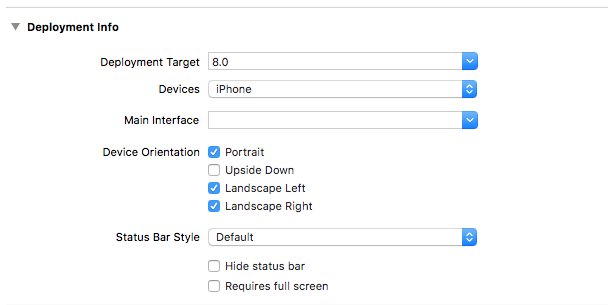
2.在控制器中实现对应的方法(默认支持竖屏)
-(BOOL)shouldAutorotate{

    return YES;

}

-(UIInterfaceOrientationMask)supportedInterfaceOrientations{

    return UIInterfaceOrientationMaskPortrait;

}
3.某些特定的页面需要横屏支持的,则单独处理(同样需要实现2个方法)
-(BOOL)shouldAutorotate{

    return YES;

}

- (UIInterfaceOrientationMask)supportedInterfaceOrientations

{

    return (UIInterfaceOrientationMaskPortrait|UIInterfaceOrientationMaskLandscapeLeft|UIInterfaceOrientationMaskLandscapeRight);

}
4.如果控制器中有用到导航控制器或者tabbarController,这需要在导航控制器和tabbarController分别实现以下2个方法
- (BOOL)shouldAutorotate{

    return [self.selectedViewController shouldAutorotate];

}

- (UIInterfaceOrientationMask)supportedInterfaceOrientations{

    return [self.selectedViewController supportedInterfaceOrientations];

}
5.如果需要实现点击按钮切换横竖屏的效果则可以参考如下方案:
//按钮点击事件

- (void)leftAction

{

    [self interfaceOrientation:UIInterfaceOrientationPortrait];

}

- (void)rightAction

{

    [self interfaceOrientation:UIInterfaceOrientationLandscapeRight];

}

- (void)interfaceOrientation:(UIInterfaceOrientation)orientation

{

    if ([[UIDevice currentDevice] respondsToSelector:@selector(setOrientation:)]) {

        SEL selector             = NSSelectorFromString(@"setOrientation:");

        NSInvocation *invocation = [NSInvocation invocationWithMethodSignature:[UIDevice instanceMethodSignatureForSelector:selector]];

        [invocation setSelector:selector];

        [invocation setTarget:[UIDevice currentDevice]];

        int val                  = orientation;

        // 从2开始是因为0 1 两个参数已经被selector和target占用

        [invocation setArgument:&val atIndex:2];

        [invocation invoke];

    }

}
6.如果要监听屏幕旋转事件则可以参考如下方案(监听旋转事件,控制键盘,控制frame等操作)
    UIDevice *device = [UIDevice currentDevice]; //Get the device object

    [[NSNotificationCenter defaultCenter] addObserver:self selector:@selector(orientationChanged:) name:UIDeviceOrientationDidChangeNotification  object:device];

-(void)orientationChanged:(NSNotification *)noti{

    UIDeviceOrientation orientation = [[UIDevice currentDevice] orientation];

    switch (orientation) {

        case UIDeviceOrientationPortrait:            // Device oriented

            break;

        case UIDeviceOrientationPortraitUpsideDown:  // Device oriented

            break;

        case UIDeviceOrientationLandscapeLeft :      // Device oriented

            break;

        case UIDeviceOrientationLandscapeRight:      // Device oriented horizontally, home button on the left

            break;

        default:

            break;

    }

}
iOS 横竖屏切换解决方案的更多相关文章
- [iOS]终极横竖屏切换解决方案
[iOS]终极横竖屏切换解决方案 大家的项目都是只支持竖屏的吧?大多数朋友(这其中当然也包括博主),都没有做过横屏开发,这次项目刚好有这个需求,因此把横竖屏相关的心得写成一遍文章供诸位参考. 01.综 ...
- Android横竖屏切换解决方案
Android横竖屏切换解决方案 首先在Mainifest.xml的Activity元素中加入android:configChanges="orientation|keyboardHidde ...
- iOS 横竖屏切换(应对特殊需求)
iOS 中横竖屏切换的功能,在开发iOS app中总能遇到.以前看过几次,感觉简单,但是没有敲过代码实现,最近又碰到了,demo尝试了几种情况,这里就做下总结.注意 横屏两种情况是反的你知道吗? UI ...
- iOS横竖屏切换的一些坑(持续更新)
最近在做视频类的App,遇到视频滚动播放的坑,紧接着就是横竖屏问题.之前太过天真不想做横竖屏配置.只是想旋转视频View,但是分享什么的包括AlertView还是竖屏样式,项目着急上线(1周提交一次也 ...
- 【IOS界面布局】横竖屏切换和控件自适应(推荐)
[IOS界面布局]横竖屏切换和控件自适应(推荐) 分类: [MAC/IOS下开发]2013-11-06 15:14 8798人阅读 评论(0) 收藏 举报 横竖屏切换 自适应 第一种:通过人为的办法改 ...
- iOS 中各种横竖屏切换总结
iOS 中横竖屏切换的功能,在开发iOS app中总能遇到.以前看过几次,感觉简单,但是没有敲过代码实现,最近又碰到了,demo尝试了几种情况,这里就做下总结.注意 横屏两种情况是反的你知道吗? UI ...
- iOS开发之判断横竖屏切换
/** * 当屏幕即将旋转的时候调用 * * @param toInterfaceOrientation 旋转完毕后的最终方向 * @param duration 旋转动画所花费的时间 */ ...
- Activity 横竖屏切换
前言 在开发中常要处理横竖屏切换,怎么处理先看生命周期 申明 Activity 横竖屏切换时需要回调两个函数 ,所以在此将这个两个函数暂时看成是Activity 横竖屏切换的生命周期的一部分,这两个函 ...
- Android应用:横竖屏切换总结
眨眼间,已经到了2016你年春节前,离上一篇博客的时间已经有6个月多,回想起这半年的种种,不得不说,学习和工作实在是太忙了,或许这就是程序员的真实写照吧. 写博客之初,主要的目的还是为了把自己的学习痕 ...
随机推荐
- Web直接导入导出SHP/CAD实现探讨。
1.导入SHP/CAD文件 WEB具有直接美观展现功能,功能实现到可视化最好不要超过3S,那么就要限制导入文件的大小和优化算法了. 1.1.SHP导入实现思路 SHP格式开源,Git上随便可以找到读取 ...
- 【Android Developers Training】 86. 基于连接类型修改您的下载模式
注:本文翻译自Google官方的Android Developers Training文档,译者技术一般,由于喜爱安卓而产生了翻译的念头,纯属个人兴趣爱好. 原文链接:http://developer ...
- PHP基础入门(五)---PHP面向对象
前言: 今天来和大家介绍一下PHP的面向对象.说到面向对象,我不得不提一下面向过程,因为本人在初学时,常常分不清楚. 那么面向对象和面向过程有什么区别呢?下面给大家简单介绍一下: 面向对象专注于由哪个 ...
- CJOJ 1331 【HNOI2011】数学作业 / Luogu 3216 【HNOI2011】数学作业 / HYSBZ 2326 数学作业(递推,矩阵)
CJOJ 1331 [HNOI2011]数学作业 / Luogu 3216 [HNOI2011]数学作业 / HYSBZ 2326 数学作业(递推,矩阵) Description 小 C 数学成绩优异 ...
- HashTable的故事----Jdk源码解读
HashTable的故事 很早之前,在讲HashMap的时候,我们就说过hash是散列,把...弄碎的意思.hashtable中的hash也是这个意思,而table呢,是指数据表格,也就是说hasht ...
- redhat mysql安装配置
1. 下载好编译包, 解压到/usr/local/ 并修改文件夹名字为mysql tar -zxf mysql-5.6.30-linux-glibc2.5-x86_64.tar.gz -C /u ...
- 发博客用的一些HTML
这个世界,在发生什么? 移动光标 <p style="background: #999999; padding: 5px; font-size: 22px;">< ...
- java 变量和常量
通常情况下,为了方便物品的存储,我们会规定每个盒子可以存放的物品种类,就好比在"放臭袜子的盒子"里我们是不会放"面包"的!同理,变量的存储也讲究"分门 ...
- 浅谈JVM与内存分配
一.程序内存分配 初始内存分配 当一个程序准备运行时,它首先向java虚拟机要内存,但是java虚拟机本身没有权限,它只能向操作系统申请内存,此时java虚拟机会拥有一个初始内存, 此处额外说明一下e ...
- c# 多线程 创建对象实例
本次的标题是我在写单例模式的博客时遇到的问题,所以今天专门写了的demo让自己记住怎么简单的使用多线程. 一直纠结的是怎么在for循环中多次实例化对象,好复现单例模式在没有加锁的情况下出现多个实例对象 ...