
rsync服务器的搭建
Rsync(remote synchronize)是一个远程数据同步工具,简要的概括就是主机于主机之间的文件目录数据的一个同步。下面就是rsync服务器的搭建过程。
系统环境
平台:Centos 6.5
rsync版本:rsync-3.0.6-12.el6.x86_64
rsync服务器:172.23.216.86
rsync客户端:172.23.216.87
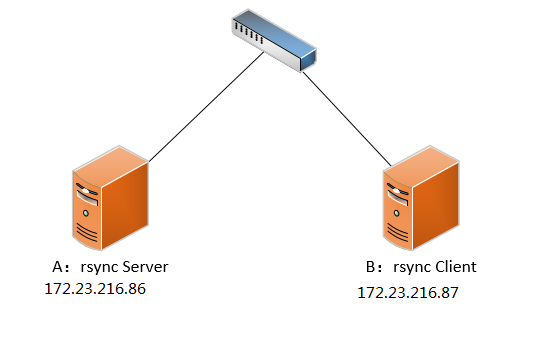
服务端安装rsync服务
1.检查rsync是否已经安装,若已安装,使用rpm -e 命令卸载。
[root@021rjsh216087s ~]# rpm -qa|grep rsync

rsync-3.0.-.el6.x86_64
2.安装这里我们选择yum安装。
yum -y install rsync
3.安装完成后,我们要在/etc目录下创建并编辑这三个文件。
[root@021rjsh216086s run]# ll /etc/rsyncd*

-rw-r--r--  root root  Jan   : /etc/rsyncd.conf        --配置文件

-rw-r--r--  root root    Jan   : /etc/rsyncd.motd         --欢迎文件(不重要)

-rw-------  root root   Jan   : /etc/rsyncd.password      --用户的密码文件
4.修改/etc/rsyncd.conf 文件
#This is rsync conf######

uid = root                          #必须是系统的用户,可以不是root

gid = root                #必须是系统用用户,可以不是root

max connections =

timeout =

pid file = /var/run/rsyncd.pid

lock file = /var/run/rsync.lock

log file = /var/log/rsyncd.log

motd file = /etc/rsyncd.motd

[hellowhome]                 #同步的模块的名称

path = /home/hello            #模块的家目录,

read only = false              #true表示只读,false表示非只读

list = yes

hosts allow = *               #允许访问的ip

hosts deny = 10.10.10.10         #拒绝访问的ip

auth users = hello            #访问的用户(可以不是系统用户)

secrets file = /etc/rsyncd.password   #密码文件

exclude =  www/ xxx/            #这是除了home目录的下www  跟xxx目录

comment = ...Hello..            #欢迎内容
注意:在搭建服务时,要把注释删除,或者另起一行,因为当有些配置项(auth users...)后面有空格,rsync会无法使用,这种空格问题很隐蔽,很难发现,所以要避免。
5.修改/etc/rsyncd.password 文件,修改完成之后,要把文件权限赋成600,否则无法访问。
hello:123456 #格式【用户名(auth users):密码】
[root@021rjsh216086s run]# chmod  /etc/rsyncd.password

[root@021rjsh216086s run]# ll /etc/rsyncd.password

-rw-------  root root  Jan   : /etc/rsyncd.password
6.启动rsync 服务。
rsync --daemon --config=/etc/rsyncd.conf                #启动服务
cat /var/run/rsyncd.pid|xargs kill -9 && rm -rf  /var/run/rsyncd.pid      #停止服务
7.查看873端口是否成功启动
[root@021rjsh216086s run]#  netstat -an | grep 873                #查873端口状态

tcp               0.0.0.0:                 0.0.0.0:*                   LISTEN

tcp               :::                      :::*                        LISTEN

[root@021rjsh216086s run]# lsof -i tcp:873                         #根据端口查服务

COMMAND   PID USER   FD   TYPE  DEVICE SIZE/OFF NODE NAME

rsync    root    4u  IPv4       0t0  TCP *:rsync (LISTEN)

rsync    root    5u  IPv6       0t0  TCP *:rsync (LISTEN)
客户端操作
服务端装完之后,在客户端也需要进行一些配置。
1.先用yum装一下rsync这个软件。
yum -y install rsync
2.测试一下是否成功
[root@021rjsh216087s ~]# rsync -avz -P hello@172.23.216.86::

*****************************************

*                                       *

*                Rsync                  *

*                                       *

*                                       *

*****************************************

hellohome        loading...Hello..
3.列出服务器上的文件信息
[root@021rjsh216087s ~]# rsync -a hello@172.23.216.86::hellohome       #hello为auth users,hellohome为模块名字,密码在/etc/rsyncd.password中,列出的信息是/home/hello下的内容

*****************************************

*                                       *

*                Rsync                  *

*                                       *

*                                       *

*****************************************

Password:

drwx------         // :: .

-rw-r--r--           // :: .bash_logout

-rw-r--r--          // :: .bash_profile

-rw-r--r--          // :: .bashrc

-rw-r--r--          // :: rsyncd.conf

drwxr-xr-x         // :: .gnome2

drwxr-xr-x         // :: .mozilla

drwxr-xr-x         // :: .mozilla/extensions

drwxr-xr-x         // :: .mozilla/plugins

drwxr-xr-x         // :: newdir

drwxr-xr-x         // :: newdir/test

drwxr-xr-x         // :: newdir/test/newdir
4.下载服务器上的文件
[root@021rjsh216087s ~]# rsync -avzP hello@172.23.216.86::hellohome/newdir /tmp/tmp    #将hello用户家目录下的newdir文件夹拷贝到 本地/tmp/tmp 文件夹下

Password:

receiving incremental file list

created directory /tmp/tmp

newdir/

newdir/test/

newdir/test/newdir/

sent  bytes  received  bytes  194.00 bytes/sec

total size is   speedup is 0.00

[root@021rjsh216087s ~]# ll /tmp/tmp                           #查看下载的内容

total

drwxr-xr-x     Jan   : newdir
5.上传文件到服务器
[root@021rjsh216087s ~]# rsync -avzP /tmp/abc hello@172.23.216.86::hellohome # 将本地tmp/abc文件下的内容上传到hello用户的家目录下
注意:在上传时,若写成【 /tmp/abc 】,上传的是tmp目录下的abc文件夹,连abc一同上传;
若写成【 /tmp/abc/ 】,上传的是tmp目录下的abc目录下的内容,abc这个文件夹不会上传。下载时情况也一样。
6.客户端配置密码文件登录
在客户端上的新建一个密码文件/etc/rsyncd.password,在文件内只写登录用户(auth users)的密码,例如用户hello,其密码是123,那么只在文件中写123.
[root@021rjsh216087s ~]# chmod  /etc/rsyncd.password            #也要将密码文件的权限赋成600,要不会失败

[root@021rjsh216087s ~]# ll /etc/rsyncd.password

-rw-------  root root  Jan  : /etc/rsyncd.password
之后,再用rsync时,加上--password-file=/etc/rsyncd.password,就可以不用输入密码登录了。
[root@021rjsh216087s ~]# rsync -avzP --password-file=/etc/rsyncd.password hello@172.23.216.86::hellohome/newdir /tmp/tmp

receiving incremental file list

sent  bytes  received  bytes  311.33 bytes/sec

total size is   speedup is 0.00
至此,算是完成。
参考文档:rsync服务与搭建详解
rsync关于auth failed on module xxx的解决方法
rsync服务器的搭建的更多相关文章
- Rsync 服务器搭建
Rsync简介 rsync 是一个 Unix 系统下的文件同步和传输工具. 它具备以下特性: 1. 能更新整个目录和树和文件系统 2. 有选择性的保持符号链链.硬链接.文件属于.权限.设备以及时间 等 ...
- 搭建Rsync服务器
部署Rsync服务器需要创建至少 一个配置文件,默认在系统中并不存在Rsync配置文件,对于服务器而言,配置文件创建完成后,使用守护进程模式启动rsync程序即可. 使用Centos 系统安装 部署R ...
- Linux-Rsync服务器/客户端搭建实战
一.需求 每晚汇总各机器的操作日志,同步到主服务器进行日志分析. 二.基础知识 rsync 分为服务器端.客户端,服务器端搭建比客户端辛苦一些(也是很简单). rsync 服务器是指以 deamon ...
- [Linux]Linux下rsync服务器和客户端配置
一.rsync简介 Rsync(remote sync)是UNIX及类UNIX平台下一款神奇的数据镜像备份软件,它不像FTP或其他文件传输服务那样需要进行全备份,Rsync可以根据数据的变化进行差异( ...
- 4、nfs服务器的搭建
4.1.nfs服务介绍: samba服务器一般互联网企业不会使用 nfs服务的端口是不固定的,需要先启动rpc服务对nfs服务端口进行注册 4.2.安装nfs: rpm -qa nfs-utils r ...
- 在MAC服务器上搭建docker-registry(转)
在MAC服务器上搭建docker-registry 2014-03-14 0个评论 来源:在MAC服务器上搭建docker-registry 收藏 我要投稿 本文介绍如何在M ...
- LNAMP服务器环境搭建(手动编译安装)
LNAMP服务器环境搭建(手动编译安装) 一.准备材料 阿里云主机一台,操作系统CentOS 6.5 64位 lnamp.zip包(包含搭建环境所需要的所有软件) http://123.56.144. ...
- 在Ubuntu14.04系统POWER8服务器上搭建Docker Registry服务
本文描述了如何在POWER8服务器上搭建一个本地化的Docker镜像仓库,主要涉及镜像制作,Docker Registry服务启动等.希望能够对在非X86服务器上搭建Docker仓库的同学提供参考. ...
- 【转载】CentOS 6.3下rsync服务器的安装与配置
一.rsync 简介 Rsync(remote synchronize)是一个远程数据同步工具,可通过LAN/WAN快速同步多台主机间的文件,也可以使用 Rsync 同步本地硬盘中的不同目录. Rsy ...
随机推荐
- java 之 适配器模式(大话设计模式)
适配器模式,笔者不是很推荐在项目初期阶段使用,在笔者看来这个设计模式就是套接了一层,从而达到能够迎合现有的外部接口规范. 先来简单的看下类图: 大话设计模式-类图 这个模式理解起来非常简单,A→B因为 ...
- 为什么win记事本编辑的shell在linux中运行会报错
结论:win记事本使用的格式有别于linux,二者不可混用.linux使用一个叫vi的编辑器. 解决办法:使用vi命令建立文件,在其中敲shell.命令:vi > filename (敲完 ...
- 使用echarts,制作色温图
1.需要下载echarts的echarts-all.js文件和创建地图需要用到的数据源 2.在项目中创建jsp文件,将js文件引入 <script type="text/javascr ...
- UWP 重启App
今天看见了阿迪王的博客,写到了重启App自身的代码,微软终于在16299加进来了 其实就加上一句话 await CoreApplication.RequestRestartAsync(string.E ...
- 掌握NIO,程序人生
就像新IO为java带来的革新那样,让我们也开启一段新的程序人生. 关键字:NIO,BIO,伪IO,AIO,多路复用选择器,通道,缓冲区,jdk研究,回调函数,高并发 java.nio 概述 历史背景 ...
- 直播一:H.264编码基础知识详解
一.编码基础概念 1.为什么要进行视频编码? 视频是由一帧帧图像组成,就如常见的gif图片,如果打开一张gif图片,可以发现里面是由很多张图片组成.一般视频为了不让观众感觉到卡顿,一秒钟至少需要16帧 ...
- Tomcat 源码分析(一)——启动与生命周期组件
写在前面的话:读Tomcat源码也有段时间了,大领悟谈不上.一些小心得记录下来,供大家参考相护学习. 一.启动流程 Tomcat启动首先需要熟悉的是它的启动流程.和初学者第一天开始写Hello Wor ...
- 实践作业3:白盒测试----我是如何写测试用例DAY6
一开始接到写白盒测试的任务,我感觉挺难的,因为感觉之前我所想到的都是黑盒测试啊,说到测试系统逻辑,感觉就有些神秘的样子没有思路了,那黑盒和白盒写的到底有啥区别.后来我请教了实验室的一个同学,他虽然还没 ...
- 遍历输出tuple元素的简洁方式(C++11)
//遍历输出tuple元素的简洁方式(C++11) //Win32Con17_VS2017_01.cpp #include <iostream> #include <tuple> ...
- 出现JSONvalue failed .error is Illegal start of token
出现JSONvalue failed .error is Illegal start of token了? 别着急,抽根烟,喝杯水.开工: 1:判断是请求前报的错还是请求后报的错!!这个很重要,我就是 ...