
算法帖——用舞蹈链算法(Dancing Links)求解俄罗斯方块覆盖问题
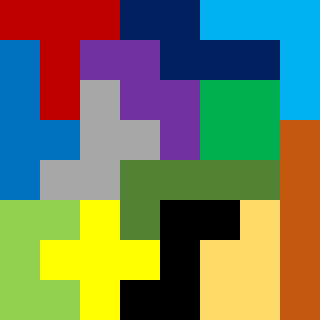
问题的提出:如下图,用13块俄罗斯方块覆盖8*8的正方形。如何用计算机求解?
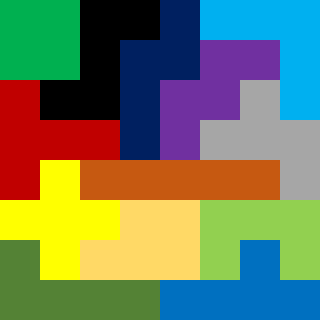
解决这类问题的方法不一而足,然而核心思想都是穷举法,不同的方法仅仅是对穷举法进行了优化
用13块不同形状的俄罗斯方块(每个方块只能使用一次)覆盖住棋盘,很容易就想到这是“精确覆盖问题”(13个俄罗斯方块完全覆盖住8*8的正方形)。而舞蹈链算法(Dancing Links)是比较好求解“精确覆盖问题”的算法,因为该算法在穷举的过程中,不再额外增加空间负担,状态的回溯也比较方便,能快捷的排除无效的穷举过程。有关舞蹈链算法(Dancing Links),在这里不再赘述,详情参看“跳跃的舞者,舞蹈链(Dancing Links)算法——求解精确覆盖问题”
用舞蹈链算法(Dancing Links)解决问题的核心是把问题转换为问题矩阵
很直观的,这样的矩阵一共有77列,其中第1-64列表示8*8正方形的每一个单元格,第65-77列代表方块的编号
这样求解出来的解就是正方形的每一个单元格都有方块填充,每个方块都被使用了一次
以上图为例,我把左下角的深绿色的方块定义为方块1,而这个深绿色方块又占用了第49、57、58、59、60单元格
那么这个深绿色的方块所构造的数据行就是如下表示
{0,0,0,0,0,0,0,0,0,0,0,0,0,0,0,0,0,0,0,0,0,0,0,0,0,0,0,0,0,0,0,0,0,0,0,0,0,0,0,0,0,0,0,0,0,0,0,0,1,0,0,0,0,0,0,0,1,1,1,1,0,0,0,0,1,0,0,0,0,0,0,0,0,0,0,0,0}
为了方便描述,我们把上面的行矩阵记作{49,57、58、59、60、65}
而我们要做的就是,构造出所有的数据行
先把如下图方块1的所有能在的位置做成数据行
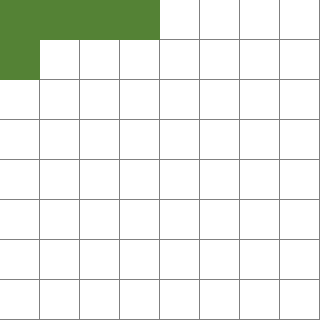
则一共能有7行*5列=35种可能
同时,巧妙利用中心旋转的算法,分别得出旋转90度、180度、270度的位置可能
如下所示
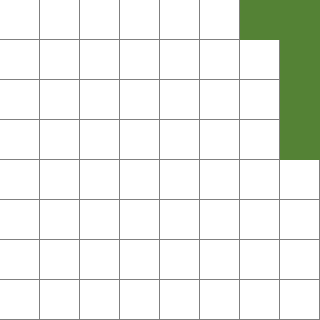
旋转90度的图
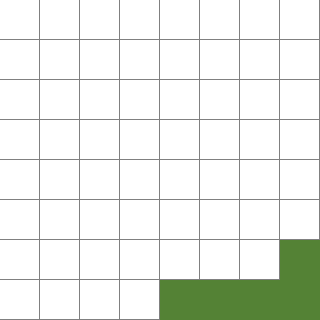
旋转180度的图
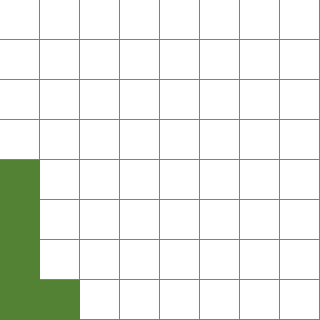
旋转270度的图
这样一来,只需要遍历最先图的形状位置即可,其余旋转的形状的可以依次推导。
上面的形状还有一个如下图的,需要遍历
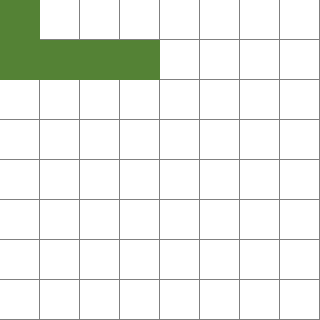
这样一来,这个形状1的所有位置就遍历完成了。
依次遍历13个形状,这样就生成了问题矩阵的所有行
代码如下:
Implements I_Question
Private _Shapes As List(Of clsTetrisShape)
Private _Index() As Integer
Public ReadOnly Property Cols As Integer Implements I_Question.Cols
Get
Return 77
End Get
End Property
Public Function ConvertFromDance(Answer() As Integer) As Object Implements I_Question.ConvertFromDance
Debug.Print(Answer.Length)
Dim tBmp As New Bitmap(320, 320)
Dim tG As Graphics = Graphics.FromImage(tBmp)
tG.Clear(Color.White)
Dim I As Integer
For I = 0 To Answer.Length - 1
_Shapes(_Index(Answer(I) - 1)).DrawShape(tG)
Next
Return tBmp
End Function
Public ReadOnly Property ExtraCols As Integer Implements I_Question.ExtraCols
Get
Return 77
End Get
End Property
Public Sub ConvertToDance(Dance As clsDancingLinksImproveNoRecursive) Implements I_Question.ConvertToDance
_Shapes = New List(Of clsTetrisShape)
Dim I As Integer, J As Integer
Dim tShape As clsTetrisShape, tRotateShape As clsTetrisShape
Dim S As Integer
'Shape 1
For I = 0 To 6
For J = 0 To 4
S = I * 8 + J
tShape = New clsTetrisShape(1, S, S + 1, S + 2, S + 3, S + 8)
AppendAllShapes(Dance, tShape)
Next
Next
For I = 0 To 6
For J = 0 To 4
S = I * 8 + J
tShape = New clsTetrisShape(1, S, S + 8, S + 9, S + 10, S + 11)
AppendAllShapes(Dance, tShape)
Next
Next
'Shape 2
For I = 0 To 5
For J = 0 To 5
S = I * 8 + J
tShape = New clsTetrisShape(2, S, S + 1, S + 9, S + 10, S + 18)
AppendAllShapes(Dance, tShape)
Next
Next
'Shape3
For I = 0 To 5
For J = 0 To 5
S = I * 8 + J
tShape = New clsTetrisShape(3, S, S + 1, S + 9, S + 10, S + 17)
AppendAllShapes(Dance, tShape)
Next
Next
For I = 0 To 5
For J = 1 To 6
S = I * 8 + J
tShape = New clsTetrisShape(3, S, S + 1, S + 7, S + 8, S + 16)
AppendAllShapes(Dance, tShape)
Next
Next
'Shape 4
For I = 0 To 5
For J = 0 To 5
S = I * 8 + J
tShape = New clsTetrisShape(4, S, S + 1, S + 2, S + 8, S + 16)
AppendAllShapes(Dance, tShape)
Next
Next
'Shape5
For I = 0 To 6
For J = 0 To 4
S = I * 8 + J
tShape = New clsTetrisShape(5, S, S + 1, S + 2, S + 10, S + 11)
AppendAllShapes(Dance, tShape)
Next
Next
For I = 0 To 6
For J = 1 To 5
S = I * 8 + J
tShape = New clsTetrisShape(5, S, S + 1, S + 2, S + 7, S + 8)
AppendAllShapes(Dance, tShape)
Next
Next
'Shape6
For I = 0 To 5
For J = 0 To 5
S = I * 8 + J
tShape = New clsTetrisShape(6, S, S + 8, S + 9, S + 10, S + 18)
_Shapes.Add(tShape)
tRotateShape = tShape.Rotate90
_Shapes.Add(tRotateShape)
Next
Next
For I = 0 To 5
For J = 2 To 7
S = I * 8 + J
tShape = New clsTetrisShape(6, S, S + 6, S + 7, S + 8, S + 14)
_Shapes.Add(tShape)
tRotateShape = tShape.Rotate90
_Shapes.Add(tRotateShape)
Next
Next
'Shape 7
For I = 0 To 5
For J = 0 To 5
S = I * 8 + J
tShape = New clsTetrisShape(7, S, S + 1, S + 2, S + 9, S + 17)
AppendAllShapes(Dance, tShape)
Next
Next
'Shape 8
For I = 0 To 6
For J = 0 To 5
S = I * 8 + J
tShape = New clsTetrisShape(8, S, S + 1, S + 2, S + 8, S + 9)
AppendAllShapes(Dance, tShape)
Next
Next
For I = 0 To 6
For J = 0 To 5
S = I * 8 + J
tShape = New clsTetrisShape(8, S, S + 1, S + 2, S + 9, S + 10)
AppendAllShapes(Dance, tShape)
Next
Next
'Shape 9
For I = 0 To 6
For J = 0 To 4
S = I * 8 + J
tShape = New clsTetrisShape(9, S, S + 1, S + 2, S + 3, S + 9)
AppendAllShapes(Dance, tShape)
Next
Next
For I = 0 To 6
For J = 0 To 4
S = I * 8 + J
tShape = New clsTetrisShape(9, S, S + 1, S + 2, S + 3, S + 10)
AppendAllShapes(Dance, tShape)
Next
Next
'Shape 10
For I = 0 To 6
For J = 0 To 6
S = I * 8 + J
tShape = New clsTetrisShape(10, S, S + 1, S + 8, S + 9)
_Shapes.Add(tShape)
Next
Next
'Shape 11
For I = 0 To 5
For J = 1 To 6
S = I * 8 + J
tShape = New clsTetrisShape(11, S, S + 7, S + 8, S + 9, S + 16)
_Shapes.Add(tShape)
Next
Next
'Shape12
For I = 0 To 7
For J = 0 To 3
S = I * 8 + J
tShape = New clsTetrisShape(12, S, S + 1, S + 2, S + 3, S + 4)
_Shapes.Add(tShape)
tRotateShape = tShape.Rotate90
_Shapes.Add(tRotateShape)
Next
Next
'Shape 13
For I = 0 To 6
For J = 0 To 5
S = I * 8 + J
tShape = New clsTetrisShape(13, S, S + 1, S + 2, S + 8, S + 10)
AppendAllShapes(Dance, tShape)
Next
Next
ReDim _Index(_Shapes.Count - 1)
For I = 0 To _Shapes.Count - 1
_Index(I) = I
Next
Dim R As New Random, tSwap As Integer
For I = _Shapes.Count - 1 To Int(_Shapes.Count / 3) Step -1
J = R.Next(I)
tSwap = _Index(J)
_Index(J) = _Index(I)
_Index(I) = tSwap
Next
For I = 0 To _Shapes.Count - 1
Dance.AppendLine(_Shapes(_Index(I)).GetLineValue)
Next
End Sub
Private Sub AppendAllShapes(Dance As clsDancingLinksImproveNoRecursive, tShape As clsTetrisShape)
Dim tRotateShape As clsTetrisShape
_Shapes.Add(tShape)
tRotateShape = tShape.Rotate90
_Shapes.Add(tRotateShape)
tRotateShape = tShape.Rotate180
_Shapes.Add(tRotateShape)
tRotateShape = tShape.Rotate270
_Shapes.Add(tRotateShape)
End Sub
Public ReadOnly Property IsRandomSolution As Boolean Implements I_Question.IsRandomSolution
Get
Return False
End Get
End Property
End Class
上面这个类实现了I_Question接口,代码如下:
Public Interface I_Question
ReadOnly Property Cols As Integer
ReadOnly Property ExtraCols As Integer
ReadOnly Property IsRandomSolution As Boolean
Sub ConvertToDance(Dance As clsDancingLinksImproveNoRecursive)
Function ConvertFromDance(Answer() As Integer) As Object
End Interface
几个参数解释一下
Cols:问题矩阵的数据列数
ExtraCols:问题矩阵必须覆盖的列数。大多数的情况下,和Cols相等,也就是所有列完全覆盖
IsRandomSolution:一个开关,指示求解过程中,是按照最少列优先求解(为False的时候)还是随机选择列求解(为True的时候),在列数比较少的情况下,可以为True,否则不建议使用True,为True的时候,如果存在多个解,每次求解有可能得出不同的解。
ConvertToDance:将数据转换为问题矩阵,并输入到指定的Dance类
ConvertFromDance:Dance类计算得出结果后,将结果返回给实现接口的类,让该类对结果进行相应的处理。
类clsTetris还内置了clsTetrisShape类,定义每个形状的编号、位置、并最终将每个形状绘制到指定的图上,如下:
Private Poi() As Integer
Private ShapeType As Integer
Public Sub New(ShapeType As Integer, ParamArray Poi() As Integer)
Me.ShapeType = ShapeType
Dim I As Integer
ReDim Me.Poi(Poi.Length - 1)
For I = 0 To Poi.Length - 1
Me.Poi(I) = Poi(I)
Next
End Sub
Public Function GetLineValue() As Integer()
Dim Value(76) As Integer
Dim I As Integer
For I = 0 To 76
Value(I) = 0
Next
For I = 0 To Poi.Length - 1
Value(Poi(I)) = 1
Next
Value(63 + ShapeType) = 1
Return Value
End Function
Public Function Rotate90() As clsTetrisShape
Dim NewPoi(Poi.Length - 1) As Integer
Dim I As Integer, X As Integer, Y As Integer
For I = 0 To Poi.Length - 1
X = Int(Poi(I) / 8)
Y = Poi(I) Mod 8
NewPoi(I) = Y * 8 + 7 - X
Next
Return New clsTetrisShape(ShapeType, NewPoi)
End Function
Public Function Rotate180() As clsTetrisShape
Dim NewPoi(Poi.Length - 1) As Integer
Dim I As Integer
For I = 0 To Poi.Length - 1
NewPoi(I) = 63 - Poi(I)
Next
Return New clsTetrisShape(ShapeType, NewPoi)
End Function
Public Function Rotate270() As clsTetrisShape
Dim NewPoi(Poi.Length - 1) As Integer
Dim I As Integer, X As Integer, Y As Integer
For I = 0 To Poi.Length - 1
X = Int(Poi(I) / 8)
Y = Poi(I) Mod 8
NewPoi(I) = (7 - Y) * 8 + X
Next
Return New clsTetrisShape(ShapeType, NewPoi)
End Function
Public Sub DrawShape(G As Graphics)
Dim tBrush As SolidBrush
Select Case ShapeType
Case 1
tBrush = New SolidBrush(Color.FromArgb(84, 130, 53))
Case 2
tBrush = New SolidBrush(Color.FromArgb(112, 48, 160))
Case 3
tBrush = New SolidBrush(Color.FromArgb(166, 166, 166))
Case 4
tBrush = New SolidBrush(Color.FromArgb(0, 176, 240))
Case 5
tBrush = New SolidBrush(Color.FromArgb(0, 32, 96))
Case 6
tBrush = New SolidBrush(Color.FromArgb(0, 0, 0))
Case 7
tBrush = New SolidBrush(Color.FromArgb(192, 0, 0))
Case 8
tBrush = New SolidBrush(Color.FromArgb(255, 217, 102))
Case 9
tBrush = New SolidBrush(Color.FromArgb(0, 112, 192))
Case 10
tBrush = New SolidBrush(Color.FromArgb(0, 176, 80))
Case 11
tBrush = New SolidBrush(Color.FromArgb(255, 255, 0))
Case 12
tBrush = New SolidBrush(Color.FromArgb(198, 89, 17))
Case 13
tBrush = New SolidBrush(Color.FromArgb(146, 208, 80))
Case Else
tBrush = New SolidBrush(Color.FromArgb(146, 208, 80))
End Select
Dim I As Integer, X As Integer, Y As Integer
For I = 0 To Poi.Length - 1
X = Int(Poi(I) / 8)
Y = Poi(I) Mod 8
G.FillRectangle(tBrush, New Rectangle(Y * 40, X * 40, 40, 40))
Next
End Sub
End Class
然后是贴出求解类
Public Shared Function Dancing(Question As I_Question) As Object
Dim _Dance As New clsDancingLinksImproveNoRecursive(Question.Cols, Question.ExtraCols)
Question.ConvertToDance(_Dance)
Return Question.ConvertFromDance(_Dance.Dance(Question.IsRandomSolution))
End Function
End Class
该类只有一个核心方法,定义一个舞蹈链算法(Dancing Links)类,并对该类和I_Question接口搭桥求解问题
在clsTetris类中,原本如果设置IsRandomSolution为True的话,那么求解过程非常缓慢(曾经1小时没有求出一个解出来),但如果设置为False的时候,每次求解是秒破,但是每次求解都是同一个结果。后来想到,交换问题矩阵的行,会影响求解的顺序,但不影响求解的结果。如果求解的结果是唯一的,那么矩阵的行交不交换都一样,但是如果求解的问题不是唯一的,那么改变问题矩阵的行,那么每次求解出来的解就有可能不同。故在clsTetris中,在最后把数据添加到Dance类的时候,是改变了添加顺序的,这样每次求解都是秒破,并且得出的结果也不一样。求解100个解,不到30秒。
最后贴出Dancing类,这才是舞蹈链算法(Dancing Links)的核心
Private Left() As Integer, Right() As Integer, Up() As Integer, Down() As Integer
Private Row() As Integer, Col() As Integer
Private _Head As Integer
Private _Rows As Integer, _Cols As Integer, _NodeCount As Integer
Private Count() As Integer
Private Ans() As Integer
Public Sub New(ByVal Cols As Integer)
Me.New(Cols, Cols)
End Sub
Public Sub New(ByVal Cols As Integer, ExactCols As Integer)
ReDim Left(Cols), Right(Cols), Up(Cols), Down(Cols), Row(Cols), Col(Cols), Ans(Cols)
ReDim Count(Cols)
Dim I As Integer
Up(0) = 0
Down(0) = 0
Right(0) = 1
Left(0) = Cols
For I = 1 To Cols
Up(I) = I
Down(I) = I
Left(I) = I - 1
Right(I) = I + 1
Col(I) = I
Row(I) = 0
Count(I) = 0
Next
Right(Cols) = 0
_Rows = 0
_Cols = Cols
_NodeCount = Cols
_Head = 0
Dim N As Integer = Right(ExactCols)
Right(ExactCols) = _Head
Left(_Head) = ExactCols
Left(N) = _Cols
Right(_Cols) = N
End Sub
Public Sub AppendLine(ByVal ParamArray Value() As Integer)
Dim V As New List(Of Integer)
Dim I As Integer
For I = 0 To Value.Length - 1
If Value(I) <> 0 Then V.Add(I + 1)
Next
AppendLineByIndex(V.ToArray)
End Sub
Public Sub AppendLine(Line As String)
Dim V As New List(Of Integer)
Dim I As Integer
For I = 0 To Line.Length - 1
If Line.Substring(I, 1) <> "0" Then V.Add(I + 1)
Next
AppendLineByIndex(V.ToArray)
End Sub
Public Sub AppendLineByIndex(ByVal ParamArray Index() As Integer)
If Index.Length = 0 Then Exit Sub
_Rows += 1
Dim I As Integer, K As Integer = 0
ReDim Preserve Left(_NodeCount + Index.Length)
ReDim Preserve Right(_NodeCount + Index.Length)
ReDim Preserve Up(_NodeCount + Index.Length)
ReDim Preserve Down(_NodeCount + Index.Length)
ReDim Preserve Row(_NodeCount + Index.Length)
ReDim Preserve Col(_NodeCount + Index.Length)
ReDim Preserve Ans(_Rows)
For I = 0 To Index.Length - 1
_NodeCount += 1
If I = 0 Then
Left(_NodeCount) = _NodeCount
Right(_NodeCount) = _NodeCount
Else
Left(_NodeCount) = _NodeCount - 1
Right(_NodeCount) = Right(_NodeCount - 1)
Left(Right(_NodeCount - 1)) = _NodeCount
Right(_NodeCount - 1) = _NodeCount
End If
Down(_NodeCount) = Index(I)
Up(_NodeCount) = Up(Index(I))
Down(Up(Index(I))) = _NodeCount
Up(Index(I)) = _NodeCount
Row(_NodeCount) = _Rows
Col(_NodeCount) = Index(I)
Count(Index(I)) += 1
Next
End Sub
Public Function Dance(Optional Random As Boolean = False) As Integer()
Dim P As Integer, C1 As Integer
Dim I As Integer, J As Integer
Dim K As Integer = 0
Dim R As New Random
Do
If (Right(_Head) = _Head) Then
ReDim Preserve Ans(K - 1)
For I = 0 To Ans.Length - 1
Ans(I) = Row(Ans(I))
Next
Return Ans
End If
P = Right(_Head)
C1 = P
If Random = False Then
Do While P <> _Head
If Count(P) < Count(C1) Then C1 = P
P = Right(P)
Loop
Else
I = R.Next(_Cols)
For J = 1 To I
P = Right(P)
Next
If P = _Head Then P = Right(_Head)
C1 = P
End If
RemoveCol(C1)
I = Down(C1)
Do While I = C1
ResumeCol(C1)
K -= 1
If K < 0 Then Return Nothing
C1 = Col(Ans(K))
I = Ans(K)
J = Left(I)
Do While J <> I
ResumeCol(Col(J))
J = Left(J)
Loop
I = Down(I)
Loop
Ans(K) = I
J = Right(I)
Do While J <> I
RemoveCol(Col(J))
J = Right(J)
Loop
K += 1
Loop
End Function
Private Sub RemoveCol(ByVal ColIndex As Integer)
Left(Right(ColIndex)) = Left(ColIndex)
Right(Left(ColIndex)) = Right(ColIndex)
Dim I As Integer, J As Integer
I = Down(ColIndex)
Do While I <> ColIndex
J = Right(I)
Do While J <> I
Up(Down(J)) = Up(J)
Down(Up(J)) = Down(J)
Count(Col(J)) -= 1
J = Right(J)
Loop
I = Down(I)
Loop
End Sub
Private Sub ResumeCol(ByVal ColIndex As Integer)
Left(Right(ColIndex)) = ColIndex
Right(Left(ColIndex)) = ColIndex
Dim I As Integer, J As Integer
I = Up(ColIndex)
Do While (I <> ColIndex)
J = Right(I)
Do While J <> I
Up(Down(J)) = J
Down(Up(J)) = J
Count(Col(J)) += 1
J = Right(J)
Loop
I = Up(I)
Loop
End Sub
End Class
注:
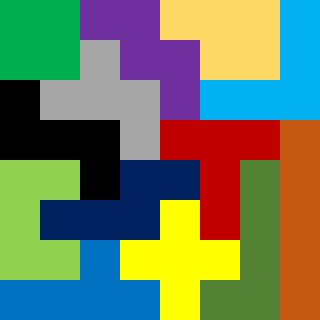
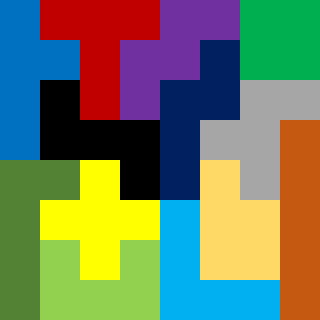
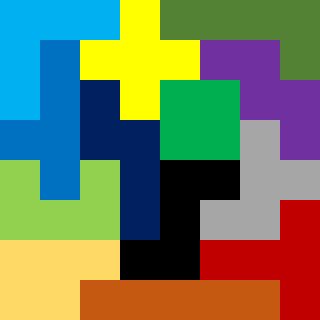
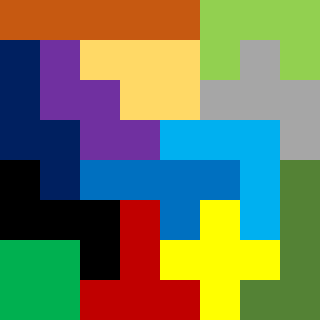
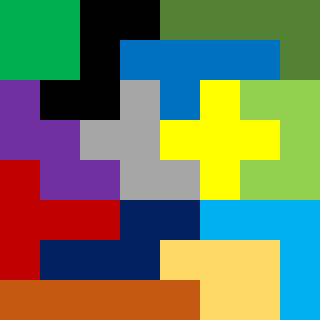
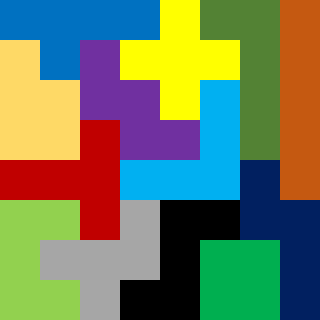
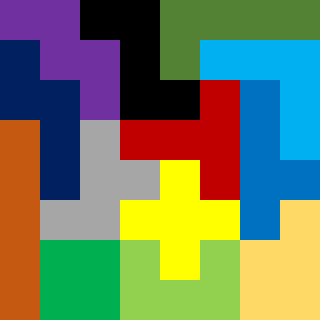
求解了1000个解,发现很有趣的一个现象,就是长条(1*5的那个),几乎都在边上,在当中的解少之又少
下面贴几个解
算法帖——用舞蹈链算法(Dancing Links)求解俄罗斯方块覆盖问题的更多相关文章
- 跳跃的舞者,舞蹈链(Dancing Links)算法——求解精确覆盖问题
精确覆盖问题的定义:给定一个由0-1组成的矩阵,是否能找到一个行的集合,使得集合中每一列都恰好包含一个1 例如:如下的矩阵 就包含了这样一个集合(第1.4.5行) 如何利用给定的矩阵求出相应的行的集合 ...
- 算法实践——舞蹈链(Dancing Links)算法求解数独
在“跳跃的舞者,舞蹈链(Dancing Links)算法——求解精确覆盖问题”一文中介绍了舞蹈链(Dancing Links)算法求解精确覆盖问题. 本文介绍该算法的实际运用,利用舞蹈链(Dancin ...
- 转载 - 算法实践——舞蹈链(Dancing Links)算法求解数独
出处:http://www.cnblogs.com/grenet/p/3163550.html 在“跳跃的舞者,舞蹈链(Dancing Links)算法——求解精确覆盖问题”一文中介绍了舞蹈链(Dan ...
- 转载 - 跳跃的舞者,舞蹈链(Dancing Links)算法——求解精确覆盖问题
出处:http://www.cnblogs.com/grenet/p/3145800.html 精确覆盖问题的定义:给定一个由0-1组成的矩阵,是否能找到一个行的集合,使得集合中每一列都恰好包含一个1 ...
- [转] 舞蹈链(Dancing Links)——求解精确覆盖问题
转载自:http://www.cnblogs.com/grenet/p/3145800.html 精确覆盖问题的定义:给定一个由0-1组成的矩阵,是否能找到一个行的集合,使得集合中每一列都恰好包含一个 ...
- 浅入 dancing links x(舞蹈链算法)
abastract:利用dancing links 解决精确覆盖问题,例如数独,n皇后问题:以及重复覆盖问题. 要学习dacning links 算法,首先要先了解该算法适用的问题,精确覆盖问题和重复 ...
- 【POJ3740】Easy Finding DLX(Dancing Links)精确覆盖问题
题意:多组数据,每组数据给你几行数,要求选出当中几行.使得每一列都有且仅有一个1.询问是可不可行,或者说能不能找出来. 题解:1.暴搜.2.DLX(Dancing links). 本文写的是DLX. ...
- FZU1686 神龙的难题 —— Dancing Links 可重复覆盖
题目链接:https://vjudge.net/problem/FZU-1686 Problem 1686 神龙的难题 Accept: 812 Submit: 2394 Time Limit: ...
- HDU2295 Radar —— Dancing Links 可重复覆盖
题目链接:http://acm.hdu.edu.cn/showproblem.php?pid=2295 Radar Time Limit: 2000/1000 MS (Java/Others) ...
随机推荐
- 自学 Python 3 最好的 入门 书籍 推荐(附 免费 在线阅读 下载链接)
请大家根据自己的实际情况对号入座,挑选适合自己的 Python 入门书籍: 完全没有任何编程基础:01 号书 少量编程基础,不求全,只希望能以最快的速度入门:02 号书 少量编程基础,有一定的英文阅读 ...
- SpringMVC 配置
1.在WEB-INF\web.xml中定义前端控制器 <servlet> <servlet-name>springmvc</servlet-name> <se ...
- Unix英雄传:图文细数十五位计算机先驱
Unix,一款多任务多用户操作系统,最早由AT&T公司员工及合作伙伴在贝尔实验室于1969年开发完成.Unix的衍生及克隆版本包括Berkeley Unix.Minix.Linux.AIX.A ...
- LeetCode 280. Wiggle Sort (摆动排序)$
Given an unsorted array nums, reorder it in-place such that nums[0] <= nums[1] >= nums[2] < ...
- python 使用小结
使用Python 已经一段时间了 ,现将python 中可能用到的技巧和一些知识点分享如下. 1.lambda使用. Lambda函数,是一个匿名函数,创建语法: lambda parameters: ...
- .8-Vue源码之AST(4)
上一节讲完了超长的start函数,也同时完结了handleStartTag函数,接着continue进入下一轮while循环. 此时剩余的字符串状态如图:,切掉了<div id='app'> ...
- SE6 模板字符串详解
SE6引入了模板字符串这样一个概念,让我们从无止尽的+连接字符串中解脱了出来,SE5中也可以在字符串末尾添加\实现,不过模板字符串更加好用和强大. SE6模板字符串是用反撇号(`,即键盘上和~键同一个 ...
- hadoop2 YARN/Mv2中 ApplicationMaster相关问题及介绍
ApplicationMaster是什么? ApplicationMaster是一个框架特殊的库,对于Map-Reduce计算模型而言有它自己的ApplicationMaster实现,对于其他的想要运 ...
- 2017上海QCon之旅总结(下)
本来这个公众号的交流消息中间件相关的技术的.十月去上海参加了QCon,第一次参加这样的技术会议,感受挺多的,所以整理一下自己的一些想法接公众号和大家交流一下. 三天的内容还挺多的,之前已经有上篇和中篇 ...
- maven构建SSM--pox.mxl
最近在做项目,把maven构建SSM的pom.xml文件内容小结一下: 在console中输入如下内容,使用maven创建java web项目: mvn archetype:generate -Dgr ...