
PostgreSQL源码编译
环境:Ubuntu 16.04+PostgresQL13.2
1、指定安装路径
./configure --prefix=/opt/postgresql
2、编译安装
sudo make

sudo make install
3、添加用户和用户组
 sudo groupadd postgres

 sudo useradd -g postgres  postgres
4、创建数据库文件目录
sudo mkdir /opt/postgresql/data
5、用户文件访问权限变更
sudo chown postgres /opt/postgresql/data/

sudo chgrp postgres /opt/postgresql/data/
6、数据库初始化
sudo su postgres

/opt/postgresql/bin/initdb -D /opt/postgresql/data/
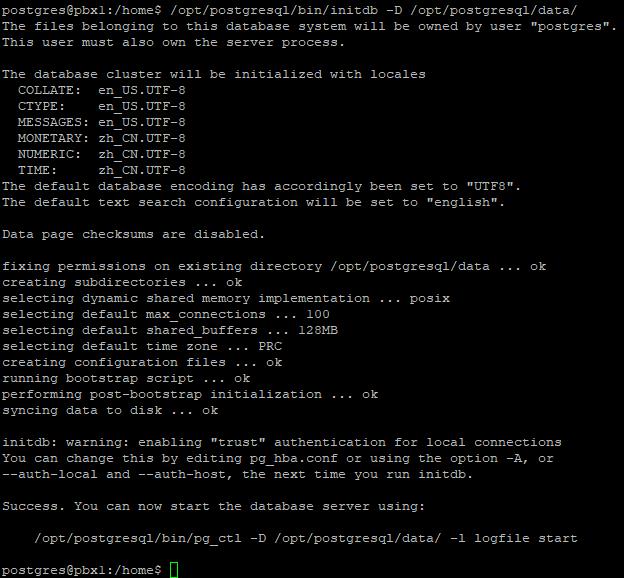
初始化成功后,如下图所示:
7、配置
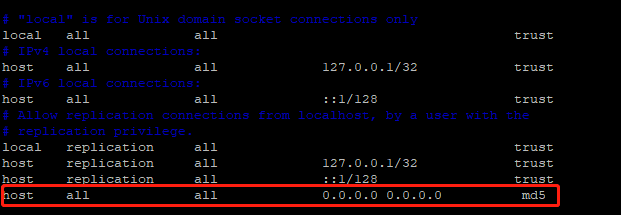
配置允许访问的IP(所有IP都可以访问则对应为0.0.0.0/0)。
vim /opt/postgresql/data/pg_hba.conf
添加如下内容
配置监听地址和端口号:
vim /opt/postgresql/postgresql.conf
内容:
listen_addresses = '*'

port = 5433
8、启动数据库
/opt/postgresql/bin/pg_ctl -D /opt/postgresql/data -l /opt/postgresql/data/logfile start
9、登录数据库
./psql postgres -p 5433
10、创建开机启动服务
进入系统目录:
cd /etc/systemd/system/
创建postgresql.service文件:
[Unit]

Description=postgresql 13.2

After=network.target auditd.service

[Service]

User=postgres

Type=forking

PIDFile=/opt/postgresql/data/postmaster.pid

ExecStart=/usr/local/pgsql/bin/pg_ctl -D /opt/postgresql/data -l /opt/postgresql/data/logfile start

ExecReload=/bin/kill -HUP $MAINPID

KillMode=process

Restart=on-failure

RestartPreventExitStatus=255

[Install]

WantedBy=multi-user.target
or
[Unit]

Description=postgresql 13.2

After=network.target auditd.service

[Service]

User=postgres

ExecStart=/opt/postgresql/bin/pg_ctl -D /opt/postgresql/data -l /opt/postgresql/data/logfile start

ExecReload=/bin/kill -HUP $MAINPID

KillMode=process

Restart=on-failure

RestartPreventExitStatus=255

Type=notify

[Install]

WantedBy=multi-user.target
最后启动服务即可。
11、开放防火墙
sudo iptables -A INPUT -p tcp -m state --state NEW -m tcp --dport 5433 -j ACCEPT
PostgreSQL源码编译的更多相关文章
- Linux环境PostgreSQL源码编译安装
Linux环境PostgreSQL源码编译安装 Linux版本: Red Hat 6.4 PostgreSQL版本: postgresql-9.3.2.tar.gz 数据存放目录: /var/post ...
- postgresql源码编译安装(centos)
centos6.8安装postgresql-9.6.8 一.环境 centos6.8 postgresql-9.6.8 二.准备工作 虚拟机可以连接外网 三.先安装make,gcc,gcc-c++,r ...
- ubuntu 14.04 源码编译postgresql
环境 ubuntu 14.04 桌面版 postgresql 源码下载链接,本教程是使用postgresql 9.3.4 进行编译的 http://www.postgresql.org/ftp/sou ...
- Linux CentOS 7 安装PostgreSQL 9.5.17 (源码编译)
近日需要将PostgreSQL数据库从Windows中迁移到Linux中,Linux CentOS 7 安装PostgreSQL 9.5.17 安装过程 特此记录. 安装环境: 数据库:Postgre ...
- [原创]在Windows和Linux中搭建PostgreSQL源码调试环境
张文升http://ode.cnblogs.comEmail:wensheng.zhang#foxmail.com 配图太多,完整pdf下载请点这里 本文使用Xming.Putty和VMWare几款工 ...
- 跟我一起读postgresql源码(十)——Executor(查询执行模块之——Scan节点(下))
接前文跟我一起读postgresql源码(九)--Executor(查询执行模块之--Scan节点(上)) ,本篇把剩下的七个Scan节点结束掉. T_SubqueryScanState, T_Fun ...
- Linux 从源码编译安装 OpenSSH
https://blog.csdn.net/bytxl/article/details/46639073 Linux 从源码编译安装 OpenSSH以及各问题解决 2015年06月25日 17:37: ...
- [转]PostgreSQL源码结构
PostgreSQL采用C/S(客户机/服务器)模式结构.应用层通过INET或者Unix Socket利用既定的协议与数据库服务器进行通信. 另外,还有一种‘Standalone Backend’使用 ...
- php源码编译常见错误解决方案大全
php源码编译常见错误解决方案大全http://www.cnlvzi.com/index.php/Index/article/id/143 在CentOS编译PHP5的时候有时会遇到以下的一些错误信息 ...
随机推荐
- 【LeetCode】503. Next Greater Element II 解题报告(Python & C++)
作者: 负雪明烛 id: fuxuemingzhu 个人博客: http://fuxuemingzhu.cn/ 目录 题目描述 题目大意 解题方法 暴力解法 单调递减栈 日期 题目地址:https:/ ...
- 【LeetCode】592. Fraction Addition and Subtraction 解题报告(Python)
[LeetCode]592. Fraction Addition and Subtraction 解题报告(Python) 标签(空格分隔): LeetCode 作者: 负雪明烛 id: fuxuem ...
- 1007 - Mathematically Hard
1007 - Mathematically Hard PDF (English) Statistics Forum Time Limit: 2 second(s) Memory Limit: 6 ...
- Reproducing Kernel Hilbert Space (RKHS)
目录 概 主要内容 RKHS-wiki 概 这里对RKHS做一个简单的整理, 之前的理解错得有点离谱了. 主要内容 首先要说明的是, RKHS也是指一种Hilbert空间, 只是其有特殊的性质. Hi ...
- jsp标签 c:when
Illegal use of <when>-style tag without <choose> as its direct parent 在jsp页面用报错Illegal u ...
- 强强联袂!腾讯云TDSQL与国双战略签约,锚定国产数据库巨大市场
日前,腾讯云计算(北京)有限责任公司与北京国双科技有限公司签署了<国产数据库产品战略合作协议>,双方将在数据库技术方面展开深度合作,通过分布式交易型数据库的联合研发.产品服务体系建设.品牌 ...
- [数据结构]常见数据结构的typedef类型定义总结
目录 数据结构类型定义: 1.线性表 线性表(顺序存储类型描述): 线性表(动态存储类型描述) 2.线性表的链式表示 双链表的结点类型描述: 静态链表结点类型的描述: 3.栈的数据结构 顺序栈的数据结 ...
- Python升级至2.7方法
在Linux下Python升级至2.7的详细步骤方法, 此处的升级,使用的是全新安装新版本,替换旧版本的方法, 同时新旧版本可以共存,将默认python指向最新2.7版本即可. 1.下载Python- ...
- Linux_接收文件(rz)和发送文件(sz)
我们连接linux通常是使用一些ssh工具进行远程访问连接的,在使用过程中,少不了将本地文件上传到linux或将linux上的文件下载到本地,每次使用ftp比较繁琐而且浪费时间.我们可以使用linux ...
- Chrome - XPath Helper插件 使用手工拖拽方式无法正常安装的解决办法
安装前准备: (1)下载 XPath Helper资源: 链接: https://pan.baidu.com/s/1yEnngIJz8fT9fNv3aHhs7w 提取码: afy3 (2)Chrome ...