
基于Spring MVC + Spring + MyBatis的【人事管理系统】
资源下载:https://download.csdn.net/download/weixin_44893902/33163160
一、语言和环境
- 实现语言:JAVA语言
- 环境要求:IDEA/Eclipse + Tomcat + MySql
- 使用技术:
Spring Boot或SSM
二、实现功能
随着公司业务的发展,需要一款在线人事管理系统,主要功能如下:
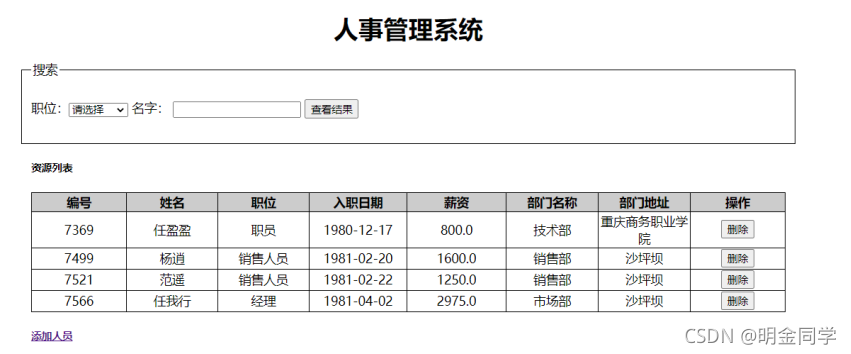
- 首页默认显示所有员工信息,如图1所示。
- 鼠标悬停某行数据时,以线性过渡动画显示光棒效果,如图2所示。

- 用户可以单独通过选择职位进行查询,也可以单独输入名字进行模糊查询,也可以两个条件一起查询,如图3所示。

- 点击添加人员,跳转到添加页面。输入数据后,点击确定添加,跳转主页面并刷新数据。

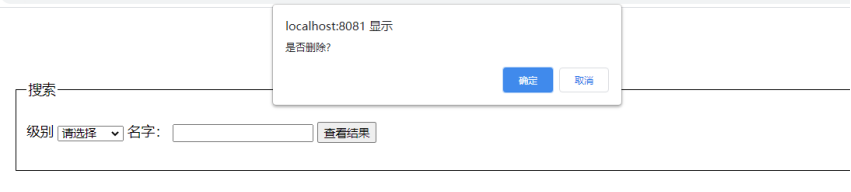
- 用户点击删除,弹出提示框,用户点击确定后,删除选中数据并显示最新数据,如图5所示
三、数据库设计
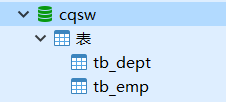
创建数据库(
cqsw)。创建数据表(
tb_emp),结构如下。
| 字段名 | 说明 | 字段类型 | 长度 | 备注 |
|---|---|---|---|---|
| emp_id | 员工编号 | int | 主键,自增,增量为1 | |
| emp_name | 员工名称 | varchar | 50 | 不能为空 |
| emp_position | 员工职位 | varchar | 不能为空 | |
| emp_in_date | 员工入职时间 | Date | 不能为空 | |
| emp_salary | 员工薪资 | float | 不能为空 | |
| dept_id | 部门id | int | 不能为空 |
- 创建数据表(
tb_dept),结构如下。
| 字段名 | 说明 | 字段类型 | 长度 | 备注 |
|---|---|---|---|---|
| dept_id | 部门编号 | int | 主键,自增,增量为1 | |
| dept_name | 部门名称 | varchar | 50 | 不能为空 |
| dept_address | 部门地址 | varchar | 不能为空 |
四、实现步骤
SSM版本的实现步骤如下:
- 创建
数据库和数据表,添加测试数据(至少添加4条测试数据)。 - 创建Web工程并创建各个包,导入工程所需的
jar文件。 - 添加相关
SSM框架支持。 - 配置项目所需要的各种配置文件(
mybatis配置文件、spring配置文件、springMVC配置文件)。 - 创建实体类。
- 创建MyBatis操作数据库所需的
Mapper接口及其Xml映射数据库操作语句文件。 - 创建业务逻辑相应的接口及其实现类,实现相应的业务,并在类中加入对
DAO/Mapper的引用和注入。 - 创建
Controller控制器类,在Controller中添加对业务逻辑类的引用和注入,并配置springMVC配置文件。 - 创建相关的操作页面,并使用CSS对页面进行美化。
- 实现页面的各项操作功能,并在相关地方进行验证,操作要人性化。
- 调试运行成功后导出相关的数据库文件并提交。
五、实现代码
1、MySQL数据库
cqsw.sql
/*

Navicat MySQL Data Transfer

Date: 2021-08-06 20:07:05

*/

SET FOREIGN_KEY_CHECKS=0;

-- ----------------------------

-- Table structure for `tb_dept`

-- ----------------------------

DROP TABLE IF EXISTS `tb_dept`;

CREATE TABLE `tb_dept` (

  `dept_id` int(11) NOT NULL AUTO_INCREMENT,

  `dept_name` varchar(50) NOT NULL,

  `dept_address` varchar(50) NOT NULL,

  PRIMARY KEY (`dept_id`)

) ENGINE=InnoDB AUTO_INCREMENT=4 DEFAULT CHARSET=utf8;

-- ----------------------------

-- Records of tb_dept

-- ----------------------------

INSERT INTO `tb_dept` VALUES ('1', '技术部', '重庆商务职业学院');

INSERT INTO `tb_dept` VALUES ('2', '销售部', '沙坪坝');

INSERT INTO `tb_dept` VALUES ('3', '市场部', '沙坪坝');

-- ----------------------------

-- Table structure for `tb_emp`

-- ----------------------------

DROP TABLE IF EXISTS `tb_emp`;

CREATE TABLE `tb_emp` (

  `emp_id` int(11) NOT NULL AUTO_INCREMENT,

  `emp_name` varchar(50) NOT NULL,

  `emp_position` varchar(50) NOT NULL,

  `emp_in_date` varchar(100) NOT NULL,

  `emp_salary` float NOT NULL,

  `dept_id` int(11) NOT NULL,

  PRIMARY KEY (`emp_id`)

) ENGINE=InnoDB AUTO_INCREMENT=7374 DEFAULT CHARSET=utf8;

-- ----------------------------

-- Records of tb_emp

-- ----------------------------

INSERT INTO `tb_emp` VALUES ('7369', '任盈盈', '职员', '1980-12-17', '800', '1');

INSERT INTO `tb_emp` VALUES ('7370', '杨逍', '销售人员', '1981-02-20', '1600', '2');

INSERT INTO `tb_emp` VALUES ('7371', '范瑶', '销售人员', '1981-02-22', '1250', '2');

INSERT INTO `tb_emp` VALUES ('7372', '任我行', '经理', '1981-04-02', '2975', '3');

INSERT INTO `tb_emp` VALUES ('7373', '卡卡西', '经理', '2021-08-06', '5000', '1');
2、项目Java代码
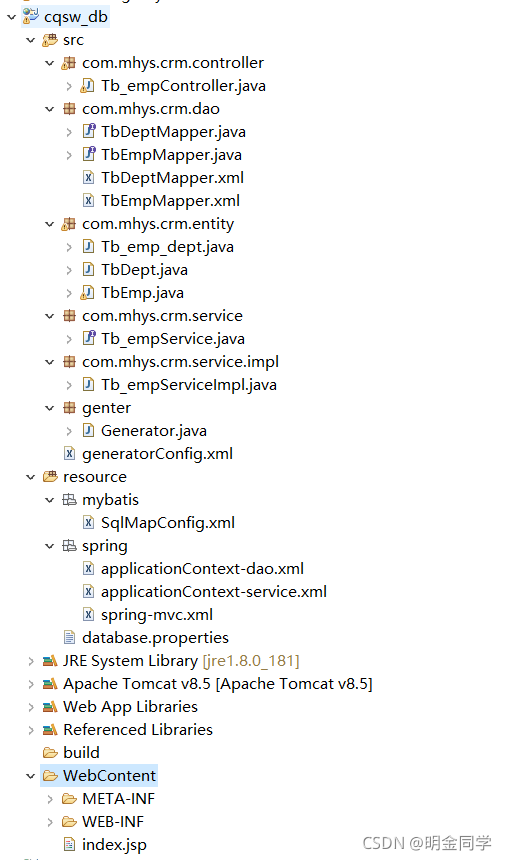
目录结构
cqsw_db
JAR包:
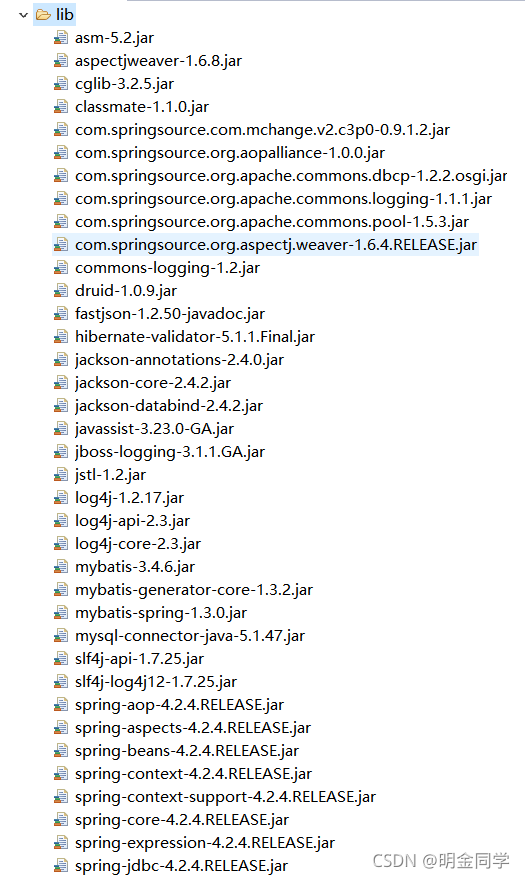
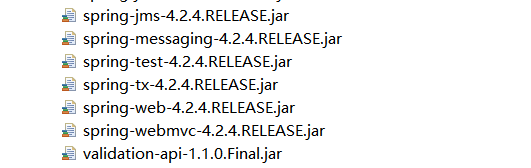
src
com.mhys.crm.controller【控制层】
Tb_empController.java
package com.mhys.crm.controller;

import java.util.List;

import javax.annotation.Resource;

import org.springframework.stereotype.Controller;

import org.springframework.ui.Model;

import org.springframework.web.bind.annotation.RequestMapping;

import com.mhys.crm.entity.TbEmp;

import com.mhys.crm.entity.Tb_emp_dept;

import com.mhys.crm.service.Tb_empService;

import com.sun.org.apache.xpath.internal.operations.Mod;

import com.sun.swing.internal.plaf.metal.resources.metal;

@Controller

public class Tb_empController {

	@Resource

	private Tb_empService service;

	@RequestMapping("selectAll")

	public String selectAll(Model model,Tb_emp_dept tb_emp_dept) {

		if (tb_emp_dept.getEmpName()==null) {

			tb_emp_dept.setEmpName("");

		}

		if (tb_emp_dept.getEmpPosition()==null) {

			tb_emp_dept.setEmpPosition("");

		}

		List<Tb_emp_dept> list=service.selectAll(tb_emp_dept);

		model.addAttribute("empList", list);

		return "/account";

	}

	@RequestMapping("addPage")

	public String addPage() {

		return "/addAccount";

	}

	@RequestMapping("add")

	public String add(TbEmp tbEmp) {

		int rows=service.add(tbEmp);

		return "redirect:selectAll.do";

	}

	@RequestMapping("delete")

	public String  delete(int id) {

		int row=service.delete(id);

		return "redirect:selectAll.do";

	}

}
com.mhys.crm.dao【数据库访问层】
TbDeptMapper.java
package com.mhys.crm.dao;

import com.mhys.crm.entity.TbDept;

import java.util.List;

public interface TbDeptMapper {

    int deleteByPrimaryKey(Integer deptId);

    int insert(TbDept record);

    TbDept selectByPrimaryKey(Integer deptId);

    List<TbDept> selectAll();

    int updateByPrimaryKey(TbDept record);

}
TbEmpMapper.java
package com.mhys.crm.dao;

import com.mhys.crm.entity.TbEmp;

import com.mhys.crm.entity.Tb_emp_dept;

import java.util.List;

public interface TbEmpMapper {

    int deleteByPrimaryKey(Integer empId);

    int insert(TbEmp record);

    TbEmp selectByPrimaryKey(Integer empId);

    List<TbEmp> selectAll();

    int updateByPrimaryKey(TbEmp record);

    //多表连查

    List<Tb_emp_dept> selectEmp();

    //模糊查询

    List<Tb_emp_dept> selectEmpLike(Tb_emp_dept tb_emp_dept);

}
TbDeptMapper.xml
<?xml version="1.0" encoding="UTF-8" ?>

<!DOCTYPE mapper PUBLIC "-//mybatis.org//DTD Mapper 3.0//EN" "http://mybatis.org/dtd/mybatis-3-mapper.dtd" >

<mapper namespace="com.mhys.crm.dao.TbDeptMapper" >

  <resultMap id="BaseResultMap" type="com.mhys.crm.entity.TbDept" >

    <id column="dept_id" property="deptId" jdbcType="INTEGER" />

    <result column="dept_name" property="deptName" jdbcType="VARCHAR" />

    <result column="dept_address" property="deptAddress" jdbcType="VARCHAR" />

  </resultMap>

  <delete id="deleteByPrimaryKey" parameterType="java.lang.Integer" >

    delete from tb_dept

    where dept_id = #{deptId,jdbcType=INTEGER}

  </delete>

  <insert id="insert" parameterType="com.mhys.crm.entity.TbDept" >

    insert into tb_dept (dept_id, dept_name, dept_address

      )

    values (#{deptId,jdbcType=INTEGER}, #{deptName,jdbcType=VARCHAR}, #{deptAddress,jdbcType=VARCHAR}

      )

  </insert>

  <update id="updateByPrimaryKey" parameterType="com.mhys.crm.entity.TbDept" >

    update tb_dept

    set dept_name = #{deptName,jdbcType=VARCHAR},

      dept_address = #{deptAddress,jdbcType=VARCHAR}

    where dept_id = #{deptId,jdbcType=INTEGER}

  </update>

  <select id="selectByPrimaryKey" resultMap="BaseResultMap" parameterType="java.lang.Integer" >

    select dept_id, dept_name, dept_address

    from tb_dept

    where dept_id = #{deptId,jdbcType=INTEGER}

  </select>

  <select id="selectAll" resultMap="BaseResultMap" >

    select dept_id, dept_name, dept_address

    from tb_dept

  </select>

</mapper>
TbEmpMapper.xml
<?xml version="1.0" encoding="UTF-8" ?>

<!DOCTYPE mapper PUBLIC "-//mybatis.org//DTD Mapper 3.0//EN" "http://mybatis.org/dtd/mybatis-3-mapper.dtd" >

<mapper namespace="com.mhys.crm.dao.TbEmpMapper" >

  <resultMap id="BaseResultMap" type="com.mhys.crm.entity.Tb_emp_dept" >

    <id column="emp_id" property="empId" jdbcType="INTEGER" />

    <result column="emp_name" property="empName" jdbcType="VARCHAR" />

    <result column="emp_position" property="empPosition" jdbcType="VARCHAR" />

    <result column="emp_in_date" property="empInDate" jdbcType="DATE" />

    <result column="emp_salary" property="empSalary" jdbcType="REAL" />

    <result column="dept_id" property="deptId" jdbcType="INTEGER" />

    <result column="dept_name" property="deptName" jdbcType="VARCHAR" />

    <result column="dept_address" property="deptAddress" jdbcType="VARCHAR" />

  </resultMap>

  <delete id="deleteByPrimaryKey" parameterType="java.lang.Integer" >

    delete from tb_emp

    where emp_id = #{empId,jdbcType=INTEGER}

  </delete>

  <insert id="insert" parameterType="com.mhys.crm.entity.TbEmp" >

    insert into tb_emp (emp_id, emp_name, emp_position,

      emp_in_date, emp_salary, dept_id

      )

    values (#{empId,jdbcType=INTEGER}, #{empName,jdbcType=VARCHAR}, #{empPosition,jdbcType=VARCHAR},

      #{empInDate,jdbcType=DATE}, #{empSalary,jdbcType=REAL}, #{deptId,jdbcType=INTEGER}

      )

  </insert>

  <update id="updateByPrimaryKey" parameterType="com.mhys.crm.entity.TbEmp" >

    update tb_emp

    set emp_name = #{empName,jdbcType=VARCHAR},

      emp_position = #{empPosition,jdbcType=VARCHAR},

      emp_in_date = #{empInDate,jdbcType=DATE},

      emp_salary = #{empSalary,jdbcType=REAL},

      dept_id = #{deptId,jdbcType=INTEGER}

    where emp_id = #{empId,jdbcType=INTEGER}

  </update>

  <select id="selectByPrimaryKey" resultMap="BaseResultMap" parameterType="java.lang.Integer" >

    select emp_id, emp_name, emp_position, emp_in_date, emp_salary, dept_id

    from tb_emp

    where emp_id = #{empId,jdbcType=INTEGER}

  </select>

  <select id="selectAll" resultMap="BaseResultMap" >

    select emp_id, emp_name, emp_position, emp_in_date, emp_salary, dept_id

    from tb_emp

  </select>

  <select id="selectEmp" resultMap="BaseResultMap" >

    SELECT emp_id, emp_name, emp_position, emp_in_date, emp_salary,dept_name,

     dept_address FROM tb_emp e,tb_dept d WHERE e.dept_id=d.dept_id

  </select>

  <select id="selectEmpLike" resultMap="BaseResultMap" >

    SELECT emp_id, emp_name, emp_position, emp_in_date, emp_salary,dept_name,

     dept_address FROM tb_emp e LEFT JOIN tb_dept d on e.dept_id=d.dept_id WHERE emp_position LIKE "%"#{empPosition}"%"

     and emp_name like "%"#{empName}"%"

  </select>

</mapper>
com.mhys.crm.entity【实体的包】
Tb_emp_dept.java
package com.mhys.crm.entity;

import java.util.Date;

public class Tb_emp_dept {

	private Integer empId;

    private String empName;

    private String empPosition;

    private Date empInDate;

    private Float empSalary;

    private Integer deptId;

    private String deptName;

    private String deptAddress;

	public Integer getEmpId() {

		return empId;

	}

	public void setEmpId(Integer empId) {

		this.empId = empId;

	}

	public String getEmpName() {

		return empName;

	}

	public void setEmpName(String empName) {

		this.empName = empName;

	}

	public String getEmpPosition() {

		return empPosition;

	}

	public void setEmpPosition(String empPosition) {

		this.empPosition = empPosition;

	}

	public Date getEmpInDate() {

		return empInDate;

	}

	public void setEmpInDate(Date empInDate) {

		this.empInDate = empInDate;

	}

	public Float getEmpSalary() {

		return empSalary;

	}

	public void setEmpSalary(Float empSalary) {

		this.empSalary = empSalary;

	}

	public Integer getDeptId() {

		return deptId;

	}

	public void setDeptId(Integer deptId) {

		this.deptId = deptId;

	}

	public String getDeptName() {

		return deptName;

	}

	public void setDeptName(String deptName) {

		this.deptName = deptName;

	}

	public String getDeptAddress() {

		return deptAddress;

	}

	public void setDeptAddress(String deptAddress) {

		this.deptAddress = deptAddress;

	}

	public Tb_emp_dept(Integer empId, String empName, String empPosition, Date empInDate, Float empSalary,

			Integer deptId, String deptName, String deptAddress) {

		super();

		this.empId = empId;

		this.empName = empName;

		this.empPosition = empPosition;

		this.empInDate = empInDate;

		this.empSalary = empSalary;

		this.deptId = deptId;

		this.deptName = deptName;

		this.deptAddress = deptAddress;

	}

	public Tb_emp_dept() {

		super();

	}

	@Override

	public String toString() {

		return "Tb_emp_dept [empId=" + empId + ", empName=" + empName + ", empPosition=" + empPosition + ", empInDate="

				+ empInDate + ", empSalary=" + empSalary + ", deptId=" + deptId + ", deptName=" + deptName

				+ ", deptAddress=" + deptAddress + "]";

	}

}
TbDept.java
package com.mhys.crm.entity;

public class TbDept {

    private Integer deptId;

    private String deptName;

    private String deptAddress;

    public Integer getDeptId() {

        return deptId;

    }

    public void setDeptId(Integer deptId) {

        this.deptId = deptId;

    }

    public String getDeptName() {

        return deptName;

    }

    public void setDeptName(String deptName) {

        this.deptName = deptName == null ? null : deptName.trim();

    }

    public String getDeptAddress() {

        return deptAddress;

    }

    public void setDeptAddress(String deptAddress) {

        this.deptAddress = deptAddress == null ? null : deptAddress.trim();

    }

}
TbEmp.java
package com.mhys.crm.entity;

import java.util.Date;

public class TbEmp {

    private Integer empId;

    private String empName;

    private String empPosition;

    private String empInDate;

    private Float empSalary;

    private Integer deptId;

    public Integer getEmpId() {

        return empId;

    }

    public void setEmpId(Integer empId) {

        this.empId = empId;

    }

    public String getEmpName() {

        return empName;

    }

    public void setEmpName(String empName) {

        this.empName = empName == null ? null : empName.trim();

    }

    public String getEmpPosition() {

        return empPosition;

    }

    public void setEmpPosition(String empPosition) {

        this.empPosition = empPosition == null ? null : empPosition.trim();

    }

    public String getEmpInDate() {

        return empInDate;

    }

    public void setEmpInDate(String empInDate) {

        this.empInDate = empInDate;

    }

    public Float getEmpSalary() {

        return empSalary;

    }

    public void setEmpSalary(Float empSalary) {

        this.empSalary = empSalary;

    }

    public Integer getDeptId() {

        return deptId;

    }

    public void setDeptId(Integer deptId) {

        this.deptId = deptId;

    }

}
com.mhys.crm.service【业务处理类】
Tb_empService.java
package com.mhys.crm.service;

import java.util.List;

import com.mhys.crm.entity.TbEmp;

import com.mhys.crm.entity.Tb_emp_dept;

public interface Tb_empService {

	//查询

	List<Tb_emp_dept> selectAll(Tb_emp_dept tb_emp_dept);

	//添加

	int add(TbEmp tbEmp);

	int delete(int id);

}
com.mhys.crm.service.impl【业务处理的实现类】
Tb_empServiceImpl.java
package com.mhys.crm.service.impl;

import java.util.List;

import javax.annotation.Resource;

import org.springframework.stereotype.Service;

import com.mhys.crm.dao.TbEmpMapper;

import com.mhys.crm.entity.TbEmp;

import com.mhys.crm.entity.Tb_emp_dept;

import com.mhys.crm.service.Tb_empService;

@Service

public class Tb_empServiceImpl implements Tb_empService {

	@Resource

	private TbEmpMapper mapper;

	@Override

	public List<Tb_emp_dept> selectAll(Tb_emp_dept tb_emp_dept) {

		// TODO Auto-generated method stub

		System.out.println(tb_emp_dept.getEmpName());

		System.out.println(tb_emp_dept.getEmpPosition());

		if (tb_emp_dept.getEmpName().equals("")&&tb_emp_dept.getEmpPosition().equals("")) {

			List<Tb_emp_dept> list=mapper.selectEmp();

			return list;

		}else {

			List<Tb_emp_dept> list=mapper.selectEmpLike(tb_emp_dept);

			return list;

		}

	}

	@Override

	public int add(TbEmp tbEmp) {

		// TODO Auto-generated method stub

		int rows=mapper.insert(tbEmp);

		return rows;

	}

	@Override

	public int delete(int id) {

		// TODO Auto-generated method stub

		return mapper.deleteByPrimaryKey(id);

	}

}
genter【实体类自动生成包】
Tb_empController.java
package genter;

import java.io.IOException;

import java.io.InputStream;

import java.sql.SQLException;

import java.util.ArrayList;

import java.util.List;

import org.mybatis.generator.api.MyBatisGenerator;

import org.mybatis.generator.config.Configuration;

import org.mybatis.generator.config.xml.ConfigurationParser;

import org.mybatis.generator.exception.InvalidConfigurationException;

import org.mybatis.generator.exception.XMLParserException;

import org.mybatis.generator.internal.DefaultShellCallback;

public class Generator {

/*

 * targetRuntime="MyBatis3Simple", 不生成Example

 */

public void generateMyBatis() {

	//MBG执行过程中的警告信息

	List<String> warnings = new ArrayList<String>();

	//当生成的代码重复时,覆盖原代码

	boolean overwrite = true ;

	String generatorFile = "/generatorConfig.xml";

	//String generatorFile = "/generator/generatorConfigExample.xml";

	//读取MBG配置文件

	InputStream is = Generator.class.getResourceAsStream(generatorFile);

	ConfigurationParser cp = new ConfigurationParser(warnings);

	Configuration config;

	try {

		config = cp.parseConfiguration(is);

		DefaultShellCallback callback = new DefaultShellCallback(overwrite);

		//创建MBG

		MyBatisGenerator myBatisGenerator = new MyBatisGenerator(config, callback, warnings);

		//执行生成代码

		myBatisGenerator.generate(null);

	} catch (IOException e) {

		e.printStackTrace();

	} catch (XMLParserException e) {

		e.printStackTrace();

	} catch (InvalidConfigurationException e) {

		e.printStackTrace();

	} catch (SQLException e) {

		e.printStackTrace();

	} catch (InterruptedException e) {

		e.printStackTrace();

	}

	for (String warning : warnings) {

		System.out.println(warning);

	}

}

public static void main(String[] args) {

	Generator generator = new Generator();

	generator.generateMyBatis();

}

}
generatorConfig.xml
<?xml version="1.0" encoding="UTF-8"?>

<!DOCTYPE generatorConfiguration

  PUBLIC "-//mybatis.org//DTD MyBatis Generator Configuration 1.0//EN"

  "http://mybatis.org/dtd/mybatis-generator-config_1_0.dtd">

<!-- 配置生成器 -->

<generatorConfiguration>

	<context id="MySQLContext" targetRuntime="MyBatis3Simple" defaultModelType="flat">

		<!-- 配置前置分隔符和后置分隔符 -->

		<property name="beginningDelimiter" value="`"/>

		<property name="endingDelimiter" value="`"/>

		<!-- 配置注释信息 -->

		<commentGenerator>

			<!-- 不生成注释 -->

			<property name="suppressAllComments" value="true"/>

			<property name="suppressDate" value="true"/>

			<property name="addRemarkComments" value="true"/>

		</commentGenerator>

		<!-- 数据库连接配置 -->

		<jdbcConnection driverClass="com.mysql.jdbc.Driver"

				connectionURL="jdbc:mysql://localhost:3306/cqsw"

				userId="root" password="123456">

		</jdbcConnection>

		<!-- targetPackage:生成实体类存放的包名, targetProject:指定目标项目路径,可以使用相对路径或绝对路径 -->

		<javaModelGenerator targetPackage="com.mhys.crm.entity" targetProject="src">

			<property name="trimStrings" value="true"/>

		</javaModelGenerator>

		<!-- 配置SQL映射器Mapper.xml文件的属性 -->

		<sqlMapGenerator targetPackage="com.mhys.crm.dao" targetProject="src"/>

		<!-- type="XMLMAPPER":所有的方法都在XML中,接口调用依赖XML文件 -->

		<javaClientGenerator targetPackage="com.mhys.crm.dao" type="XMLMAPPER"

								targetProject="src"/>

		<!-- 生成所有表的映射 -->

		<table tableName="%"></table>

	</context>

</generatorConfiguration>
resource
mybatis
SqlMapConfig.xml
<?xml version="1.0" encoding="UTF-8" ?>

<!DOCTYPE configuration PUBLIC "-//mybatis.org//DTD Config 3.0//EN"

"http://mybatis.org/dtd/mybatis-3-config.dtd">

<configuration>

	<typeAliases>

		<package name="com.mhys.crm.entity"/>

	</typeAliases>

</configuration>
spring
applicationContext-dao.xml
<?xml version="1.0" encoding="UTF-8"?>

<beans xmlns="http://www.springframework.org/schema/beans"

	xmlns:context="http://www.springframework.org/schema/context" xmlns:p="http://www.springframework.org/schema/p"

	xmlns:aop="http://www.springframework.org/schema/aop" xmlns:tx="http://www.springframework.org/schema/tx"

	xmlns:xsi="http://www.w3.org/2001/XMLSchema-instance"

	xsi:schemaLocation="http://www.springframework.org/schema/beans http://www.springframework.org/schema/beans/spring-beans-4.0.xsd

	http://www.springframework.org/schema/context http://www.springframework.org/schema/context/spring-context-4.0.xsd

	http://www.springframework.org/schema/aop http://www.springframework.org/schema/aop/spring-aop-4.0.xsd http://www.springframework.org/schema/tx http://www.springframework.org/schema/tx/spring-tx-4.0.xsd

	http://www.springframework.org/schema/util http://www.springframework.org/schema/util/spring-util-4.0.xsd">

	<context:property-placeholder location="classpath:database.properties" />

	<bean id="dataSource" class="com.alibaba.druid.pool.DruidDataSource">

		<property name="driverClassName" value="${db.driverClass}" />

		<property name="url" value="${db.jdbcUrl}" />

		<property name="username" value="${db.user}" />

		<property name="password" value="${db.password}" />

	</bean>

	<bean class="org.mybatis.spring.SqlSessionFactoryBean">

		<property name="configLocation" value="classpath:mybatis/SqlMapConfig.xml" />

		<property name="dataSource" ref="dataSource" />

	</bean>

	<bean class="org.mybatis.spring.mapper.MapperScannerConfigurer">

		<property name="basePackage" value="com.mhys.crm.dao" />

	</bean>

</beans>
applicationContext-service.xml
<?xml version="1.0" encoding="UTF-8"?>

<beans xmlns="http://www.springframework.org/schema/beans"

	xmlns:context="http://www.springframework.org/schema/context" xmlns:p="http://www.springframework.org/schema/p"

	xmlns:aop="http://www.springframework.org/schema/aop" xmlns:tx="http://www.springframework.org/schema/tx"

	xmlns:xsi="http://www.w3.org/2001/XMLSchema-instance"

	xsi:schemaLocation="http://www.springframework.org/schema/beans http://www.springframework.org/schema/beans/spring-beans-4.0.xsd

	http://www.springframework.org/schema/context http://www.springframework.org/schema/context/spring-context-4.0.xsd

	http://www.springframework.org/schema/aop http://www.springframework.org/schema/aop/spring-aop-4.0.xsd http://www.springframework.org/schema/tx http://www.springframework.org/schema/tx/spring-tx-4.0.xsd

	http://www.springframework.org/schema/util http://www.springframework.org/schema/util/spring-util-4.0.xsd">

	<context:component-scan base-package="com.mhys.crm.service" />

	<bean id="transactionManager" class="org.springframework.jdbc.datasource.DataSourceTransactionManager">

		<property name="dataSource" ref="dataSource"></property>

	</bean>

	<tx:annotation-driven transaction-manager="transactionManager" />

</beans>
spring-mvc.xml
<?xml version="1.0" encoding="UTF-8"?>

<beans xmlns="http://www.springframework.org/schema/beans"

	xmlns:xsi="http://www.w3.org/2001/XMLSchema-instance" xmlns:p="http://www.springframework.org/schema/p"

	xmlns:context="http://www.springframework.org/schema/context"

	xmlns:mvc="http://www.springframework.org/schema/mvc"

	xsi:schemaLocation="http://www.springframework.org/schema/beans http://www.springframework.org/schema/beans/spring-beans-4.0.xsd

        http://www.springframework.org/schema/mvc http://www.springframework.org/schema/mvc/spring-mvc-4.0.xsd

        http://www.springframework.org/schema/context http://www.springframework.org/schema/context/spring-context-4.0.xsd">

	<context:component-scan base-package="com.mhys.crm.controller" />

	<mvc:annotation-driven />

	<bean class="org.springframework.web.servlet.view.InternalResourceViewResolver">

		<property name="prefix" value="/WEB-INF/jsp" />

		<property name="suffix" value=".jsp" />

	</bean>

</beans>
WebContent
jsp
index.jsp
<%@ page language="java" contentType="text/html; charset=utf-8"

	pageEncoding="utf-8"%>

<!DOCTYPE html>

<html>

<head>

<meta charset="utf-8">

<title>Insert title here</title>

</head>

<body>

	<script>

		window.location.href = "selectAll.do";

	</script>

</body>

</html>
account.jsp
<%@ page language="java" contentType="text/html; charset=utf-8"

    pageEncoding="utf-8"%>

<%@ taglib prefix="c" uri="http://java.sun.com/jsp/jstl/core" %>

<%@ taglib prefix="fmt" uri="http://java.sun.com/jsp/jstl/fmt"%>

<!DOCTYPE html>

<html>

<head>

<meta charset="utf-8">

<title>人事管理系统</title>

<style>

			*{

				margin: 0;padding: 0;

			}

			table,td,th{

				border-collapse: collapse;

				border-spacing: 0;

			}

			table{

				text-align:center;

				width: 90%;

				margin: 0 auto;

			}

			td,th{

				padding: 5px 10px;

				border: 1px solid black;

			}

			th{

				background: #a1a4b5;

				font-size: 1.3rem;

				font-weight: 450;

				color: white;

				cursor: pointer;

			}

			.form{

				width:90%;

				padding:10px;

				margin: 0 auto;

			}

			.bottom{

				width:90%;

				padding:10px;

				margin: 0 auto;

			}

			h1{

				text-align:center;

			}

			tr:hover{

				box-shadow: #8f8fff 10px 10px 30px 5px ;

				background: #a1a4b5;

			}

			.form-group{

				padding: 20px;

			}

		</style>

</head>

<body>

	<div class="form">

	<h1>人事管理系统</h1><br/>

		<fieldset>

				<legend>

					搜索

				</legend>

				<div class="form-group">

					<form action="selectAll.do">

						<label>职位:</label>

						<select name="empPosition">

							<option value="">请选择---</option>

							<option>总裁</option>

							<option>经理</option>

							<option>销售人员</option>

							<option>职员</option>

						</select>

						<label>姓名:</label>

						<input type="text" name="empName" />

						<input type="submit" value="查看结果">

					</form>

				</div>

			</fieldset>

	</div>

	<table>

		<tr>

			<th>员工编号</th>

			<th>姓名</th>

			<th>职位</th>

			<th>入职日期</th>

			<th>薪资</th>

			<th>部门名称</th>

			<th>部门地址</th>

			<th>操作</th>

		</tr>

			<c:forEach items="${empList }" var="emp">

				<tr>

					<td>${emp.empId }</td>

					<td>${emp.empName }</td>

					<td>${emp.empPosition }</td>

					<td><fmt:formatDate value="${emp.empInDate }" pattern="yyyy-MM-dd"/></td>

					<td>${emp.empSalary }</td>

					<td>${emp.deptName }</td>

					<td>${emp.deptAddress }</td>

					<td>

						<button style="padding: 4px 10px" onclick="del(${emp.empId })" >删除</button>

							<%-- <a style="color: red" onclick="del(${emp.empId })" >删除</a> --%>

					</td>

				</tr>

			</c:forEach>

	</table>

	<div class="bottom">

		<a href="addPage.do">添加员工</a>

		共${empList.size() }条数据

	</div>

	<script type="text/javascript">

	function del(id){

	    if(confirm("确认要删除吗?")){

	        return window.location.href="delete.do?id="+id;

	    }else {

	        return false;

	    }

	 };

	</script>

</body>

</html>
addAccount.jsp
<%@ page language="java" contentType="text/html; charset=utf-8"

    pageEncoding="utf-8"%>

    <%@ taglib prefix="c" uri="http://java.sun.com/jsp/jstl/core" %>

<!DOCTYPE html>

<html>

<head>

<meta charset="utf-8">

<title>Insert title here</title>

</head>

<body>

	<h1>添加账户</h1>

	<form action="add.do">

		<input type="hidden" name="id" />

		<p>

			<label>姓名:</label>

			<input type="text" name="empName"  />

		</p>

		<p>

			<label>职位:</label>

							<select name="empPosition">

								<option></option>

								<option>总裁</option>

								<option>经理</option>

								<option>销售人员</option>

								<option>职员</option>

							</select>

		</p>

		<p>

			<label>入职日期:</label>

			<input type="date" name="empInDate"/>

		</p>

		<p>

			<label>薪资:</label>

			<input type="number" name="empSalary"/>

		</p>

		<p>

			<label>部门:</label>

			<select name="deptId">

				<option></option>

				<option value="1">技术部</option>

				<option value="2">销售部</option>

				<option value="3">市场部</option>

			</select>

		</p>

		<p>

			<button type="submit">提交</button>

			<input type="button" onclick="window.history.back();" value="取消">

		</p>

	</form>

</body>

</html>
基于Spring MVC + Spring + MyBatis的【人事管理系统】的更多相关文章
- 基于Spring MVC + Spring + MyBatis的【医院就诊挂号系统】
资源下载:https://download.csdn.net/download/weixin_44893902/21727306 一.语言和环境 1.实现语言: JAVA语言. 2.环境要求: MyE ...
- Spring、Spring MVC、MyBatis
Spring.Spring MVC.MyBatis整合文件配置详解 使用SSM框架做了几个小项目了,感觉还不错是时候总结一下了.先总结一下SSM整合的文件配置.其实具体的用法最好还是看官方文档. Sp ...
- 转载 Spring、Spring MVC、MyBatis整合文件配置详解
Spring.Spring MVC.MyBatis整合文件配置详解 使用SSM框架做了几个小项目了,感觉还不错是时候总结一下了.先总结一下SSM整合的文件配置.其实具体的用法最好还是看官方文档. ...
- spring MVC、mybatis配置读写分离
spring MVC.mybatis配置读写分离 1.环境: 3台数据库机器,一个master,二台slave,分别为slave1,slave2 2.要实现的目标: ①使数据写入到master ②读数 ...
- spring mvc与mybatis收集到博客
mybaits-spring 官方教程 http://mybatis.github.io/spring/zh/ SpringMVC 基础教程 框架分析 http://blog.csdn.net/swi ...
- 搭建Spring、Spring MVC、Mybatis和Freemarker
搭建Spring.Spring MVC.Mybatis和Freemarker 1.pom文件 <project xmlns="http://maven.apache.org/POM/4 ...
- Spring Mvc和Mybatis的多数据库访问配置过程
Spring Mvc 加Mybatis的多数据库访问源配置访问过程如下: 在applicationContext.xml进行配置 <?xml version="1.0" en ...
- freemarker + spring mvc + spring + mybatis + mysql + maven项目搭建
今天说说搭建项目,使用freemarker + spring mvc + spring + mybatis + mysql + maven搭建web项目. 先假设您已经配置好eclipse的maven ...
- IDEA下创建Maven项目,并整合使用Spring、Spring MVC、Mybatis框架
项目创建 本项目使用的是IDEA 2016创建. 首先电脑安装Maven,接着打开IDEA新建一个project,选择Maven,选择图中所选项,下一步. 填写好GroupId和ArtifactId, ...
- SSM 即所谓的 Spring MVC + Spring + MyBatis 整合开发。
SSM 即所谓的 Spring MVC + Spring + MyBatis 整合开发.是目前企业开发比较流行的架构.代替了之前的SSH(Struts + Spring + Hibernate) 计划 ...
随机推荐
- 【STM32】使用SDIO进行SD卡读写,包含文件管理FatFs(一)-初步认识SD卡
由于一张SD卡要能读写,涉及到的技术有些多,我打算分以下几篇博客 [STM32]使用SDIO进行SD卡读写,包含文件管理FatFs(一)-初步认识SD卡 [STM32]使用SDIO进行SD卡读写,包含 ...
- Shell学习(七)——sort、uniq、cut、wc命令详解
Shell学习(七)--sort.uniq.cut.wc命令详解 转自:[1]linux sort,uniq,cut,wc命令详解 https://www.cnblogs.com/ggjucheng/ ...
- pycharm的破解和基本使用
pycharm的破解 pycharm的账号注册 在完成安装后打开pycharm软件,需要选择购买或是使用.点击试用,选择进入官网注册账号. 进入官网后选择邮箱登录,输入自己的邮箱,点击sign up ...
- Java synchonized 同步
Java语言的关键字,当它用来修饰一个方法或者一个代码块的时候,能够保证在同一时刻最多只有一个线程执行该段代码. 一.当两个并发线程访问同一个对象object中的这个synchronized(this ...
- bjdctf_2020_babyrop2(没有成功拿到shell)
看到程序先例行检查一下 可以看到开启了canary和nx保护,需要注意的是这个acnary 将程序放入ida中shift+f12 没有关键性函数.我们进入main函数中 在main的gift程序里面我 ...
- java 图形化小工具Abstract Window Toolit 常用组件
基本组件 Button: 按钮,可接受单击操作 Canvas: 用于绘图的画布 Checkbox: 复选框组(也可变成单选框组件) CheckboxGroup: 用于将多个checkbox组件组合成一 ...
- java 多线程:Callable接口;FutureTask类实现对象【Thread、Runnable、Callable三种方式实现多线程的区别】
Callable接口介绍: Java5开始,Java提供了Callable接口,像是Runnable接口的增强版,Callable接口提供了一个 call()方法可以作为线执行体. call()方法比 ...
- outlook2007邮件里的图片显示不出来
outlook2007邮件里的图片显示不出来,这是为啥? 以图片为附件的形式进行传送吧,这样在收件箱里就能在线看图片了,不用担心看不到图片
- Linux 主从数据库
主从数据库 主数据库的内容同步传输到附属数据库 客户访问附属数据库 这样做保证了数据库的稳定性 需要两台虚拟机 两边个虚拟机都要操作 配置hosts文件 进入/etc/hosts追加输入 192.16 ...
- JAVA微信公众号网页开发——生成自定义微信菜单(携带参数)
官网接口地址:https://developers.weixin.qq.com/doc/offiaccount/Custom_Menus/Creating_Custom-Defined_Menu.ht ...