
Python语法2
选择结构
if,elif,else,使用时注意条件的先后顺序
通过缩进四个空格来区分代码块
# 从控制台输入

age = int(input("请输入一个年龄"))

if age >= 18:

    print("成年")

elif age < 0:

    print("输入错误")

else:

    print("未成年")
循环结构
for,whil,如果做循环一般使用while,for循环一般用于遍历
# 计算1-100和的值

i = 0

cum = 0

while i < 100:

    i += 1

    # 在Python没有++,--方法

    cum += i

print(cum)

# 计算10的阶乘

cum = 1

i = 1

while i < 10:

    cum = cum * i

    i = i + 1

print(cum)

# 直接遍历字典只能获取key

dict1 = {"k1": "v1", "k2": "v2", "k3": "v3"}

for key in dict1:

    print(key)

# 获取value

for key in dict1:

    print(key, dict1.get(key))

# 使用items方法,返回二元组类型

for i in dict1.items():

    print(i, type(i))

# 用两个变量进行接收二元组

for i, j in dict1.items():

    print(i, j)

5050

362880

k1

k2

k3

k1 v1

k2 v2

k3 v3

('k1', 'v1') <class 'tuple'>

('k2', 'v2') <class 'tuple'>

('k3', 'v3') <class 'tuple'>

k1 v1

k2 v2

k3 v3
文件读写
# 读文件

f1 = open("data/data1", mode="r", encoding="utf8")

# mode="r", encoding="utf8"也可以省略

print(f1.read(10))  # 读取指定字符个数

print(f1.readline())  # 读取一行

print(f1.readlines())  # 读取所有行,并以list存储

f1.close()

# 写文件

f2 = open("data/write1", mode="w")

# w表示写文件覆盖写,a表示追加写

# write只能写string

f2.write("1\n")

# writelines可以写列表

f2.writelines(["1", "2", "3"])

f2.close()

# 读写文件

# 每次读写都需要close关闭,所以可以用with open,可以自动关闭

with open("data/data1") as f1:

    with open("data/write2", mode="w") as f2:

        f2.writelines(f1.readlines())

D:\ALanzhishujia\soft\python\python.exe C:/Users/19768/PycharmProjects/PythonLearning/demo3.py

Beautiful

is better than ugly.

['Explicit is better than implicit.\n', 'Simple is better than complex.\n', 'Complex is better than complicated.\n', 'Flat is better than nested.\n', 'Sparse is better than dense.\n', 'Readability counts.\n', "Special cases aren't special enough to break the rules.\n", 'Although practicality beats purity.\n', 'Errors should never pass silently.\n', 'Unless explicitly silenced.\n', 'In the face of ambiguity, refuse the temptation to guess.\n', 'There should be one-- and preferably only one --obvious way to do it.\n', "Although that way may not be obvious at first unless you're Dutch.\n", 'Now is better than never.\n', 'Although never is often better than *right* now.\n', "If the implementation is hard to explain, it's a bad idea.\n", 'If the implementation is easy to explain, it may be a good idea.\n', "Namespaces are one honking great idea -- let's do more of those!\n"]


函数
# 计算圆的面积

def area_of_cycle(r):

    pi = 3.14

    print(pi * r * r)

area_of_cycle(2)

# 计算1-n的和

def sum_1_to_n(n):

    cum = 0

    i = 1

    while i < n + 1:

        cum = cum + i

        i = i + 1

    print(cum)

sum_1_to_n(10)

# 计算1-n的阶乘

def jieCheng(n):

    i = 1

    cum = 1

    while i <= n:

        cum = cum * i

        i = i + 1

    print(cum)

jieCheng(10)

# 递归实现阶乘

def recursion(n):

    if n == 1:

        return 1

    return n * recursion(n - 1)

print(recursion(10))

# 计算x的n次方

def power(x, n):

    print(x ** n)

power(2, 3)

# 传入大量的数求和,可以传入list中

list1 = [i for i in range(1, 101)]

def sum_nums_with_list(l):

    cum = 0

    for i in l:

        cum += i

    print(cum)

sum_nums_with_list(list1)

# 可变参数 *,可以不用list直接传入数

# args相当于一个list

def sum_nums_with_args(*args):

    cum = 0

    for i in args:

        cum += i

    print(cum)

sum_nums_with_args(1, 2, 3, 4, 5)

# 等价于

list2 = [1, 2, 3, 4, 5]

sum_nums_with_args(list2[0], list2[1], list2[2], list2[3], list2[4])

sum_nums_with_args(*list2)

# 关键字参数**

# **后的参数相当于传入的值进入一个字典

def regsiter(name, age, address, phone, **kw):

    dict1 = {"name": name, "age": age, "address": address, "phone": phone, "others": kw}

    print(dict1)

regsiter("张三", "18", "合肥", "139")

regsiter("张三", "18", "合肥", "139", year="2021", month="10")

# 命名关键字参数

# 检查传入参数是否有year,month

def regsiter2(name, age, address, phone, **kw):

    if "year" in kw.keys():

        print("year")

    if "month" in kw.keys():

        print("month")

    dict1 = {"name": name, "age": age, "address": address, "phone": phone, "others": kw}

    print(dict1)

regsiter2("张三", "18", "合肥", "139", year="2021", month="10")

# 匿名函数

# 对list中每一个元素进行平方

list3 = [1, 2, 3]

def func(x):

    return x * x

print(list(map(func, list3)))

# 因为要写一个函数太过函索,所以可以使用lambda简化

print(list((map(lambda x: x ** x, list3))))
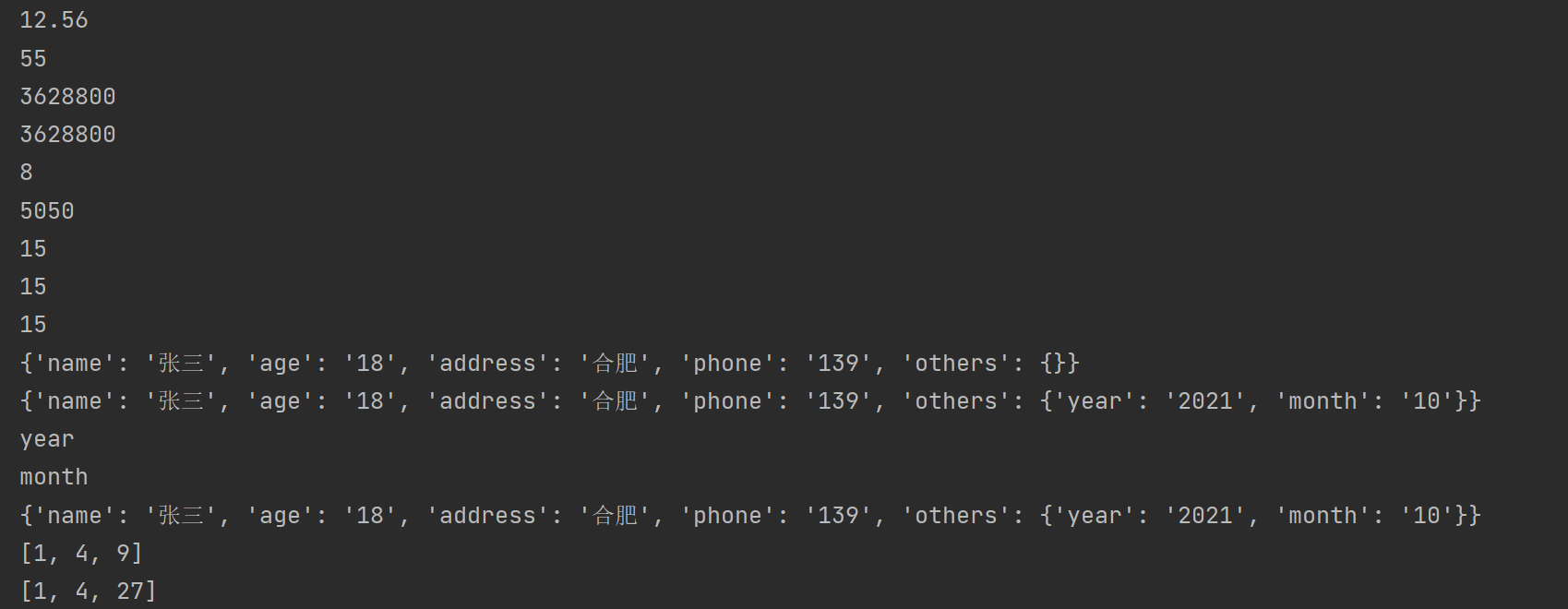
结果:
类和对象
类是对象抽象,对象时类的具体实现
三大特性:封装,继承,多态
# 定义一个Person类

# 封装:类里面封装属性,方法

class Person():

    # 定义一个构造方法

    # 类的属性需要定义在构造方法中

    # 类中所有得方法第一个参数都是self,在调用时会自动转入

    def __init__(self, id, name, age, gender):

        self.id = id

        self.name = name

        self.age = age

        self.gender = gender

        # 这个属性不需要通过传参,直接写死

        self.common = "我是猪"

        # 如果某个属性不想公开,可以在属性之前加上__

        self.__secret = "这是一个秘密"

    # 定义方法

    def run(self):

        print("%s 跑的很快" % (self.name))

        return 1

    # 相当于java中的tostring

    def __str__(self):

        return "class Person(%d %s %d %s)" % (self.id, self.name, self.age, self.gender)

    # 封装方法

    def __test(self):

        print("测试封装方法")

# 实例化 构造对象

person = Person(1001, "张三", 18, "男")

print(person)

print(person.name)

print(person.run())

# 调用封装的属性,通过 _类型__属性名 获取

print(person._Person__secret)

# 调用封装的方法

person._Person__test()

print("----------------------------------------------")

# 继承

class Teacher(Person):

    def __init__(self, id, name, age, gender, subject):

        # 直接得到父类的属性

        super(Teacher, self).__init__(id, name, age, gender)

        self.subject = subject

    # 写个teach的方法

    def teach(self):

        print("%s教的%s很棒" % (self.name, self.subject))

    # 重写Person的tostring方法

    def __str__(self):

        return "class Teacher:%d %s %d %s %s" % (self.id, self.name, self.age, self.gender, self.subject)

teacher = Teacher(1002, "张老师", 33, "女", "语文")

print(teacher)

print(teacher.name)

# 这里可以直接使用父类的方法

print(teacher.run())

print(teacher.teach())

print("---------------------------------")

# 多态

# 父类引用指向子类对象

def runTwice(c):

    c.run()

    c.run()

runTwice(person)

runTwice(teacher)
结果:

Python语法2的更多相关文章
- 对 Python 语法不够了解导致的 bug
对 Python 语法不够了解导致的 bug. `in` '20' in '11264,6144,4096,3072,2048,1024,300,30' Out[7]: True a_list = ' ...
- python 笔记2:python语法基础
python语法学习笔记: 1 输入输出 input(),print(). name = input('input your name : ')print('hello ,'+name)print(& ...
- python语法快速入门(1)
http://www.runoob.com/python/python-tutorial.html Python 是一种解释型语言: 这意味着开发过程中没有了编译这个环节.类似于PHP和Perl语言 ...
- python语法笔记(四)
1.对象的属性 python一切皆对象,每个对象都可能有多个属性.python的属性有一套统一的管理方案. 属性的__dict__系统 对象的属性可能来自于其类定义,叫做类属性:还可能 ...
- python语法-[with来自动释放对象]
python语法-[with来自动释放对象] http://www.cnblogs.com/itech/archive/2011/01/13/1934779.html 一 with python中的w ...
- wxpython 支持python语法高亮的自定义文本框控件的代码
在研发闲暇时间,把开发过程中比较重要的一些代码做个珍藏,下面的代码内容是关于wxpython 支持python语法高亮的自定义文本框控件的代码,应该是对大家也有用. import keywordimp ...
- Python语法的转义字符
Python语法的转义字符 转义字符 说 明 \ 续行符 \n 换行符 \0 空 \t 水平制表符,用于横向跳到下一制表位 \'' 双引号 \' 单引号 \\ 一个反斜杠 \f 换页 \0dd 八进 ...
- Python语法教程总结规范
Python语法易错点记录 本文提供全流程,中文翻译. Chinar 坚持将简单的生活方式,带给世人!(拥有更好的阅读体验 -- 高分辨率用户请根据需求调整网页缩放比例) Chinar -- 心分享. ...
- 初试Python语法小试牛刀之冒泡排序
Python很火,心里很慌,没吃过猪肉,也要见见猪走路. 看了几天Python的语法,大概初步了解了一点点,https://www.liaoxuefeng.com/wiki/0014316089557 ...
- (数据分析)第02章 Python语法基础,IPython和Jupyter Notebooks.md
第2章 Python语法基础,IPython和Jupyter Notebooks 当我在2011年和2012年写作本书的第一版时,可用的学习Python数据分析的资源很少.这部分上是一个鸡和蛋的问题: ...
随机推荐
- WPF 过渡效果
http://blog.csdn.net/lhx527099095/article/details/8005095 先上张效果图看看 如果不如您的法眼 可以移步了 或者有更好的效果 可以留言给我 废话 ...
- zip命令常用选项
大家都知道,在linux上一切皆文件,在实际生产环境中,如果我们需要部署一些系统的服务,我们会将一些软件包提前下载下来统一放到一个文件夹中, 然后将部署的过程用shell或者python写成一个脚本, ...
- 【转】.net core开发windows服务
.net core开发windows服务 文建Blog
- go相关
mac 上build go 如果想要在centos上面执行 必须使用下面的方式 CGO_ENABLED=0 GOOS=linux GOARCH=amd64 go build -a -o hello ...
- 机器学习——softmax回归
softmax回归 前面介绍了线性回归模型适用于输出为连续值的情景.在另一类情景中,模型输出可以是一个像图像类别这样的离散值.对于这样的离散值预测问题,我们可以使用诸如 softmax 回归在内的分类 ...
- python matplotlib.pyplot 条形图详解
python matplotlib.pyplot 条形图详解 一.创建直方图 可以用bar函数来创建直方图 然后用show函数显示直方图 比如: import matplotlib.pyplot as ...
- Artix Linux作业系统的使用~
Artix(阿蒂克斯)Linux 与Gentoo(贱兔) Linux真是夫唱妇随.由于Artix(阿蒂克斯)逃离Systemd,投入到了openrc温暖的怀抱,从而使得每安装一个软体,你还得额外为其安 ...
- 前端常用场景总结CSS/JS/插件(实用篇更新中...)
<div class="box box1"> <span>垂直居中</span> </div> .box1{ display: ta ...
- P1088 [NOIP2004 普及组] 火星人
题目描述 人类终于登上了火星的土地并且见到了神秘的火星人.人类和火星人都无法理解对方的语言,但是我们的科学家发明了一种用数字交流的方法.这种交流方法是这样的,首先,火星人把一个非常大的数字告诉人类科学 ...
- (一)es 概述与安装
一.基本概念介绍 1. es 核心术语 核心概念 ES -> 数据库 索引index -> 表 文档 document -> 行(记录) 字段 fields -> 列 早期版本 ...