
【UE4 C++ 基础知识】<9> Interface 接口
概述
- 简单的说,接口提供一组公共的方法,不同的对象中继承这些方法后可以有不同的具体实现。
- 任何使用接口的类都必须实现这些接口。
- 实现解耦
- 解决多继承的问题
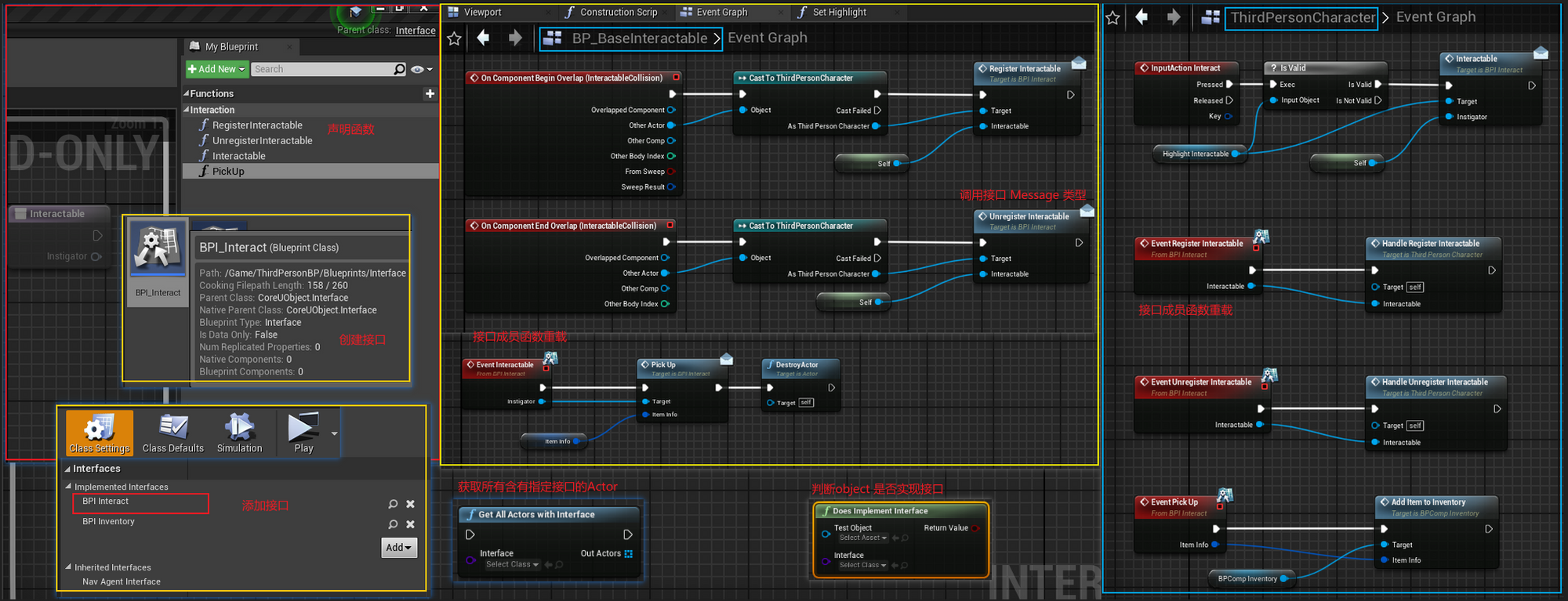
蓝图使用
使用方法
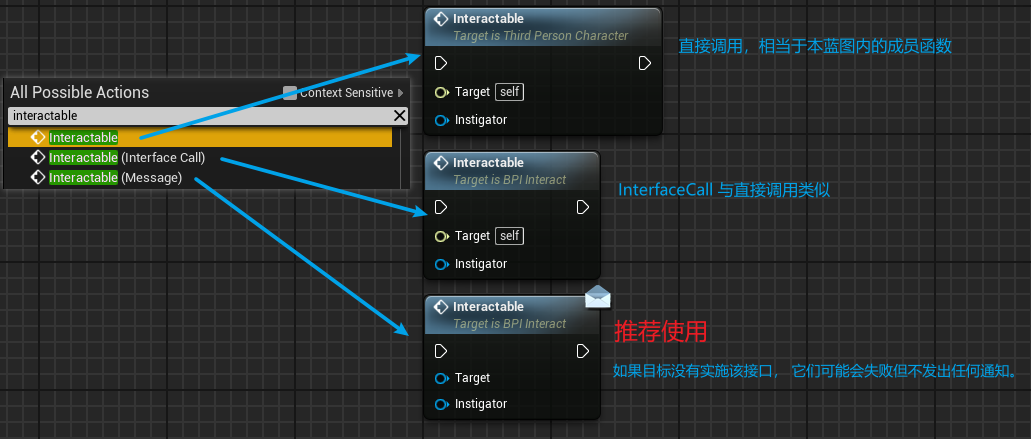
三种调用方法的区别
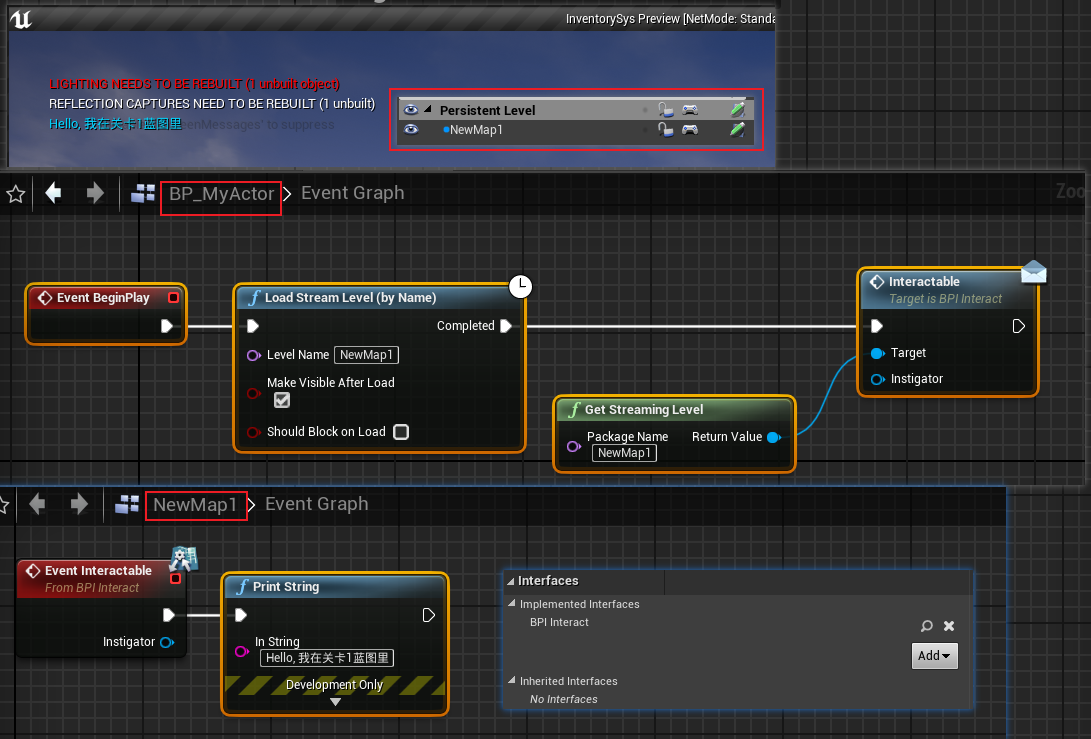
调用流关卡蓝图的接口函数
C++ 使用接口
本例使用一个Box Trigger 出发overlap 调用 Drone实例的接口
添加接口类
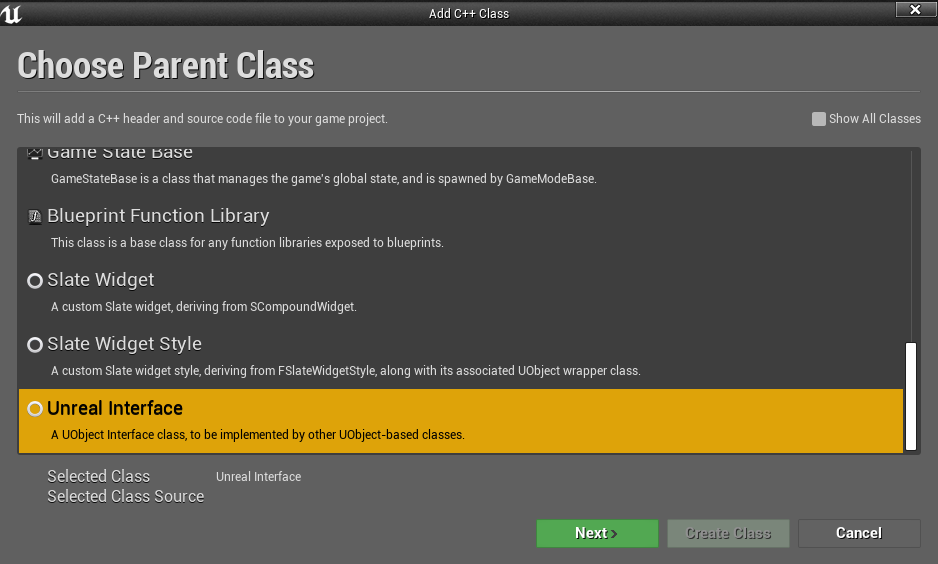
定义接口
声明蓝图可调用接口函数
用UFUNCTION 宏
BlueprintCallable声明蓝图可调用,还必须使用BlueprintImplementableEvent或BlueprintNativeEvent说明,而且函数不能为虚函数如果不想蓝图重载,只是想使用
BlueprintCallable以支持蓝图起到单纯的调用作用,可以通过将接口标记为UINTERFACE(meta = (CannotImplementInterfaceInBlueprint))来解决通过声明 virtual 虚函数,使得派生类可重载
代码
ReactToTriggerInterface.h
#pragma once

#include "CoreMinimal.h"

#include "UObject/Interface.h"

#include "ReactToTriggerInterface.generated.h"

// 无需更改

// UINTERFACE类不是实际的接口;它是一个空白类,它的存在只是为了向虚幻引擎反射系统确保可见性。

UINTERFACE(MinimalAPI)

class UReactToTriggerInterface : public UInterface

{

	GENERATED_BODY()

};

//开头字母"U"必须改为"I"。

class TIPS_API IReactToTriggerInterface

{

	GENERATED_BODY()

public:

	// 纯虚函数,实现类必须实现接口

	virtual void ReactToTrigger_PureVirtual() = 0;

	// 虚函数,在接口本身的 .h 或 .cpp 文件中提供默认实现.实现类可覆盖

	virtual void ReactToTrigger_Virtual();

	//实现类可以在蓝图和C++中实现接口

	UFUNCTION(BlueprintCallable, BlueprintNativeEvent, Category="Trigger Reaction")

		void ReactToTrigger_NativeEvent1(int32 number);

	//实现类可以在蓝图和C++中实现接口

	UFUNCTION(BlueprintCallable, BlueprintNativeEvent, Category = "Trigger Reaction")

		bool ReactToTrigger_NativeEvent2(int32 number);

	//实现类在蓝图中实现接口

	UFUNCTION(BlueprintCallable, BlueprintImplementableEvent, Category = "Trigger Reaction")

		void ReactToTrigger_ImplementableEvent();

};
ReactToTriggerInterface.cpp
#include "ReactToTriggerInterface.h"

void IReactToTriggerInterface::ReactToTrigger_Virtual()

{

	// unimplemented(); //该宏将在执行代码行时发出调试语句, 中断

	UE_LOG(LogTemp, Warning, TEXT("ReactToTrigger_Virtual 被调用, From 接口本身"));

}
实现接口
MyDrone.h 此类继承自Pawn类,无关本文主题
#include "ReactToTriggerInterface.h"

#include "MyDrone.generated.h"

UCLASS()

class TIPS_API AMyDrone : public ADrone, public IReactToTriggerInterface

{

	GENERATED_BODY()

public:

	virtual void ReactToTrigger_PureVirtual() override;

	//可蓝图调用,貌似通用写法

	UFUNCTION(BlueprintCallable, BlueprintNativeEvent, Category = "Trigger Reaction")

		void ReactToTrigger_NativeEvent1(int32 number);

		virtual void ReactToTrigger_NativeEvent1_Implementation(int32 number) override;

	//蓝图可调用,,貌似和上面没区别

	virtual bool ReactToTrigger_NativeEvent2_Implementation(int32 number) override;

	//void ReactToTrigger_ImplementableEvent();需要在蓝图实现

};
MyDrone.cpp
#include "MyDrone.h"

void AMyDrone::ReactToTrigger_PureVirtual()

{

	UE_LOG(LogTemp, Warning, TEXT("ReactToTrigger_PureVirtual 被调用, From MyDrone"));

}

void AMyDrone::ReactToTrigger_NativeEvent1_Implementation(int32 number)

{

	UE_LOG(LogTemp, Warning, TEXT("ReactToTrigger_NativeEvent1 被调用, From MyDrone"));

}

bool AMyDrone::ReactToTrigger_NativeEvent2_Implementation(int32 number)

{

	UE_LOG(LogTemp, Warning, TEXT("ReactToTrigger_NativeEvent2 被调用, From MyDrone"));

	return true;

}
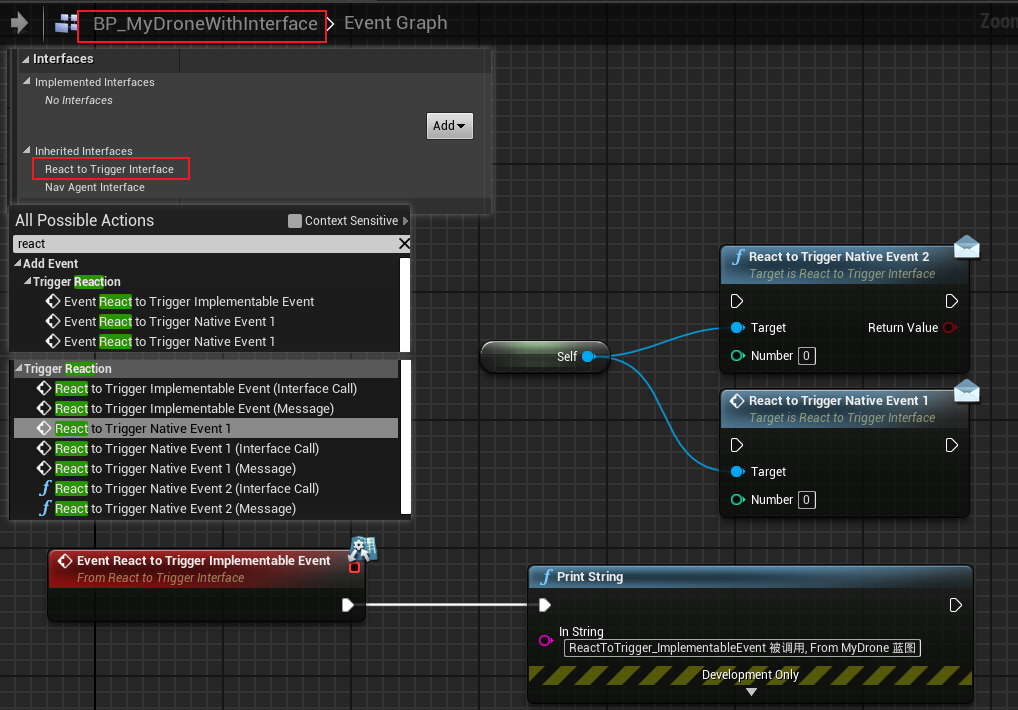
也可以蓝图重载
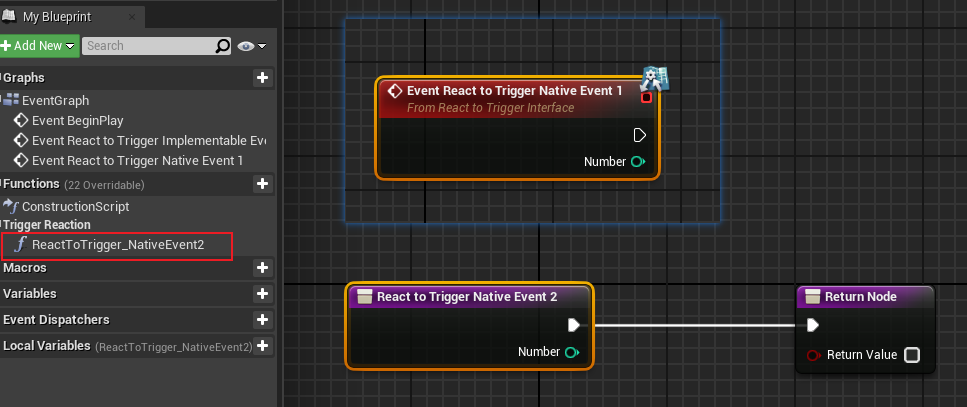
调用接口的类
c++ 调用接口可以先判断该类是否有实现接口
// 如果OriginalObject实现了UReactToTriggerInterface,则bisimplemated将为true。

bool bIsImplemented = OriginalObject->GetClass()->ImplementsInterface(UReactToTriggerInterface::StaticClass());

// 如果OriginalObject实现了UReactToTrigger,bIsImplemented将为true。

bIsImplemented = OriginalObject->Implements<UReactToTriggerInterface>();

// 如果OriginalObject实现了UReactToTriggerInterface,则ReactingObject将为非空。

IReactToTriggerInterface* ReactingObject = Cast<IReactToTriggerInterface>(OriginalObject);
原生 虚函数调用按照原生C++调用即可
UFUCNTION()修饰的接口函数则以
I接口名::Execute_函数名( 接口实例, 函数参数)调用
代码
MyTriggerBox.h
#pragma once

#include "CoreMinimal.h"

#include "Engine/TriggerBox.h"

#include "MyTriggerBox.generated.h"

UCLASS()

class TIPS_API AMyTriggerBox : public ATriggerBox

{

	GENERATED_BODY()

public:

	virtual void BeginPlay() override;

	UFUNCTION()

	void HandleOverlap(AActor* OverlappedActor, AActor* OtherActor );

};
MyTriggerBox.cpp
#include "MyTriggerBox.h"

#include "Components/BoxComponent.h"

#include "ReactToTriggerInterface.h"

void AMyTriggerBox::BeginPlay()

{

	//放在构造函数好像不起作用

	OnActorBeginOverlap.AddDynamic(this, &AMyTriggerBox::HandleOverlap);

}

void AMyTriggerBox::HandleOverlap(AActor* OverlappedActor, AActor* OtherActor )

{

	UClass* ActorClass = OtherActor->GetClass();

	if (ActorClass->ImplementsInterface(UReactToTriggerInterface::StaticClass()))

	{

		UE_LOG(LogTemp, Warning, TEXT("是否实现接口判断方法一"));

		IReactToTriggerInterface* ReactToTriggerInterface1 = CastChecked<IReactToTriggerInterface>(OtherActor);

		ReactToTriggerInterface1->ReactToTrigger_PureVirtual();

		ReactToTriggerInterface1->ReactToTrigger_Virtual();

		IReactToTriggerInterface::Execute_ReactToTrigger_NativeEvent1(OtherActor, 16);

		IReactToTriggerInterface::Execute_ReactToTrigger_NativeEvent2(OtherActor, 32);

		IReactToTriggerInterface::Execute_ReactToTrigger_ImplementableEvent(OtherActor);

	}

	if (OtherActor->Implements<UReactToTriggerInterface>())

	{

		UE_LOG(LogTemp, Warning, TEXT("是否实现接口判断方法二"));

		IReactToTriggerInterface::Execute_ReactToTrigger_NativeEvent1(OtherActor, 16);

		IReactToTriggerInterface::Execute_ReactToTrigger_NativeEvent2(OtherActor, 32);

	}

	IReactToTriggerInterface* ReactToTriggerInterface2 = Cast<IReactToTriggerInterface>(OtherActor);

	if (ReactToTriggerInterface2)

	{

		UE_LOG(LogTemp, Warning, TEXT("是否实现接口判断方法三"));

		IReactToTriggerInterface::Execute_ReactToTrigger_ImplementableEvent(OtherActor);

	}

}
测试结果

参考
【UE4 C++ 基础知识】<9> Interface 接口的更多相关文章
- 【UE4 C++ 基础知识】<11>资源的同步加载与异步加载
同步加载 同步加载会造成进程阻塞. FObjectFinder / FClassFinder 在构造函数加载 ConstructorHelpers::FObjectFinder Constructor ...
- 【UE4 C++ 基础知识】<12> 多线程——FRunnable
概述 UE4里,提供的多线程的方法: 继承 FRunnable 接口创建单个线程 创建 AsyncTask 调用线程池里面空闲的线程 通过 TaskGraph 系统来异步完成一些自定义任务 支持原生的 ...
- 【UE4 C++ 基础知识】<3> 基本数据类型、字符串处理及转换
基本数据类型 TCHAR TCHAR就是UE4通过对char和wchar_t的封装 char ANSI编码 wchar_t 宽字符的Unicode编码 使用 TEXT() 宏包裹作为字面值 TCHAR ...
- Java基础知识:Collection接口
*本文是最近学习到的知识的记录以及分享,算不上原创. *参考文献见文末. 这篇文章主要讲的是java的Collection接口派生的两个子接口List和Set. 目录 Collection框架 Lis ...
- 【UE4 C++ 基础知识】<8> Delegate 委托
概念 定义 UE4中的delegate(委托)常用于解耦不同对象之间的关联:委托的触发者不与监听者有直接关联,两者通过委托对象间接地建立联系. 监听者通过将响应函数绑定到委托上,使得委托触发时立即收到 ...
- java基础知识回顾之接口
/* abstract class AbsDemo { abstract void show1(); abstract void show2(); } 当一个抽象类中的方法都是抽象的时候,这时可以将该 ...
- 【UE4 C++ 基础知识】<14> 多线程——AsyncTask
概念 AsyncTask AsyncTask 系统是一套基于线程池的异步任务处理系统.每创建一个AsyncTas,都会被加入到线程池中进行执行 AsyncTask 泛指 FAsyncTask 和 FA ...
- 《Java基础知识》Java接口和抽象类的区别
抽象类 抽象类必须用 abstract 修饰,子类必须实现抽象类中的抽象方法,如果有未实现的,那么子类也必须用 abstract 修饰.抽象类默认的权限修饰符为 public,可以定义为 public ...
- JAVA基础知识|抽象类与接口类
一.抽象类 抽象类:拥有抽象方法的类就是抽象类,抽象类要使用abstract声明 抽象方法:没有方法体的方法,必须要使用abstract修饰 为什么要使用抽象类,抽象方法? 举例来说,如果你定义了一个 ...
随机推荐
- AFL++初探-手把手Fuzz一个PDF解析器
CVE-2019-13288 目前漏洞在正式版本已经被修复,本文章仅供学习Fuzz过程,不存在漏洞利用的内容 这是一个pdf查看器的漏洞,可能通过精心制作的文件导致无限递归,由于程序中每个被调用的函数 ...
- 如何在RHEL7或CentOS 7系统下修改网卡名称(亲测有效~!)
亲测有效的更改RHEL7或CentOS 7的网卡名称的方法, 按照以下4步来操作就可以实现! Step 1 :网卡配置文件名称重命名为eth0[root@localhost ~]# ifconfige ...
- Linux基础命令(基于CentOS7)
1.帮助相关命令 man 查看普通命令的帮助 --help 只能查看内置命令 info 查看一个命令的更多信息 type 查看是否为内置命令 2.关机重启 shutdown -h 关机 -r 重启 - ...
- Python - typing 模块 —— Union
前言 typing 是在 python 3.5 才有的模块 前置学习 Python 类型提示:https://www.cnblogs.com/poloyy/p/15145380.html 常用类型提示 ...
- PHP中的PDO操作学习(三)预处理类及绑定数据
要说 PDO 中最强大的功能,除了为不同的数据库提供了统一的接口之外,更重要的就是它的预处理能力,也就是 PDOStatement 所提供的功能.因为它的存在,才让我们可以安心地去使用而不用操心 SQ ...
- PHP的bz2压缩扩展工具
在日常的开发和电脑使用中,我们经常会接触到压缩和解压的一些工具,PHP 也为我们准备了很多相关的操作扩展包,都有直接可用的函数能够方便的操作一些压缩解压功能.今天,我们先学习一个比较简单但不太常用的压 ...
- tp5 引入 没有命名空间的类库的方法(以微信支付SDK为例)
use think\Loader; Loader::import('Wxpay.WxPay',EXTEND_PATH,'.Api.php'); 注意扩展名的点"."不能省略 使用之 ...
- 阿里云短信功能php
1. 引入文件: https://help.aliyun.com/document_detail/53111.html?spm=a2c1g.8271268.10000.99.5a8ddf25gG0wW ...
- ecshop商品批量上传之EC助理1.28支持ECshop2.7.3方法
目前官方随着ECShop V2.73的发布也发布了相对应的EC助理1.30版.默认EC助理1.28也支持到ECShop V2.72,要想让EC助理1.28也支持到ECShop V2.73,那要了解EC ...
- Shell系列(25)- 条件判断之文件权限
按照文件权限进行判断 读.写.执行等选项权限,只要有,就返回真 不会按照所属者,所属用户组,其他用户进行区分 先判断文件是否存在,再去判断选项权限 测试选项 作用(标红熟记) -r 文件 判断该文件是 ...