
gradle项目中资源文件的相对路径打包处理技巧
开发java application时,不管是用ant/maven/gradle中的哪种方式来构建,通常最后都会打包成一个可执行的jar包程序,而程序运行所需的一些资源文件(配置文件),比如jdbc.properties, log4j2.xml,spring-xxx.xml这些,可以一起打包到jar中,程序运行时用类似classpath*:xxx.xml的去加载,大多数情况下,这样就能工作得很好了。
但是,如果有一天,需要修正配置,比如:一个应用上线初期,为了调试方便,可能会把log的日志级别设置低一些,比如:INFO级别,运行一段时间稳定以后,只需要记录WARN或ERROR级别的日志,这时候就需要修改log4j2.xml之类的配置文件,如果把配置文件打包在jar文件内部,改起来就比较麻烦,要把重新打包部署,要么在线上,先用jar命令将jar包解压,改好后,再打包回去,比较繁琐。
面对这种需求,更好的方式是把配置文件放在jar文件的外部相对目录下,程序启动时去加载相对目录下的配置文件,这样改起来,就方便多了,下面演示如何实现:(以gradle项目为例)
主要涉及以下几点:
1、如何不将配置文件打包到jar文件内
既然配置文件放在外部目录了,jar文件内部就没必要再重复包含这些文件了,可以修改build.gradle文件,参考下面这样:
processResources {

    exclude { "**/*.*" }

}
相当于覆盖了默认的processResouces task,这样gradle打包时,资源目录下的任何文件都将排除。
2、log4j2的配置加载处理
log4j2加载配置文件时,默认情况下会找classpath下的log4j2.xml文件,除非手动给它指定配置文件的位置,分析它的源码,可以找到下面这段:org.apache.logging.log4j.core.config.ConfigurationFactory.Factory#getConfiguration(java.lang.String, java.net.URI)
 public Configuration getConfiguration(final String name, final URI configLocation) {

             if (configLocation == null) {

                 final String configLocationStr = this.substitutor.replace(PropertiesUtil.getProperties()

                         .getStringProperty(CONFIGURATION_FILE_PROPERTY));

                 if (configLocationStr != null) {

                     ConfigurationSource source = null;

                     try {

                         source = getInputFromUri(NetUtils.toURI(configLocationStr));

                     } catch (final Exception ex) {

                         // Ignore the error and try as a String.

                         LOGGER.catching(Level.DEBUG, ex);

                     }

                     if (source == null) {

                         final ClassLoader loader = LoaderUtil.getThreadContextClassLoader();

                         source = getInputFromString(configLocationStr, loader);

                     }

                     if (source != null) {

                         for (final ConfigurationFactory factory : getFactories()) {

                             final String[] types = factory.getSupportedTypes();

                             if (types != null) {

                                 for (final String type : types) {

                                     if (type.equals("*") || configLocationStr.endsWith(type)) {

                                         final Configuration config = factory.getConfiguration(source);

                                         if (config != null) {

                                             return config;

                                         }

                                     }

                                 }

                             }

                         }

                     }

                 } else {

                     for (final ConfigurationFactory factory : getFactories()) {

                         final String[] types = factory.getSupportedTypes();

                         if (types != null) {

                             for (final String type : types) {

                                 if (type.equals("*")) {

                                     final Configuration config = factory.getConfiguration(name, configLocation);

                                     if (config != null) {

                                         return config;

                                     }

                                 }

                             }

                         }

                     }

                 }

             } else {

                 // configLocation != null

                 final String configLocationStr = configLocation.toString();

                 for (final ConfigurationFactory factory : getFactories()) {

                     final String[] types = factory.getSupportedTypes();

                     if (types != null) {

                         for (final String type : types) {

                             if (type.equals("*") || configLocationStr.endsWith(type)) {

                                 final Configuration config = factory.getConfiguration(name, configLocation);

                                 if (config != null) {

                                     return config;

                                 }

                             }

                         }

                     }

                 }

             }

             Configuration config = getConfiguration(true, name);

             if (config == null) {

                 config = getConfiguration(true, null);

                 if (config == null) {

                     config = getConfiguration(false, name);

                     if (config == null) {

                         config = getConfiguration(false, null);

                     }

                 }

             }

             if (config != null) {

                 return config;

             }

             LOGGER.error("No log4j2 configuration file found. Using default configuration: logging only errors to the console.");

             return new DefaultConfiguration();

         }
其中常量CONFIGURATION_FILE_PROPERTY的定义为:
public static final String CONFIGURATION_FILE_PROPERTY = "log4j.configurationFile";
从这段代码可以看出,只要在第一次调用log4j2的getLogger之前设置系统属性,将其指到配置文件所在的位置即可。
3、其它一些配置文件(比如spring配置)的相对路径加载
这个比较容易,spring本身就支持从文件目录加载配置的能力。
综合以上分析,可以封装一个工具类:
 import org.springframework.context.ConfigurableApplicationContext;

 import org.springframework.context.support.FileSystemXmlApplicationContext;

 import java.io.File;

 public class ApplicationContextUtil {

     private static ConfigurableApplicationContext context = null;

     private static ApplicationContextUtil instance = null;

     public static ApplicationContextUtil getInstance() {

         if (instance == null) {

             synchronized (ApplicationContextUtil.class) {

                 if (instance == null) {

                     instance = new ApplicationContextUtil();

                 }

             }

         }

         return instance;

     }

     public ConfigurableApplicationContext getContext() {

         return context;

     }

     private ApplicationContextUtil() {

     }

     static {

         //加载log4j2.xml

         String configLocation = "resources/log4j2.xml";

         File configFile = new File(configLocation);

         if (!configFile.exists()) {

             System.err.println("log4j2 config file:" + configFile.getAbsolutePath() + " not exist");

             System.exit(0);

         }

         System.out.println("log4j2 config file:" + configFile.getAbsolutePath());

         try {

             //注:这一句必须放在整个应用第一次LoggerFactory.getLogger(XXX.class)前执行

             System.setProperty("log4j.configurationFile", configFile.getAbsolutePath());

         } catch (Exception e) {

             System.err.println("log4j2 initialize error:" + e.getLocalizedMessage());

             System.exit(0);

         }

         //加载spring配置文件

         configLocation = "resources/spring-context.xml";

         configFile = new File(configLocation);

         if (!configFile.exists()) {

             System.err.println("spring config file:" + configFile.getAbsolutePath() + " not exist");

             System.exit(0);

         }

         System.out.println("spring config file:" + configFile.getAbsolutePath());

         if (context == null) {

             context = new FileSystemXmlApplicationContext(configLocation);

             System.out.println("spring load success!");

         }

     }

 }
注:这里约定了配置文件放在相对目录resources下,而且log4j2的配置文件名为log4j2.xml,spring的入口配置文件为spring-context.xml(如果不想按这个约定来,可参考这段代码自行修改)
有了这个工具类,mainclass入口程序上可以这么用:
 import org.slf4j.Logger;

 import org.slf4j.LoggerFactory;

 import org.springframework.context.ApplicationContext;

 /**

  * Created by yangjunming on 12/15/15.

  * author: yangjunming@huijiame.com

  */

 public class App {

     private static ApplicationContext context;

     private static Logger logger;

     public static void main(String[] args) {

         context = ApplicationContextUtil.getInstance().getContext();

         logger = LoggerFactory.getLogger(App.class);

         System.out.println("start ...");

         logger.debug("debug message");

         logger.info("info message");

         logger.warn("warn message");

         logger.error("error message");

         System.out.println(context.getBean(SampleObject.class));

     }

 }
再次友情提醒:logger的实例化,一定要放在ApplicationContextUtil.getInstance().getContext();之后,否则logger在第一次初始化时,仍然尝试会到classpath下去找log4j2.xml文件,实例化之后,后面再设置系统属性就没用了。
4、gradle 打包的处理
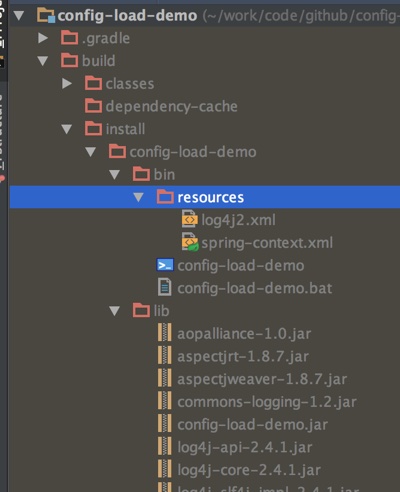
代码写完了,还有最后一个工作没做,既然配置文件不打包到jar里了,那就得复制到jar包的相对目录resources下,可以修改build.gradle脚本,让计算机处理处理,在代替手动复制配置文件。
task pack(type: Copy, dependsOn: [clean, installDist]) {

    sourceSets.main.resources.srcDirs.each {

        from it

        into "$buildDir/install/$rootProject.name/bin/resources"

    }

}
增加这个task后,直接用gradle pack 就可以实现打包,并自动复制配置文件到相对目录resources目录下了,参考下图:
最后国际惯例,给个示例源码:https://github.com/yjmyzz/config-load-demo
gradle pack 后,可进入build/install/config-load-demo/bin 目录,运行./config-load-demo (windows下运行config-load-demo.bat) 查看效果,然后尝试修改resources/log4j2.xml里的日志级别,再次运行,观察变化 。
gradle项目中资源文件的相对路径打包处理技巧的更多相关文章
- 【Android Studio探索之路系列】之十:Gradle项目构建系统(四):Android Studio项目多渠道打包
作者:郭孝星 微博:郭孝星的新浪微博 邮箱:allenwells@163.com 博客:http://blog.csdn.net/allenwells github:https://github.co ...
- 第一次使用Android Studio时你应该知道的一切配置(三):gradle项目构建
[声明] 欢迎转载,但请保留文章原始出处→_→ 生命壹号:http://www.cnblogs.com/smyhvae/ 文章来源:http://www.cnblogs.com/smyhvae/p/ ...
- 【转】第一次使用Android Studio时你应该知道的一切配置(三):gradle项目构建
原文网址:http://www.cnblogs.com/smyhvae/p/4456420.html [声明] 欢迎转载,但请保留文章原始出处→_→ 生命壹号:http://www.cnblogs.c ...
- Delphi编程中资源文件的应用
Delphi编程中资源文件的应用/转自 http://chamlly.spaces.live.com/blog/cns!548f73d8734d3acb!236.entry一.引子: 现在的Windo ...
- Android Studio 入门级教程(三):gradle项目构建
声明 生命壹号:http://www.cnblogs.com/smyhvae/ 文章来源:http://www.cnblogs.com/smyhvae/p/4456420.html [系列] Andr ...
- 将Gradle项目公布到maven仓库
将Gradle项目公布到maven仓库 1 Gradle简单介绍 1.1 Ant.Maven还是Gradle? 1.1.1 Ant和Maven介绍 全称为Apache Maven,是一个软件(特别是J ...
- Spring boot dubbo+zookeeper 搭建------基于gradle项目的消费端与服务端分离实战
1. Dubbo简介 Dubbo是Alibaba开源的分布式框架,是RPC模式的一种成熟的框架,优点是可以与Spring无缝集成,应用到我们的后台程序中.具体介绍可以查看Dubbo官网. 2. Why ...
- Android官方技术文档翻译——迁移 Gradle 项目到1.0.0 版本
本文译自Android官方技术文档<Migrating Gradle Projects to version 1.0.0>,原文地址:http://tools.android.com/te ...
- linux下将eclipse项目转换为gradle项目
本文针对于在linux环境下,不使用eclipse而把一个eclipse项目转换为gradle默认结构的项目的情况,脚本可能在mac下也适用,未验证. windows中的转换问题,以及使用eclips ...
随机推荐
- JMeter专题系列(三)元件的作用域与执行顺序
1.元件的作用域 JMeter中共有8类可被执行的元件(测试计划与线程组不属于元件),这些元件中,取样器是典型的不与其它元件发生交互作用的元件,逻辑控制器只对其子节点的取样器有效,而其它元件(conf ...
- 【转】微信小程序给程序员带来的可能是一个赚钱的机遇
自上周被微信小程序刷屏之后,这周大家都在谈微信小程序能够带来哪些红利的话题,其实我想从程序员的角度来谈谈,带给我们程序员来的红利,或许是我们程序员创业或者赚钱的机遇. 其实我从<作为移动开发程序 ...
- 关于jquery中用函数来设置css样式
关于jquery中用函数来设置css样式 2016-12-21 23:27:55 1.jquery语法 $(selector).css(name,function(index,value)) name ...
- transformjs:让天下没有难做的生意!不对,是特效!
写在前面 transform是css3新增的一个属性,可是令开发者费解的是,其内部又有大量的属性如旋转.缩放.扭曲.平移,这也就导致了获取或者是设置transform中一个或者多个属性变得异常麻烦. ...
- 各大互联网公司前端面试题(HTML/CSS)
Html篇: 1.你做的页面在哪些流览器测试过?这些浏览器的内核分别是什么? IE: trident内核 Firefox:gecko内核 Safari:webkit内核 Opera:以前是presto ...
- SharePoint 2013 母版页取消和HTML页关联
前言:在新版本的SharePoint 2013上,有新的功能可以通过HTML导入母版页,然后HTML和Master页面相关联,更改HTML页的时候,Master会自动同步修改,然而,有些时候我们不需要 ...
- SharePoint服务器端对象模型 之 使用CAML进展数据查询
SharePoint服务器端对象模型 之 使用CAML进行数据查询 一.概述 在SharePoint的开发应用中,查询是非常常用的一种手段,根据某些筛选.排序条件,获得某个列表或者某一些列表中相应的列 ...
- Android-两种方式实现走马灯效果
第一种方法(很普遍,很简单的在xml布局文件中设置TextView的属性): <TextView android:id="@+id/tv_text" android:layo ...
- statusbarhidden stuff 状态栏的各种特性
plist 文件中的View controller-based status bar appearance 设置的是 在viewcontroller 中 对状态栏进行修改是否起作用. 设置状态栏隐藏和 ...
- Android 轻松实现仿淘宝地区选择
介绍 最近用淘宝客户端的时候,编辑地址的时候有个地区选择的功能.看上面的效果觉得挺酷,滚动的时候,是最后一个从下面飞上来挨着前一个.就自己鼓捣一个出来玩玩. 说了效果可能不太直观,下面上两张图看看效果 ...