
javascript-初级-day03自定义属性
day01-自定义属性应用
<!DOCTYPE HTML>

<html>

<head>

<meta http-equiv="Content-Type" content="text/html; charset=utf-8">

<title>无标题文档</title>

<style>

li { list-style:none; width:114px; height:140px; background:url(img/normal.png); float:left; margin-right:20px; }

</style>

<script>

window.onload = function (){

    var aLi = document.getElementsByTagName('li');

    // var onOff = true;    // 只能控制一组!

    for( var i=0; i<aLi.length; i++ ){

        aLi[i].onOff = true;

        aLi[i].onclick = function (){

            // alert( this.style.background );

            // 背景不能判断

            // color red #f00

            // 相对路径

            if ( this.onOff ) {

                this.style.background = 'url(img/active.png)';

                this.onOff = false;

            } else {

                this.style.background = 'url(img/normal.png)';

                this.onOff = true;

            }

        };

    }

};

</script>

</head>

<body>

<ul>

    <li></li>

    <li></li>

    <li></li>

</ul>

</body>

</html>
day02-自定义属性应用-按钮控制一组应用的变化
<!DOCTYPE HTML>

<html>

<head>

<meta http-equiv="Content-Type" content="text/html; charset=utf-8">

<title>无标题文档</title>

<script>

window.onload = function (){

    var aBtn = document.getElementsByTagName('input');

    var arr = [ 'A', 'B', 'C', 'D' ];

    for( var i=0; i<aBtn.length; i++ ){

        aBtn[i].num = 0;

        aBtn[i].onclick = function (){

            // alert( arr[ this.num ] );

            this.value = arr[ this.num ];

            this.num++;

            if( this.num === arr.length ){

                this.num = 0;

            }

        };

    }

};

</script>

</head>

<body>

<input type="button" value="0" />

<input type="button" value="0" />

<input type="button" value="0" />

</body>

</html>
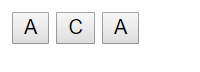
初始值都是0,点击一次变成a,再次点击,b..c,d,a.....
day03-自定义属性索引值的应用
<!DOCTYPE HTML>

<html>

<head>

<meta http-equiv="Content-Type" content="text/html; charset=utf-8">

<title>无标题文档</title>

<script>

window.onload = function (){

    var aBtn = document.getElementsByTagName('input');

    var aP = document.getElementsByTagName('p');

    // 想建立“匹配”“对应”关系,就用索引值

    var arr = [ '莫涛', '张森', '杜鹏' ];

    for( var i=0; i<aBtn.length; i++ ){

        aBtn[i].index = i;            // 自定义属性(索引值)

        aBtn[i].onclick = function (){

            // alert( arr[ this.index ] );

            this.value = arr[ this.index ];

            aP[ this.index ].innerHTML = arr[ this.index ];

        };

    }

};

</script>

</head>

<body>

<input type="button" value="btn1" />

<input type="button" value="btn2" />

<input type="button" value="btn3" />

<p>a</p>

<p>b</p>

<p>c</p>

</body>

</html>
day04-图片切换实例
<!DOCTYPE HTML>

<html>

<head>

<meta http-equiv="Content-Type" content="text/html; charset=utf-8">

<title>无标题文档</title>

<style>

ul { padding:0; margin:0; }

li { list-style:none; }

body { background:#333; }

#pic { width:400px; height:500px; position:relative; margin:0 auto; background:url(img/loader_ico.gif) no-repeat center #fff; }

#pic img { width:400px; height:500px; }

#pic ul { width:40px; position:absolute; top:0; right:-50px; }

#pic li { width:40px; height:40px; margin-bottom:4px; background:#666; }

#pic .active { background:#FC3; }

#pic span { top:0; }

#pic p { bottom:0; margin:0; }

#pic p,#pic span { position:absolute; left:0; width:400px; height:30px; line-height:30px; text-align:center; color:#fff; background:#000; }

</style>

<script>

window.onload = function (){

    var oDiv = document.getElementById('pic');

    var oImg = oDiv.getElementsByTagName('img')[0];

    var oSpan = oDiv.getElementsByTagName('span')[0];

    var oP = oDiv.getElementsByTagName('p')[0];

    var oUl = oDiv.getElementsByTagName('ul')[0];

    var aLi = oUl.getElementsByTagName('li');

    var arrUrl = [ 'img/1.png', 'img/2.png', 'img/3.png', 'img/4.png' ];

    var arrText = [ '小宠物', '图片二', '图片三', '面具' ];

    var num = 0;

    var oldLi = null;

    for( var i=0; i<arrUrl.length; i++ ){

        oUl.innerHTML += '<li></li>';

    }

    oldLi = aLi[num];

    // 初始化

    oImg.src = arrUrl[num];

    oSpan.innerHTML = 1+num+' / '+arrUrl.length;

    oP.innerHTML = arrText[num];

    aLi[num].className = 'active';

    for( var i=0; i<aLi.length; i++ ){

        aLi[i].index = i;            // 索引值

        aLi[i].onclick = function (){

            oImg.src = arrUrl[ this.index ];

            oP.innerHTML = arrText[ this.index ];

            oSpan.innerHTML = 1+this.index + ' / '+arrText.length;

            /*

                <li class="active"></li>

                <li></li>

                <li></li>

                <li></li>

            */

            // 思路一:全部清空,当前添加

            for( var i=0; i<aLi.length; i++ ){

                aLi[i].className = '';

            }

            this.className = 'active';

            /*

            // 思路二:清空上个,当前添加

            oldLi.className = '';

            oldLi = this;

            this.className = 'active';

            */

        };

    }

};

</script>

</head>

<body>

<div id="pic">

    <img src="" />

  <span>数量正在加载中……</span>

  <p>文字说明正在加载中……</p>

  <ul></ul>

</div>

</body>

</html>

重构:
<!DOCTYPE HTML>

<html>

<head>

<meta http-equiv="Content-Type" content="text/html; charset=utf-8">

<title>无标题文档</title>

<style>

ul { padding:0; margin:0; }

li { list-style:none; }

body { background:#333; }

#pic { width:400px; height:500px; position:relative; margin:0 auto; background:url(img/loader_ico.gif) no-repeat center #fff; }

#pic img { width:400px; height:500px; }

#pic ul { width:40px; position:absolute; top:0; right:-50px; }

#pic li { width:40px; height:40px; margin-bottom:4px; background:#666; }

#pic .active { background:#FC3; }

#pic span { top:0; }

#pic p { bottom:0; margin:0; }

#pic p,#pic span { position:absolute; left:0; width:400px; height:30px; line-height:30px; text-align:center; color:#fff; background:#000; }

</style>

<script>

window.onload = function (){

    var oDiv = document.getElementById('pic');

    var oImg = oDiv.getElementsByTagName('img')[0];

    var oSpan = oDiv.getElementsByTagName('span')[0];

    var oP = oDiv.getElementsByTagName('p')[0];

    var oUl = oDiv.getElementsByTagName('ul')[0];

    var aLi = oUl.getElementsByTagName('li');

    var arrUrl = [ 'img/1.png', 'img/2.png', 'img/3.png', 'img/4.png' ];

    var arrText = [ '小宠物', '图片二', '图片三', '面具' ];

    var num = 0;

    for( var i=0; i<arrUrl.length; i++ ){

        oUl.innerHTML += '<li></li>';

    }

    // 初始化

    function fnTab(){

        oImg.src = arrUrl[num];

        oSpan.innerHTML = 1+num+' / '+arrUrl.length;

        oP.innerHTML = arrText[num];

        for( var i=0; i<aLi.length; i++ ){

            aLi[i].className = '';

        }

        aLi[num].className = 'active';

    }

    fnTab();

    for( var i=0; i<aLi.length; i++ ){

        aLi[i].index = i;            // 索引值

        aLi[i].onclick = function (){

            num = this.index;

            fnTab();

        };

    }

};

</script>

</head>

<body>

<div id="pic">

    <img src="" />

  <span>数量正在加载中……</span>

  <p>文字说明正在加载中……</p>

  <ul></ul>

</div>

</body>

</html>
day05-qq列表
<!DOCTYPE HTML>

<html>

<head>

<meta http-equiv="Content-Type" content="text/html; charset=utf-8">

<title>无标题文档</title>

<style>

ul , h2 { padding:0; margin:0; }

li { list-style:none; }

#list { width:240px; border:1px solid #333; margin:0 auto; }

#list .lis {}

#list h2 { height:30px; line-height:30px; text-indent:20px; background:url(img/ico1.gif) no-repeat 5px center #6FF; color:#000; }

#list .active { background:url(img/ico2.gif) no-repeat 5px center #FF9; color:#000; }

#list ul { display:none; }

#list ul li { line-height:24px; border-bottom:1px solid #333; text-indent:24px; }

#list ul .hover { background:#6FF; }

</style>

<script>

window.onload = function (){

    var oUl = document.getElementById('list');

    var aH2 = oUl.getElementsByTagName('h2');

    var aUl = oUl.getElementsByTagName('ul');

    var aLi = null;

    var arrLi = [];

    for( var i=0; i<aH2.length; i++ ){

        aH2[i].index = i;

        aH2[i].onclick = function (){

            for( var i=0; i<aH2.length; i++ ){

                if( i != this.index ){

                    aUl[i].style.display = 'none';

                    aH2[i].className = '';

                }

            }

            if( this.className == '' ){

                aUl[this.index].style.display = 'block';

                this.className = 'active';

            } else {

                aUl[this.index].style.display = 'none';

                this.className = '';

            }

        };

    }

    for( var i=0; i<aUl.length; i++ ){

        aLi = aUl[i].getElementsByTagName('li');

        for( var j=0; j<aLi.length; j++ ){

            arrLi.push( aLi[j] );

        }

    }

    for( var i=0; i<arrLi.length; i++ ){

        arrLi[i].onclick = function (){

            for( var i=0; i<arrLi.length; i++ ){

                if( arrLi[i] !=this ){

                    arrLi[i].className = '';

                }

            }

            if( this.className == '' ){

                this.className = 'hover';

            }else{

                this.className = '';

            }

        };

    }

};

</script>

</head>

<body>

<ul id="list">

    <li class="lis">

      <h2>我的好友</h2>

    <ul>

        <li>张三</li>

        <li>张三</li>

        <li>张三</li>

        <li>张三</li>

    </ul>

  </li>

    <li class="lis">

      <h2>企业好友</h2>

    <ul>

        <li>李四</li>

        <li>李四</li>

        <li>李四</li>

        <li>李四</li>

        <li>李四</li>

    </ul>

  </li>

    <li class="lis">

      <h2>黑名单</h2>

    <ul>

        <li>张小三</li>

        <li>李小四</li>

    </ul>

  </li>

</ul>

</body>

</html>

javascript-初级-day03自定义属性的更多相关文章
- JavaScript初级面试题
前面几题是会很基础,越下越有深度. 初级Javascript: 1.JavaScript是一门什么样的语言,它有哪些特点? 没有标准答案. 2.JavaScript的数据类型都有什么? 基本数据类型: ...
- Javascript初级学习总结
首先,在Html页面输出,使用document.write('内容'); <html> <head> <title></title> <scrip ...
- javascript根据元素自定义属性获取元素,操作元素
写在前面:给某个或多个元素自定义属性data-tar,想获取data-tar='123'的元素来进行进一步的操作,如何实现? function getElementByAttr(tag,attr,va ...
- 妙味课堂:JavaScript初级--第11课:字符串、查找高亮显示
1.数字字母 Unicode 编码 <!DOCTYPE HTML> <html> <head> <meta http-equiv="Content- ...
- javascript中的自定义属性
标签的自定义属性: 在开发中,有时需要在标签上添加一些自定义属性用来存储数据或状态. 设置了自定义属性的标签,就是在这个标签上添加了这个属性,浏览器中的html结构中可以看到. 使用点语法(如oWra ...
- FCC的javascript初级算法题解答
FCC上的javascript基础算法题 前一阵子做的基础算法题,感觉做完后收获还蛮大的,现在将自己的做法总结出来,供大家参考讨论.基本上做到尽量简短有效,但有些算法还可以继续简化,比如第七题若采用正 ...
- JavaScript初级学习
1. JavaScript的介绍 前身是LiveScript+JavaScript JavaScript(js)是一个脚本语言 基于浏览器的脚本语言 基于对象,面向对象的一个编程语言 2. EcmaS ...
- 关于JavaScript初级的知识点一(持续更新 )
自己刚开始接触JS这是自己一个多月以来的一些总结和回顾. 一.什么是js? js是一种弱类型的脚本语言,是HTML的3大组成部分之一.HTML标签 CSS样式 JS脚本. 二.js的5种基本数据类型 ...
- JavaScript初级教程(Jquery)
序,学习前端页面编程技术,JS是不得不学的一门技术,目前JS不仅可以作为前端编程语言,在服务器端也有了一定发展,例如NodeJS.废话不多书,本篇博客主要介绍JS作为前端语言,怎样获得和改变HTML标 ...
随机推荐
- SpringCloud升级之路2020.0.x版-27.OpenFeign的生命周期-创建代理
本系列代码地址:https://github.com/JoJoTec/spring-cloud-parent 接下来,我们开始分析 OpenFeign 的生命周期,结合 OpenFeign 本身的源代 ...
- 分析你的第一个Android程序
目录 分析你的第一个Android程序 Android模式的项目结构 切换项目结构模式 Project模式的项目结构 .gradle和idea app build(没有发现这个文件夹) gradle ...
- redis两种持久化策略/存储模式
redis的持久化策略 RDB,即 Redis DataBase,以快照形式将数据写入一个临时文件,持久化结束后,用这个临时文件替换上次持久化的dump文件,达到数据恢复. 默认开启,见redis ...
- C 输入输出函数
流 就C程序而言,所有的I/O操作只是简单地从程序移入或移出字节的事情.这种字节流便称为流( stream ). 绝大多数流是完全缓存的,这意味着"读取"和"写入&quo ...
- 详解python三大器——迭代器、生成器、装饰器
迭代器 聊迭代器前我们要先清楚迭代的概念:通常来讲从一个对象中依次取出数据,这个过程叫做遍历,这个手段称为迭代(重复执行某一段代码块,并将每一次迭代得到的结果作为下一次迭代的初始值). 可迭代对象(i ...
- Java正则中"\\\\"表示普通反斜杠
Java中"\"用于转义字符,"\\"表示普通无转义功能的反斜杠. 如果将字符串当做正则表达式来解析,那么"\\"也有了特殊意义,它与其后的 ...
- Sequence Model-week2编程题1-词向量的操作【余弦相似度 词类比 除偏词向量】
1. 词向量上的操作(Operations on word vectors) 因为词嵌入的训练是非常耗资源的,所以ML从业者通常 都是 选择加载训练好 的 词嵌入(Embedding)数据集.(不用自 ...
- BUAA 2020 软件工程 个人项目作业
BUAA 2020 软件工程 个人项目作业 Author: 17373051 郭骏 项目 内容 这个作业属于哪个课程 2020春季计算机学院软件工程(罗杰 任健) 这个作业的要求在哪里 个人项目作业 ...
- Noip模拟54 2021.9.16
T1 选择 现在发现好多题目都是隐含的状压,不明面给到数据范围里,之凭借一句话 比如这道题就是按照题目里边给的儿子数量不超过$10$做状压,非常邪门 由于数据范围比较小,怎么暴力就怎么来 从叶子节点向 ...
- 查看VCS版本的指令
以本人电脑的安装目录为例:在任意path下打开terminal执行命令行/usr/local/vcs2018/bin/vlogan -ID -full64 /usr/local/vcs2018为VCS ...