
mysql读写分离(proxySQL) lamp+proxysql+nfs
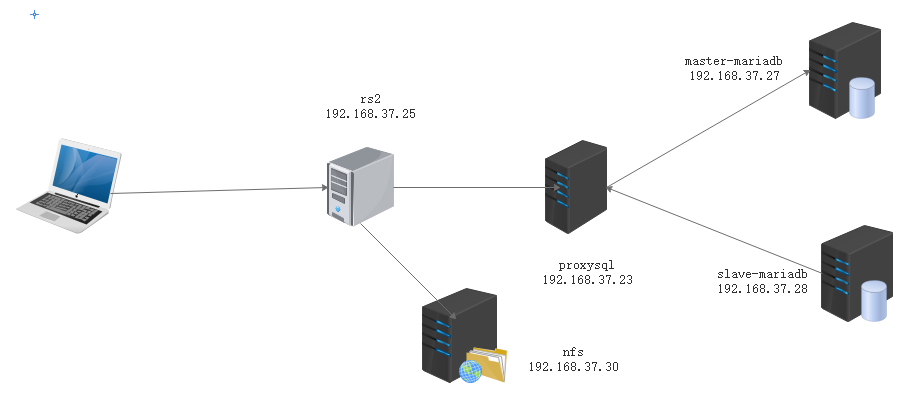
先在主从节点安装mysql
[root@master-mariadb ~]# yum install mariadb-server -y

[root@slave-mariadb ~]# yum install mariadb-server -y
配置主节点和从节点
[root@master-mariadb ~]# vim /etc/my.cnf

[mysqld]

datadir=/var/lib/mysql

socket=/var/lib/mysql/mysql.sock

server_id=27

log-bin=master-log

skip_name_resolve=ON

innodb_file_per_table=ON
datadir=/var/lib/mysql
socket=/var/lib/mysql/mysql.sock
relay-log=slave-log
read_only=1
skip_name_resolve=ON
innodb_file_per_table=ON
配置主节点做成master
[root@master-mariadb ~]# mysql

Welcome to the MariaDB monitor.  Commands end with ; or \g.

Your MariaDB connection id is 3

Server version: 5.5.60-MariaDB MariaDB Server

Copyright (c) 2000, 2018, Oracle, MariaDB Corporation Ab and others.

Type 'help;' or '\h' for help. Type '\c' to clear the current input statement.

MariaDB [(none)]> show master logs;

+-------------------+-----------+

| Log_name          | File_size |

+-------------------+-----------+

| master-log.000001 |     30358 |

| master-log.000002 |   1038814 |

| master-log.000003 |       245 |

+-------------------+-----------+

3 rows in set (0.00 sec)

MariaDB [(none)]> grant all on *.* to 'repluser'@'192.168.37.%' identified by 'centos';

Query OK, 0 rows affected (0.00 sec)

MariaDB [(none)]> flush privileges;

Query OK, 0 rows affected (0.00 sec)
配置从服务器同步主节点
[root@slave-mariadb ~]# mysql

Welcome to the MariaDB monitor.  Commands end with ; or \g.

Your MariaDB connection id is 5

Server version: 5.5.60-MariaDB MariaDB Server

Copyright (c) 2000, 2018, Oracle, MariaDB Corporation Ab and others.

Type 'help;' or '\h' for help. Type '\c' to clear the current input statement.

MariaDB [(none)]> change master to master_host='192.168.37.27',master_user='repluser',master_password='centos',master_log_file='master-log.000003',master_log_pos=245;

MariaDB [(none)]> start slave;
配置PorxySQL服务器的Yum源安装proxysql
[root@msyql-proxy ~]# cat <<EOF | tee /etc/yum.repos.d/proxysql.repo

> [proxysql_repo]

> name= ProxySQL YUM repository

> baseurl=http://repo.proxysql.com/ProxySQL/proxysql-1.4.x/centos/\$releasever

> gpgcheck=1

> gpgkey=http://repo.proxysql.com/ProxySQL/repo_pub_key

> EOF

[root@msyql-proxy ~]# yum install proxysql -y
[root@msyql-proxy ~]# systemctl start proxysql

[root@msyql-proxy ~]# mysql -uadmin -padmin -P 6032 -h127.0.0.1
Query OK, 1 row affected (0.00 sec)
Query OK, 1 row affected (0.00 sec) #:将主从加入到proxysql
Query OK, 0 rows affected (0.00 sec)
Query OK, 0 rows affected (0.01 sec)
在master节点添加一个监控后端服务器的用户
 MariaDB [(none)]> grant replication client on *.* to monitor@'192.168.37.%' identified by 'magedu';

Query OK, 0 rows affected (0.00 sec)

MariaDB [(none)]> flush privileges;

Query OK, 0 rows affected (0.00 sec)
在proxysql服务器添加监控后端服务器的用户
MySQL [(none)]> set mysql-monitor_username='monitor';

Query OK, 1 row affected (0.00 sec)

MySQL [(none)]> set mysql-monitor_password='magedu';

Query OK, 1 row affected (0.00 sec)
Query OK, 0 rows affected (0.00 sec)
Query OK, 97 rows affected (0.00 sec)
Query OK, 1 row affected (0.00 sec) #设置分组
Query OK, 0 rows affected (0.00 sec)
Query OK, 0 rows affected (0.01 sec)
在主节点创建一个用户可以让该用户操作主从节点的数据库
MariaDB [(none)]> grant all on *.* to sqluser@'192.168.8.%' identified by 'magedu';

Query OK, 0 rows affected (0.00 sec)

MariaDB [(none)]> flush privileges;

Query OK, 0 rows affected (0.00 sec)
在proxysql服务器,将该用户添加到proxysql表里
MySQL [(none)]> insert into mysql_users(username,password,default_hostgroup) values('sqluser','magedu',10);

Query OK, 1 row affected (0.00 sec)

MySQL [(none)]> load mysql users to runtime;

Query OK, 0 rows affected (0.00 sec)

MySQL [(none)]> save mysql users to disk

    -> ;

Query OK, 0 rows affected (0.00 sec)
在proxysql上配置路由规则
MySQL [(none)]> insert into mysql_query_rules

    -> (rule_id,active,match_digest,destination_hostgroup,apply)VALUES

    -> (1,1,'^SELECT.*FOR UPDATE$',10,1),(2,1,'^SELECT',20,1);

Query OK, 2 rows affected (0.01 sec)

MySQL [(none)]> load mysql query rules to runtime;

Query OK, 0 rows affected (0.00 sec)

MySQL [(none)]> save mysql query rules to disk;

Query OK, 0 rows affected (0.00 sec)
在rs2服务器安装httpd php-fpm php-mysql
[root@rs2 ~]# yum install php-fpm php-mysql httpd -y
在rs2服务器配置httpd
[root@rs2 html]# vim /etc/httpd/conf/httpd.conf

<IfModule dir_module>

    DirectoryIndex index.phpindex.html

</IfModule>

AddType application/x-httpd-php .php

AddType application/x-httpd-php-source .phps

ProxyPassMatch "^/(.*\.php)$" "fcgi://127.0.0.1:9000/var/www/html/$1"
[root@rs2 html]# systemctl restart httpd
然后配置nfs服务器
[root@NFS ~]# yum install nfs-util rpcbind -y

[root@NFS ~]# useradd apache  #创建映射用户

[root@NFS ~]# id apache

uid=1000(apache) gid=1000(apache) groups=1000(apache)

[root@NFS ~]# vim /etc/exports.d/httpd.exports    #将目录共享给http服务器

/data/httpd 192.168.37.25(rw,async,all_squash,anonuid=1000,anongid=1000)

/data/httpd 192.168.37.24(rw,async,all_squash,anonuid=1000,anongid=1000)

[root@NFS ~]# mkdir /data/httpd/  #创建目录
[root@NFS wordpress]# systemctl start nfs
将wordpress程序移动到nfs服务器目录并解压然后修改目录权限
[root@NFS httpd]# ls

index.html  wordpress  wordpress-5.0.4-zh_CN.tar.gz
[root@NFS httpd]# setfacl -Rm u:apache:rwx /data/httpd/
在master-mysql服务器授权wordpress账户
MariaDB [(none)]> create database wordpress

    -> ;

Query OK, 1 row affected (0.00 sec)

MariaDB [(none)]> grant all on wordpress.* to 'wordpress'@'192.168.37.%' identified by 'centos';

Query OK, 0 rows affected (0.00 sec)

MariaDB [(none)]> flush privileges;

Query OK, 0 rows affected (0.01 sec)
在Proxysql 服务器将用户添加到msyql_user表中
MySQL [(none)]> insert into mysql_users(username,password,default_hostgroup) values ('wordpress','centos',10);

Query OK, 1 row affected (0.00 sec)

MySQL [(none)]> load mysql users to runtime;

Query OK, 0 rows affected (0.00 sec)

MySQL [(none)]> load mysql users to disk;

ERROR 1045 (#2800): near "load": syntax error

MySQL [(none)]> save mysql users to disk;

Query OK, 0 rows affected (0.00 sec)
在nfs服务器配置wordpress的配置文件
[root@NFS wordpress]# cp wp-config-sample.php wp-config.php
[root@NFS wordpress]# vim wp-config.php
define('DB_NAME', 'wordpress'); /** MySQL?版.搴..?峰. */
define('DB_USER', 'wordpress'); /** MySQL?版.搴..?.*/
define('DB_PASSWORD', 'centos'); /** MySQL涓绘. */
define('DB_HOST', '192.168.37.23:6033'); /** ?.缓?版.琛ㄦ.榛..?..瀛.??.*/
define('DB_CHARSET', 'utf8'); /** ?版.搴..?.被?..?涓.‘瀹..?挎.??*/
define('DB_COLLATE', '');
mysql读写分离(proxySQL) lamp+proxysql+nfs的更多相关文章
- mysql中间件proxysql实现mysql读写分离
目录 1. mysql实现读写分离的方式 2. ProxySQL简介 3. ProxySQL安装 4. ProxySQL的Admin管理接口 5. 和admin管理接口相关的变量 5.1 admin- ...
- mysql读写分离(PHP类)
mysql读写分离(PHP类) 博客分类: php mysql 自己实现了php的读写分离,并且不用修改程序 优点:实现了读写分离,不依赖服务器硬件配置,并且都是可以配置read服务器,无限扩展 ...
- amoeba实现MySQL读写分离
amoeba实现MySQL读写分离 准备环境:主机A和主机B作主从配置,IP地址为192.168.131.129和192.168.131.130,主机C作为中间件,也就是作为代理服务器,IP地址为19 ...
- PHP代码实现MySQL读写分离
关于MySQL的读写分离有几种方法:中间件,Mysql驱动层,代码控制 关于中间件和Mysql驱动层实现Mysql读写分离的方法,今天暂不做研究, 这里主要写一点简单的代码来实现由PHP代码控制MyS ...
- 转:Mysql读写分离实现的三种方式
1 程序修改mysql操作类可以参考PHP实现的Mysql读写分离,阿权开始的本项目,以php程序解决此需求.优点:直接和数据库通信,简单快捷的读写分离和随机的方式实现的负载均衡,权限独立分配缺点:自 ...
- 使用Atlas实现MySQL读写分离+MySQL-(Master-Slave)配置
参考博文: MySQL-(Master-Slave)配置 本人按照博友北在北方的配置已成功 我使用的是 mysql5.6.27版本. 使用Atlas实现MySQL读写分离 数据切分——Atlas读 ...
- MySQL读写分离技术
1.简介 当今MySQL使用相当广泛,随着用户的增多以及数据量的增大,高并发随之而来.然而我们有很多办法可以缓解数据库的压力.分布式数据库.负载均衡.读写分离.增加缓存服务器等等.这里我们将采用读写分 ...
- php实现MySQL读写分离
MySQL读写分离有好几种方式 MySQL中间件 MySQL驱动层 代码控制 关于 中间件 和 驱动层的方式这里不做深究 暂且简单介绍下 如何通过PHP代码来控制MySQL读写分离 我们都知道 &q ...
- [记录]MySQL读写分离(Atlas和MySQL-proxy)
MySQL读写分离(Atlas和MySQL-proxy) 一.阿里云使用Atlas从外网访问MySQL(RDS) (同样的方式修改配置文件可以实现代理也可以实现读写分离,具体看使用场景) 1.在跳板机 ...
- docker环境 mysql读写分离 mycat maxscale
#mysql读写分离测试 环境centos 7.4 ,docker 17.12 ,docker-compose mysql 5.7 主从 mycat 1.6 读写分离 maxscale 2.2.4 读 ...
随机推荐
- Java反射判断对象实例所有属性是否为空
https://www.jb51.net/article/201647.htm public static Boolean ObjectAllFieldsEmpty(Object obj) throw ...
- if语句和switch语句的选择与区别
if语句和Switch语句的选择 if 结构 基本if选择结构: 处理单一或组合条件的情况 if-else选择结构:处理简单的条件分支情况 多重if选择结构:处理复杂的条件分支情况 嵌套if选择结构: ...
- 使用grep命令,玩转代码审计寻找Sink
好久没分享东西了,今天分享个实用代码审计技巧 使用grep,玩转代码审计,适用于linux/mac,windows需要另行安装grep: 使用场景如下:快速寻找项目中所有的Sink,快速寻找符合适配条 ...
- 南京大学OS笔记(1)-应用眼中的操作系统
南京大学OS笔记(1)-应用眼中的操作系统 早就想刷一刷南大JYY老师的os课.之前稍微看过几节,果然讲的风趣幽默,而且现场写代码展示水平确实很高,这次准备认真刷一刷然后好好记一下笔记.当然lab就不 ...
- super和this
super注意点: 1.super调用父类的构造方法,必须在构造方法的第一个 2.super必须只能出现在子类的方法或者构造方法中 3.super和this不能同时调用构造方法 this: 代表的对象 ...
- 基于Netty实现自定义消息通信协议(协议设计及解析应用实战)
所谓的协议,是由语法.语义.时序这三个要素组成的一种规范,通信双方按照该协议规范来实现网络数据传输,这样通信双方才能实现数据正常通信和解析. 由于不同的中间件在功能方面有一定差异,所以其实应该是没有一 ...
- Fastjson妙用之@JSONField注解
在开发的过程中使用json格式的地方非常多,现在前后端分离的项目中,前后端数据交换的格式一般为json,这种格式的优/缺点这里不再赘述,感兴趣的可以百度.把java中的实体类序列化为json的方式也有 ...
- [atAGC004F]Namori
考虑树的情况,将其以任意一点为根建树 对于每一个节点,考虑其要与父亲操作几次才能使子树内均为黑色,这可以用形如$(0/1,x)$的二元组来描述,其中0/1即表示其要求操作时父亲是白色/黑色且要操作$x ...
- 在安卓开发中需要格式化桌面icon图标
使用以下在线工具即可实现http://www.makeicon.cc/home/index
- vue create is a Vue CLI 3 only command and you are using Vue CLI 2.9.6. You
这是因为你安装的是2.9的版本用了3.0的命令 解决方法:1.用2.9的命令初始化项目 vue init webpack my-project 2.卸载2.9升级到3.0