
Python中的时间日期模块(time、datetime)
目录
Python提供了datetime、time和 calendar 模块用来处理日期和时间,时间间隔是以秒为单位的浮点数。每个时间戳都是自1970年1月1日来算。
Datetime
datetime在python中是用来处理时间的一个模块
datetime模块下又包含了几个类
| 类名 | 功能 |
|---|---|
| date | 日期对象,常用的属性有year, month, day |
| time | 时间对象 |
| datetime | 日期时间对象,常用的属性有hour, minute, second, microsecond |
| timedelta | 时间间隔,即两个时间点之间的长度 |
| datetime_CAPI | 日期时间对象C语言接口 |
| tzinfo | 时区信息对象 |
下面介绍datetime中比较常用的一些函数
获取当前时间
from datetime import datetime

>>> print ( datetime.now() )

2018-10-08 08:08:13.296957

>>> print ( datetime.now().time() )

08:08:13.296957

>>> print ( type(datetime.now()) )

<class 'datetime.datetime'>
获取当前日期
from datetime import datetime

>>> print ( datetime.now().date() )

2018-10-08

>>> print ( type(datetime.now().date() ) )

<class 'datetime.date'>
获取当前时间的tuple元组
from datetime import datetime

print(datetime.now().timetuple())

//time.struct_time(tm_year=2018, tm_mon=11, tm_mday=1, tm_hour=16, tm_min=21, tm_sec=5, tm_wday=3, tm_yday=305, tm_isdst=-1)

print(datetime.now().timetuple().tm_year)  //2018  年

print(datetime.now().timetuple().tm_mon)   //11    月

print(datetime.now().timetuple().tm_mday)  //1     日

print(datetime.now().timetuple().tm_hour)  //16    时

print(datetime.now().timetuple().tm_min)   //21    分

print(datetime.now().timetuple().tm_sec)   //5     秒

print(datetime.now().timetuple().tm_wday)  //3     0-6 0是周一,6是周日

print(datetime.now().timetuple().tm_yday)  //305   一年中的第几天

print(datetime.now().timetuple().tm_isdst) //-1    是否为下令时 1为是 0为不是 -1为未知,默认为-1
格式化日期和时间
from datetime import datetime

print(datetime.now().strftime("%Y-%m-%d %H:%M:%S"))

#############

2018-11-01 19:25:45
时间移动
使用datetime.timedelta这个方法来前后移动时间,可以用的参数有weeks,days,hours,minutes,seconds,microseconds。使用 days=1代表后一天,days=-1代表前一天,其他参数也一样
from datetime import datetime

from datetime import timedelta

>>>print( datetime.now() )

2018-10-08 08:25:49.546137

>>>print( datetime.now()+ timedelta(days=1))

2018-10-09 08:25:49.547196
获取两个时间的时间差
from datetime import datetime

>>>nowtime=datetime.now()

>>>utctime=datetime.utcnow()

>>>print( nowtime-utctime )

8:00:00

>>>print((nowtime-utctime).total_seconds())         ##以秒计算

28800.0
时间格式转换
datetime转str格式
from datetime import datetime

>>>print( datetime.now() )

2018-10-08 08:33:37.369422

>>>print( datetime.now().strftime("%Y-%m-%d %H:%M:%S") )

2018-10-08 08:33:37

>>>print( datetime.now().strftime("%Y-%m-%d") )

2018-10-08

>>>print( datetime.now().strftime("%H-%M:%S") )

08:33:37
str格式转datetime
from datetime import datetime

>>>print( datetime.strptime("2018-10-08 09:00:00","%Y-%m-%d %H:%M:%S"))

2018-10-08 09:00:00

>>>print( type(datetime.strptime("2018-10-08 09:00:00","%Y-%m-%d %H:%M:%S")) )

<class 'datetime.datetime'>
datetime转timestamp
from datetime import datetime

import time

>>>now=datetime.now()

>>>print(now)

2018-10-08 08:51:42.215168

>>>print( time.mktime(now.timetuple()) )

1538959902.0                  ##现在距离1970-01-01 00:00:00的秒数
timestamp转datetime
from datetime import datetime

>>>print( datetime.fromtimestamp(1538959902.0))

2018-10-08 08:51:42
Time
获取距元年(1970.1.1)的秒数
>>import time

>>print(time.time())

1541121353.1594238

>>print(time.ctime(time.time()))

Fri Nov  2 09:15:53 2018
当时时间
import time

localtime=time.localtime()  #返回结构时间

asctime=time.asctime(localtime)    #将结构时间转换为asctime

print(localtime)

print(asctime)

############

time.struct_time(tm_year=2018, tm_mon=11, tm_mday=1, tm_hour=19, tm_min=13, tm_sec=5, tm_wday=3, tm_yday=305, tm_isdst=0)

Thu Nov  1 19:13:05 2018
格式化时间和日期
import time

formattime1=time.strftime("%Y-%m-%d %H:%M:%S",time.localtime())

formattime2=time.strftime("%a-%b-%d %H:%M:%S:%Y",time.localtime())

print(formattime1)

print(formattime2)

#############################

2018-11-01 19:16:30

Thu-Nov-01 19:16:30:2018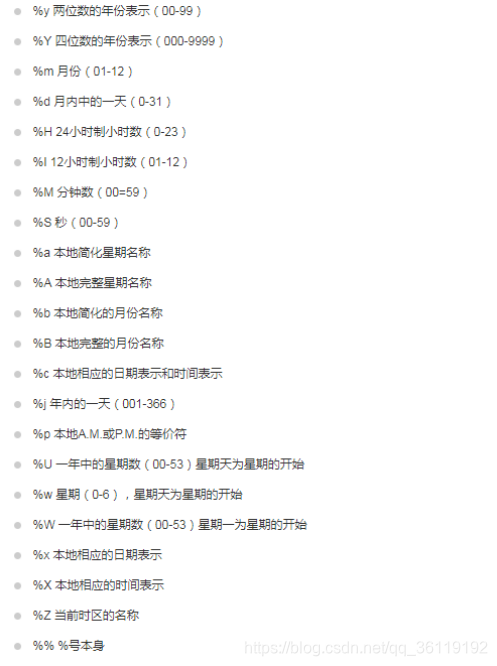
休眠
import time

time.sleep(10)   ##休眠10秒
Calendar
Calendar模块有很广泛的方法用来处理年历和月历
打印某一年和某一个月的月历
import calendar

print("2018年的年历是:")

print(calendar.prcal(2018))

###################################

2018年的年历是:

                                  2018

      January                   February                   March

Mo Tu We Th Fr Sa Su      Mo Tu We Th Fr Sa Su      Mo Tu We Th Fr Sa Su

 1  2  3  4  5  6  7                1  2  3  4                1  2  3  4

 8  9 10 11 12 13 14       5  6  7  8  9 10 11       5  6  7  8  9 10 11

15 16 17 18 19 20 21      12 13 14 15 16 17 18      12 13 14 15 16 17 18

22 23 24 25 26 27 28      19 20 21 22 23 24 25      19 20 21 22 23 24 25

29 30 31                  26 27 28                  26 27 28 29 30 31

       April                      May                       June

Mo Tu We Th Fr Sa Su      Mo Tu We Th Fr Sa Su      Mo Tu We Th Fr Sa Su

                   1          1  2  3  4  5  6                   1  2  3

 2  3  4  5  6  7  8       7  8  9 10 11 12 13       4  5  6  7  8  9 10

 9 10 11 12 13 14 15      14 15 16 17 18 19 20      11 12 13 14 15 16 17

16 17 18 19 20 21 22      21 22 23 24 25 26 27      18 19 20 21 22 23 24

23 24 25 26 27 28 29      28 29 30 31               25 26 27 28 29 30

30

        July                     August                  September

Mo Tu We Th Fr Sa Su      Mo Tu We Th Fr Sa Su      Mo Tu We Th Fr Sa Su

                   1             1  2  3  4  5                      1  2

 2  3  4  5  6  7  8       6  7  8  9 10 11 12       3  4  5  6  7  8  9

 9 10 11 12 13 14 15      13 14 15 16 17 18 19      10 11 12 13 14 15 16

16 17 18 19 20 21 22      20 21 22 23 24 25 26      17 18 19 20 21 22 23

23 24 25 26 27 28 29      27 28 29 30 31            24 25 26 27 28 29 30

30 31

      October                   November                  December

Mo Tu We Th Fr Sa Su      Mo Tu We Th Fr Sa Su      Mo Tu We Th Fr Sa Su

 1  2  3  4  5  6  7                1  2  3  4                      1  2

 8  9 10 11 12 13 14       5  6  7  8  9 10 11       3  4  5  6  7  8  9

15 16 17 18 19 20 21      12 13 14 15 16 17 18      10 11 12 13 14 15 16

22 23 24 25 26 27 28      19 20 21 22 23 24 25      17 18 19 20 21 22 23

29 30 31                  26 27 28 29 30            24 25 26 27 28 29 30

                                                    31

cal=calendar.month(2018,10)

print("2018年10月的月历是:")

print(cal)

#########################

2018年10月的月历是:

    October 2018

Mo Tu We Th Fr Sa Su

 1  2  3  4  5  6  7

 8  9 10 11 12 13 14

15 16 17 18 19 20 21

22 23 24 25 26 27 28

29 30 31

print(calendar.leapdays(2000,2018))  #返回2000~2018内的闰年数

print(calendar.weekday(2018,11,2))  ##返回2018.11.2是星期几,0-6
Python中的时间日期模块(time、datetime)的更多相关文章
- Python中对时间日期的处理方法简单汇总
这篇文章主要介绍了Python实用日期时间处理方法汇总,本文讲解了获取当前datetime.获取当天date.获取明天/前N天.获取当天开始和结束时间(00:00:00 23:59:59).获取两个d ...
- 解决 python 中,时间日期不能序列化的问题
在python 中, 你在数据库娶到了数据中如果含有时间日期,那么你在向前端作为json对象传递的时候呢,就会报错.大致如下: TypeError: datetime.datetime(2017, 1 ...
- python、js 时间日期模块time
python 参考链接:https://www.runoob.com/python/python-date-time.html 时间戳 >>> print(time.time())# ...
- Python中好用的模块们
目录 Python中好用的模块们 datetime模块 subprocess模块 matplotlib折线图 importlib模块 Python中好用的模块们 datetime模块 相信我们都使 ...
- Python 中的时间处理包datetime和arrow
Python 中的时间处理包datetime和arrow 在获取贝壳分的时候用到了时间处理函数,想要获取上个月时间包括年.月.日等 # 方法一: today = datetime.date.today ...
- Python中xlrd和xlwt模块使用方法 (python对excel文件的操作)
本文主要介绍可操作excel文件的xlrd.xlwt模块.其中xlrd模块实现对excel文件内容读取,xlwt模块实现对excel文件的写入. 安装xlrd和xlwt模块 xlrd和xlwt模块不是 ...
- python中的时间转换
Python中的时间相关库有: datetime 和time. 主要形式有: datetime timestamp 相互转换: timestamp->datetime: dt = datetim ...
- SQLite中的时间日期函数(转)
SQLite包含了如下时间/日期函数: datetime().......................产生日期和时间date()...........................产生日期tim ...
- Python中os和shutil模块实用方法集…
Python中os和shutil模块实用方法集锦 类型:转载 时间:2014-05-13 这篇文章主要介绍了Python中os和shutil模块实用方法集锦,需要的朋友可以参考下 复制代码代码如下: ...
随机推荐
- Java跨平台原理与Java虚拟机(JVM)
Java跨平台原理(字节码文件.虚拟机) C/C++语言都直接编译成针对特定平台机器码.如果要跨平台,需要使用相应的编译器重新编译. Java源程序(.java)要先编译成与平台无关的字节码文件(.c ...
- dubbo实战之四:管理控制台dubbo-admin
欢迎访问我的GitHub https://github.com/zq2599/blog_demos 内容:所有原创文章分类汇总及配套源码,涉及Java.Docker.Kubernetes.DevOPS ...
- 实话实说:只会.NET,会让我们一直处于鄙视链、食物链的下游
金三银四,是个躁动的季节. 结合最近的面试,谈一谈一个老牌开发人员的面试感悟. 大家都知道我的主力技术栈是 .NET + Devops + 弱前端 (当前技术认知,不排除以后变化). 面试了大小厂,有 ...
- 远程文件管理系统(SpringBoot + Vue)
一.简介 可以实现对本地文件的 增.删.改.重命名等操作的监控,通过登录远程文件监控系统,获取一段时间内本地文件的变化情况. 系统功能图如下: 流程图如下: 二.本地文件监控程序的实现(C++) 调用 ...
- Python中if __name__ = "__main__"的理解
通俗的理解__name__ ="__main__"的意思就是:当.py文件被直接运行时,if __name__ = "__main__"之下的代码快将被运行:当 ...
- Java并发编程之并发关键字
volatile 保证可见性 一个线程修改volatile变量的值时,该变量的新值会立即刷新到主内存中,这个新值对其他线程来说是立即可见的 一个线程读取volatile变量的值时,该变量在本地内存中缓 ...
- ch1_6_6求解门禁系统问题
import java.util.HashMap; import java.util.Scanner; public class ch1_6_6求解门禁系统问题 { public static voi ...
- C# .NET Socket 简单实用框架,socket组件封装
参考资料 https://www.cnblogs.com/coldairarrow/p/7501645.html 根据.NET Socket 简单实用框架进行了改造,这个代码对socket通信封装还是 ...
- 使用KeepAlived来实现高可用的DR模型
环境 VMware 16 CentOS8 相关软件 keepalived ipvsadm httpd 准备工作 准备四个节点,如上图,Node01 ~ Node04, 本文默认你会在VMWare上安装 ...
- 生产中使用ssh-copy-id复制公钥到多台服务器
在系统运维的时候,可能免密码通过ssh方式登录到远程主机,这时就首先需要将本机的公钥复制到远程主机,用 ssh-copy-id 命令可以轻松做到. 对于单台远程主机,直接使用命令就可以了 # 生成密钥 ...