
SpringBoot-MVC自动配置原理
SpringBoot对SpringMVC做了哪些配置,如何扩展,如何定制?
文档地址 :https://docs.spring.io/spring-boot/docs/2.2.5.RELEASE/reference/htmlsingle/#boot-features-spring-mvc-auto-configuration
Spring MVC Auto-configuration

// Spring Boot为Spring MVC提供了自动配置,它可以很好地与大多数应用程序一起工作。

Spring Boot provides auto-configuration for Spring MVC that works well with most applications.

// 自动配置在Spring默认设置的基础上添加了以下功能:

The auto-configuration adds the following features on top of Spring’s defaults:

// 包含视图解析器

Inclusion of ContentNegotiatingViewResolver and BeanNameViewResolver beans.

// 支持静态资源文件夹的路径,以及webjars

Support for serving static resources, including support for WebJars

// 自动注册了Converter:

// 转换器,这就是我们网页提交数据到后台自动封装成为对象的东西,比如把"1"字符串自动转换为int类型

// Formatter:【格式化器,比如页面给我们了一个2019-8-10,它会给我们自动格式化为Date对象】

Automatic registration of Converter, GenericConverter, and Formatter beans.

// HttpMessageConverters

// SpringMVC用来转换Http请求和响应的的,比如我们要把一个User对象转换为JSON字符串,可以去看官网文档解释;

Support for HttpMessageConverters (covered later in this document).

// 定义错误代码生成规则的

Automatic registration of MessageCodesResolver (covered later in this document).

// 首页定制

Static index.html support.

// 图标定制

Custom Favicon support (covered later in this document).

// 初始化数据绑定器:帮我们把请求数据绑定到JavaBean中!

Automatic use of a ConfigurableWebBindingInitializer bean (covered later in this document).

/*

如果您希望保留Spring Boot MVC功能,并且希望添加其他MVC配置(拦截器、格式化程序、视图控制器和其他功能),则可以添加自己

的@configuration类,类型为webmvcconfiguer,但不添加@EnableWebMvc。如果希望提供

RequestMappingHandlerMapping、RequestMappingHandlerAdapter或ExceptionHandlerExceptionResolver的自定义

实例,则可以声明WebMVCregistrationAdapter实例来提供此类组件。

*/

If you want to keep Spring Boot MVC features and you want to add additional MVC configuration

(interceptors, formatters, view controllers, and other features), you can add your own

@Configuration class of type WebMvcConfigurer but without @EnableWebMvc. If you wish to provide

custom instances of RequestMappingHandlerMapping, RequestMappingHandlerAdapter, or

ExceptionHandlerExceptionResolver, you can declare a WebMvcRegistrationsAdapter instance to provide such components.

// 如果您想完全控制Spring MVC,可以添加自己的@Configuration,并用@EnableWebMvc进行注释。

If you want to take complete control of Spring MVC, you can add your own @Configuration annotated with
仔细对照,看一下它怎么实现的,它告诉我们SpringBoot已经帮我们自动配置好了SpringMVC,那自动配置了哪些东西呢?
ContentNegotiatingViewResolver 内容协商视图解析器
自动配置了ViewResolver,就是我们之前学习的SpringMVC的视图解析器;
即根据方法的返回值取得视图对象(View),然后由视图对象决定如何渲染(转发,重定向)。
我们去看看这里的源码:我们找到 WebMvcAutoConfiguration , 然后搜索ContentNegotiatingViewResolver。找到如下方法!
@Bean

@ConditionalOnBean(ViewResolver.class)

@ConditionalOnMissingBean(name = "viewResolver", value = ContentNegotiatingViewResolver.class)

public ContentNegotiatingViewResolver viewResolver(BeanFactory beanFactory) {

    ContentNegotiatingViewResolver resolver = new ContentNegotiatingViewResolver();

    resolver.setContentNegotiationManager(beanFactory.getBean(ContentNegotiationManager.class));

    // ContentNegotiatingViewResolver使用所有其他视图解析器来定位视图,因此它应该具有较高的优先级

    resolver.setOrder(Ordered.HIGHEST_PRECEDENCE);

    return resolver;

}
可以点进这类看看!找到对应的解析视图的代码;
@Nullable // 注解说明:@Nullable 即参数可为null

public View resolveViewName(String viewName, Locale locale) throws Exception {

    RequestAttributes attrs = RequestContextHolder.getRequestAttributes();

    Assert.state(attrs instanceof ServletRequestAttributes, "No current ServletRequestAttributes");

    List<MediaType> requestedMediaTypes = this.getMediaTypes(((ServletRequestAttributes)attrs).getRequest());

    if (requestedMediaTypes != null) {

        // 获取候选的视图对象

        List<View> candidateViews = this.getCandidateViews(viewName, locale, requestedMediaTypes);

        // 选择一个最适合的视图对象,然后把这个对象返回

        View bestView = this.getBestView(candidateViews, requestedMediaTypes, attrs);

        if (bestView != null) {

            return bestView;

        }

    }

    // .....

}
我们继续点进去看,他是怎么获得候选的视图的呢?
getCandidateViews中看到他是把所有的视图解析器拿来,进行while循环,挨个解析
Iterator var5 = this.viewResolvers.iterator();
得出结论:ContentNegotiatingViewResolver 这个视图解析器就是用来组合所有的视图解析器的
我们再去研究下他的组合逻辑,看到有个属性viewResolvers,看看它是在哪里进行赋值的!
protected void initServletContext(ServletContext servletContext) {

    // 这里它是从beanFactory工具中获取容器中的所有视图解析器

    // ViewRescolver.class 把所有的视图解析器来组合的

    Collection<ViewResolver> matchingBeans = BeanFactoryUtils.beansOfTypeIncludingAncestors(this.obtainApplicationContext(), ViewResolver.class).values();

    ViewResolver viewResolver;

    if (this.viewResolvers == null) {

        this.viewResolvers = new ArrayList(matchingBeans.size());

    }

    // ...............

}
既然它是在容器中去找视图解析器,我们是否可以猜想,我们就可以去实现一个视图解析器了呢?
我们可以自己给容器中去添加一个视图解析器;这个类就会帮我们自动的将它组合进来;我们去实现一下
1、我们在我们的主程序中去写一个视图解析器来试试;
@Bean //放到bean中

public ViewResolver myViewResolver(){

    return new MyViewResolver();

}

//我们写一个静态内部类,视图解析器就需要实现ViewResolver接口

private static class MyViewResolver implements ViewResolver{

    @Override

    public View resolveViewName(String s, Locale locale) throws Exception {

        return null;

    }

}
SpringBoot在自动配置很多组件的时候,先看容器中有没有用户自己配置的(如果用户自己配置@bean),如果有就用用户配置的,如果没有就用自动配置的;
如果有些组件可以存在多个,比如我们的视图解析器,就将用户配置的和自己默认的组合起来!
扩展使用SpringMVC
If you want to keep Spring Boot MVC features and you want to add additional MVC configuration (interceptors, formatters, view controllers, and other features), you can
add your own @Configuration class of type WebMvcConfigurer but without @EnableWebMvc. If you wish to provide custom instances of RequestMappingHandlerMapping, RequestMappingHandlerAdapter,
or ExceptionHandlerExceptionResolver, you can declare a WebMvcRegistrationsAdapter instance to provide such components.
我们要做的就是编写一个@Configuration注解类,并且类型要为WebMvcConfigurer,还不能标注@EnableWebMvc注解;
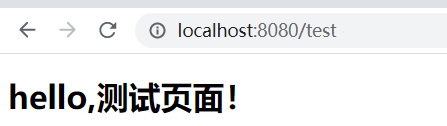
自己写一个:新建一个包叫config,写一个类MyMvcConfig;
使用@Configuration、实现WebMvcConfigurer,重写xieaddViewControllers方法
@Configuration

public class MyMvcConfig implements WebMvcConfigurer {

    @Override

    public void addViewControllers(ViewControllerRegistry registry) {

        // 浏览器发送/test , 就会跳转到test页面;

        registry.addViewController("/test").setViewName("test");

    }

}
这样既SpringBoot保留了所有的自动配置,也扩展了自己实际需求的配置!
全面接管SpringMVC
全面接管即:SpringBoot对SpringMVC的自动配置不需要了,所有都是我们自己去配置!
只需在我们的配置类中要加一个@EnableWebMvc。
我们看下如果我们全面接管了SpringMVC了,我们之前SpringBoot给我们配置的静态资源映射一定会无效,可以去测试一下;
我们发现所有的SpringMVC自动配置都失效了!回归到了最初的样子;
当然,我们开发中,不推荐使用全面接管SpringMVC
SpringBoot-MVC自动配置原理的更多相关文章
- Springboot MVC 自动配置
Springboot MVC 自动配置 官方文档阅读 https://docs.spring.io/spring-boot/docs/current/reference/html/web.html#w ...
- springboot mvc自动配置(三)初始化mvc的组件
所有文章 https://www.cnblogs.com/lay2017/p/11775787.html 正文 在springboot mvc自动配置的时候,获得了DispatcherServlet和 ...
- springboot mvc自动配置(一)自动配置DispatcherServlet和DispatcherServletRegistry
所有文章 https://www.cnblogs.com/lay2017/p/11775787.html 正文 springboot的自动配置基于SPI机制,实现自动配置的核心要点就是添加一个自动配置 ...
- 全网最深分析SpringBoot MVC自动配置失效的原因
前言 本来没有计划这一篇文章的,只是在看完SpringBoot核心原理后,突然想到之前开发中遇到的MVC自动失效的问题,虽然网上有很多文章以及官方文档都说明了原因,但还是想亲自看一看,本以为很简单的事 ...
- SpringBoot的自动配置原理过程解析
SpringBoot的最大好处就是实现了大部分的自动配置,使得开发者可以更多的关注于业务开发,避免繁琐的业务开发,但是SpringBoot如此好用的 自动注解过程着实让人忍不住的去了解一番,因为本文的 ...
- SpringBoot之自动配置原理
我在前面的Helloworld的程序中已经分析过一次,配置原理了: 1).SpringBoot启动的时候加载主配置类,开启了自动配置功能 @EnableAutoConfiguration 2).@En ...
- springboot mvc自动配置(目录)
对于长时间基于spring框架做web开发的我们,springmvc几乎成为了开发普通web项目的标配.本系列文章基于快速启动的springboot,将从源码角度一点点了解springboot中mvc ...
- 面试题: SpringBoot 的自动配置原理
个人博客网:https://wushaopei.github.io/ (你想要这里多有) 3.Spring Boot 的自动配置原理 package com.mmall; import org. ...
- SpringBoot的自动配置原理
一.入口 上篇注解@SpringBootApplication简单分析,说到了@SpringBootApplication注解的内部结构, 其中@EnableAutoConfiguration利用En ...
- springboot mvc自动配置(二)注册DispatcherServlet到ServletContext
所有文章 https://www.cnblogs.com/lay2017/p/11775787.html 正文 上一篇文章中,我们看到了DispatcherServlet和DispatcherServ ...
随机推荐
- Redis(二):基本数据类型
基础 # redis默认有16个数据库,数组下标从0开始,默认使用0号库 # 当我们启动服务器并连接客户端之后: set <key> <value> # 向数据库中添加数据用于 ...
- Go-内置函数之append、recover用法
package main import "fmt" import "time" func test() { defer func() { if err := r ...
- leetcode——217. 存在重复元素
leetcode--217. 存在重复元素 题目描述:给定一个整数数组,判断是否存在重复元素. 如果存在一值在数组中出现至少两次,函数返回 true .如果数组中每个元素都不相同,则返回 false ...
- Servlet监听器详解及举例
监听器就是一个实现特定接口的普通java程序,这个程序专门用于监听另一个java对象的方法调用或属性改变,当被监听对象发生上述事件后,监听器某个方法将立即被执行. 监听器原理 监听原理 1.存在事件源 ...
- 【Spring 5.x】学习笔记汇总
Spring 工厂 工厂设计模式.第一个Spring程序细节分析.整合日志框架 注入详解 - Set注入(JDK内置类型,用户自定义类型).构造注入(重载) 反转控制与依赖注入.Spring工厂创建复 ...
- 阿里云服务器安装配置nginx
服务器: 阿里云 Alibaba Cloud Linux 下载 进入到预计存放nginx的目录,比如:/usr/local/ 下载nginx压缩包,并解压 cd /usr/local wget htt ...
- redis 主从复制详解
引言 我们之前操作 Redis 都是单机版,但是实际应用中没人使用单机版,都是搭建集群的方式.这篇文章要介绍的主从复制,是指将一台 Redis 服务器的数据,复制到其他 Redis 服务器,我们将前者 ...
- CodeForce-811C Vladik and Memorable Trip(动态规划)
Vladik and Memorable Trip CodeForces - 811C 有一个长度为 n 的数列,其中第 i 项为 ai. 现在需要你从这个数列中选出一些互不相交的区间,并且保证整个数 ...
- STM32,下载HAL库写的代码后J-Link识别不到芯片,必须要按住复位才能下载?
问题描述:最近在学STM32的HAL库,据说可以统一STM32江湖,前途无量.最近一段时间参照STM32CubeMX和原子的资料自己学着建了两个HAL库的工程模板,F4的还好说,F1的出现了一个玄学问 ...
- redis连接密码和指定数据库
台服务器上都快开启200个redis实例了,看着就崩溃了.这么做无非就是想让不同类型的数据属于不同的应用程序而彼此分开. 那么,redis有没有什么方法使不同的应用程序数据彼此分开同时又存储在相同的实 ...