
Android开发----开发工具的安装与TextView组件
开发工具的安装
选择使用Android Studio进行开发,Android Studio 是谷歌推出的一个Android集成开发工具,基于IntelliJ IDEA. 类似 Eclipse ADT,Android Studio 提供了集成的 Android 开发工具用于开发和调试。
在此附上大佬的安装教程:Android Studio安装教程
UI组件
1 布局管理器
- 线性布局(LinearLayout)
- 相对布局(RelativeLayout)
1.1 LinearLayout
常用属性:
- id
- layout_width
- match_parent 匹配父控件
- wrap_content 填充文字
- layout_height
- background
- layout_margin
- layout_padding
- orientation
<?xml version="1.0" encoding="utf-8"?>

<LinearLayout xmlns:android="http://schemas.android.com/apk/res/android"

    xmlns:app="http://schemas.android.com/apk/res-auto"

    xmlns:tools="http://schemas.android.com/tools"

    android:layout_width="match_parent"

    android:layout_height="match_parent"

    android:orientation="vertical"

    tools:context=".MainActivity">

    <LinearLayout

        android:id="@+id/ll_1"

        android:layout_width="200dp"

        android:layout_height="200dp"

        android:background="#8BC34A"

        android:orientation="vertical"

        android:padding="20dp">

        <View

            android:layout_width="match_parent"

            android:layout_height="match_parent"

            android:background="#565555"/>

    </LinearLayout>

    <LinearLayout

        android:layout_width="match_parent"

        android:layout_height="200dp"

        android:background="#8B634A"

        android:orientation="horizontal"

        android:layout_marginTop="20dp"

        android:gravity="bottom">

        <View

            android:layout_width="0dp"

            android:layout_height="match_parent"

            android:background="#FFC107"

            android:layout_weight="1"/>

        <View

            android:layout_width="0dp"

            android:layout_height="match_parent"

            android:layout_weight="1"/>

    </LinearLayout>

</LinearLayout>

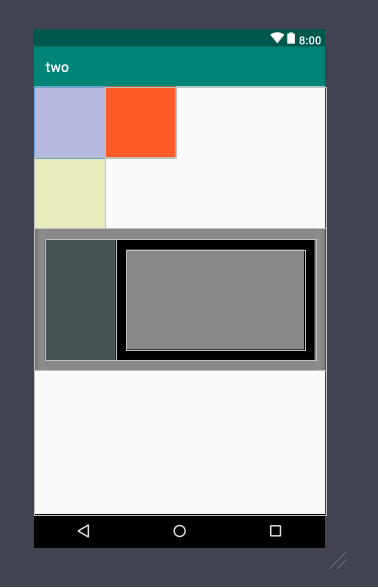
1.2 RelativeLayout
layout_
- toLeftOf
- toRightOf
- alignBottom
- alignParentBottom
- below
<?xml version="1.0" encoding="utf-8"?>

<RelativeLayout xmlns:android="http://schemas.android.com/apk/res/android"

    android:layout_width="match_parent"

    android:layout_height="match_parent">

    <View

        android:id="@+id/view_1"

        android:layout_width="100dp"

        android:layout_height="100dp"

        android:background="#4600108D" />

    <View

        android:id="@+id/view_2"

        android:layout_width="100dp"

        android:layout_height="100dp"

        android:background="#FF5722"

        android:layout_toRightOf="@id/view_1"/>

    <View

        android:id="@+id/view_3"

        android:layout_width="100dp"

        android:layout_height="100dp"

        android:background="#46BCC719"

        android:layout_below="@id/view_2"/>

    <LinearLayout

        android:id="@+id/ll_1"

        android:layout_width="match_parent"

        android:layout_height="200dp"

        android:layout_below="@id/view_3"

        android:background="#888888"

        android:orientation="horizontal"

        android:padding="15dp">

        <View

            android:layout_width="100dp"

            android:layout_height="match_parent"

            android:background="#465456"/>

        <RelativeLayout

            android:layout_width="match_parent"

            android:layout_height="match_parent"

            android:background="#000000"

            android:padding="15dp">

            <View

                android:layout_width="match_parent"

                android:layout_height="match_parent"

                android:background="#888888"/>

        </RelativeLayout>

    </LinearLayout>

</RelativeLayout>
TextView控件
创建按钮新建一个空白活动
在activity_main.xml中创建一个按钮用于点击跳转
<Button

        android:id="@+id/bt_1"

        android:layout_width="match_parent"

        android:layout_height="wrap_content"

        android:text="按钮"/>
在MainActivity.java中添加bt_1的点击事件使其跳转到TextViewActivity
public class MainActivity extends AppCompatActivity {

    private Button mbtn;

    @Override

    protected void onCreate(Bundle savedInstanceState) {

        super.onCreate(savedInstanceState);

        setContentView(R.layout.activity_main);

        mbtn = findViewById(R.id.bt_1);

        mbtn.setOnClickListener(new View.OnClickListener() {

            @Override

            public void onClick(View view) {

                //跳转到演示界面

                Intent intent = new Intent(MainActivity.this,TextViewActivity.class);

                startActivity(intent);

            }

        });

    }

}
创建一个新的TextViewActivity,在activity_text_view.xml中创建TextView控件并实现以下功能
文字在一行中显示并标注未现实完全
activity_text_view.xml
<TextView

        android:id="@+id/tv_2"

        android:layout_width="wrap_content"

        android:layout_height="wrap_content"

        android:maxLines="1"

        android:ellipsize="end"

        android:text="学习Android的第一天"

        android:textSize="50sp"

        android:layout_marginTop="10dp"/>
效果显示图:

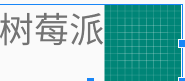
实现文字和图片在一个TextView中
activity_text_view.xml
<TextView

        android:id="@+id/tv_3"

        android:layout_width="wrap_content"

        android:layout_height="wrap_content"

        android:maxLines="1"

        android:text="树莓派"

        android:drawableRight="@drawable/ic_launcher_background"

        android:textSize="50sp"/>
效果显示图:
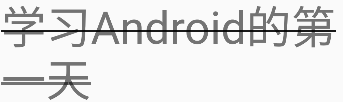
实现文字删除线
创建一个普通TextView
<TextView

        android:id="@+id/tv_4"

        android:layout_width="wrap_content"

        android:layout_height="wrap_content"

        android:text="@string/hzy"

        android:textSize="50sp"/>
在java中进行添加删除线的效果
public class TextViewActivity extends AppCompatActivity {

    private TextView mtv4;

    @Override

    protected void onCreate(Bundle savedInstanceState) {

        super.onCreate(savedInstanceState);

        setContentView(R.layout.activity_text_view);

        mtv4 = findViewById(R.id.tv_4);

        mtv4.getPaint().setFlags(Paint.STRIKE_THRU_TEXT_FLAG);//中划线

        mtv4.getPaint().setAntiAlias(true);//去除锯齿

    }

}
效果显示图
实现下划线效果
如上,创建组件
<TextView

        android:id="@+id/tv_5"

        android:layout_width="wrap_content"

        android:layout_height="wrap_content"

        android:text="@string/hzy"

        android:textSize="24sp"/>
在java代码中做修改
public class TextViewActivity extends AppCompatActivity {

    private TextView mtv5;

    @Override

    protected void onCreate(Bundle savedInstanceState) {

        super.onCreate(savedInstanceState);

        setContentView(R.layout.activity_text_view);

        mtv5 = findViewById(R.id.tv_1);

        mtv5.getPaint().setFlags(Paint.UNDERLINE_TEXT_FLAG);//下划线

    }

}
效果显示:

实现文字走马灯效果
.xml文件
<TextView

        android:id="@+id/tv_7"

        android:layout_width="wrap_content"

        android:layout_height="wrap_content"

        android:text="dididiididahhdesfsdfdsfsdfsdfsdfsdfdsf"

        android:textSize="34sp"

        android:singleLine="true"

        android:ellipsize="marquee"

        android:marqueeRepeatLimit="marquee_forever"

        android:focusable="true"

        android:focusableInTouchMode="true"

        android:layout_marginTop="10dp"/>
显示效果图:

注意:遇事不决,清理缓存并重启
Android开发----开发工具的安装与TextView组件的更多相关文章
- vscode-wechat 小程序开发提示工具 vscode 安装
vscode 安装 vscode-wechat vscode-wechat 小程序开发提示工具 ---- 有了小程序开发提示,开发很方便 https://segmentfault.com/a/1190 ...
- 前端开发Grunt工具的安装使用
随着前端开发效果越来越丰富,前端的结构也越来越复杂,这个时候就需要一个工具来进行管理,可以帮你做语法校验,文件拼接,代码压缩,文件清理等等琐事,Grunt就是这么一个不错的工具. 安装并不复杂,只要先 ...
- SVN团队开发项目工具(安装以及使用)
https://pan.baidu.com/s/1jJyo9ue 密码:ce9z
- Android APP安全评估工具 Drozer - 安装介绍
一.Drozedr安装 注意事项:安装需要 JavaRuntime Environment (JRE) or Java Development Kit (JDK)环境, 没有安装的请先安装java环境 ...
- Xamarin Mono For Android 4.6.07004 完整离线安装破解版(C#开发Android、IOS工具)
Xamarin是由Miguel de Icaza成立的一家新的独立公司,目的是给Mono一个继续奋斗的机会.Mono for Android (原名:MonoDroid)可以让开发人员使用 Mic ...
- 安装并配置 Android Studio 开发工具和 Genymotion 模拟器
需求说明: 安装并配置 Android Studio 开发工具和 Genymotion 模拟器. 熟练使用 Genymotion 模拟器,掌握 Genymotion 模拟器的基本设置和程序安装. 实现 ...
- 简单的调用OpenCV库的Android NDK开发 工具Android Studio
前言 本博客写于2017/08/11, 博主非专业搞安卓开发, 只是工作的需要倒腾了下Android NDK相关的开发, 博文中有什么不正确.不严格的地方欢迎指正哈 本文后续也许还会有删改, 就 ...
- Xamarin For Visual Studio 3.0.54.0 完整离线破解版(C# 开发Android、IOS工具 吾乐吧软件站分享)
Xamarin For Visual Studio就是原本的Xamarin For Android 以及 Xamarin For iOS,最新版的已经把两个独立的插件合并为一个exe安装包了.为了区分 ...
- Android开发常用工具类
来源于http://www.open-open.com/lib/view/open1416535785398.html 主要介绍总结的Android开发中常用的工具类,大部分同样适用于Java. 目前 ...
随机推荐
- 【九度OJ】题目1012:畅通工程 解题报告
[九度OJ]题目1012:畅通工程 解题报告 标签(空格分隔): 九度OJ 原题地址:http://ac.jobdu.com/problem.php?pid=1012 题目描述: 某省调查城镇交通状况 ...
- 【LeetCode】873. Length of Longest Fibonacci Subsequence 解题报告(Python)
[LeetCode]873. Length of Longest Fibonacci Subsequence 解题报告(Python) 标签(空格分隔): LeetCode 作者: 负雪明烛 id: ...
- Interesting Fibonacci(hdu 2814)
Interesting Fibonacci Time Limit: 2000/1000 MS (Java/Others) Memory Limit: 32768/32768 K (Java/Ot ...
- 1340 - Story of Tomisu Ghost
1340 - Story of Tomisu Ghost PDF (English) Statistics Forum Time Limit: 2 second(s) Memory Limit: ...
- 一、golang以及vscode的安装和配置
1.golang的下载安装 golang的官网最近好像整合了内容,统一到了一个地址:https://go.dev/ 首页直接点击download,下载自己对应的版本即可. 安装是傻瓜式的,一般默认安装 ...
- uniapp上传图片后台返回url后放入image中图片不显示问题
原因:后台返回路径问题后台返回地址斜杠为 \ 我们需要的是 / 如下后台返回的地址导致转义了 修改后可以显示
- [数学]高数部分-Part I 极限与连续
Part I 极限与连续 回到总目录 Part I 极限与连续 一.极限 泰勒公式 基本微分公式 常用等价无穷小 函数极限定义 数列极限数列极限 极限的性质 极限的唯一性 极限的局部有限性 极限的局部 ...
- docker学习:docker安装
Centos7 安装docker 下载安装 yum install docker-ce 启动docker systemctl start docker 创建并编写镜像加速文件 vim /etc/doc ...
- 简单的 Shell 脚本入门教程
Shell脚本 运作方式与解释型语言相当,如果有语言基础,学起 Shell 脚本就非常容易,但是 Shell 与常见的语言不同,一些常见的函数在 Shell 中需要组合一些命令得以实现 工具推荐 Sh ...
- Spring @Bean 注解的使用
使用说明 这个注解主要用在方法上,声明当前方法体中包含了最终产生 bean 实例的逻辑,方法的返回值是一个 Bean.这个 bean 会被 Spring 加入到容器中进行管理,默认情况下 bean 的 ...