
【HTML基础习题】HTML5+CSS3做问卷星登录页面
源代码下载地址:https://download.csdn.net/download/weixin_44893902/12839539
码云仓库地址: https://gitee.com/ynavc/WJX
演示地址:http://ynavc.gitee.io/wjx
演示连接:https://www.wulihub.com.cn/go/QowRNQ/index.html
效果图: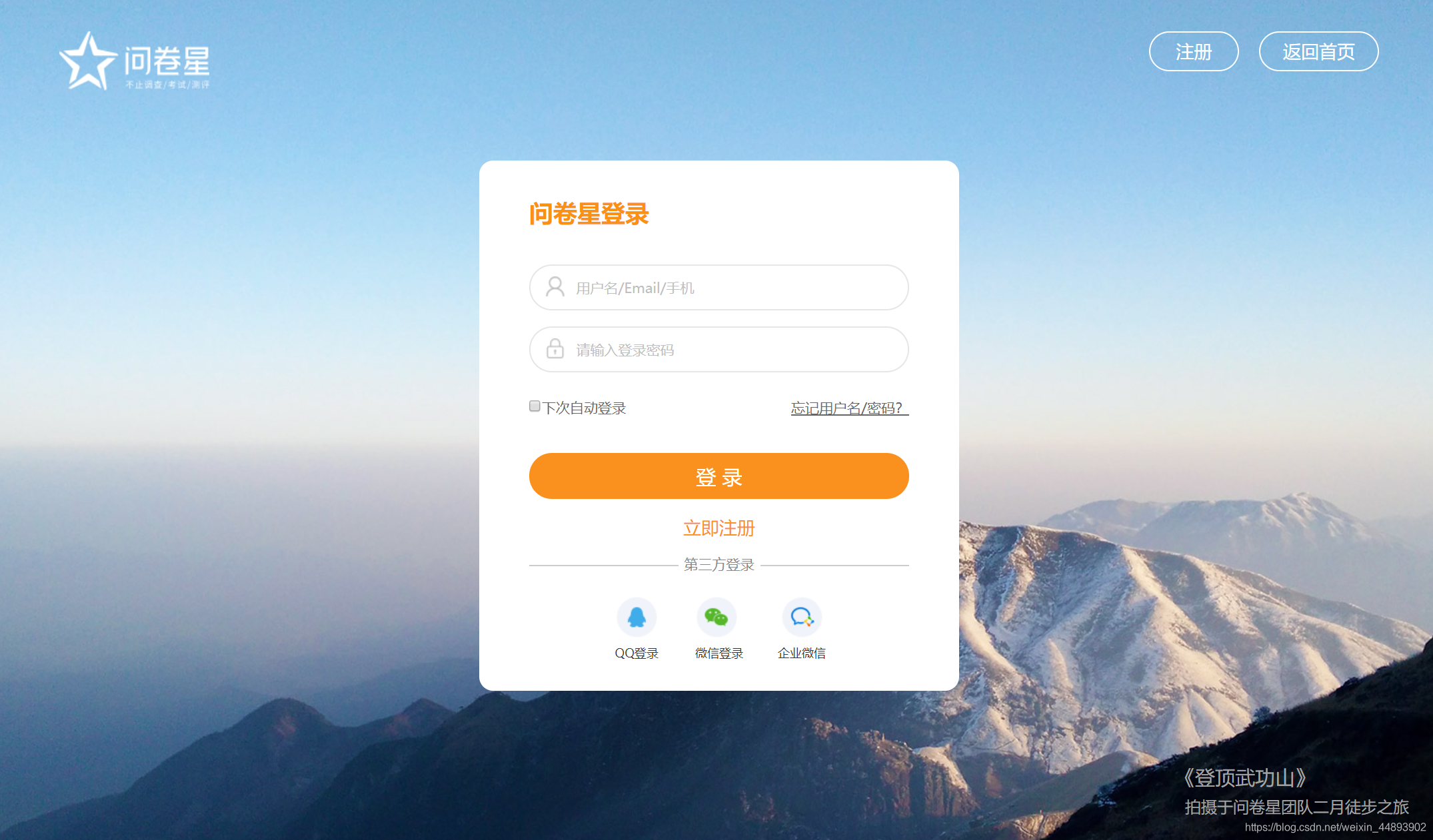
图片素材(放到 img文件夹下):img.zip
HTML代码:
<!DOCTYPE html>

<html>

	<head>

		<meta charset="utf-8" />

		<title>问卷星_登录页面</title>

		<link rel="stylesheet" type="text/css" href="css/index.css"/>

	</head>

	<body>

		<div id="wrap">

			<!--头部-->

			<div id="header">

				<div id="top_l">

					<a href="#"><img src="img/logo.png"/></a>

				</div>

				<div id="top_f">

					<a id="text_zc" href="#">注册</a>

					<a id="text_fhsy" href="#">返回首页</a>

				</div>

			</div>

			<!--中间内容部分-->

			<div id="content">

				<h1>问卷星登录</h1>

				<form action="login" method="post">

					<input id="input_1" type="text" value="" placeholder="用户名/Email/手机" />

					<br />

					<input id="input_2" type="text" value="" placeholder="请输入登录密码"/>

					<br />

					<input id="input_3" type="checkbox" value="" />

					<a id="a_1" >下次自动登录</a>

					<a id="a_2" href="#">忘记用户名/密码?</a>

					<br />

					<input type="submit" id="input_4" value="登录" />

				</form>

				<a id="a_3" href="#">立即注册</a>

				<div id="content_foot_1">第三方登录</div>

				<hr id="content_foot_2"></hr>

				<div id="content_foot_3_1"><div class="img50"><img src="img/qq_hover.jpg"/></div>QQ登录</div>

				<div id="content_foot_3_2"><div class="img50"><img src="img/weix_hover.jpg"/></div>微信登录</div>

				<div id="content_foot_3_3"><div class="img50"><img src="img/qiye_hover.jpg"/></div>企业微信</div>

			</div>

			<!--脚部-->

			<div id="footer">

				<div style="margin-bottom:12px;font-size:20px;color: #a4a4a5;">

					《登顶武功山》

				</div>

				<div style="padding-left:10px;font-size:16px;color: #a4a4a5;">

					拍摄于问卷星团队二月徒步之旅

				</div>

			</div>

		</div>

	</body>

</html>
CSS代码(放到 CSS文件夹下):
*{

	margin: 0;

	padding: 0;

}

#wrap{

	margin: 0 auto;

	width: 1920px;

	height: 926px;

	background-image: url(../img/bacg.jpg);

}

#header{

	float: left;

	width: 100%;

	height: 10%;

}

#top_l{

	float: left;

	padding-left: 50px;

	padding-top: 40px;

	height: 100%;

}

#top_f{

	float: right;

	padding-top: 50px;

	padding-right: 50px;

	height: 100%;

	float: right;

}

#top_f a{

	margin-left: 20px;

	padding: 10px 30px;

	text-decoration: none;

	color: #FFF;

	width: 90px;

	height: 48px;

	border-radius: 100px;

	font-size: 20px;

	border: 1px solid #fff;

}

#top_f a:hover{

	border: 3px solid #fff;

}

#content{

	float: left;

	margin: 0 auto;

	margin-top: 90px;

	margin-left: 700px;

	border-radius: 14px;

	background-color: white;

	width: 490px;

	height: 530px;

}

#content h1{

	padding: 30px;

	text-align: left;

	color: #fa911e;

	font-weight: bold;

	font-size: 24px;

}

#input_1,#input_2{

	margin-left: 50px;

	font-size: 15px;

	border: 1px solid #e6e6e6;

	border-radius: 100px;

	width: 70%;

	height: 48px;

	padding: 1px 0 1px 46px;

	outline: none;

}

#input_1{

	background-repeat: no-repeat;

	background-position: left;

	background-position: 15px;

	background-image: url(../img/user.png);

}

#input_1:hover{

	border: 1px solid #fa911e;

}

#input_2{

	margin-top: 15px;

	background-repeat: no-repeat;

	background-position: left;

	background-position: 15px;

	background-image: url(../img/password.png)

}

#input_2:hover{

	border: 1px solid #fa911e;

}

#input_3,#input_4{

	margin-left: 60px;

	margin-top: 35px;

}

#content a_1{

	font-size: 16px;

}

#a_2{

	font-size: 15px;

	margin-left: 130px;

	color: black;

}

#a_2:hover{

	color: #f08200;

}

#input_4{

	background-color: #fa911e;

	width: 76%;

	height: 48px;

	font-size: 23px;

	color: white;

	border: none;

	border-radius: 100px;

	letter-spacing: 10px;

}

#input_4:hover{

	background-color: #f08200;

}

#a_3{

	line-height: 50px;

	margin-left: 205px;

	text-decoration: none;

	color: #FA911E;

	font-size: 18px;

}

#a_3:hover{

	color: #f08200;

}

#content_foot_1{

	width: 100px;

	height: 20px;

	margin-left: 200px;

	margin-bottom: 20px;

	color: #888888;

	text-align: center;

}

#content_foot_2{

	margin-left: 50px;

	width: 80%;

	float: left;

	border-top: 2px solid #e6e6e6;

	margin-top: -30px;

}

#content_foot_3_1,#content_foot_3_2,#content_foot_3_3{

	font-size: 10px;

	margin-left: 140px;

	float: left;

	width: 50px;

	height: 50px;

}

#content_foot_3_1{

	background-image: url(../img/qq.png);

}

#content_foot_3_2{

	margin-left: 30px;

	background-image: url(../img/weixin-nor.png);

}

#content_foot_3_3{

	margin-left: 30px;

	background-image: url(../img/qiye-nor.png);

}

#content img:hover{

	display: none;

}

.img50{

	width: 50px;

	height: 50px;

}

#footer{

	float: right;

	padding-top: 700px;

	padding-right: 100px;

}
【HTML基础习题】HTML5+CSS3做问卷星登录页面的更多相关文章
- 《零基础学HTML5+CSS3(全彩版)》读书笔记
2019年1月31日星期四 1点 <零基础学HTML5+CSS3(全彩版)>开始全面学习 前提: 11月20日开始学Python,可能因为太累了,也可能遇到了瓶颈,进入了一个迷茫期,1月6 ...
- 用Html5/CSS3做Winform,一步一步教你搭建CefSharp开发环境(附JavaScript异步调用C#例子,及全部源代码)上
本文为鸡毛巾原创,原文地址:http://www.cnblogs.com/jimaojin/p/7077131.html,转载请注明 CefSharp说白了就是Chromium浏览器的嵌入式核心,我们 ...
- 零基础学 HTML5+CSS3 全彩版 明日科技 编著
第1章 基础知识 1.1 HTML概述 1.1.1 什么是HTML 1.1.2 HTML的发展历程 1.2 HTML文件的基本结构 1.2.1 HTML的基本结构 1.2.2 HTML的基本标记 1. ...
- selenium+python+eclipse 实现 “问卷星”网站,登录与检查登录示例!
1.使用selenium+python+eclipse实现的登录"问卷星",问卷星访问地址:https://www.sojump.com/ 2.实现步骤:1)进入链接---首页-- ...
- HTML5+CSS3制作无限滚动与文字跳动效果
㈠用HTML5+CSS3做无限滚动效果 ⑴逻辑分析 ⑵实践示例 前5张图片为所有图片显示区,假设总长度为1100px: 后面出现的五张图片为克隆区,只是将前面的图片拷贝了一份: 然后将前五张和后五张的 ...
- 9款大气实用的HTML5/CSS3注册登录表单
1.HTML5/CSS3仿Facebook登录表单 利用CSS3制作的登录表单的确很漂亮,我们在html5tricks网站上也分享过几款了,比如CSS3密码强度验证表单可以显示密码的强度,这款纯CSS ...
- JavaScript——问卷星自动填写
一.前言: 我们学校要刷学术章,有些学术章又是指定在某个时间点填写问卷星的问卷报名的.但是由于我手速慢,导致总会有些时候报不上名,于是想着搞个代码实现自动填写问卷星的报名表.一顿操作后,在github ...
- 第九十三节,html5+css3移动手机端流体布局,基础CSS,头部设计,轮播设计,底部设计
html5+css3移动手机端流体布局,基础CSS,头部设计,轮播设计,底部设计 基础CSS 首先将通用css属性写好 @charset "utf-8"; /*通用样式*/ /*去 ...
- HTML5/CSS3 第一章基础
HTML5/CSS3基础 1. HTML 1.1 什么是HTML HTML是用来制作网页的标记语言 HTML是Hypertext Markup Language的英文缩写,即超文本标记语言 HTML语 ...
随机推荐
- Oracle参数文件—pfile与spfile
oracle的参数文件:pfile和spfile 1.pfile和spfile Oracle中的参数文件是一个包含一系列参数以及参数对应值的操作系统文件.它们是在数据库实例启动时候加载的, ...
- oracle异常处理——ORA-01000:超出打开游标最大数
oracle异常处理--ORA-01000:超出打开游标最大数https://www.cnblogs.com/zhaosj/p/4309352.htmlhttps://blog.csdn.net/u0 ...
- Linux基础命令---put上传ftp文件
put 使用lftp登录ftp服务器之后,可以使用put指令将文件上传到服务器. 1.语法 put [-E] [-a] [-c] [-O base] lfile [-o rfi ...
- vue引入d3
单页面使用 cnpm install d3 --save-dev 指定版本安装 cnpm install d3@6.3.1 -S <script> import * as d3 from ...
- this指针的用法和基本分析
当在不同的对象中采用this指针,就已经是在给它赋值了.对象各自的this指针指向各自对象的首地址,所以不同对象的this指针一定指向不同的内存地址. this 指针是由系统自动提供的指向对象的特殊指 ...
- 部署应用程序到Tomcat的webapps目录
一.方法如下 1.通过MyEclipse上方工具栏Manage Deployments,依次选择项目和服务器: 2.通过右击项目Export,生成war包到webapps中: 3.复制项目WebRoo ...
- MySQL基础之DML语句
DML 语句 DML(Data Manipulation Language)语句:数据操纵语句. 用途:用于添加.修改.删除和查询数据库记录,并检查数据完整性. 常用关键字:insert.update ...
- [BUUCTF]PWN——ciscn_2019_es_2
ciscn_2019_es_2 附件 步骤: 例行检查,32位程序,开启了nx保护 32位ida载入,shif+f12查看程序里的字符串,这边的"echo flag" 是个迷惑性的 ...
- LuoguP7679 [COCI2008-2009#5] JABUKA 题解
Content Mirko 拥有 \(R\) 个红苹果和 \(G\) 个绿苹果,他想把他分给若干个朋友,使得所有朋友分得的红苹果个数和绿苹果个数都一样.现给定 \(R,G\),请你帮助 Mirko 找 ...
- logging模块学习
logging模块: https://docs.python.org/3/howto/logging.html#logging-basic-tutorial 本记录教程 日志记录是一种跟踪某些软件运行 ...