
C#生成pdf -- iText7 设置自定义字体和表格
itextsharp已经不再更新,由iText 7来替代
安装
nuget 安装 itext7

注册自定义字体
下载字体文件 .ttc或.ttf到项目目录,设置更新则拷贝到输出目录,这样构建的时候会把字体文件拷贝过去
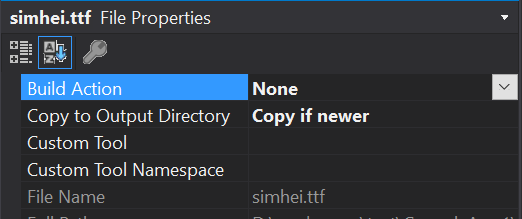
windows系统自带黑体, 可以直接复制到项目目录, 其路径是
C:\Windows\Fonts\simhei.ttf
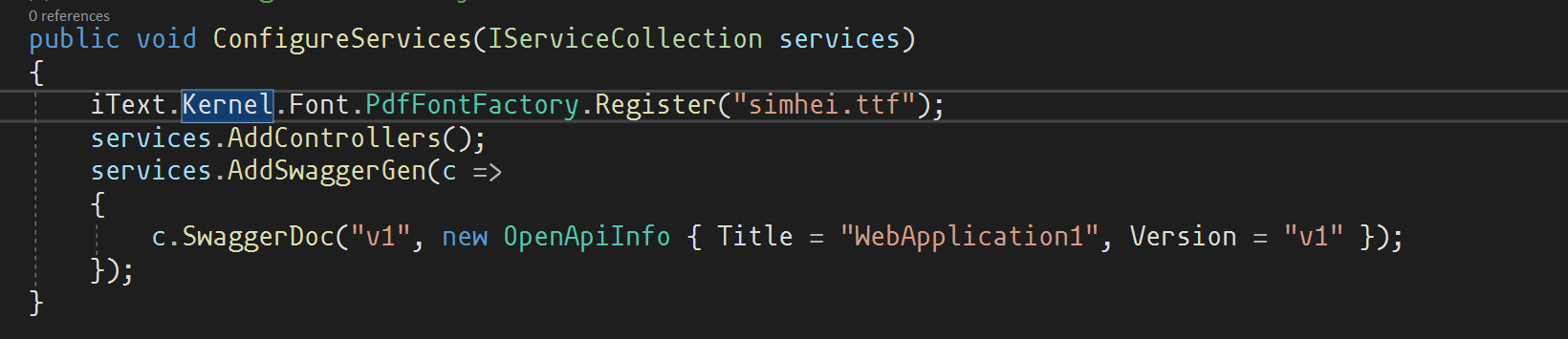
因为字体注册只需要一次,所以建议放到StartUp中. 其中的simhei.ttf换为你的字体文件
iText.Kernel.Font.PdfFontFactory.Register("simhei.ttf");
新建pdf文档
using PdfWriter writer = new ("list.pdf");

PdfDocument pdf = new (writer);

Document doc = new (pdf);
PdfWriter可以传入pdf文件目标路径或者Stream,如果不想保存到本地,那用MemoryStream保存在内存中即可. 后边的例子我们就是直接用MemoryStream来保存数据
设置字体
PdfFont sysFont = PdfFontFactory.CreateRegisteredFont("simhei", PdfEncodings.IDENTITY_H, PdfFontFactory.EmbeddingStrategy.PREFER_EMBEDDED, true);

doc.SetFont(sysFont)

   .SetFontSize(12);//设置字体大小
示例
public class OrderDto

    {

        public string Name { get; set; }

        public string Gender { get; set; }

        public string Address { get; set; }

        public string Phone { get; set; }

        public List<ProductDto> Products { get; set; }

        public string Remark { get; set; }

    }

    public class ProductDto

    {

        public string Code { get; set; }

        public string Name { get; set; }

        public string Category { get; set; }

        public string Unit { get; set; }

        public string Sku { get; set; }

        public decimal Price { get; set; }

        public int Quantity { get; set; }

    }
        [HttpGet("pdf")]

        public IActionResult ExportPdf()

        {

            MemoryStream stream = new ();

            PdfWriter writer = new (stream);

            PdfDocument pdf = new (writer);

            Document doc = new (pdf);

            //黑体

            PdfFont sysFont = PdfFontFactory.CreateRegisteredFont("simhei", PdfEncodings.IDENTITY_H, PdfFontFactory.EmbeddingStrategy.PREFER_EMBEDDED, true);

            doc.SetFont(sysFont)

                .SetFontSize(12);//设置字体大小

            doc.Add(new Paragraph("订单列表")

                .SetBold()//粗体

                .SetTextAlignment(iText.Layout.Properties.TextAlignment.CENTER)//居中

                );

            var headerTexts = new[] {

                "序号", "姓名", "性别",  "居住地址", "联系电话",

                "货号", "产品名称", "分类", "单位", "规格", "售价", "数量",

                "备注"

            };

            var table = new Table(headerTexts.Length)  // 设置表格列数

                .SetTextAlignment(iText.Layout.Properties.TextAlignment.CENTER)

                ;

            //添加表头

            foreach (var header in headerTexts)

            {

                table.AddHeaderCell(new Cell()

                    .Add(new Paragraph(header))

                    .SetBold()//设置粗体

                    );

            }


            var orders = new[]

            {

                new OrderDto

                {

                    Name =  "法外", Gender = "男", Address =  "江苏省南京市江宁区梧桐路325号", Phone = "13545781245", Remark = "就这?",

                    Products = new List<ProductDto>{ new ProductDto { Code="XGRD102", Name = "格子衫", Category = "男装", Unit = "件", Sku = "紫色", Price = 39, Quantity = 1} }

                },

                new OrderDto

                {

                    Name =  "狂徒", Gender = "男", Address =  "重庆市江北区朝鸽大道北777号", Phone = "15845568956", Remark = "代码敲得好,备胎当到老",

                    Products = new List<ProductDto>

                    {

                        new ProductDto { Code="FUS458", Name = "Amd R7 5800X", Category = "电子产品", Unit = "个", Sku = "盒装", Price = 2499, Quantity = 1},

                        new ProductDto { Code="TFES982", Name = "程序员帽子", Category = "配饰", Unit = "件", Sku = "绿色", Price = 666, Quantity = 1},

                    }

                },

                new OrderDto

                {

                    Name =  "张三", Gender = "女", Address =  "辽宁省大连市甘井子区伞兵路2333号", Phone = "15952415263", Remark = "rnm, 退钱!!!",

                    Products = new List<ProductDto>{ new ProductDto { Code="TOP10", Name = "Rnm,退钱同款长袖", Category = "男装", Unit = "件", Sku = "红色", Price = 69, Quantity = 1} }

                },

            };

            for (int i = 0; i < orders.Length; i++)

            {

                int rowSpan = orders[i].Products.Count;//商品行有多少个,基本信息列就要跨对应多少行

                table.StartNewRow();//第一列开启新行

                table

                  .AddCell(new Cell(rowSpan,1).Add(new Paragraph((i + 1).ToString()))//序号

                      .SetVerticalAlignment(iText.Layout.Properties.VerticalAlignment.MIDDLE))

                  .AddCell(new Cell(rowSpan, 1).Add(new Paragraph(orders[i].Name)).SetMinWidth(25)//姓名  设置最小列宽25,方便名字横向显示

                      .SetVerticalAlignment(iText.Layout.Properties.VerticalAlignment.MIDDLE))

                  .AddCell(new Cell(rowSpan, 1).Add(new Paragraph(orders[i].Gender))//性别

                      .SetVerticalAlignment(iText.Layout.Properties.VerticalAlignment.MIDDLE))

                  .AddCell(new Cell(rowSpan, 1).Add(new Paragraph(orders[i].Address))//居住地址

                      .SetVerticalAlignment(iText.Layout.Properties.VerticalAlignment.MIDDLE))

                  .AddCell(new Cell(rowSpan, 1).Add(new Paragraph(orders[i].Phone))//联系电话

                      .SetVerticalAlignment(iText.Layout.Properties.VerticalAlignment.MIDDLE));

                //添加一行商品信息 (因为table只能按顺序从左到右一个cell一个cell地加)

                table

                    .AddCell(new Cell(1,1).SetVerticalAlignment(iText.Layout.Properties.VerticalAlignment.MIDDLE)

                    .Add(new Paragraph(orders[i].Products[0].Code)//货号

                    ))

                    .AddCell(new Cell().SetVerticalAlignment(iText.Layout.Properties.VerticalAlignment.MIDDLE)

                    .Add(new Paragraph(orders[i].Products[0].Name)//产品名称

                    ))

                    .AddCell(new Cell().SetVerticalAlignment(iText.Layout.Properties.VerticalAlignment.MIDDLE)

                    .Add(new Paragraph(orders[i].Products[0].Category))

                    .SetMinWidth(25)

                    )//分类

                    .AddCell(new Cell().SetVerticalAlignment(iText.Layout.Properties.VerticalAlignment.MIDDLE)

                    .Add(new Paragraph(orders[i].Products[0].Unit)//单位

                    ))

                    .AddCell(new Cell()

                    .SetVerticalAlignment(iText.Layout.Properties.VerticalAlignment.MIDDLE)

                    .Add(new Paragraph(orders[i].Products[0].Sku)//规格

                    .SetMinWidth(25)

                    ))

                    .AddCell(new Cell().SetVerticalAlignment(iText.Layout.Properties.VerticalAlignment.MIDDLE)

                    .Add(new Paragraph(orders[i].Products[0].Price.ToString("0.00"))//售价

                    ))

                    .AddCell(new Cell()

                    .SetVerticalAlignment(iText.Layout.Properties.VerticalAlignment.MIDDLE)

                    .Add(new Paragraph(orders[i].Products[0].Quantity.ToString())//数量

                    ))

                    .AddCell(new Cell(rowSpan, 1).SetVerticalAlignment(iText.Layout.Properties.VerticalAlignment.MIDDLE)

                    .Add(new Paragraph(orders[i].Remark))

                    );//备注

                //商品行大于1, 需要添加多行商品信息

                if (orders[i].Products.Count > 1)

                {

                    for (int j = 1; j < orders[i].Products.Count; j++)

                    {

                        table

                            .AddCell(new Cell(1, 1).SetVerticalAlignment(iText.Layout.Properties.VerticalAlignment.MIDDLE)

                            .Add(new Paragraph(orders[i].Products[j].Code)//货号

                            ))

                            .AddCell(new Cell().SetVerticalAlignment(iText.Layout.Properties.VerticalAlignment.MIDDLE)

                            .Add(new Paragraph(orders[i].Products[j].Name)//产品名称

                            ))

                            .AddCell(new Cell().SetVerticalAlignment(iText.Layout.Properties.VerticalAlignment.MIDDLE)

                            .Add(new Paragraph(orders[i].Products[j].Category))

                            .SetMinWidth(25)

                            )//分类

                            .AddCell(new Cell().SetVerticalAlignment(iText.Layout.Properties.VerticalAlignment.MIDDLE)

                            .Add(new Paragraph(orders[i].Products[j].Unit)//单位

                            ))

                            .AddCell(new Cell()

                            .SetVerticalAlignment(iText.Layout.Properties.VerticalAlignment.MIDDLE)

                            .Add(new Paragraph(orders[i].Products[j].Sku)//规格

                            .SetMinWidth(25)

                            ))

                            .AddCell(new Cell().SetVerticalAlignment(iText.Layout.Properties.VerticalAlignment.MIDDLE)

                            .Add(new Paragraph(orders[i].Products[j].Price.ToString("0.00"))//售价

                            ))

                            .AddCell(new Cell()

                            .SetVerticalAlignment(iText.Layout.Properties.VerticalAlignment.MIDDLE)

                            .Add(new Paragraph(orders[i].Products[j].Quantity.ToString())//数量

                            ));

                    }

                }

            }

            doc.Add(table);

            pdf.Close();//记得关闭PdfDocument和PdfWriter

            writer.Close();

            return File(stream.ToArray(), "application/pdf");

        }
结果如下
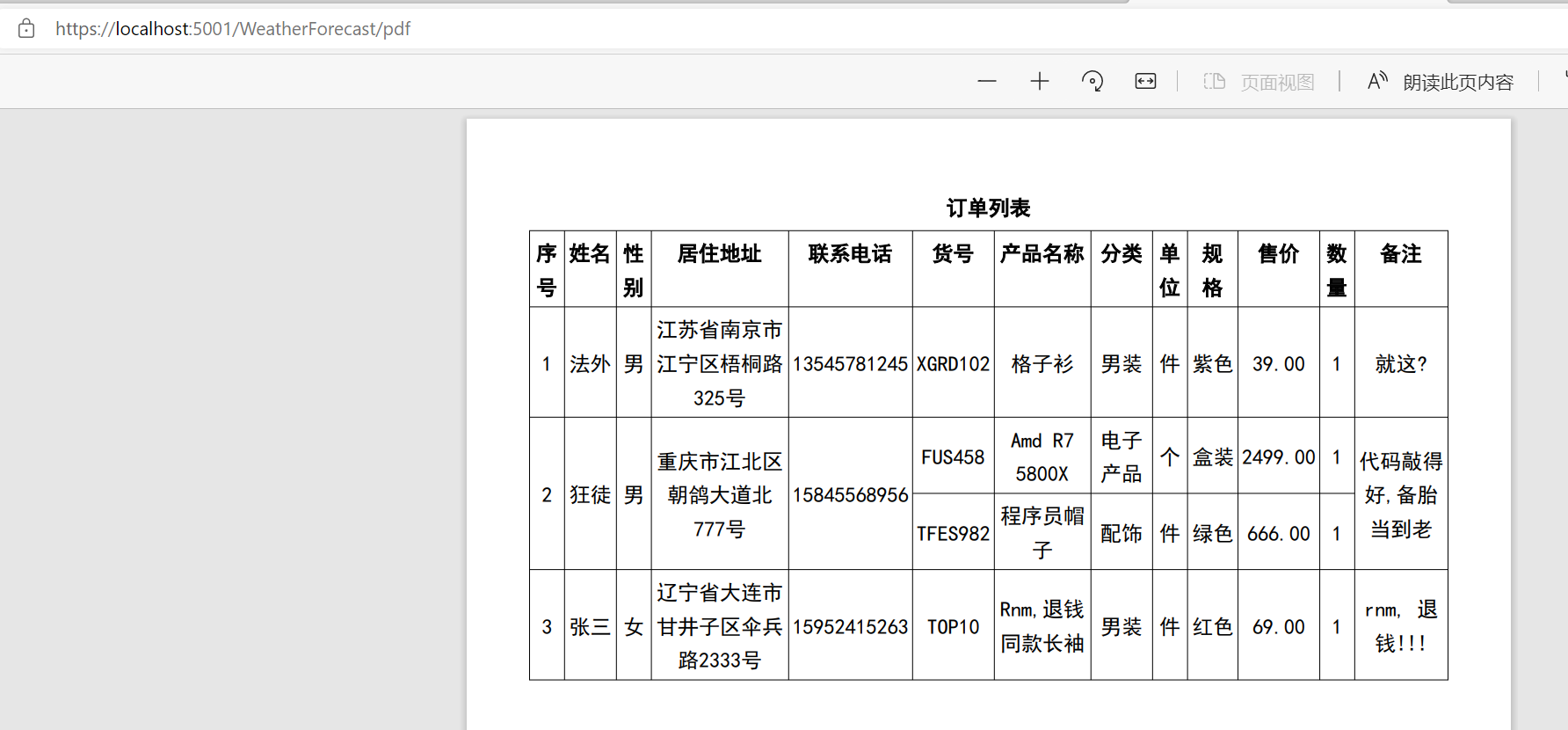
有几个要点
- 单元格合并是通过跨行或跨列来实现的, new Cell(2, 2)表示此单元格跨2行 2列
- 单元格设置居中最好是放在Add(new Paragraph("xx"))之前
- 添加单元格只能从左到右一个一个地加,所以有合并行的时候要把第一行全部添加完再添加下边的几行,如图所示.

- 新的一行要先调用table.StartNewRow() 然后table.AddCell()才会添加到新行
- 表格的列数是在new Table(13) 时传入的, 传入13就表示有13列
C#生成pdf -- iText7 设置自定义字体和表格的更多相关文章
- Android Studio设置自定义字体
Android Studio设置自定义字体 (1)进入设置页面,File->Settings (2)自定义字体Editor->Colors&Fonts->Font (3)点击 ...
- poi生成excel整理(设置边框/字体/颜色/加粗/居中/)
转: poi生成excel整理(设置边框/字体/颜色/加粗/居中/) 2016年12月02日 11:05:23 吃奶的牛 阅读数:34324 HSSFWorkbook wb = new HSSFW ...
- freemark+ITextRenderer 生成PDF,设置pdf的页面大小
在html中添加样式,仅生成pdf是生效,浏览器展示时是不会生效的: <style> @page{ size : 200mm 300 mm; } </style>
- c# iText 生成PDF 有文字,图片,表格,文字样式,对齐方式,页眉页脚,等等等,
#region 下载说明书PDF protected void lbtnDownPDF_Click(object sender, EventArgs e) { int pid = ConvertHel ...
- PHP生成PDF并转换成图片爬过的坑
需求描述:根据订单通过模板合同生成新的PDF合同通过e签宝签约后转为图片给用户下载. 需求整理: 1.如何生成PDF文件:使用TCPDF扩展生成.思考: ⑴为了方便将模板中的固定占位符替换为订单中的内 ...
- CSS自定义字体的实现,前端实现字体压缩
CSS中使用自定义字体,首先需要下载你需要的字体ttf或者otf文件 这里推荐一个网站:http://www.zitixiazai.org/ /********css中********/ @font- ...
- iOS自定义字体
1.下载字体库,如:DINCond-Bold.otf 2.双击,在mac上安装 3.把下载的字体库拖入工程中: 4.配置info.plist文件 5.xib方式设置自定义字体:Font选Custom, ...
- CSS怎么在项目里引入自定义字体(@font-face)
前言: 以前我一直用内置的默认字体给文字设置字体,直到一天UI妹纸给了我下面的字体 当时我是蒙蔽的,这个字体的效果如下 默认字体并无该字体,直接设置是没有效果的,这时就需要用到自定义字体了 下面 ...
- Java使用iText7生成PDF
前言 我们之前使用js库html2canvas + jspdf实现html转PDF.图片,并下载(详情请戳:html页面转PDF.图片操作记录),大致原理是将页面塞到画布里,以图片的方式放到PDF中, ...
随机推荐
- Linux基础一:基础命令
Linux是什么,是干什么用的? 1.Linux是一个操作系统,电脑=软件+硬件,而操作系统就是特殊的软件 2.Linux系统内一切皆文件 3.bash shell 是红帽默认的shell(shell ...
- XenServer删除ISO存储!
1.用命令 df -hal 可以看到 ISO库是使用了10G的硬盘的 2.下面开始直接右键删除ISO,但看到资源还是占用着10G的 3.如果想把这10G的硬盘资源空出来的话,只要复制前面查找到挂载的路 ...
- java中static关键字的解析
静态的特点: A:随着类的加载而加载 B:优先于对象而存在 C:静态是被所有对象共享的数据 这也是我们来判断是否使用静态的标准 D:静态的出现,让我们的调用方式多了一种 类名.静态的内容 非静态的内容 ...
- c语言循环位移(数字,字符串)
C语言中没有提供循环移位的操作符,但可以通过简洁的方式实现循环移位 设一个操作数x有s位则循环左移n位的操作为: (x << n) | (x >> (s - n)); 同理右移 ...
- Web优化躬行记(5)——网站优化
最近阅读了很多优秀的网站性能优化的文章,所以自己也想总结一些最近优化的手段和方法. 个人感觉性能优化的核心是:减少延迟,加速展现. 本文主要从产品设计.前端.后端和网络四个方面来诉说优化过程. 一.产 ...
- [uoj76]懒癌
为了方便,称患有懒癌的狗为"坏狗" 记$Q_{i}$为第$i$个人能观察的狗集合,$S$为坏狗集合,那么第$k$天第$i$个人能得到的信息有且仅有$S\ne \empty$.$S\ ...
- 『与善仁』Appium基础 — 12、Appium的安装详解
目录 (一)Appium server安装 方式一:(桌面方式:推荐) 1.Appium Desktop下载 2.Appium Desktop安装 3.Appium Desktop使用 方式二:(No ...
- [USACO17FEB]Why Did the Cow Cross the Road III P
[USACO17FEB]Why Did the Cow Cross the Road III P 考虑我们对每种颜色记录这样一个信息 \((x,y,z)\),即左边出现的位置,右边出现的位置,该颜色. ...
- 洛谷 P5853 - [USACO19DEC]Tree Depth P(生成函数+背包)
洛谷题面传送门 神仙题. 首先考虑一个点的深度是什么,注意到对于笛卡尔树而言直接从序列的角度计算一个点的深度是不容易的,因为这样会牵扯到序列中多个元素,需要 fixed 的东西太多,计算起来太复杂了. ...
- 洛谷 P4709 - 信息传递(置换+dp)
题面传送门 一道挺有意思的题罢-- 首先看到这种与置换乘法相关的题,首先把这些置换拆成一个个置换环,假设输入的置换有 \(m\) 个置换环,大小分别为 \(s_1,s_2,\cdots,s_m\),显 ...