
jQuery--事件, 事件绑定, 阻止事件冒泡, 事件委托,页面载入后函数
1.常用事件, 按住shift键实现同步选择效果,搜索框联想效果
2.阻止事件冒泡
3.事件委托
4.使用 $(document).ready(function (){...}) 实现文件加载完绑定事件
一.常用事件
click(function(){...})  //鼠标点击事件

hover(function(){...})  //当鼠标指针悬停在被选元素上时

blur(function(){...})  //当输入域失去焦点 (blur) 时

focus(function(){...})  //当输入框获得焦点时

change(function(){...}) //内容发生变化,input,select等

keyup(function(){...})  //键盘抬起时

keydown(function(){...}) //键盘按下时

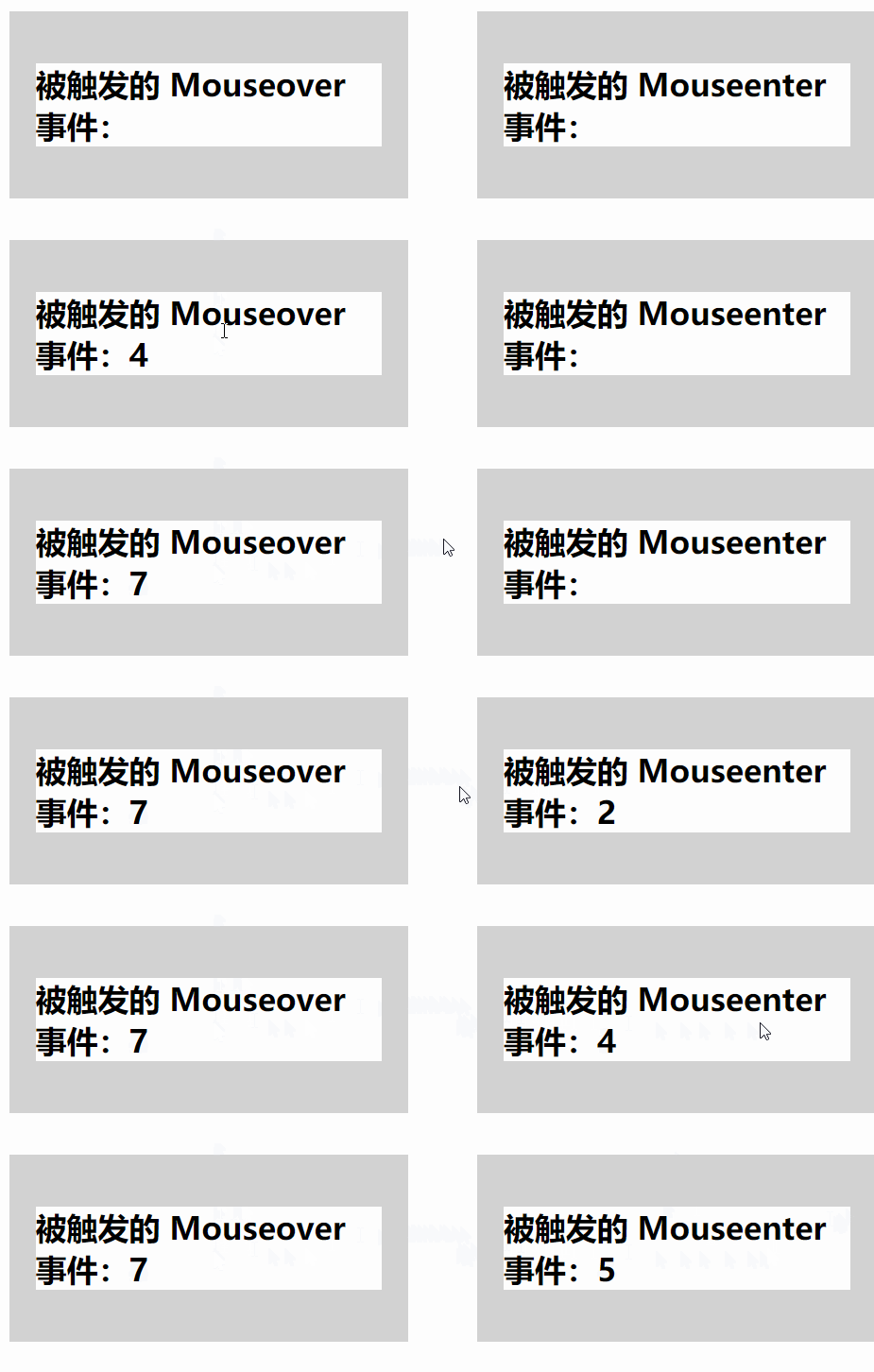
mouseover (keydown(function(){...}) // 不论鼠标指针穿过被选元素或其子元素,都会触发 mouseover 事件。

mouseenter(keydown(function(){...})  //只有在鼠标指针穿过被选元素时,才会触发 mouseenter 事件。
mouseover和mouseenter的区别:
1.keydown和keyup事件
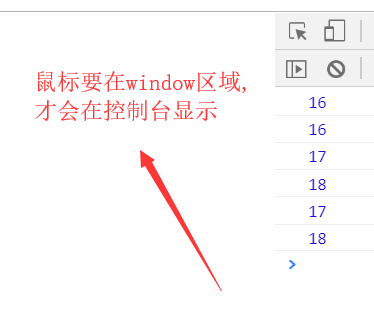
键盘上每一个按键都有一个keycode,我们可以这样测试查看shift键
<script>

$(window).keydown(function (event) {

        console.log("event.keycode");

    });

</script>
使用keyup和keydown事件实现的菜单选择功能
效果图

<!DOCTYPE html>

<html lang="zh-CN">

<head>

    <meta http-equiv="content-Type" charset="UTF-8">

    <meta http-equiv="x-ua-compatible" content="IE=edge">

    <title>Title</title>

</head>

<body>

<table border="1">

  <thead>

  <tr>

    <th>#</th>

    <th>姓名</th>

    <th>操作</th>

  </tr>

  </thead>

  <tbody>

  <tr>

    <td><input type="checkbox"></td>

    <td>乔峰</td>

    <td>

      <select>

        <option value="1">上线</option>

        <option value="2">下线</option>

        <option value="3">停职</option>

      </select>

    </td>

  </tr>

  <tr>

    <td><input type="checkbox"></td>

    <td>段誉</td>

    <td>

      <select>

        <option value="1">上线</option>

        <option value="2">下线</option>

        <option value="3">停职</option>

      </select>

    </td>

  </tr>

  <tr>

    <td><input type="checkbox"></td>

    <td>虚竹</td>

    <td>

      <select>

        <option value="1">上线</option>

        <option value="2">下线</option>

        <option value="3">停职</option>

      </select>

    </td>

  </tr>

  <tr>

    <td><input type="checkbox"></td>

    <td>鸠摩智</td>

    <td>

      <select>

        <option value="1">上线</option>

        <option value="2">下线</option>

        <option value="3">停职</option>

      </select>

    </td>

  </tr>

  <tr>

    <td><input type="checkbox"></td>

    <td>扫地僧</td>

    <td>

      <select>

        <option value="1">上线</option>

        <option value="2">下线</option>

        <option value="3">停职</option>

      </select>

    </td>

  </tr>

  </tbody>

</table>

<script src="https://cdn.bootcss.com/jquery/3.2.1/jquery.min.js"></script>

<script>

    //按下shift就进入批量操作的模式

    var flag = false;

    // shift按键被按下的时候,键盘上每个按键都对应有一个keyCode值

    $(window).keydown(function (event) {

        console.log(event.keyCode);

        if (event.keyCode === 16){

            flag = true;

        }

    });

    // shift按键被抬起的时候

    $(window).keyup(function (event) {

        console.log(event.keyCode);

        if (event.keyCode === 16){

            flag = false;

        }

    });

    // select标签的值发生变化的时候

    $("select").change(function (event) {

        // 如果shift按键被按下,就进入批量编辑模式

        // shift按键对应的code是16

        // 判断当前select这一行是否被选中

        console.log($(this).parent().siblings().first().find(":checkbox"));

        var isChecked = $(this).parent().siblings().first().find(":checkbox").prop("checked");

        console.log(isChecked);

        if (flag && isChecked) {

            // 进入批量编辑模式

            // 1. 取到当前select选中的值

            var value = $(this).val();//别忘了this是个dom对象,要用$(this)包裹起来变成jQuery对象

            // 2. 给其他被选中行的select设置成和我一样的值

            // 2.1 找到那些被选中行的select //被选中的行就是$('input:checked')

            var $select = $("input:checked").parent().parent().find("select");  //一般jQuery中的变量名,我们在变量名前面加一个$符号区分一下

            //var $select = $('tr:has(input:checked)').find('select') 这个也可以,选择某些标签的方法有很多昂

            // 2.2 给选中的select赋值

            $select.val(value);

        }

    });

</script>

</body>

</html>
2.hover事件
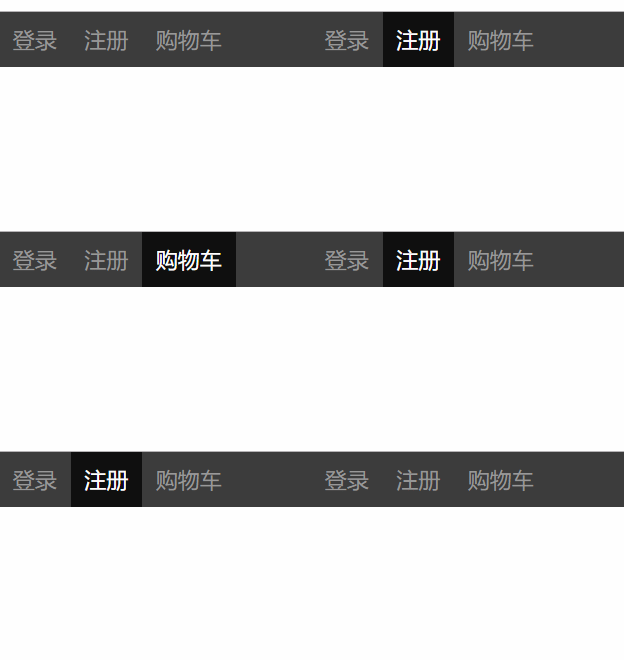
这个hover事件不是原生DOM的那个,这个是jquery的hover事件:
示例
<!DOCTYPE html>

<html lang="en">

<head>

  <meta charset="UTF-8">

  <meta http-equiv="x-ua-compatible" content="IE=edge">

  <meta name="viewport" content="width=device-width, initial-scale=1">

  <title>hover示例</title>

  <style>

    * {

      margin: 0;

      padding: 0;

    }

    .nav {

      height: 40px;

      width: 100%;

      background-color: #3d3d3d;

      position: fixed;

      top: 0;

    }

    .nav ul {

      list-style-type: none;

      line-height: 40px;

    }

    .nav li {

      float: left;

      padding: 0 10px;

      color: #999999;

      position: relative;

    }

    .nav li:hover {

      background-color: #0f0f0f;

      color: white;

    }

    .clearfix:after {

      content: "";

      display: block;

      clear: both;

    }

    .son {

      position: absolute;

      top: 40px;

      right: 0;

      height: 50px;

      width: 100px;

      background-color: #00a9ff;

      display: none;  <!--最开始是默认不显示的-->

    }

    .hover .son {  <!--这个选择器生效的条件是这两个class属性的值都有才生效,如果我们移除了class='hover',这个.hover就没有了,那么这个选择器就不生效了,那这个样式也就不生效了-->

      display: block;

    }

  </style>

</head>

<body>

<div class="nav">

  <ul class="clearfix">

    <li>登录</li>

    <li>注册</li>

    <li>购物车

      <p class="son hide">

        空空如也...

      </p>

    </li>

  </ul>

</div>

<script src="https://cdn.bootcss.com/jquery/3.3.1/jquery.min.js"></script>

<script>

$(".nav li").hover(

 //hover事件分为两步,事件中有两个匿名函数

  //第一步:鼠标移动上去

  function () {

    $(this).addClass("hover");

  },

  //第二步:鼠标移走

  function () {

    $(this).removeClass("hover");

  }

);

</script>

</body>

</html>
3.input事件:
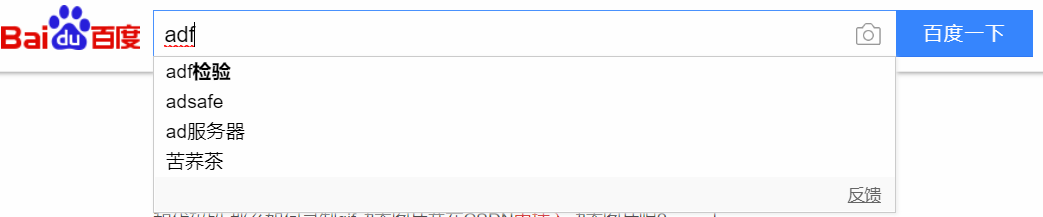
这个事件在IE9中不支持,使用的话要用onpropertychange事件.这个事件可以用来实现搜索框联想这样的例子
示例:
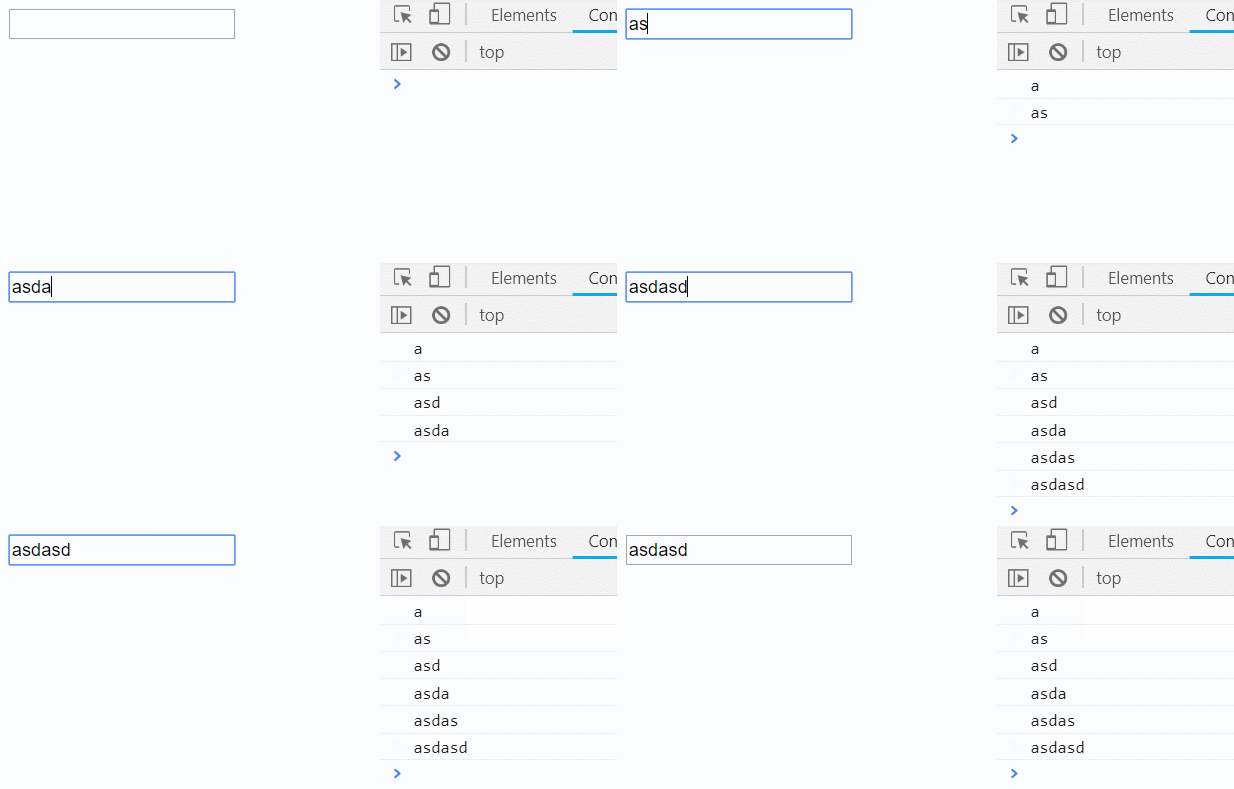
<!DOCTYPE html>

<html lang="en">

<head>

  <meta charset="UTF-8">

  <meta http-equiv="x-ua-compatible" content="IE=edge">

  <meta name="viewport" content="width=device-width, initial-scale=1">

  <title>实时监听input输入值变化</title>

</head>

<body>

<input type="text" id="i1">

<script src="https://cdn.bootcss.com/jquery/3.3.1/jquery.min.js"></script>

<script>

  /*

  * oninput是HTML5的标准事件

  * 能够检测textarea,input:text,input:password和input:search这几个元素的内容变化,

  * 在内容修改后立即被触发,不像onchange事件需要失去焦点才触发

  * oninput事件在IE9以下版本不支持,需要使用IE特有的onpropertychange事件替代

  * 使用jQuery库的话直接使用on同时绑定这两个事件即可。

  * */

  $("#i1").on("input propertychange", function () {  //可以支持IE9以下的版本

    console.log($(this).val());

  })

</script>

</body>

</html>
二.事件绑定与移除
事件绑定
.on( events [, selector ],function(){})
1. events : 事件
2. selector: 选择器(可选的)
3. function: 事件处理函数
移除事件,
用off()方法移除 .on() 绑定的事件处理程序.
.off( events [, selector ][,function(){}])
1. events: 事件
2. selector: 选择器(可选的)
3. function: 事件处理函数
示例:
$("li").off("click");
三.阻止事件冒泡
阻止后续事件执行:
1. return false
2. e.stopPropagation();
<!DOCTYPE html>

<html lang="en">

<head>

    <meta charset="UTF-8">

    <title>阻止默认事件</title>

</head>

<body>

<form action="">  #action里面如果没写url,默认是将内容提交到当前页面的url处

    <button id="b1">点我</button>

</form>

<script src="jquery-3.3.1.min.js"></script>

<script>

    $("#b1").click(function (e) {

        alert(123);

        //return false;

        e.stopPropagation();

    });

</script>

</body>

</html>
注意:
像click、keydown等DOM中定义的事件,我们都可以使用`.on()`方法来绑定事件,但是`hover`这种jQuery中定义的事件就不能用`.on()`方法来绑定了。
想使用事件委托的方式绑定hover事件处理函数,可以参照如下代码分两步绑定事件:
$('ul').on('mouseenter', 'li', function() {//绑定鼠标进入事件

    $(this).addClass('hover');

});

$('ul').on('mouseleave', 'li', function() {//绑定鼠标划出事件

    $(this).removeClass('hover');

});
阻止事件冒泡
html标签可以嵌套,如果给一个父标签和绑定了事件,不管子标签有没有绑定事件,只要点击了子标签,就会触发父标签的事件,如果子标签绑定了事件,就会先触发子标签的事件,再触发父标签的事件,之后再一层一层的向外找触发事件,所以要注意阻止事件冒泡发生
<!DOCTYPE html>

<html lang="en">

<head>

    <meta charset="UTF-8">

    <title>阻止事件冒泡</title>

</head>

<body>

<div>

    <p>

        <span>点我</span>

    </p>

</div>

<script src="jquery-3.3.1.min.js"></script>

<script>

    $("span").click(function (e) { //这个参数e(只是个形参,写evt或者event名字的也很多)表示当前事件本身,这个事件也是一个对象

        alert("span");

        //return false;这个也可以阻止

        e.stopPropagation(); 用事件对象的这个方法就能阻止冒泡 (Propagation:传递的意思)

    });

    $("p").click(function () {

        alert("p");

    });

    $("div").click(function () {

        alert("div");

    })

</script>

</body>

</html>
四.事件委托
事件委托是通过事件冒泡的原理,利用父标签去捕获子标签的事件,将未来添加进来的某些子标签自动绑定上事件。
$("table").on("click", ".delete", function () { //中间的参数是个选择器,前面这个$('table')是父级标签选择器,选择的是父级标签,意思就是将子标签(子子孙孙)的点击事件委托给了父级标签

  //但是这里注意一点,你console.log(this);你会发现this还是触发事件的那个子标签,这个记住昂

  // 删除按钮绑定的事件

})
中间的选择器的事件委托给父标签
五.页面载入
当DOM载入就绪可以查询及操纵时绑定一个要执行的函数。这是事件模块中最重要的一个函数,因为它可以极大地提高web应用程序的响应速度。
与window.onload的区别
1.window.onload()函数有覆盖现象,必须等待着图片资源加载完成之后才能调用
2.jQuery的这个入口函数没有函数覆盖现象,文档加载完成之后就可以调用(建议使用此函数)
写法:
$(document).ready(function(){

// 在这里写你的JS代码...

})
简写:
$(function(){

// 代码

})
登陆校验示例:
文档加载完绑定事件,并且阻止默认事件发生:

<!DOCTYPE html>

<html lang="zh-CN">

<head>

  <meta charset="UTF-8">

  <meta http-equiv="x-ua-compatible" content="IE=edge">

  <meta name="viewport" content="width=device-width, initial-scale=1">

  <title>登录注册示例</title>

  <style>

    .error {

      color: red;

    }

  </style>

</head>

<body>

<form id="myForm">

  <label for="name">姓名</label>

  <input type="text" id="name">

  <span class="error"></span>

  <label for="passwd">密码</label>

  <input type="password" id="passwd">

  <span class="error"></span>

  <input type="submit" id="modal-submit" value="登录">

</form>

<script src="jquery-3.2.1.min.js"></script>

<script src="s7validate.js"></script>

<script>

  function myValidation() {

    // 多次用到的jQuery对象存储到一个变量,避免重复查询文档树

    var $myForm = $("#myForm");

    $myForm.find(":submit").on("click", function () {

      // 定义一个标志位,记录表单填写是否正常

      var flag = true;

      $myForm.find(":text, :password").each(function () {

        var val = $(this).val();

        if (val.length <= 0 ){

          var labelName = $(this).prev("label").text();

          $(this).next("span").text(labelName + "不能为空");

          flag = false;

        }

      });

      // 表单填写有误就会返回false,阻止submit按钮默认的提交表单事件

      return flag;

    });

    // input输入框获取焦点后移除之前的错误提示信息

    $myForm.find("input[type!='submit']").on("focus", function () {

      $(this).next(".error").text("");

    })

  }

  // 文档树就绪后执行

  $(document).ready(function () {

    myValidation();

  });

</script>

</body>

</html>
jQuery--事件, 事件绑定, 阻止事件冒泡, 事件委托,页面载入后函数的更多相关文章
- jQuery---jQ动画(普通,滑动,淡入淡出,自定义动画,停止动画),jQuery的事件,jQ事件的绑定/解绑,一次性事件,事件委托,事件冒泡,文档加载
jQuery---jQ动画(普通,滑动,淡入淡出,自定义动画,停止动画),jQuery的事件,jQ事件的绑定/解绑,一次性事件,事件委托,事件冒泡,文档加载 一丶jQuery动画 show,hide, ...
- jquery一次绑定多个元素事件
jquery一次绑定多个元素事件 $(".peoplenum,input[name$='otherAmount'],#aa,#bb").bind("change" ...
- 兼容firefox,ie,谷歌,阻止浏览器冒泡事件,Firefox不支持event解决方法
兼容firefox,ie,谷歌,阻止浏览器冒泡事件,Firefox不支持event解决方法 // 获取事件function getEvent(){ if(window.event) {return w ...
- 阻止默认/冒泡事件(兼容ie)
(1) 阻止默认事件 function(e){ if(e && e.preventDefault){ e.preventDefault(); }else{ //IE window.ev ...
- js阻止时间冒泡事件——event.stopPropagation()
1. 作用:不再派发事件. 2. 语法: html代码: <div class="oreder-cont" ng-click="Orderdetails()&quo ...
- jQuery阻止向上冒泡事件
//阻止起泡取消下面的注释 e.stopPropagation(); //或者使用这种方式 //return false; }); $('.three').click(function(e){ ale ...
- 阻止浏览器冒泡事件,兼容firefox和ie
//得到事件 function getEvent(){ if(window.event) {return window.event;} func=getEvent.caller; while(func ...
- jquery on() bind()绑定的点击事件在js动态新添加的元素生效
方法一:$('.class').on("click",function(){……}); 相当于 $('.class').bind("click",functio ...
- JQuery阻止冒泡事件on绑定中异常情况分析
科普下事件冒泡以及默认行为,以下面例子举列子: 事件冒泡:当点击内部button元素时,会触发自身及外层 a的点击事件,这就是事件冒泡引起的.事件会随着 DOM 的层次结构依次向上传播. 事件 ...
随机推荐
- Richview 首页 奇偶页 不同页眉页脚
首页 奇偶页 不同页眉页脚 ScaleRichView v6.0 Different headers and footers for the first page, for odd and even ...
- ORA-01157:无法标识/锁定数据文件,ORA-01110:数据文件。。。
- sql server 日期转换
一.时间函数 在使用存储过程,sql函数的时候,会遇到一些对时间的处理.比如时间的获取与加减.这里就用到了sql自带的时间函数.下面我列出这些函数,方便日后记忆,使用. --getdate 获取当前时 ...
- RNA-Seq differential expression analysis: An extended review and a software tool RNA-Seq差异表达分析: 扩展评论和软件工具
RNA-Seq differential expression analysis: An extended review and a software tool RNA-Seq差异表达分析: 扩展 ...
- Java07
/* 定义一个类Demo,其中定义一个求两个数据和的方法, 定义一个测试了Test,进行测试. 变量什么时候定义为成员变量: 如果这个变量是用来描述这个类的信息的,那么,该变量就应该定义为成员变量. ...
- CentOS 7 装好系统一些优化
1.禁用SELINUX vi /etc/sysconfig/selinux 设置为disabled 2.同步时间*/20 * * * * /usr/sbin/ntpdate pool.ntp.org ...
- 在Linux下使用logrotate管理日志(转)
原文地址:http://www.tuicool.com/articles/ieAnMjN logrotate是日志循环管理工具,可以分割日志文件,删除旧的日志文件,创建新的日志文件,循环管理日志从而节 ...
- Thrift编译错误('::malloc' has not been declared)
问题版本:0.9.0 make[4]: Entering directory `/tmp/X/thrift-0.9.0/lib/cpp' /bin/sh ../../libtool --tag=CX ...
- xib下这种方式创建cell
这种方法在iOS5.0之前是不能够创建成功的. MEConvertListTableViewCell *cell = [tableView dequeueReusableCellWithIde ...
- [编译,报错以及其他] 有关C/C++中int不能用-2147483648当最小值的问题
这个取决于今早看耗子叔的微博: 这里说到了int的取值范围的问题,int的取值是-2147483648 ~ 2147483647,但是如果直接在编译器(VS2013)中使用-2147483648会报错 ...