
HTML5 Canvas 梦幻的文字飞扬动画教程
之前为大家介绍了一款HTML5/CSS3 3D文字特效 文字外翻效果。今天为大家带来的是html5 canvas实现的文字漂动动画效果。画面非常梦幻。
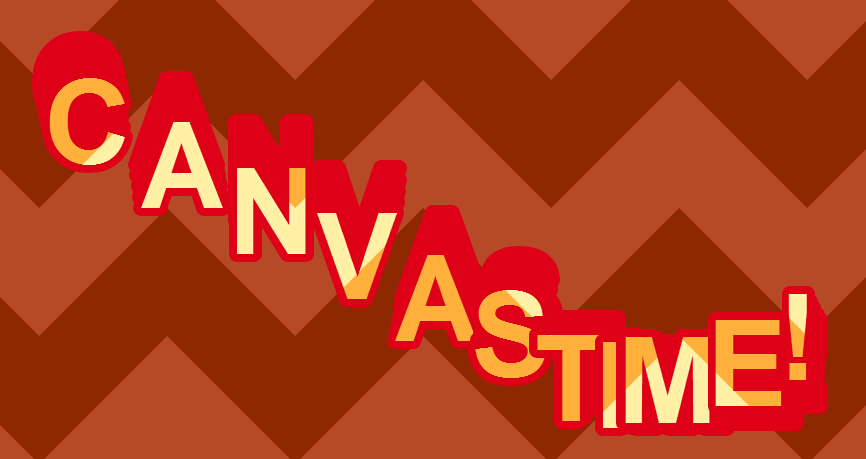
实现代码如下:
html代码:
 <div class="dg ac">

        <div class="dg main a taller-than-window" style="width: 245px;">

            <div style="width: 6px; margin-left: -3px; height: 42px; cursor: ew-resize; position: absolute;">

            </div>

            <ul style="height: 42px;">

                <li class="cr string">

                    <div>

                        <span class="property-name">text</span><div class="c">

                            <input type="text"></div>

                    </div>

                </li>

                <li class="cr number has-slider">

                    <div>

                        <span class="property-name">speed</span><div class="c">

                            <div>

                                <input type="text"></div>

                            <div class="slider">

                                <div class="slider-fg" style="width: 14.089754445385266%;">

                                </div>

                            </div>

                        </div>

                    </div>

                </li>

                <li class="cr number has-slider">

                    <div>

                        <span class="property-name">spacing</span><div class="c">

                            <div>

                                <input type="text"></div>

                            <div class="slider">

                                <div class="slider-fg" style="width: 86.70618120237087%;">

                                </div>

                            </div>

                        </div>

                    </div>

                </li>

                <li class="cr number has-slider">

                    <div>

                        <span class="property-name">waviness</span><div class="c">

                            <div>

                                <input type="text"></div>

                            <div class="slider">

                                <div class="slider-fg" style="width: 56.35901778154106%;">

                                </div>

                            </div>

                        </div>

                    </div>

                </li>

                <li class="cr number has-slider">

                    <div>

                        <span class="property-name">trail</span><div class="c">

                            <div>

                                <input type="text"></div>

                            <div class="slider">

                                <div class="slider-fg" style="width: 9.67741935483871%;">

                                </div>

                            </div>

                        </div>

                    </div>

                </li>

                <li class="cr boolean">

                    <div>

                        <span class="property-name">multiply_trail</span><div class="c">

                            <input type="checkbox"></div>

                    </div>

                </li>

            </ul>

            <div class="close-button" style="width: 245px;">

                Close Controls</div>

        </div>

    </div>
css代码:
.dg ul

        {

            list-style: none;

            margin:;

            padding:;

            width: 100%;

            clear: both;

        }

        .dg.ac

        {

            position: fixed;

            top:;

            left:;

            right:;

            height:;

            z-index:;

        }

        .dg:not(.ac) .main

        {

            overflow: hidden;

        }

        .dg.main

        {

            -webkit-transition: opacity 0.1s linear;

            -o-transition: opacity 0.1s linear;

            -moz-transition: opacity 0.1s linear;

            transition: opacity 0.1s linear;

        }

        .dg.main.taller-than-window

        {

            overflow-y: auto;

        }

        .dg.main.taller-than-window .close-button

        {

            opacity:;

            margin-top: -1px;

            border-top: 1px solid #2c2c2c;

        }

        .dg.main ul.closed .close-button

        {

            opacity: 1 !important;

        }

        .dg.main:hover .close-button, .dg.main .close-button.drag

        {

            opacity:;

        }

        .dg.main .close-button

        {

            -webkit-transition: opacity 0.1s linear;

            -o-transition: opacity 0.1s linear;

            -moz-transition: opacity 0.1s linear;

            transition: opacity 0.1s linear;

            border:;

            position: absolute;

            line-height: 19px;

            height: 20px;

            cursor: pointer;

            text-align: center;

            background-color: #000;

        }

        .dg.main .close-button:hover

        {

            background-color: #111;

        }

        .dg.a

        {

            float: right;

            margin-right: 15px;

            overflow-x: hidden;

        }

        .dg.a.has-save ul

        {

            margin-top: 27px;

        }

        .dg.a.has-save ul.closed

        {

            margin-top:;

        }

        .dg.a .save-row

        {

            position: fixed;

            top:;

            z-index:;

        }

        .dg li

        {

            -webkit-transition: height 0.1s ease-out;

            -o-transition: height 0.1s ease-out;

            -moz-transition: height 0.1s ease-out;

            transition: height 0.1s ease-out;

        }

        .dg li:not(.folder)

        {

            cursor: auto;

            height: 27px;

            line-height: 27px;

            overflow: hidden;

            padding: 0 4px 0 5px;

        }

        .dg li.folder

        {

            padding:;

            border-left: 4px solid rgba(0,0,0,0);

        }

        .dg li.title

        {

            cursor: pointer;

            margin-left: -4px;

        }

        .dg .closed li:not(.title), .dg .closed ul li, .dg .closed ul li > *

        {

            height:;

            overflow: hidden;

            border:;

        }

        .dg .cr

        {

            clear: both;

            padding-left: 3px;

            height: 27px;

        }

        .dg .property-name

        {

            cursor: default;

            float: left;

            clear: left;

            width: 40%;

            overflow: hidden;

            text-overflow: ellipsis;

        }

        .dg .c

        {

            float: left;

            width: 60%;

        }

        .dg .c input[type=text]

        {

            border:;

            margin-top: 4px;

            padding: 3px;

            width: 100%;

            float: right;

        }

        .dg .has-slider input[type=text]

        {

            width: 30%;

            margin-left:;

        }

        .dg .slider

        {

            float: left;

            width: 66%;

            margin-left: -5px;

            margin-right:;

            height: 19px;

            margin-top: 4px;

        }

        .dg .slider-fg

        {

            height: 100%;

        }

        .dg .c input[type=checkbox]

        {

            margin-top: 9px;

        }

        .dg .c select

        {

            margin-top: 5px;

        }

        .dg .cr.function, .dg .cr.function .property-name, .dg .cr.function *, .dg .cr.boolean, .dg .cr.boolean *

        {

            cursor: pointer;

        }

        .dg .selector

        {

            display: none;

            position: absolute;

            margin-left: -9px;

            margin-top: 23px;

            z-index:;

        }

        .dg .c:hover .selector, .dg .selector.drag

        {

            display: block;

        }

        .dg li.save-row

        {

            padding:;

        }

        .dg li.save-row .button

        {

            display: inline-block;

            padding: 0px 6px;

        }

        .dg.dialogue

        {

            background-color: #222;

            width: 460px;

            padding: 15px;

            font-size: 13px;

            line-height: 15px;

        }

        #dg-new-constructor

        {

            padding: 10px;

            color: #222;

            font-family: Monaco, monospace;

            font-size: 10px;

            border:;

            resize: none;

            box-shadow: inset 1px 1px 1px #888;

            word-wrap: break-word;

            margin: 12px 0;

            display: block;

            width: 440px;

            overflow-y: scroll;

            height: 100px;

            position: relative;

        }

        #dg-local-explain

        {

            display: none;

            font-size: 11px;

            line-height: 17px;

            border-radius: 3px;

            background-color: #333;

            padding: 8px;

            margin-top: 10px;

        }

        #dg-local-explain code

        {

            font-size: 10px;

        }

        #dat-gui-save-locally

        {

            display: none;

        }

        .dg

        {

            color: #eee;

            font: 11px 'Lucida Grande' , sans-serif;

            text-shadow: 0 -1px 0 #111;

        }

        .dg.main::-webkit-scrollbar

        {

            width: 5px;

            background: #1a1a1a;

        }

        .dg.main::-webkit-scrollbar-corner

        {

            height:;

            display: none;

        }

        .dg.main::-webkit-scrollbar-thumb

        {

            border-radius: 5px;

            background: #676767;

        }

        .dg li:not(.folder)

        {

            background: #1a1a1a;

            border-bottom: 1px solid #2c2c2c;

        }

        .dg li.save-row

        {

            line-height: 25px;

            background: #dad5cb;

            border:;

        }

        .dg li.save-row select

        {

            margin-left: 5px;

            width: 108px;

        }

        .dg li.save-row .button

        {

            margin-left: 5px;

            margin-top: 1px;

            border-radius: 2px;

            font-size: 9px;

            line-height: 7px;

            padding: 4px 4px 5px 4px;

            background: #c5bdad;

            color: #fff;

            text-shadow: 0 1px 0 #b0a58f;

            box-shadow: 0 -1px 0 #b0a58f;

            cursor: pointer;

        }

        .dg li.save-row .button.gears

        {

            background: #c5bdad url(data:image/png;base64,iVBORw0KGgoAAAANSUhEUgAAAAsAAAANCAYAAAB/9ZQ7AAAAGXRFWHRTb2Z0d2FyZQBBZG9iZSBJbWFnZVJlYWR5ccllPAAAAQJJREFUeNpiYKAU/P//PwGIC/ApCABiBSAW+I8AClAcgKxQ4T9hoMAEUrxx2QSGN6+egDX+/vWT4e7N82AMYoPAx/evwWoYoSYbACX2s7KxCxzcsezDh3evFoDEBYTEEqycggWAzA9AuUSQQgeYPa9fPv6/YWm/Acx5IPb7ty/fw+QZblw67vDs8R0YHyQhgObx+yAJkBqmG5dPPDh1aPOGR/eugW0G4vlIoTIfyFcA+QekhhHJhPdQxbiAIguMBTQZrPD7108M6roWYDFQiIAAv6Aow/1bFwXgis+f2LUAynwoIaNcz8XNx3Dl7MEJUDGQpx9gtQ8YCueB+D26OECAAQDadt7e46D42QAAAABJRU5ErkJggg==) 2px 1px no-repeat;

            height: 7px;

            width: 8px;

        }

        .dg li.save-row .button:hover

        {

            background-color: #bab19e;

            box-shadow: 0 -1px 0 #b0a58f;

        }

        .dg li.folder

        {

            border-bottom:;

        }

        .dg li.title

        {

            padding-left: 16px;

            background: #000 url(data:image/gif;base64,R0lGODlhBQAFAJEAAP////Pz8////////yH5BAEAAAIALAAAAAAFAAUAAAIIlI+hKgFxoCgAOw==) 6px 10px no-repeat;

            cursor: pointer;

            border-bottom: 1px solid rgba(255,255,255,0.2);

        }

        .dg .closed li.title

        {

            background-image: url(data:image/gif;base64,R0lGODlhBQAFAJEAAP////Pz8////////yH5BAEAAAIALAAAAAAFAAUAAAIIlGIWqMCbWAEAOw==);

        }

        .dg .cr.boolean

        {

            border-left: 3px solid #806787;

        }

        .dg .cr.function

        {

            border-left: 3px solid #e61d5f;

        }

        .dg .cr.number

        {

            border-left: 3px solid #2fa1d6;

        }

        .dg .cr.number input[type=text]

        {

            color: #2fa1d6;

        }

        .dg .cr.string

        {

            border-left: 3px solid #1ed36f;

        }

        .dg .cr.string input[type=text]

        {

            color: #1ed36f;

        }

        .dg .cr.function:hover, .dg .cr.boolean:hover

        {

            background: #111;

        }

        .dg .c input[type=text]

        {

            background: #303030;

            outline: none;

        }

        .dg .c input[type=text]:hover

        {

            background: #3c3c3c;

        }

        .dg .c input[type=text]:focus

        {

            background: #494949;

            color: #fff;

        }

        .dg .c .slider

        {

            background: #303030;

            cursor: ew-resize;

        }

        .dg .c .slider-fg

        {

            background: #2fa1d6;

        }

        .dg .c .slider:hover

        {

            background: #3c3c3c;

        }

        .dg .c .slider:hover .slider-fg

        {

            background: #44abda;

        }
js代码:
 var settings = {

            text: "CANVAS TIME!",

            waviness: 3,

            spacing: 5,

            speed: 16,

            trail: 4,

            multiply_trail: false

        };

        var viewWidth = 1024;

        var viewHeight = 512;

        var drawingCanvas, ctx;

        var timeStep = (1 / 16);

        var time = 0;

        var frame = 0;

        var measureDiv = document.getElementById('text-measure');

        var totalTextWidth = 0;

        var letters = [];

        var bgColor1 = '#FFF0A5',

    bgColor2 = '#FFB03B',

    letterFillColor1 = '#B64926',

    letterFillColor2 = '#8E2800',

    letterStrokeColor = '#DE0017';

        var textFillPattern = createPattern(bgColor1, bgColor2);

        var backgroundFillPattern = createPattern(letterFillColor1, letterFillColor2);

        var Letter = function (v) {

            measureDiv.innerHTML = v;

            this.width = measureDiv.clientWidth;

            this.height = measureDiv.clientHeight;

            this.value = v;

            this.x = 0;

            this.y = 0;

            var history = [];

            this.draw = function () {

                if (settings.multiply_trail) {

                    ctx.globalCompositeOperation = 'multiply';

                }

                for (var i = 0; i < history.length; i++) {

                    ctx.strokeText(this.value, history[i].x, history[i].y);

                }

                ctx.strokeText(this.value, this.x, this.y);

                ctx.globalCompositeOperation = 'source-over'; // this is the default

                ctx.fillText(this.value, this.x, this.y);

                history.unshift({ x: this.x, y: this.y });

                if (history.length > settings.trail) history.length = settings.trail;

            }

        }

        initGui();

        initDrawingCanvas();

        processText();

        requestAnimationFrame(loop);

        function initGui() {

            var gui = new dat.GUI();

            gui.add(settings, 'text').onChange(processText);

            gui.add(settings, 'speed', 1, 60).onChange(function () { timeStep = 1 / (61 - settings.speed) });

            gui.add(settings, 'spacing', 0, 10);

            gui.add(settings, 'waviness', 1, 16);

            gui.add(settings, 'trail', 1, 32).step(1);

            gui.add(settings, 'multiply_trail');

        }

        function initDrawingCanvas() {

            drawingCanvas = document.getElementById("drawing_canvas");

            drawingCanvas.width = viewWidth;

            drawingCanvas.height = viewHeight;

            ctx = drawingCanvas.getContext('2d');

            ctx.font = 'bolder 120px Arial';

            ctx.lineJoin = 'round';

        }

        function processText() {

            letters.length = 0;

            totalTextWidth = 0;

            for (var i = 0; i < settings.text.length; i++) {

                letters.push(new Letter(settings.text[i]));

                totalTextWidth += letters[i].width;

            }

        }

        function createPattern(c1, c2) {

            var patternCanvas = document.getElementById('pattern_canvas');

            var w = patternCanvas.width = 256;

            var h = patternCanvas.height = 256;

            var hw = w * 0.5;

            var hh = h * 0.5;

            var c = patternCanvas.getContext('2d');

            // background color

            c.fillStyle = c1;

            c.fillRect(0, 0, w, h);

            // the 'v' shape

            c.fillStyle = c2;

            c.beginPath();

            c.moveTo(0, 0);

            c.lineTo(hw, hh);

            c.lineTo(w, 0);

            c.lineTo(w, hh);

            c.lineTo(hw, h);

            c.lineTo(0, hh);

            c.closePath();

            c.fill();

            return c.createPattern(patternCanvas, 'repeat');

        }

        function loop() {

            draw();

            time += timeStep;

            frame++;

            requestAnimationFrame(loop);

        }

        function draw() {

            ctx.fillStyle = backgroundFillPattern;

            ctx.fillRect(0, 0, viewWidth, viewHeight);

            if (letters.length === 0) return;

            ctx.strokeStyle = letterStrokeColor;

            ctx.lineWidth = 16;

            ctx.fillStyle = textFillPattern;

            var letter,

        margin = settings.spacing,

        x = (viewWidth - (totalTextWidth + margin * (settings.text.length - 1))) * 0.5,

        y = viewHeight * 0.5 + letters[0].height * 0.25,

        d = settings.waviness / letters.length;

            for (var i = 0; i < letters.length; i++) {

                letter = letters[i];

                letter.x = x + Math.cos(time + i * d) * 64;

                letter.y = y + Math.sin(time + i * d) * 184;

                letter.draw();

                x += letter.width + margin;

            }

        } //@ sourceURL=pen.js
注:本文爱编程原创文章,转载请注明原文地址:http://www.w2bc.com/Article/5285
HTML5 Canvas 梦幻的文字飞扬动画教程的更多相关文章
- Canvas 3D球形文字云动画特效
Canvas 3D球形文字云动画特效 效果图: 代码如下,复制即可使用: (适用浏览器:360.FireFox.Chrome.Opera.傲游.搜狗.世界之窗. 不支持Safari.IE8及以下浏览器 ...
- html5 canvas首屏自适应背景动画循环效果代码
模板描述:html5 canvas首屏自适应背景动画循环效果代码 由于动态图太大,怕以后服务器受不了,所以现在都改为静态图了,大家点击演示地址一样的,希望大家喜欢,你们的支持就是小海的动力!! 欢迎大 ...
- html5 canvas雨点打到窗玻璃动画
html5 canvas雨点打到窗玻璃动画 HTML5下雨效果 效果预览:http://hovertree.com/texiao/html5/4.htm 以下是代码: <!doctype htm ...
- 基于HTML5 Canvas粒子效果文字动画特效
之前我们分享过很多超酷的文字特效,其中也有利用HTML5和CSS3的.今天我们要来分享一款基于HTML5 Canvas的文字特效,输入框中输入想要展示的文字,回车后即可在canvas上绘制出粒子效果的 ...
- HTML5 Canvas 超逼真烟花绽放动画
各位前端朋友们,大家好!五一假期即将结束,在开启加班模式之前,我要给大家分享一个超酷超逼真的HTML5 Canvas烟花模拟动画.这次升级版的烟花动画有以下几个特点: 烟花绽放时,将展现不同的色彩,不 ...
- HTML5 Canvas实现黑客帝国文字掉落效果
效果: 原理: 用canvas逐行输出文字,然后让背景颜色逐渐加深,再随机中断某些列. 代码: HTML: <canvas id="c"></canvas> ...
- 基于 HTML5 Canvas 实现的文字动画特效
前言 文字是网页中最基本的元素,一般我们在网页上都是展示的静态文字,但是就效果来说,还是比较枯燥的.文字淡入淡出的动画效果在项目中非常实用,如果有某些关键的文字,可以通过这种动态的效果来提醒用户阅读. ...
- 基于HTML5 Canvas的饼状图表实现教程
昨天我们分享了一款基于HTML5的线性图表应用,效果非常不错,可以看在线DEMO或者实现教程.今天我们继续来分享一款基于HTML5的网页图表,它也是利用Canvas绘制的,但是和前面不同的是,这款图表 ...
- HTML5 canvas上画文字出现乱码
不是这个的问题, <html> <head> <meta charset="utf-8"/> </head> 是因为从网上复制粘贴下 ...
随机推荐
- centos 6.4 调整home和root分区大小
调整过程中可以随时查看硬盘分区情况,命令: lsblk df -h 压缩home分区到5G: [root@fscp-dev /]# df -h 文件系统 容量 已用 可用 已用%% 挂载点 /dev/ ...
- 关于highstock横坐标的一些的一些说明(1)使用UTC时间
highstock的数据格式采用的是[[时间,数据],[时间,数据],[时间,数据],[时间,数据]],而时间采用的是13位的毫秒值,如[1133136000000,69.66],采用的时间格式为UT ...
- Persona——Web人物角色介绍
一.什么是人物角色? 人物角色,即persona([pə:’səunə]),这里讨论的主要是web persona,是指针对网站目标群体真实特征的勾勒,是真实用户的综合原型.我们对产品使用者的目标.行 ...
- 深入了解MyBatis参数
参考1 参考2 参考3
- MyEclipse 8.6插件下载
(源自网络:http://hi.baidu.com/%D4%B5%BA%A3%C7%E9%C9%EE/blog/item/ad86323d1e80a5e33d6d97c6.html 和 http:/ ...
- iOS 直播推流 - 搭建基于RTMP的本地Nginx服务器
前端时间,公司要调研直播相关的内容,特地花时间进行了一番调研. 本篇将记录其中的推流篇-本地推理播放测试. 关于Nginx: 配置Nginx以支持HLS.RTMP的推流与拉流,iOS系统使用LFLiv ...
- HDUOJ-----2571跳舞毯
跳舞毯 Time Limit: 2000/1000 MS (Java/Others) Memory Limit: 32768/32768 K (Java/Others)Total Submiss ...
- 【C++】int与string互转
int转string(注:itoa不是标准函数,OJ平台可能不接受) ; ]; string str; sprintf(temp, "%d", n); str = temp; or ...
- PowerDesigner 的常用方法
http://www.cnblogs.com/studyzy/archive/2008/01/23/1050194.html PowerDesigner 的常用方法 修改外键命名规则 选择Databa ...
- MVC图片上传、浏览、删除 ASP.NET MVC之文件上传【一】(八) ASP.NET MVC 图片上传到服务器
MVC图片上传.浏览.删除 1.存储配置信息 在web.config中,添加配置信息节点 <appSettings> <add key="UploadPath" ...