
10-RabbitMQ-整合SpringBoot
RabbitMQ整个SpringBoot
SpringBoot因其配置简单、快速开发,已经成为热门的开发之一
消息中间件的工作过程可以用生产者消费者模型来表示.即,生产者不断的向消息队列发送信息
而消费者从消息队列中消费信息.具体过程如下:
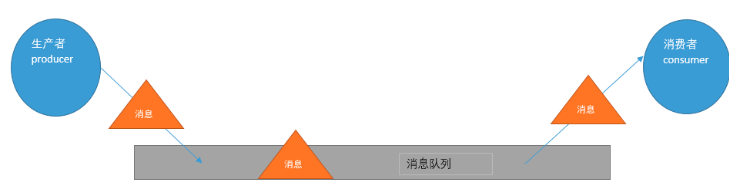
从上图可看出,对于消息队列来说,生产者,消息队列,消费者是最重要的三个概念
生产者发消息到消息队列中去,消费者监听指定的消息队列,并且当消息队列收到消息之后,
接收消息队列传来的消息,并且给予相应的处理.消息队列常用于分布式系统之间互相信息的传递.
使用SpringBoot进行整合RabbitMQ
1.pom文件的引入
这是操作RabbitMQ的starter必须要进行引入的
     <dependency>

            <groupId>org.springframework.boot</groupId>

            <artifactId>spring-boot-starter-amqp</artifactId>

        </dependency>
2.配置文件进行基础的配置
spring.rabbitmq.virtual-host=/user

spring.rabbitmq.port=

spring.rabbitmq.password=user

spring.rabbitmq.username=user

spring.rabbitmq.host=192.168.43.157
RabbitMQ的模式
1、direct模式
配置Queue(消息队列).那注意由于采用的是Direct模式,需要在配置Queue的时候,指定一个键
使其和交换机绑定.
DirectQueue.java
import org.springframework.amqp.core.Queue;

import org.springframework.context.annotation.Bean;

import org.springframework.context.annotation.Configuration;

@Configuration

public class DirectQueue {

   //若队列不存在则进行创建队列
   //返回的是队列名字

    @Bean

    public Queue queue(){

        return new Queue("direct_queue");

    }

}
消息生产者
Sender.java
import org.springframework.amqp.core.AmqpTemplate;

import org.springframework.beans.factory.annotation.Autowired;

import org.springframework.stereotype.Component;

@Component

public class Sender {

    @Autowired

    private AmqpTemplate amqpTemplate;

    public void send(){

        String msg = "direct_queue";

        User user = new User();

        user.setName("MrChegns");

        user.setAge();

        amqpTemplate.convertAndSend("direct_queue",user);

    }

}
此时发送的消息是一个User类型的对象
对于发送对象需要实现序列化接口
User.java
package com.cr.rabbitmqs.direct;

import java.io.Serializable;

public class User implements Serializable {

     private String name;

     private int age;

    public String getName() {

        return name;

    }

    public void setName(String name) {

        this.name = name;

    }

    public int getAge() {

        return age;

    }

    public void setAge(int age) {

        this.age = age;

    }

    public User(String name, int age) {this.name = name;

        this.age = age;

    }

    public User() {

    }

    @Override

    public String toString() {

        return "User{" +

                "name='" + name + '\'' +

                ", age=" + age +

                '}';

    }

}
消费者
Receive.java
import org.springframework.amqp.rabbit.annotation.RabbitListener;

import org.springframework.stereotype.Component;

@Component

public class Receive {

   //对队列进行监听
   //同时可以监听多个队列

    @RabbitListener(queues = "direct_queue")

    public void listen(User msg){

        System.out.println(msg);

    }

}
测试:
 @Autowired

    private  Sender sender;

    @Test

    public void test1(){

        sender.send();

    }
得到的结果i:

2、topic模式
首先我们看发送端,我们需要配置队列Queue,再配置交换机(Exchange)
再把队列按照相应的规则绑定到交换机上
Topic.java
import org.springframework.amqp.core.Binding;

import org.springframework.amqp.core.BindingBuilder;

import org.springframework.amqp.core.Queue;

import org.springframework.amqp.core.TopicExchange;

import org.springframework.beans.factory.annotation.Qualifier;

import org.springframework.context.annotation.Bean;

import org.springframework.context.annotation.Configuration;

@Configuration

public class Topic {

    //创建队列

    @Bean(name = "message")

    public Queue Aqueue(){

        return  new Queue("message.topic");

    }

    @Bean(name = "message1")

    public Queue BQueue(){

        return  new Queue("message.topics");

    }

    //交换机

    //若不存在则进行创建交换机

    @Bean

    public TopicExchange exchange(){

        return new TopicExchange("topic_exchange");

    }

    //交换机和队列进行绑定

    @Bean

    Binding bindingExchangeTopic(@Qualifier("message")Queue message,TopicExchange exchange){

        return BindingBuilder.bind(message).to(exchange).with("message.topic");

    }

    @Bean

    Binding bindingExchangeTopics(@Qualifier("message1")Queue message,TopicExchange exchange){

        return BindingBuilder.bind(message).to(exchange).with("message.#");

    }

}
消费者
Receive1.java
import com.cr.rabbitmqs.direct.User;

import org.springframework.amqp.rabbit.annotation.RabbitListener;

import org.springframework.stereotype.Component;

@Component

public class Receive1 {


    @RabbitListener(queues = "message.topic")

    public void tes(User user){

        System.out.println( "user1111:" + user);

    }

}
Receive2.java
import com.cr.rabbitmqs.direct.User;

import org.springframework.amqp.rabbit.annotation.RabbitListener;

import org.springframework.stereotype.Component;

@Component

public class Receive2 {

    @RabbitListener(queues = "message.topics")

    public void tes(User user){

        System.out.println("user222:" + user);

    }

}
消息生产者:
TopicSend.java
import com.cr.rabbitmqs.direct.User;

import org.springframework.amqp.core.AmqpTemplate;

import org.springframework.beans.factory.annotation.Autowired;

import org.springframework.stereotype.Component;

@Component

public class TopicSend {

    @Autowired

    private AmqpTemplate amqpTemplate;

    //发送消息

    public void send(){

        User user = new User("name",);

        amqpTemplate.convertSendAndReceive("topic_exchange","message.dev",user);

    }

    //发送消息

    public void send1(){
User user = new User("name",12);
amqpTemplate.convertSendAndReceive("topic_exchange","message.topic",user );
}
}
在开发中这种模式的使用还是相对比较多的,此时测试的是两种方法
一个方法所有的队列都可以进行获取
一个方法只有一个队列可以获取到消息
测试:
    @Autowired

    private TopicSend topicSend;

    @Test

    public  void ttt(){

        topicSend.send();

    }

测试:
    @Autowired

    private TopicSend topicSend;

    @Test

    public  void ttt(){

        topicSend.send1();

    }

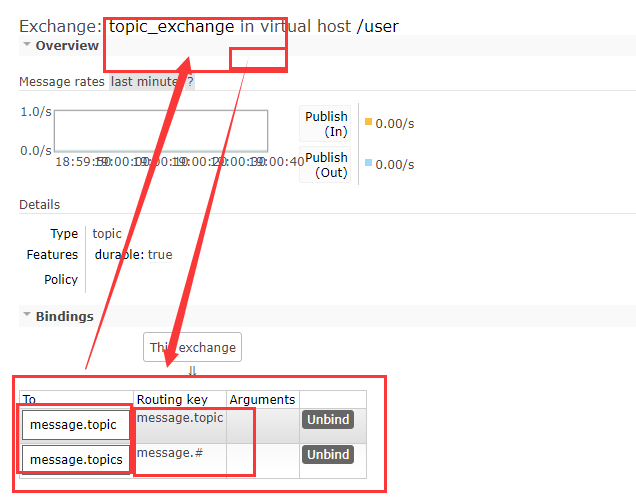
后台查看交换机和队列的绑定关系以机相关的路由键
3、fanout
那前面已经介绍过了,Fanout Exchange形式又叫广播形式,因此我们发送到路由器的消息会使
得绑定到该路由器的每一个Queue接收到消息,这个时候就算指定了Key,或者规则(即上文中
convertAndSend方法的参数2),也会被忽略!那么直接上代码,发送端配置如下:
Fanout.java
import org.springframework.amqp.core.Binding;

import org.springframework.amqp.core.BindingBuilder;

import org.springframework.amqp.core.FanoutExchange;

import org.springframework.amqp.core.Queue;

import org.springframework.context.annotation.Bean;

import org.springframework.context.annotation.Configuration;

@Configuration

public class Fanout {

    //队列

    //如果队列不存在会自动创建队列

    @Bean

    public Queue queueA(){

        return new Queue("queueA");

    }

    @Bean

    public Queue queueB(){

        return new Queue("queueB");

    }

    @Bean

    public Queue queueC(){

        return new Queue("queueC");

    }

    //交换机

    //如果交换机不存在会自动创建队列

    @Bean

    public FanoutExchange fanoutExchange(){

        return new FanoutExchange("fanoutExchange");

    }

    //将交换机和队列进行绑定

    @Bean

    Binding bindingExchangequeueA(Queue queueA,FanoutExchange fanoutExchange){

        return BindingBuilder.bind(queueA).to(fanoutExchange);

    }

    @Bean

    Binding bindingExchangequeueB(Queue queueB,FanoutExchange fanoutExchange){

        return BindingBuilder.bind(queueB).to(fanoutExchange);

    }

    @Bean

    Binding bindingExchangequeueC(Queue queueC,FanoutExchange fanoutExchange){

        return BindingBuilder.bind(queueC).to(fanoutExchange);

    }

}
消费者:
FanoutReceive.java
import org.springframework.amqp.rabbit.annotation.RabbitHandler;

import org.springframework.amqp.rabbit.annotation.RabbitListener;

import org.springframework.stereotype.Component;

@Component

//监听器

@RabbitListener(queues = "queueA")

public class FanoutReceive {

    //监听的方法

    @RabbitHandler

    public void listen(String  msg){

        System.out.println("queueA" + msg);

    }

}

FanoutSender.java
import org.springframework.amqp.core.AmqpTemplate;

import org.springframework.beans.factory.annotation.Autowired;

import org.springframework.stereotype.Component;

@Component

public class FanoutSender {

    @Autowired

    private AmqpTemplate amqpTemplate;

    //发送消息

    public void send(){

        String  msg = "test fanout....";

        //发送消息:参数依次是  交换机名字--路由键(此时设置路由键没有作用)--消息

        amqpTemplate.convertAndSend("fanoutExchange","",msg);

    }

}
测试:
@RunWith(SpringRunner.class)

@SpringBootTest

public class BpptandrabbitmqApplicationTests {

    //测试fanout

    @Autowired

    private FanoutSender fanoutSender;

    @Test

    public void fanout() {

        fanoutSender.send();

    }

}
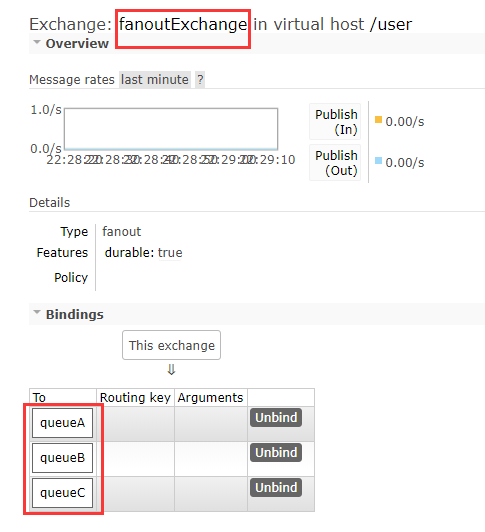
此时3个队列都能接收到消息

交换机、队列以及路由键
10-RabbitMQ-整合SpringBoot的更多相关文章
- 消息中间件——RabbitMQ(十)RabbitMQ整合SpringBoot实战!(全)
前言 1. SpringBoot整合配置详解 publisher-confirms,实现一个监听器用于监听Broker端给我们返回的确认请求:RabbitTemplate.ConfirmCallbac ...
- RabbitMQ从概念到使用、从Docker安装到RabbitMQ整合Springboot【1.5w字保姆级教学】
@ 目录 一.前言 二.RabbitMQ作用 1. 异步处理 2. 应用解耦 3. 流量控制 三.RabbitMQ概念 1. RabbitMQ简介 2. 核心概念 四.JMS与AMQP比较 五.Rab ...
- 02.RabbitMQ整合springboot简单使用
1.添加依赖 <dependency> <groupId>org.springframework.boot</groupId> <artifactId> ...
- SpringBoot系列八:SpringBoot整合消息服务(SpringBoot 整合 ActiveMQ、SpringBoot 整合 RabbitMQ、SpringBoot 整合 Kafka)
声明:本文来源于MLDN培训视频的课堂笔记,写在这里只是为了方便查阅. 1.概念:SpringBoot 整合消息服务 2.具体内容 对于异步消息组件在实际的应用之中会有两类: · JMS:代表作就是 ...
- RabbitMQ和SpringBoot的简单整合列子
一 思路总结 1 主要用spring-boot-starter-amqp来整合RabbitMQ和SpringBoot 2 使用spring-boot-starter-test来进行单元测试 3编写配置 ...
- RabbitMQ交换机、RabbitMQ整合springCloud
目标 1.交换机 2.RabbitMQ整合springCloud 交换机 蓝色区域===生产者 红色区域===Server:又称Broker,接受客户端的连接,实现AMQP实体服务 绿色区域===消费 ...
- RabbitMQ 整合 SpringCloud实战
RabbitMQ 整合 SpringCloud实战RabbitMQ 整合 SpringCloud实战rabbitmq-common 子项目rabbitmq-springcloud-consumer 子 ...
- SpringBoot2.0+Mybatis-Plus3.0+Druid1.1.10 一站式整合
SpringBoot2.0+Mybatis-Plus3.0+Druid1.1.10 一站式整合 一.先快速创建一个springboot项目,其中pom.xml加入mybatis-plus 和druid ...
- 整合 springboot 和 swagger出问题
整合 springboot 和 swagger ,出现报错, org.springframework.beans.factory.UnsatisfiedDependencyException: Err ...
- Activiti7整合SpringBoot(十二)
1 SpringBoot 整合 Activiti7 的配置 为了能够实现 SpringBoot 与 Activiti7 整合开发,首先我们要引入相关的依赖支持.所以,我们在工程的 pom.xml 文件 ...
随机推荐
- BZOJ4659:lcm
传送门 题目所给的不合法的条件可以转化为 \[\exists p,p^2|gcd(a,b) \Leftrightarrow \mu(gcd(a,b))\ne 0\] 那么 \[ans=\sum_{a= ...
- Web前端面试指导(十六):为什么要初始化CSS样式?
题目点评 这个题目乍一看感觉怪怪的,什么叫初始化样式了?如果换一句话你可能就理解了,就是通用样式.这道题目主要涉及的是理论方面的知识,不用写代码,只要描述清楚就可以了 初始化样式的原因 因为浏览器的兼 ...
- JS 计算时间差,(引入外部字体文件)
JavaScript Date() 对象: new Date() :时间对象,会把当前时间作为其初始值: setFullYear() :用于设置月份,可有三个参数,setFullYear(year,m ...
- C语言——循环队列和链队列的基本运算
// 循环队列#include <stdio.h> #include "SeqQue.h" // 循环队列的基本运算 /* const int maxsize = 20 ...
- MongoDB 投影
mongodb 投影意思是只选择必要的数据而不是选择一个文件的数据的整个.例如一个文档有5个字段,只需要显示其中3个 find() 方法 在MongoDB中,当执行find()方法,那么它会显示一个文 ...
- System Test GIS压力测试利器
System Test是ESRI公司提供一个压力测试软件.能针对ArcGIS Server 地图服务.WMS服务.WFS服务.WCS服务接口进行压力测试.以下是一个针对ArcGIS Server 地图 ...
- osgEarth编译——以VS2012为例
整理记录下 osgEarth编译过程. osgEarth是依赖于OSG的三维地理平台. 准备工作 OpenSceneGraph-3.4.0.zip OSG_3RDPARTY_DIR http:/ ...
- 微信小程序开发11-HTTPS网络通信(重点)
1.OneNET平台支持https,将HTTP头部改成https://api.heclouds.com即可(重点!!!!!!!!) 2.如果我们需要从 https://test.com/getinfo ...
- Node.js 常用 API
Node.js v6.11.2 Documentation(官方文档) Buffer Prior to the introduction of TypedArray in ECMAScript 20 ...
- DAO层,Service层,Controller层、View层介绍
来自:http://jonsion.javaeye.com/blog/592335 DAO层 DAO 层主要是做数据持久层的工作,负责与数据库进行联络的一些任务都封装在此,DAO层的设计首先是设计DA ...