
【转】C#微信公众平台开发者模式开启代码
using System;

using System.IO;

using System.Text;

using System.Web.Security;

namespace HPZJ.Web.sys.excel

{

    public partial class hpd_api_weixin : System.Web.UI.Page

    {

        const string Token = "token";  //你的token

        protected void Page_Load(object sender, EventArgs e)

        {

            string postStr = "";

            Valid();

            if (Request.HttpMethod.ToLower() == "post")

            {

                Stream s = System.Web.HttpContext.Current.Request.InputStream;

                byte[] b = new byte[s.Length];

                s.Read(b, , (int)s.Length);

                postStr = Encoding.UTF8.GetString(b);

                if (!string.IsNullOrEmpty(postStr))

                {

                    ResponseMsg(postStr);

                }

                //WriteLog("postStr:" + postStr);

            }

        }

        /// <summary>

        /// 验证微信签名

        /// </summary>

        /// * 将token、timestamp、nonce三个参数进行字典序排序

        /// * 将三个参数字符串拼接成一个字符串进行sha1加密

        /// * 开发者获得加密后的字符串可与signature对比,标识该请求来源于微信。

        /// <returns></returns>

        private bool CheckSignature()

        {

            string signature = Request.QueryString["signature"].ToString();

            string timestamp = Request.QueryString["timestamp"].ToString();

            string nonce = Request.QueryString["nonce"].ToString();

            string[] ArrTmp = { Token, timestamp, nonce };

            Array.Sort(ArrTmp);     //字典排序

            string tmpStr = string.Join("", ArrTmp);

            tmpStr = FormsAuthentication.HashPasswordForStoringInConfigFile(tmpStr, "SHA1");

            tmpStr = tmpStr.ToLower();

            if (tmpStr == signature)

            {

                return true;

            }

            else

            {

                return false;

            }

        }

        private void Valid()

        {

            string echoStr = Request.QueryString["echoStr"].ToString();

            if (CheckSignature())

            {

                if (!string.IsNullOrEmpty(echoStr))

                {

                    Response.Write(echoStr);

                    Response.End();

                }

            }

        }

        /// <summary>

        /// 返回信息结果(微信信息返回)

        /// </summary>

        /// <param name="weixinXML"></param>

        private void ResponseMsg(string weixinXML)

        {

            //回复消息的部分:你的代码写在这里

        }

        /// <summary>

        /// unix时间转换为datetime

        /// </summary>

        /// <param name="timeStamp"></param>

        /// <returns></returns>

        private DateTime UnixTimeToTime(string timeStamp)

        {

            DateTime dtStart = TimeZone.CurrentTimeZone.ToLocalTime(new DateTime(, , ));

            long lTime = long.Parse(timeStamp + "");

            TimeSpan toNow = new TimeSpan(lTime);

            return dtStart.Add(toNow);

        }

        /// <summary>

        /// datetime转换为unixtime

        /// </summary>

        /// <param name="time"></param>

        /// <returns></returns>

        private int ConvertDateTimeInt(System.DateTime time)

        {

            System.DateTime startTime = TimeZone.CurrentTimeZone.ToLocalTime(new System.DateTime(, , ));

            return (int)(time - startTime).TotalSeconds;

        }

        /// <summary>

        /// 写日志(用于跟踪)

        /// </summary>

        private void WriteLog(string strMemo)

        {

            string filename = Server.MapPath("/logs/log.txt");

            if (!Directory.Exists(Server.MapPath("//logs//")))

                Directory.CreateDirectory("//logs//");

            StreamWriter sr = null;

            try

            {

                if (!File.Exists(filename))

                {

                    sr = File.CreateText(filename);

                }

                else

                {

                    sr = File.AppendText(filename);

                }

                sr.WriteLine(strMemo);

            }

            catch

            {

            }

            finally

            {

                if (sr != null)

                    sr.Close();

            }

        }

    }

}
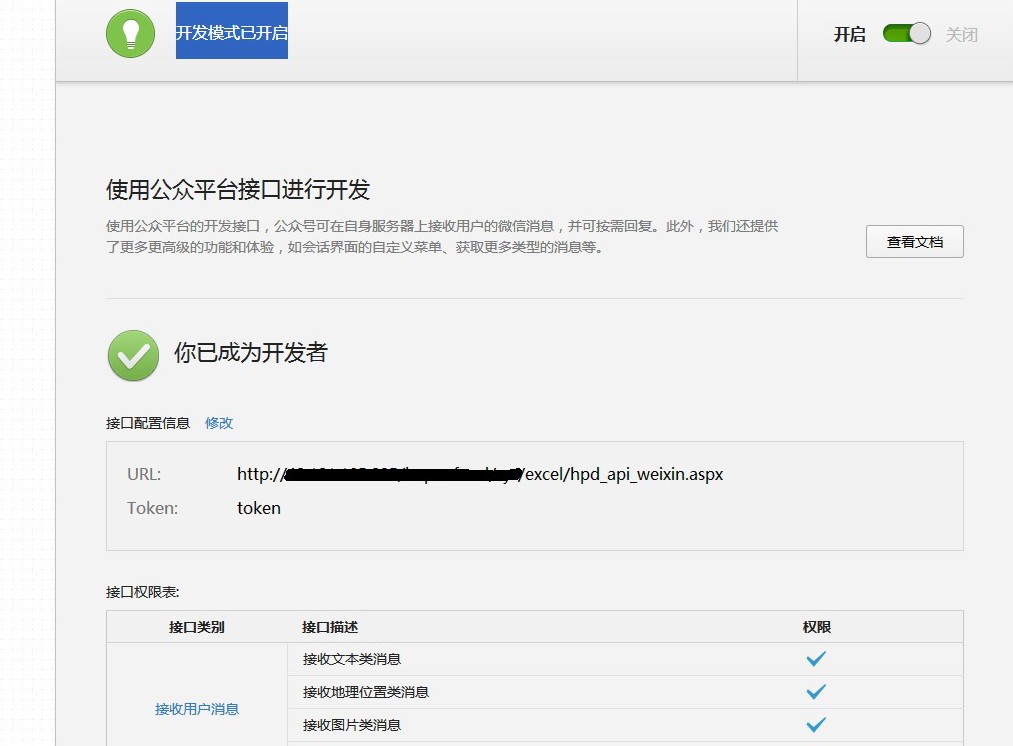
成功后显示下面截图
微信平台自定义菜单代码:
using System;

using System.Collections;

using System.Configuration;

using System.Data;

using System.Web;

using System.Web.Security;

using System.Web.UI;

using System.Web.UI.HtmlControls;

using System.Web.UI.WebControls;

using System.Web.UI.WebControls.WebParts;

using System.Xml;

using System.IO;

using System.Text;

using System.Collections.Generic;

using System.Net;

public partial class wx_weixin : System.Web.UI.Page

{

    protected void Page_Load(object sender, EventArgs e)

    {

//        首先根据微信的接口说明 获取你的 access_token 值

//然后 利用提供的文件直接上传运行,根据显示的返回 参考判断是否正确,如果返回的是 {"errcode":0,"errmsg":"ok"} 则成功。

//保证能用,有问题可以咨询

       //所有的 key 和name 都是可以自己定义,结合公众平台文档,根据自己需要调整

        string weixin1 = "";

        weixin1 += "{\n";

        weixin1 += "\"button\":[\n";

        weixin1 += "{\n";

        weixin1 += "\"type\":\"click\",\n";

        weixin1 += "\"name\":\"公司简介\",\n";

        weixin1 += "\"key\":\"jianjie\"\n";

        weixin1 += "},\n";

        weixin1 += "{\n";

        weixin1 += "\"type\":\"click\",\n";

        weixin1 += "\"name\":\"在线订房\",\n";

        weixin1 += "\"key\":\"order\"\n";

        weixin1 += "},\n";

        weixin1 += "{\n";

        weixin1 += "\"name\":\"我的菜单\",\n";

        weixin1 += "\"sub_button\":[\n";

        weixin1 += "{\n";

        weixin1 += "\"type\":\"click\",\n";

        weixin1 += "\"name\":\"子菜单1\",\n";

        weixin1 += "\"key\":\"zcd1\"\n";

        weixin1 += "},\n";

        weixin1 += "{\n";

        weixin1 += "\"type\":\"view\",\n";

        weixin1 += "\"name\":\"子菜单2\",\n";

        weixin1 += "\"key\":\"zcd2\"\n";

        weixin1 += "}]\n";

        weixin1 += "}]\n";

        weixin1 += "}\n";

        string i = GetPage("https://api.weixin.qq.com/cgi-bin/menu/create?access_token=改成你自己的access_token", weixin1);

        Response.Write(i);

    }

    public string GetPage(string posturl, string postData)

    {

        Stream outstream = null;

        Stream instream = null;

        StreamReader sr = null;

        HttpWebResponse response = null;

        HttpWebRequest request = null;

        Encoding encoding = Encoding.UTF8;

        byte[] data = encoding.GetBytes(postData);

        // 准备请求...

        try

        {

            // 设置参数

            request = WebRequest.Create(posturl) as HttpWebRequest;

            CookieContainer cookieContainer = new CookieContainer();

            request.CookieContainer = cookieContainer;

            request.AllowAutoRedirect = true;

            request.Method = "POST";

            request.ContentType = "application/x-www-form-urlencoded";

            request.ContentLength = data.Length;

            outstream = request.GetRequestStream();

            outstream.Write(data, , data.Length);

            outstream.Close();

            //发送请求并获取相应回应数据

            response = request.GetResponse() as HttpWebResponse;

            //直到request.GetResponse()程序才开始向目标网页发送Post请求

            instream = response.GetResponseStream();

            sr = new StreamReader(instream, encoding);

            //返回结果网页(html)代码

            string content = sr.ReadToEnd();

            string err = string.Empty;

            return content;

        }

        catch (Exception ex)

        {

            string err = ex.Message;

            Response.Write(err);

            return string.Empty;

        }

    }

}
原文地址:http://www.cnblogs.com/lhws/p/3324633.html
另一篇文章推荐:http://www.cnblogs.com/netyoulan/archive/2013/04/28/3049111.html
【转】C#微信公众平台开发者模式开启代码的更多相关文章
- C#微信公众平台开发者模式开启代码
using System;using System.IO;using System.Text;using System.Web.Security; namespace HPZJ.Web.sys.exc ...
- MVC下c#对接微信公众平台开发者模式
在ashx文件中进行HttpContext的处理: using System; using System.Collections.Generic; using System.Linq; using S ...
- php 开启微信公众号开发者模式
php 开启微信公众号开发者模式<pre><?php/** * wechat php test */header('Content-type:text');//define your ...
- java版微信公众平台自定义菜单创建代码实现
微信公众平台自定义菜单创建代码实现—java版 搞了两天的自定义菜单,终于搞定了,现在分享下心得,以便后来者少走弯路...... 好了,先看先微信官方的API 官方写的很详细,但是我看完后很茫然,不知 ...
- 使用 Laravel 框架:成为微信公众平台开发者
转: http://ninghao.net/blog/1441 作者:王皓发布于:2014-05-30 13:16更新于:2014-05-31 12:05 我们可以使用Laravel 框架为微信公众平 ...
- tp6微信公众号开发者模式token认证
微信公众号开发完整教程(一) PHP7.0版本,TP5.0框架 技术标签: 微信公众号开发 因为工作的需要,这一两年对微信公众号和小程序,项目制作的比较多.所以我才打算写一篇全面的 ...
- 微信公众平台开发者中心服务器配置Token验证失败问题
微信发展如火如荼,没有哪家的企业营销能避开微信不谈的,那像我们这种给客户实施项目的多多少少会涉及微信端的开发,本文只要给从未做过微信开发的人做一些简单的演示,行家里手们可以呵呵一下该干嘛干嘛去了. 微 ...
- 微信公众平台自定义菜单创建代码实现—java版
搞了两天的自定义菜单,终于搞定了,现在分享下心得,以便后来者少走弯路...... 好了,先看先微信官方的API 官方写的很详细,但是我看完后很茫然,不知道你们什么感觉. 我知道是post一个带参数的 ...
- tp6微信公众号开发者模式自定义菜单
1,参考上篇博客,获取access_token https://www.cnblogs.com/xiaoyantongxue/p/15803334.html 2:控制器写以下代码 /* * 获取普通a ...
随机推荐
- Solr相似度算法一:Lucene TF-IDF 相关性算分公式
Lucene在进行关键词查询的时候,默认用TF-IDF算法来计算关键词和文档的相关性,用这个数据排序 TF:词频,IDF:逆向文档频率,TF-IDF是一种统计方法,或者被称为向量空间模型,名字听起来很 ...
- Jenkins启动Tomcat时提示Neither the JAVA_HOME nor the JRE_HOME environment variable is defined
Jenkins构建提示: [SSH] executing...Neither the JAVA_HOME nor the JRE_HOME environment variable is defi ...
- Layui:踩坑之我见
layui.form.on("XXX",function(){}); 此方法会有事件冒泡的现象产生,解决方法是return false 或者使用 layui.stope(),但 ...
- ES6——异步操作之Promise
基本概念: Promise : 是 ES6 中新增的异步编程解决方案,提现在代码中他是一个对象 可以通过Promise构造函数来实例化. -new Promise(cb) ===> 实例的基本使 ...
- c# 后台GET、POST、PUT、DELETE传输发送json数据
一.Get 方式传输 //url为请求的网址,param参数为需要查询的条件(服务端接收的参数,没有则为null) //返回该次请求的响应 public string HttpGet(string u ...
- c++实验6 递归
1 利用递归设计此函数. int p(int a,int b) { if(a>=b) ; else ; } //粘贴测试数据及运行结果: //测试数据 int main() { cout < ...
- 原生JS实现JQuery的addClass和removeClass
代码如下: document.getElementById("btn").classList.add("active"); document.getElemen ...
- ASP.NET Core 2.0中的Azure Blob存储
问题 如何在ASP.NET Core中使用Azure Blob存储 解 创建一个类库并添加NuGet包 - WindowsAzure.Storage 添加一个类来封装设置, publicclass A ...
- BurpSuite系列----Extender模块(扩展器)
一.简介 Burp在软件中提供了支持第三方拓展插件的功能,方便使用者编写自己的自定义插件或从插件商店中安装拓展插件.Burp扩展程序可以以多种方式支持自定义Burp的行为,例如:修改HTTP请求和响应 ...
- ThreadLocal系列(三)-TransmittableThreadLocal的使用及原理解析
ThreadLocal系列(三)-TransmittableThreadLocal的使用及原理解析 上一篇:ThreadLocal系列(二)-InheritableThreadLocal的使用及原理解 ...