
iOS学习笔记(4)——显示单组件选取器
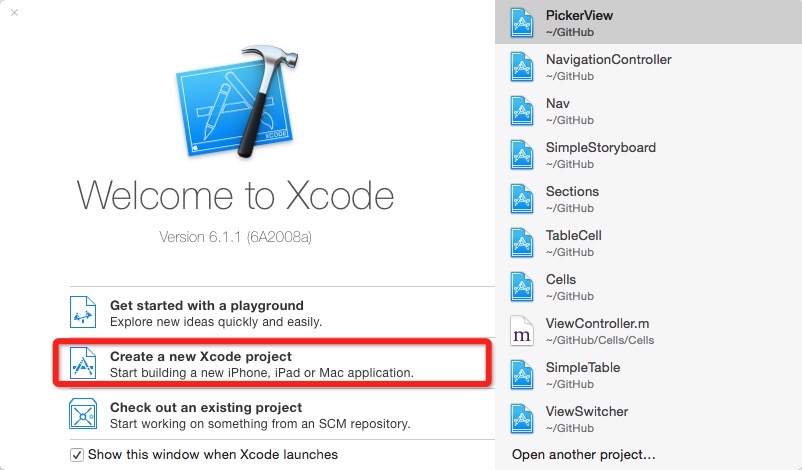
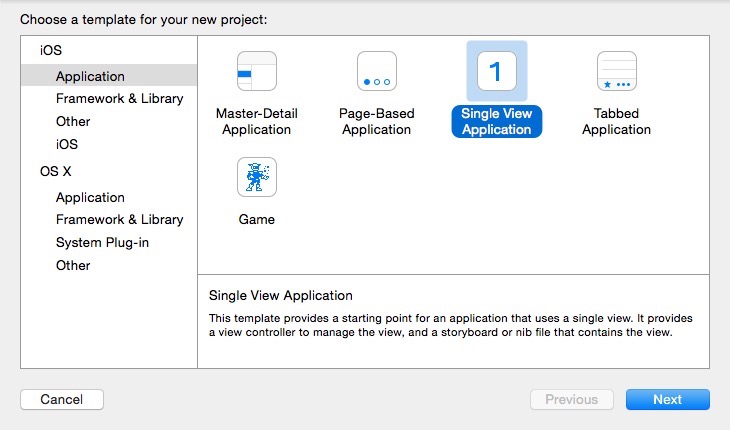
1. 创建工程
- 创建新工程,create a new Xcode project
- 创建single view application
- 创建名为PickerViewTest的工程
2. 创建xib文件
- New File创建View的user interface
- 命名为PickerView
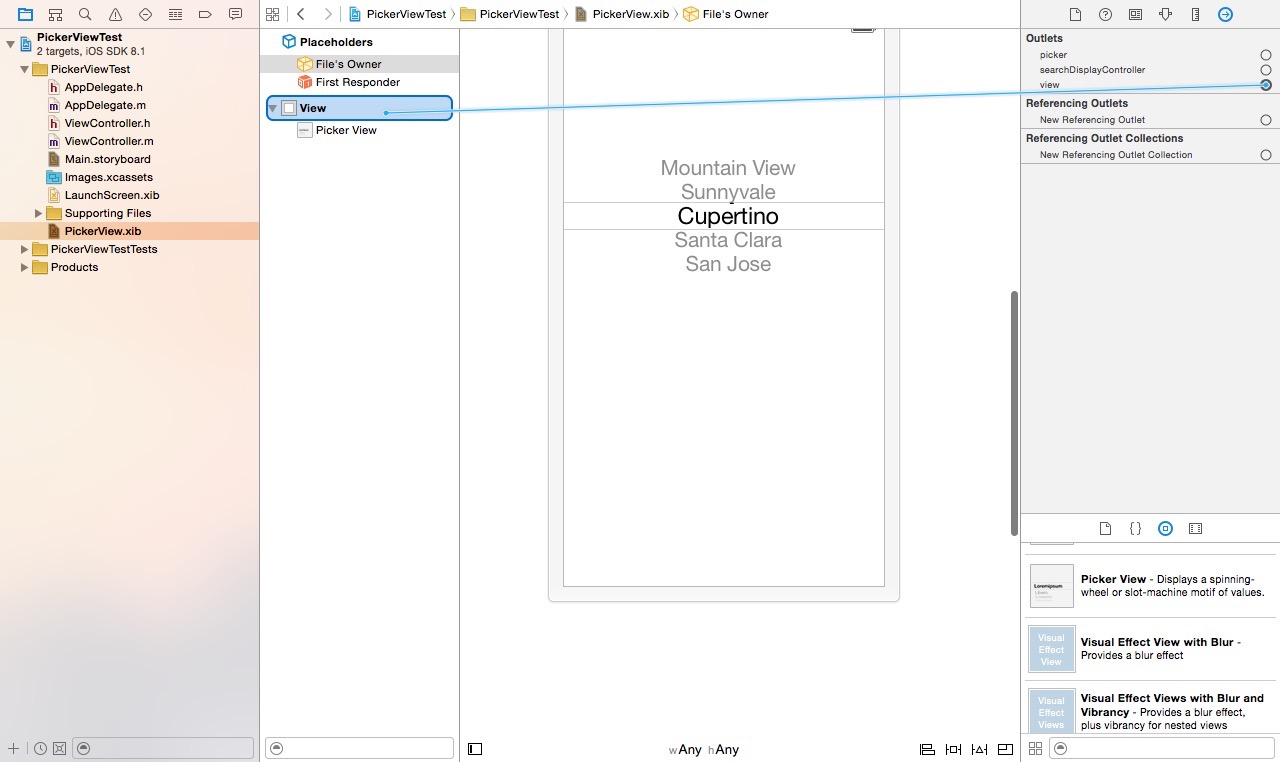
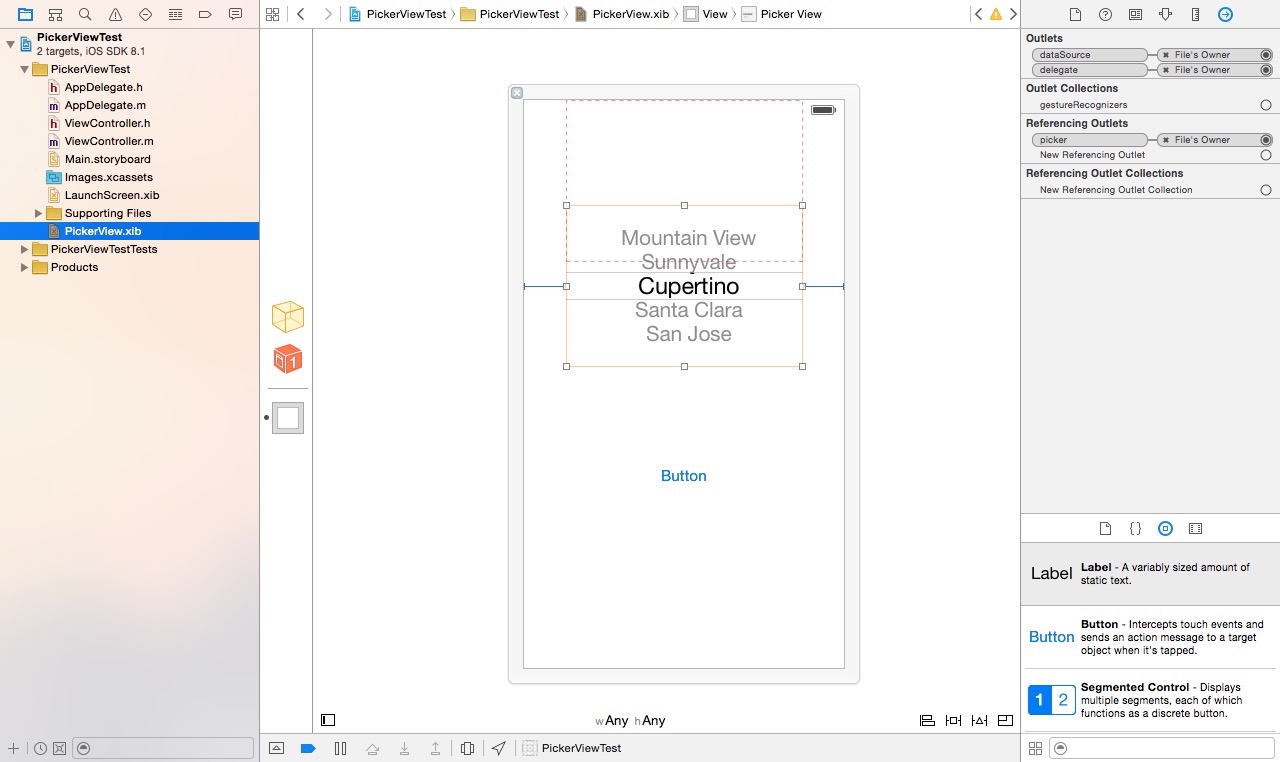
- 在interface builder中拖拽一个Picker View和Button
- 在dock中把xib的File's Owner 修改为ViewController(系统默认生成的视图控制器文件)
- 将xib文件的View视图与ViewController中的view(继承自UIViewController)关联
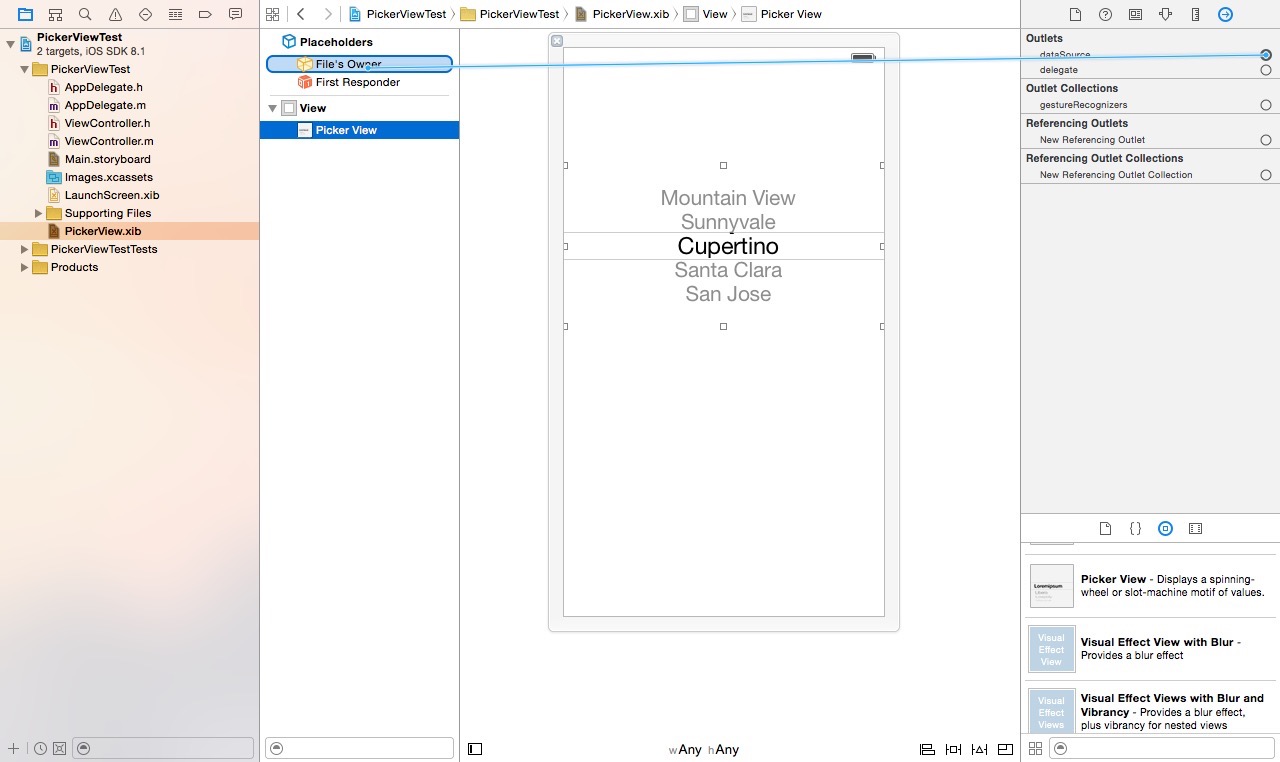
- 选定Picker View 视图,切换到connect inspector,将Picker View的delegate和dataSource关联到File's Owner(ViewController)
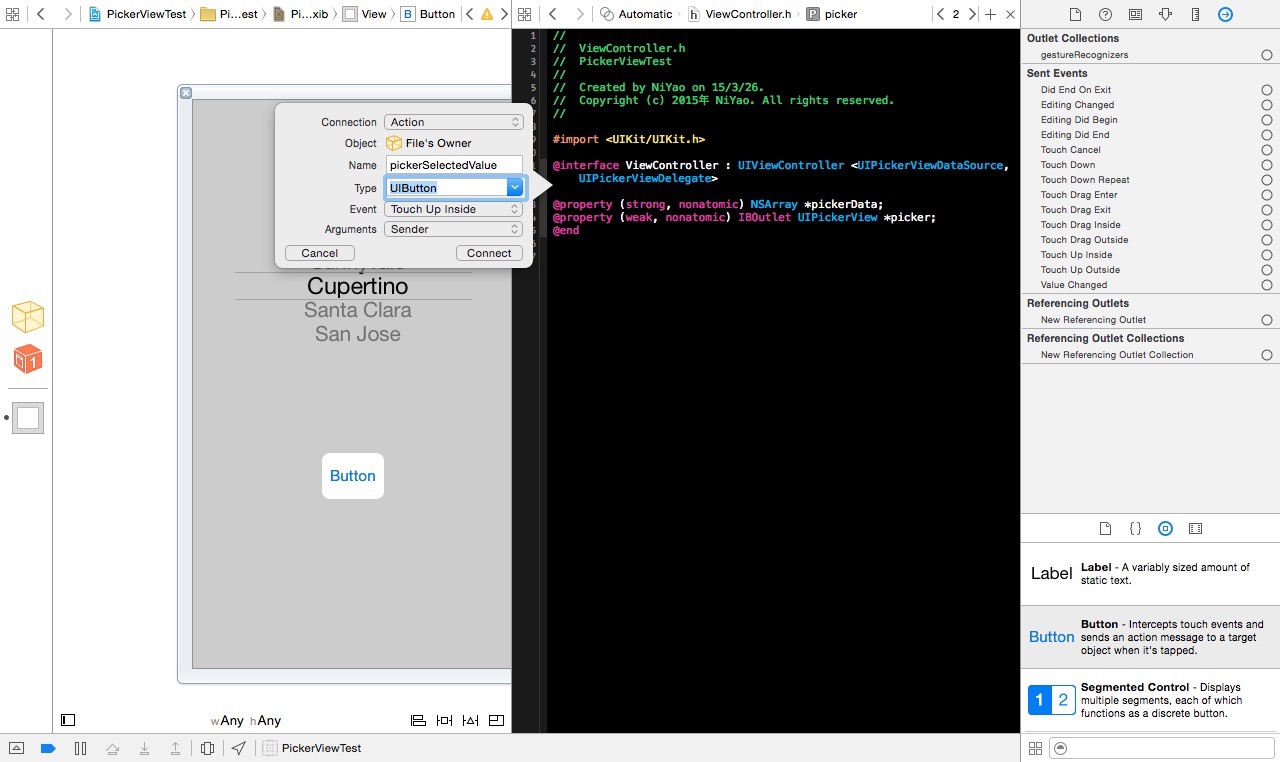
- 切换到辅助编辑模式,建立picker的IBOutlet输出口,和Button的IBAction动作方法
3. 编写程序代码
1)AppDelegate.m文件
 #import "AppDelegate.h"

 #import "ViewController.h"

 @interface AppDelegate ()

 @end

 @implementation AppDelegate

 - (BOOL)application:(UIApplication *)application didFinishLaunchingWithOptions:(NSDictionary *)launchOptions {

     // Override point for customization after application launch.

     self.window = [[UIWindow alloc] initWithFrame:[[UIScreen mainScreen] bounds]];

     ViewController *pickerController = [[ViewController alloc] initWithNibName:@"PickerView" bundle:nil];

     self.window.rootViewController = pickerController;

     self.window.backgroundColor = [UIColor whiteColor];

     [self.window makeKeyAndVisible];

     return YES;

 }

 - (void)applicationWillResignActive:(UIApplication *)application {

     // Sent when the application is about to move from active to inactive state. This can occur for certain types of temporary interruptions (such as an incoming phone call or SMS message) or when the user quits the application and it begins the transition to the background state.

     // Use this method to pause ongoing tasks, disable timers, and throttle down OpenGL ES frame rates. Games should use this method to pause the game.

 }

 - (void)applicationDidEnterBackground:(UIApplication *)application {

     // Use this method to release shared resources, save user data, invalidate timers, and store enough application state information to restore your application to its current state in case it is terminated later.

     // If your application supports background execution, this method is called instead of applicationWillTerminate: when the user quits.

 }

 - (void)applicationWillEnterForeground:(UIApplication *)application {

     // Called as part of the transition from the background to the inactive state; here you can undo many of the changes made on entering the background.

 }

 - (void)applicationDidBecomeActive:(UIApplication *)application {

     // Restart any tasks that were paused (or not yet started) while the application was inactive. If the application was previously in the background, optionally refresh the user interface.

 }

 - (void)applicationWillTerminate:(UIApplication *)application {

     // Called when the application is about to terminate. Save data if appropriate. See also applicationDidEnterBackground:.

 }

 @end
2)ViewController.h文件
#import <UIKit/UIKit.h>

@interface ViewController : UIViewController <UIPickerViewDataSource, UIPickerViewDelegate>

//必须遵循数据源和委托协议,并实现其相关方法

@property (strong, nonatomic) NSArray *pickerData;

//picker的数据源

@property (weak, nonatomic) IBOutlet UIPickerView *picker;

//辅助编辑器关联picker view的输出口时自动生成

- (IBAction)pickerSelectedValue:(UIButton *)sender;

//辅助编辑器关联button的动作方法时自动生成

@end
3)ViewController.m文件
#import "ViewController.h"

@interface ViewController ()

@end

@implementation ViewController

- (void)viewDidLoad {

    [super viewDidLoad];

    // Do any additional setup after loading the view, typically from a nib.

    self.pickerData = @[@"gthr", @"asdf", @"ghrt", @"bre", @"vew", @"adf", @"wrfe", @"vwfe", @"veww3", @"werw", @"dsfs"];

    self.pickerData = [self.pickerData sortedArrayUsingSelector:@selector(compare:)];

}

- (void)didReceiveMemoryWarning {

    [super didReceiveMemoryWarning];

    // Dispose of any resources that can be recreated.

}

- (NSInteger)numberOfComponentsInPickerView:(UIPickerView *)pickerView {

    //该方法返回选择器的组件个数

    return ;

}

- (NSInteger)pickerView:(UIPickerView *)pickerView numberOfRowsInComponent:(NSInteger)component {

    //该方法返回组件的行数

    return [self.pickerData count];

}

- (NSString *)pickerView:(UIPickerView *)pickerView titleForRow:(NSInteger)row forComponent:(NSInteger)component {

    //该方法返回数据源的值

    return self.pickerData[row];

}

- (IBAction)pickerSelectedValue:(UIButton *)sender {

    //测试值是否选择正确

    NSInteger row = [self.picker selectedRowInComponent:];

    UIAlertView *alert = [[UIAlertView alloc] initWithTitle:@"Picker Data" message:[NSString stringWithFormat:@"Picker Select %@", self.pickerData[row]] delegate:nil cancelButtonTitle:@"YES" otherButtonTitles:nil];

    [alert show];

}

@end
4. 小结
- 必须要使picker view的视图控制器遵循UIPickerViewDataSource, UIPickerViewDelegate协议
- 必须实现
- (NSInteger)numberOfComponentsInPickerView:(UIPickerView *)pickerView
- (NSInteger)pickerView:(UIPickerView *)pickerView numberOfRowsInComponent:(NSInteger)component
- (NSString *)pickerView:(UIPickerView *)pickerView titleForRow:(NSInteger)row forComponent:(NSInteger)component 三个方法
- (NSInteger)numberOfComponentsInPickerView:(UIPickerView *)pickerView 返回组件个数
- - (NSInteger)pickerView:(UIPickerView *)pickerView numberOfRowsInComponent:(NSInteger)component 返回选择项的个数
- - (NSString *)pickerView:(UIPickerView *)pickerView titleForRow:(NSInteger)row forComponent:(NSInteger)component 返回所选定的值
- 必须将Picker View的视图与视图控制器中的picker属性进行关联,否则不能获得正确的选择项
- 必须将View视图与ViewController的view属性进行关联,否则无法加载视图
- 没有删除main.storyboard,根视图控制器默认指向ViewController,不需要修改
- ViewController视图控制器作为视图的控制器File‘s Owner,也是Picker View的委托和数据源,实现picker view的协议方法,并为picker view提供所需要显示的数据。
iOS学习笔记(4)——显示单组件选取器的更多相关文章
- IOS学习笔记(四)之UITextField和UITextView控件学习
IOS学习笔记(四)之UITextField和UITextView控件学习(博客地址:http://blog.csdn.net/developer_jiangqq) Author:hmjiangqq ...
- iOS学习笔记-精华整理
iOS学习笔记总结整理 一.内存管理情况 1- autorelease,当用户的代码在持续运行时,自动释放池是不会被销毁的,这段时间内用户可以安全地使用自动释放的对象.当用户的代码运行告一段 落,开始 ...
- iOS学习笔记总结整理
来源:http://mobile.51cto.com/iphone-386851_all.htm 学习IOS开发这对于一个初学者来说,是一件非常挠头的事情.其实学习IOS开发无外乎平时的积累与总结.下 ...
- iOS学习笔记之UITableViewController&UITableView
iOS学习笔记之UITableViewController&UITableView 写在前面 上个月末到现在一直都在忙实验室的事情,与导师讨论之后,发现目前在实验室完成的工作还不足以写成毕业论 ...
- IOS学习笔记48--一些常见的IOS知识点+面试题
IOS学习笔记48--一些常见的IOS知识点+面试题 1.堆和栈什么区别? 答:管理方式:对于栈来讲,是由编译器自动管理,无需我们手工控制:对于堆来说,释放工作由程序员控制,容易产生memor ...
- iOS学习笔记22-推送通知
一.推送通知 推送通知就是向用户推送一条信息来通知用户某件事件,可以在应用退到后台后,或者关闭后,能够通过推送一条消息通知用户某件事情,比如版本更新等等. 推送通知的常用应用场景: 一些任务管理APP ...
- iOS学习笔记20-地图(二)MapKit框架
一.地图开发介绍 从iOS6.0开始地图数据不再由谷歌驱动,而是改用自家地图,当然在国内它的数据是由高德地图提供的. 在iOS中进行地图开发主要有三种方式: 利用MapKit框架进行地图开发,利用这种 ...
- iOS学习笔记——AutoLayout的约束
iOS学习笔记——AutoLayout约束 之前在开发iOS app时一直以为苹果的布局是绝对布局,在IB中拖拉控件运行或者直接使用代码去调整控件都会发上一些不尽人意的结果,后来发现iOS在引入了Au ...
- iOS学习笔记10-UIView动画
上次学习了iOS学习笔记09-核心动画CoreAnimation,这次继续学习动画,上次使用的CoreAnimation很多人感觉使用起来很繁琐,有没有更加方便的动画效果实现呢?答案是有的,那就是UI ...
随机推荐
- win10如和设置远程桌面
最近几天一直在搞远程桌面问题,电脑一直连不上远程,今天终于出来了. 前提前提 条件,要电脑允许Administrator用户,先把电脑切换到那个用户,然后进行下面操作. 1.在桌面,我的电脑图标,鼠 ...
- ie11的仿真模式
1>在ie11的仿真模式中,所有版本的按钮都失效,解决方法:再ie的配置中,选项-高级-重置,然后重启ie11 程序员的基础教程:菜鸟程序员
- Java文件下载详解
public void doPost(HttpServletRequest request, HttpServletResponse response) throws ServletException ...
- ubuntu 12.04安装jdk 8
转载:http://www.itnose.net/detail/6196130.html Ubuntu12.4安装jdk1.8 1.要安装的jdk,我把它拷在了共享文件夹里面. (用优盘拷也可以 ...
- Golang笔记之变量
哈哈 package main // 关键字var 声明变量 类型信息放在变量名后 //声明一个int型变量 var v1 int //声明一个string类型 var v2 string //声明多 ...
- Greeplum 系列(一) Greenplum 架构
Greeplum 系列(一) Greenplum 架构 Greenplum 可进行海量并行处理 (Massively Parallel Processing) 一.Greenplum 体系架构 Gre ...
- jquery破坏链
- SpringCloud之服务注册-eureka
类似于DUBBO 的zookeeper, SpringCloud本身提供一套服务注册中心--eureka 与zookeeper的区别在于 1:zookeeper本身就是一个应用,安装即可用:eurek ...
- pyhon 去除列表中重复元素
Python set() 函数 描述 set() 函数创建一个无序不重复元素集,可进行关系测试,删除重复数据,还可以计算交集.差集.并集等. 语法 set 语法: class set([iterabl ...
- Plupload 多实例上传 测试可用
<style type="text/css"> .btn{-webkit-border-radius:3px;-moz-border-radius:3px;-ms-bo ...