
Knockout 监控数组对象属性
代码:
 function Product(ProductID,ProductName,ProductNum,Result,Price) {

        this.ProductID = ko.observable(ProductID);

        this.ProductName = ko.observable(ProductName);

        this.ProductNum = ko.observable(ProductNum);

        this.Result = ko.observable(Result);

        this.Price = ko.observable(Price);

    }
 self.add = function (o) {

            self.isDetail(true);

            self.selectedItem(new Sale());

            $.ajax({

                url: "/api/CommonApi?API=GetProductListByBuy",

                type: "get",

                dataType: "json",

                success: function (data) {

                    var list = data.ApiParamObj;

                    var arr = [];

                    $(list).each(function () {

                        var ProductNum = $(this)[].ProductNum;

                        var Result = $(this)[].Result;

                        var Price = $(this)[].Price;

                        var ProductID = $(this)[].ProductID;

                        var ProductName = $(this)[].ProductName;

                        //console.log(Price);

                        //self.ProductList().push(new Product(ProductNum, Result, Price));

                        arr.push(new Product(ProductID, ProductName, ProductNum, Result, Price));

                        //self.ProductList.push(new Product(ProductID, ProductName, ProductNum, Result, Price));

                    })

                    //console.dir(arr);

                    self.ProductList(arr);

                    //self.ProductList = ko.observableArray(arr);

                    //console.log(self.ProductList().length);

                    //console.dir(self.ProductList());

                }

            });

            $("#formDialog").valid();

        }
对每一个属性进行监控,组成数组对整个数组进行监控
计算总数量,总金额
self.TotalNum = ko.computed(function () {

            //console.log("ffff");

            //console.dir(self.ProductList());

            var total = ;

            ko.utils.arrayForEach(self.ProductList(), function (item) {

                if (item.Result()) {

                    var value = parseFloat(item.ProductNum());

                    if (!isNaN(value)) {

                        total += value;

                    }

                }

            });

            return total.toFixed();

        });

        self.TotalAmount = ko.computed(function () {

            var total = ;

            ko.utils.arrayForEach(self.ProductList(), function (item) {

                if (item.Result()) {

                    var value = parseFloat(item.ProductNum() * item.Price());

                    if (!isNaN(value)) {

                        total += value;

                    }

                }

            });

            return total.toFixed();

        })
html代码:
<div class="row">
<div class="form-group col-xs-12">
<label class="control-label col-md-2">产品:</label>
<div class="col-md-10" data-bind="visible: ProductList().length > 0,foreach:ProductList">
<div class="dvcls">
<input type="checkbox" class="chk" data-bind="checked:Result,value:ProductID,attr:{ name: $index },enable:$parent.isDetail" />
<span data-bind="text:ProductName"></span>
价格:<span data-bind="text:Price"></span>
<input type="number" style="width:40px" min="" data-bind="value:ProductNum,valueUpdate:'keyup',visible:Result,enable:$parent.isDetail" />
</div>
</div>
</div>
</div>
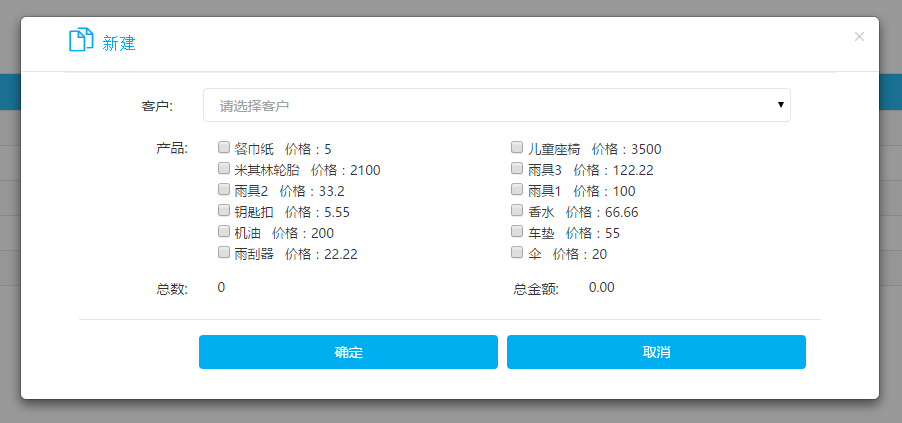
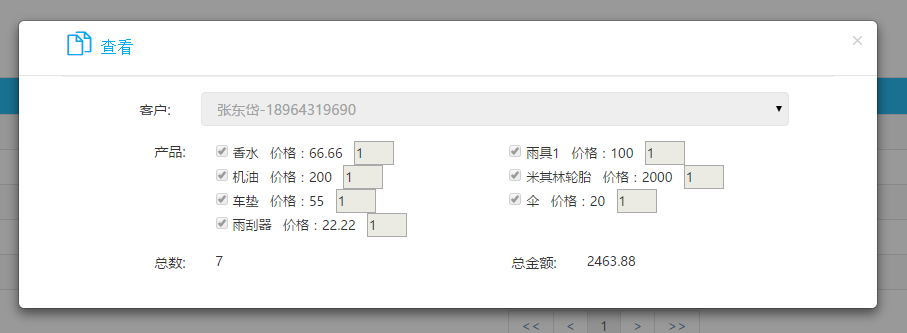
效果图:
整个代码:
@{
Model.Scripts = new string[] {
"~/Scripts/paginationViewModel.js",
"/Views/BoxSale/BoxSale.js" };
}
<style type="text/css">
.dvcls{
display:inline-block;
width:290px;
padding-left:0px;
}
</style>
<div class="page-content" style="padding-top: 0;">
<!-- BEGIN PAGE CONTENT-->
<div class="row">
<div class="col-md-12">
<!-- BEGIN EXAMPLE TABLE PORTLET-->
<div class="portlet box blue-hoki" style="background-color: white">
<div class="portlet-title">
<div class="caption" style="font-weight:bold;margin:10px;">
销售记录
</div>
<div class="tools"></div>
</div>
<div class="portlet-body">
<a href="javascript:void(0)" class="label label-info" style="margin:10px;" data-toggle="modal" data-target="#dvDialog" data-bind="click:add">销售礼品</a>
<table class="table table-striped table-bordered table-hover" id="tblCompany" style="margin:10px; text-align: center;">
<thead>
<tr style="background-color:#00adef">
<th>
序号
</th>
<th>
客户
</th>
<th>
礼品数量
</th>
<th>
总金额
</th>
<th>
编辑
</th>
</tr>
</thead>
<tbody data-bind="visible: SaleList().length > 0,foreach: SaleList">
<tr>
<td data-bind="text:$index()+1"></td>
<td data-bind="text:Name"></td>
<td data-bind="text:Num"></td>
<td data-bind="text:Amount.toFixed(2)"></td>
<td>
<a class="label label-info" data-toggle="modal" data-target="#dvDialog" data-bind="click:$parent.edit">查看</a>
<a class="label label-info" data-bind="click:$parent.remove">删除</a>
</td>
</tr>
</tbody>
</table>
<div class="row datatables_paginate paging_full_numbers" style="text-align:center;" data-bind="visible: pages().length > 0">
<div class="small-12 columns" data-bind="template: 'PaginationTemplate'"></div>
</div>
</div>
</div>
<!-- END EXAMPLE TABLE PORTLET-->
</div>
</div>
<!-- 编辑公司 -->
<div class="modal fade bs-example-modal-lg" tabindex="-1" id="dvDialog" role="dialog" aria-hidden="true">
<div class="modal-dialog modal-lg" style="margin-top:10%">
<div class="modal-content" style="width:860px">
<div class="modal-header">
<button type="button" class="close" data-dismiss="modal" aria-hidden="true"></button>
<h4 class="modal-title" style="margin-left:4%;color:#00adef">
<i class="icon-docs" style="font-size: 24px;"></i>
<span data-bind="if:selectedItem().SaleRecordID==null">新建</span>
<span data-bind="if:selectedItem().SaleRecordID!=null">查看</span>
</h4>
</div>
<div class="modal-body" style="border-top: 1px solid #EFEFEF; width: 90%;margin-left:5%">
<form id="formDialog" name="formDialog" class="form-horizontal">
<div class="row">
<div class="form-group col-xs-12">
<label class="control-label col-md-2">客户:</label>
<div class="col-md-10">
<select class="form-control" required name="fCustomerID" data-bind="options:customersList,optionsCaption: '请选择客户',
optionsText:function(item){ return item.NameMobile},
optionsValue:function(item){ return item.ID },
value:selectedItem().CustomerID,enable:isDetail"></select>
</div>
</div>
</div>
</form>
<div class="row">
<div class="form-group col-xs-12">
<label class="control-label col-md-2">产品:</label>
<div class="col-md-10" data-bind="visible: ProductList().length > 0,foreach:ProductList">
<div class="dvcls">
<input type="checkbox" class="chk" data-bind="checked:Result,value:ProductID,attr:{ name: $index },enable:$parent.isDetail" />
<span data-bind="text:ProductName"></span>
价格:<span data-bind="text:Price"></span>
<input type="number" style="width:40px" min="" data-bind="value:ProductNum,valueUpdate:'keyup',visible:Result,enable:$parent.isDetail" />
</div>
</div>
</div>
</div>
<div class="row">
<div class="form-group col-xs-12">
<label class="control-label col-md-2">总数:</label>
<div class="col-md-4">
<span data-bind="text:TotalNum"></span>
</div>
<label class="control-label col-md-2">总金额:</label>
<div class="col-md-4">
<span data-bind="text:TotalAmount"></span>
</div>
</div>
</div>
<div class="modal-footer" data-bind="visible:isDetail">
<button style="width: 42%;" type="button" class="btn blue" data-bind="click:function(){save();}">
确定
</button>
<button style="width: 42%;" type="button" class="btn blue" data-dismiss="modal">取消</button>
</div>
</div>
</div>
</div>
</div>
</div>
<script type="text/html" id="PaginationTemplate">
<ul class="pagination" data-bind="visible: pages().length > 0">
<li><a data-bind="click: goToFirst"><<</a></li>
<li><a data-bind="click: goToPrev"><</a></li>
<!--ko if:showStartPagerDot-->
<li><a data-bind="click:StartPageDot">...</a></li>
<!--/ko-->
<!--ko foreach:pages-->
<li data-bind="css: { 'active': $data == $parent.currentPage() }">
<a data-bind="text: $data, click: $parent.goToPage.bind($data, $data)"></a>
</li>
<!--/ko-->
<!--ko if:showEndPagerDot-->
<li><a data-bind="click:EndPageDot">...</a></li>
<!--/ko-->
<li><a data-bind="click: goToNext">></a></li>
<li><a data-bind="click: goToLast">>></a></li>
</ul>
</script>
$(function () {

    Date.prototype.Format = function (fmt) {

        var o = {

            "M+": this.getMonth() + , //月份

            "d+": this.getDate(), //日

            "h+": this.getHours() %  ==  ?  : this.getHours() % , //小时

            "H+": this.getHours(),

            "m+": this.getMinutes(), //分

            "s+": this.getSeconds(), //秒

            "q+": Math.floor((this.getMonth() + ) / ), //季度

            "f": this.getMilliseconds() //毫秒

        };

        if (/(y+)/.test(fmt))

            fmt = fmt.replace(RegExp.$, (this.getFullYear() + "").substr( - RegExp.$.length));

        for (var k in o)

            if (new RegExp("(" + k + ")").test(fmt))

                fmt = fmt.replace(RegExp.$, (RegExp.$.length == ) ? (o[k]) : (("" + o[k]).substr(("" + o[k]).length)));

        return fmt;

    }

    function GetNow() {

        return new Date().Format("yyyy-MM-dd HH:mm:ss");

    }

    function Guid() {

        var guid = "";

        for (var i = ; i <= ; i++) {

            var n = Math.floor(Math.random() * 16.0).toString();

            guid += n;

            if ((i == ) || (i == ) || (i == ) || (i == ))

                guid += "-";

        }

        return guid;

    }

    var isT = false;

    var isS = false;

    function Product(ProductID,ProductName,ProductNum,Result,Price) {

        this.ProductID = ko.observable(ProductID);

        this.ProductName = ko.observable(ProductName);

        this.ProductNum = ko.observable(ProductNum);

        this.Result = ko.observable(Result);

        this.Price = ko.observable(Price);

    }

    function Sale() {

        this.SaleRecordID = null;

        this.CustomerID = "";

        this.Name = "";

        this.Amount = ;

        this.Num = ;

    }

    var model = function () {

        var self = this;

        self.ProductList = ko.observableArray([]);

        self.selectedItem = ko.observable();

        self.customersList = ko.observableArray();

        self.SaleList = ko.observableArray();

        self.isDetail = ko.observable(true);

        self.remove = function (o) {

            Confirm('你确定要删除该记录吗?').on(function () {

                var data = {

                    SaleRecordID: o.SaleRecordID,

                    UpdateTime: GetNow(),

                    UpdateBy: $User.UserID,

                    IsDelete:

                };

                $.ajax({

                    url: "/api/CommonApi?API=DelSale",

                    type: "put",

                    data: { ApiParamObj: JSON.stringify(data) },

                    dataType: "json",

                    success: function (data) {

                        if (data.Success) {

                            Alert("删除成功").on(function () {

                                self.goToPage();

                            })

                        }

                    }

                });

            });

        }

        self.add = function (o) {

            self.isDetail(true);

            self.selectedItem(new Sale());

            $.ajax({

                url: "/api/CommonApi?API=GetProductListByBuy",

                type: "get",

                dataType: "json",

                success: function (data) {

                    var list = data.ApiParamObj;

                    var arr = [];

                    $(list).each(function () {

                        var ProductNum = $(this)[].ProductNum;

                        var Result = $(this)[].Result;

                        var Price = $(this)[].Price;

                        var ProductID = $(this)[].ProductID;

                        var ProductName = $(this)[].ProductName;

                        //console.log(Price);

                        //self.ProductList().push(new Product(ProductNum, Result, Price));

                        arr.push(new Product(ProductID, ProductName, ProductNum, Result, Price));

                        //self.ProductList.push(new Product(ProductID, ProductName, ProductNum, Result, Price));

                    })

                    //console.dir(arr);

                    self.ProductList(arr);

                    //self.ProductList = ko.observableArray(arr);

                    //console.log(self.ProductList().length);

                    //console.dir(self.ProductList());

                }

            });

            $("#formDialog").valid();

        }

        self.TotalNum = ko.computed(function () {

            //console.log("ffff");

            //console.dir(self.ProductList());

            var total = ;

            ko.utils.arrayForEach(self.ProductList(), function (item) {

                if (item.Result()) {

                    var value = parseFloat(item.ProductNum());

                    if (!isNaN(value)) {

                        total += value;

                    }

                }

            });

            return total.toFixed();

        });

        self.TotalAmount = ko.computed(function () {

            var total = ;

            ko.utils.arrayForEach(self.ProductList(), function (item) {

                if (item.Result()) {

                    var value = parseFloat(item.ProductNum() * item.Price());

                    if (!isNaN(value)) {

                        total += value;

                    }

                }

            });

            return total.toFixed();

        })

        self.edit = function (o) {

            self.isDetail(false);

            self.selectedItem(o);

            $.ajax({

                url: "/api/CommonApi?API=GetBoxSaleRecordBySaleRecordID",

                type: "get",

                data:{"SaleRecordID":o.SaleRecordID},

                dataType: "json",

                success: function (data) {

                    var list = data.ApiParamObj;

                    var arr = [];

                    $(list).each(function () {

                        var ProductNum = $(this)[].ProductNum;

                        var Result = ;

                        var Price = $(this)[].Price;

                        var ProductID = $(this)[].ProductID;

                        var ProductName = $(this)[].ProductName;

                        arr.push(new Product(ProductID, ProductName, ProductNum, Result, Price));

                    })

                    self.ProductList(arr);

                }

            });

            console.dir(self);

        }

        self.insertRecord = function (guid) {

            ko.utils.arrayForEach(self.ProductList(), function (item) {

                if (item.Result()) {

                    var data = {};

                    data.ProductID = item.ProductID();

                    data.SaleRecordID = guid;

                    data.Num = item.ProductNum();

                    data.Price = item.Price();

                    data.IsDelete = ;

                    data.CreateBy = $User.UserID;

                    data.UpdateBy = $User.UserID;

                    data.CreateTime = GetNow();

                    data.UpdateTime = GetNow();

                    $.ajax({

                        url: "/api/CommonApi?API=InsertBoxSaleRecord",

                        type: "post",

                        data: { ApiParamObj: JSON.stringify(data) },

                        dataType: "json",

                        success: function (data) {

                            //console.dir(data);

                            //if (data.Success) {

                            //    Alert("添加成功!").on(function () {

                            //        self.Refresh();

                            //        $('#dvDialog').modal('hide');

                            //        isS = false;

                            //    })

                            //}

                        }

                    });

                }

            });

        }

        self.save = function () {

            $("#formDialog").valid();

            var arr = self.ProductList();

            var guid = Guid();

            var o = self.selectedItem();

            if ($("#formDialog").valid()) {

                if (!isS) {

                    isS = true;

                    var data = {

                        SaleRecordID: guid,

                        Amount: self.TotalAmount(),

                        CustomerID: self.selectedItem().CustomerID,

                        Num: self.TotalNum(),

                        IsDelete: ,

                        CreateBy: $User.UserID,

                        UpdateBy: $User.UserID,

                        CreateTime: GetNow(),

                        UpdateTime: GetNow()

                    };

                    $.ajax({

                        url: "/api/CommonApi?API=InsertSale",

                        type: "post",

                        data: { ApiParamObj: JSON.stringify(data) },

                        dataType: "json",

                        success: function (data) {

                            self.insertRecord(guid);

                            if (data.Success) {

                                Alert("添加成功!").on(function () {

                                    self.Refresh();

                                    $('#dvDialog').modal('hide');

                                    isS = false;

                                })

                            }

                        }

                    });

                }

            }

        }

        self.Refresh = function (pageIndex) {

            //this.pageSize = 10;

            if (pageIndex == undefined)

                pageIndex = ;

            var data = {};

            data.API = "GetSaleList";

            data.PageSize = self.pageSize;

            data.PageIndex = pageIndex;

            $.ajax({

                url: "/api/CommonApi",

                type: "get",

                data: data,

                dataType: "json",

                success: function (datas) {

                    var list = datas.ApiParamObj;

                    self.SaleList(list);

                    if (list.length == ) {

                        self.total();

                    } else {

                        self.total(list[].TotalCount);

                    }

                    self.caculatePages();

                    return datas;

                }

            });

        }

    }

    var vm = new model();

    paginationViewModel.call(vm, );

    vm.caculatePages();

    vm.goToPage();

    vm.selectedItem(new Product());

    ko.applyBindings(vm);

    //获取客户列表

    var getCustomersList = function () {

        $.getJSON('/api/commonapi?API=GetCustomerUsedCarUse', function (data) {

            if (data.Success) {

                vm.customersList(data.ApiParamObj);

            }

        });

    };

    getCustomersList();

});
http://knockout.com.cn/topic/55cf6552829c6622973d7e40
Knockout 监控数组对象属性的更多相关文章
- php删除多重数组对象属性,重新赋值的方法
php删除多重数组对象属性,重新赋值的方法 实例:sphinx搜索出来的结果,要去掉某个属性值:$cl = new SphinxClient ();$query = $cl->Query ( $ ...
- knockout 监控数组的缺点
knockout的监控数组没有想象中的强大,只能监控数组元素的位置变化,或个数的增减,然后对视图对应区域进行同步. <!DOCTYPE html> <html> <hea ...
- knockout的监控数组实现
knockout应该是博客园群体中使用最广的MVVM框架,但鲜有介绍其监控数组的实现.最近试图升级avalon的监控数组,决定好好研究它一番,看有没有可借鉴之处. ko.observableArray ...
- Knockout v3.4.0 中文版教程-4-通过监控数组工作
2.通过监控数组工作 1. 监控数组 如果你想检测或者响应一个对象的改变,你用observables.如果你想检测和响应一个集合的改变,使用observableArray.这个在很多情况下都非常有用, ...
- JavaScript中数组对象详解
Array对象即数组对象用于在单个变量中存储多个值,JS的数组是弱类型的,所以允许数组中含有不同类型的元素,数组元素甚至可以是对象或者其他数组. 创建数组的语法 1.Array构造器 1.var li ...
- Knockout.js(二):监控数组属性(Observables Arrays)
如果想发现并响应一个对象的变化,就应该使用监控属性(observables),如果想发现并响应一个集合的变化,就需要使用监控属性数组(observableArray).在很多情况下,它都非常有用,比如 ...
- (初)Knockout 监控属性(Observables)
1 创建带有监控属性的view model 1.1 Observables Knockout是在下面三个核心功能是建立起来的: 监控属性(Observables)和依赖跟踪(Dependency tr ...
- AngularJS 监控对象属性:$watch和$digest
监控对象属性:$watch和$digest $watch和$digest是相辅相成的.两者一起,构成了Angular作用域的核心:数据变化的响应.如果你学习过WPF,并基于WPF使用过一些MVVM框架 ...
- (四 )Knockout - ViewModel 的使用3 - 对象属性变化的实时更新
ko.observableArray()就可以自动检测属性,其实他只是监控对象,而不是对象中的属性 使用ko.observable()进行处理 DEMO1 实时更新属性 //定义user数据对象 va ...
随机推荐
- nodeJS基础---->nodeJS的使用(一)
Node.js是一个Javascript运行环境(runtime).实际上它是对Google V8引擎进行了封装.V8引擎执行Javascript的速度非常快,性能非常好.Node.js对一些特殊用例 ...
- hql 语法与详细解释<转>
HQL查询 HQL查询: Criteria查询对查询条件进行了面向对象封装,符合编程人员的思维方式,不过HQL(Hibernate Query Lanaguage)查询提供了更加丰富的和灵活的查询特性 ...
- myBatis调用postgreSQL存储过程
1.调用没有OUT参数的存储过程: 创建存储过程: create or replace function get_code(a1 varchar(32)) returns varchar(32) as ...
- AStar A* A星 算法TypeScript版本
一 演示效果 二 参考教程 <ActionScript3.0 高级动画教程> + 源码 http://download.csdn.net/download/zhengchengpeng/ ...
- 【BZOJ2007】[Noi2010]海拔 对偶图最短路
[BZOJ2007][Noi2010]海拔 Description YT市是一个规划良好的城市,城市被东西向和南北向的主干道划分为n×n个区域.简单起见,可以将YT市看作 一个正方形,每一个区域也可看 ...
- postgresql----Btree索引
当表数据量越来越大时查询速度会下降,像课本目录一样,在表的条件字段上创建索引,查询时能够快速定位感兴趣的数据所在的位置.索引的好处主要有加速带条件的查询,删除,更新,加速JOIN操作,加速外键约束更新 ...
- CentOS7.4使用yum安装MySQL5.6
CentOS默认数据库为mariadb可以使用yum安装MySQL5.6 系统版本查看 下载yum源安装 wget http://dev.mysql.com/get/mysql-community-r ...
- Haskell中cabal install glib遇到的问题
1. 运行命令cabal install glib时出现错误: Cannot find gtk2hsC2hs Please install `gtk2hs-buildtools` first and ...
- tomcat的server.xml中的Context节配置
Tomcat的默认网站目录是:C:\Tomcat 9.0\webapps\ROOT,里面的index.jsp,就是tomcat官方提供的默认页,如果按照默认配置,访问链接应当是http://local ...
- 理论实践:循序渐进理解AWR细致入微分析性能报告
1. AWR 概述 Automatic Workload Repository(AWR) 是10g引入的一个重要组件.在里面存贮着近期一段时间内(默认是7天)数据库活动状态的详细信息. AWR 报告是 ...