
Android ActionBar自定义
关于自定义的ActionBar的实现过程,这里做下笔记以供之后查看。
1.默认状态
使用Android Studio新建一个名为“ActionBar”的应用,默认actionbar如图(1)所示。

图1
2.自定义
自定义actionbar可以通过以下代码实现:
    @Override

    protected void onCreate(Bundle savedInstanceState) {

        super.onCreate(savedInstanceState);

        setContentView(R.layout.activity_main);

        ActionBar actionBar = getActionBar();

        if (actionBar != null) {

            actionBar.setDisplayOptions(ActionBar.DISPLAY_SHOW_CUSTOM); //Enable自定义的View

            actionBar.setCustomView(R.layout.actionbar_custom);//设置自定义的布局:actionbar_custom

        }

    }
其中ActionBar布局文件actionbar_custom.xml如下:
<?xml version="1.0" encoding="utf-8"?>

<LinearLayout xmlns:android="http://schemas.android.com/apk/res/android"

    android:orientation="vertical" android:layout_width="match_parent"

    android:layout_height="@dimen/actionbar_hight"

    android:background="@color/customBackgroung">

    <TextView

        android:id="@+id/action_bar_title"

        android:layout_width="match_parent"

        android:layout_height="match_parent"

        android:text="Custom ActionBar"

        android:textColor="@android:color/black"

        android:textSize="16sp"

        android:gravity="center"/>

</LinearLayout>
但是真正显示自定义ActionBar如图(2),布局周围还有Margin,这个应该是需要修改Theme中对应项。

图2
  <!-- 自定义的ActionBar Style-->
    <style name="CustomActionBarStyle" parent="@android:style/Widget.DeviceDefault.Light.ActionBar">

        <item name="android:contentInsetEnd">0dp</item><!--右边距为0-->

        <item name="android:contentInsetStart">0dp</item><!--左边距为0-->

    </style>

  <!-- 自定义的Theme-->

    <style name="CustomTheme" parent="@android:style/Theme.DeviceDefault.Light.DarkActionBar">

        <item name="android:colorPrimary">@color/colorPrimary</item>

        <item name="android:colorPrimaryDark">@color/colorPrimaryDark</item>

        <item name="android:colorAccent">@color/colorAccent</item>

        <item name="android:actionBarSize">@dimen/actionbar_hight</item><!--设置ActionBar的高度-->

        <item name="android:actionBarStyle">@style/CustomActionBarStyle</item>

        <item name="android:statusBarColor">@color/customBackgroung</item><!--效果和colorPrimary一样-->

        <item name="android:windowLightStatusBar">true</item><!--设置StatusBar上Icon高亮-->

        <item name="android:windowTranslucentNavigation">false</item>

    </style>
最后在AndroidManifest.xml中将自定义的主题应用到对应的Activity or Application中。
<?xml version="1.0" encoding="utf-8"?>

<manifest xmlns:android="http://schemas.android.com/apk/res/android"

    package="com.example.steve.customactionbar">

    <application

        android:allowBackup="true"

        android:icon="@mipmap/ic_launcher"

        android:label="@string/app_name"

        android:supportsRtl="true">

        <activity android:name=".MainActivity"

            android:theme="@style/CustomTheme">

            <intent-filter>

                <action android:name="android.intent.action.MAIN" />

                <category android:name="android.intent.category.LAUNCHER" />

            </intent-filter>

        </activity>

    </application>

</manifest>
最终就可以得到想要的结果,如图3。

图3
ps:关于colorPrimary & colorPrimaryDark & colorAccent颜色的作用,如图4所示:
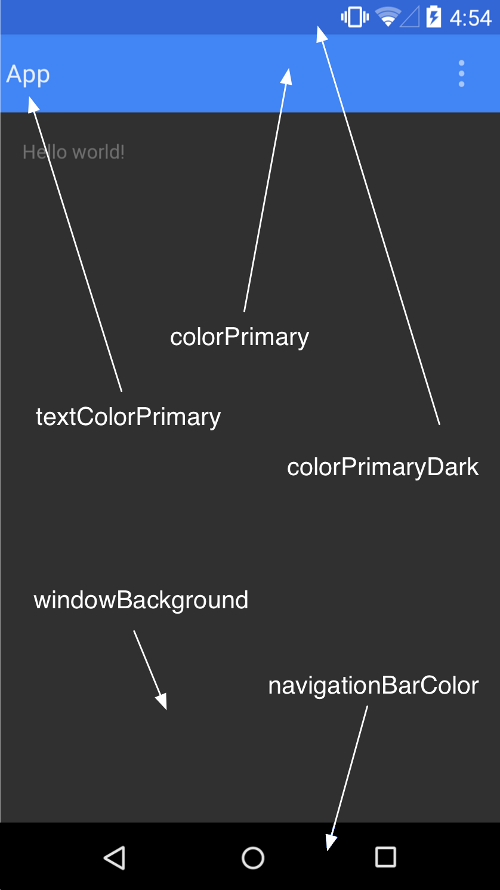
图4
参考文章:http://www.cnblogs.com/tianzhijiexian/p/4081562.html
Android ActionBar自定义的更多相关文章
- Android ActionBar详解
Android ActionBar详解 分类: Android2014-04-30 15:23 1094人阅读 评论(0) 收藏 举报 androidActionBar 目录(?)[+] 第4 ...
- Android 自定义View修炼-【2014年最后的分享啦】Android实现自定义刮刮卡效果View
一.简介: 今天是2014年最后一天啦,首先在这里,我祝福大家在新的2015年都一个个的新健康,新收入,新顺利,新如意!!! 上一偏,我介绍了用Xfermode实现自定义圆角和椭圆图片view的博文& ...
- Android ActionBar应用实战,高仿微信主界面的设计
转载请注明出处:http://blog.csdn.net/guolin_blog/article/details/26365683 经过前面两篇文章的学习,我想大家对ActionBar都已经有一个相对 ...
- Android ActionBar完全解析,使用官方推荐的最佳导航栏(下) .
转载请注明出处:http://blog.csdn.net/guolin_blog/article/details/25466665 本篇文章主要内容来自于Android Doc,我翻译之后又做了些加工 ...
- ActionBar 自定义布局定义
ActionBar 自定义布局定义 Android系统中ActionBar默认的布局不美观且难于控制,通过为ActionBar自定义布局的方式可以灵活控制ActionBar. 效果: 工具/原料 ...
- Android RatingBar 自定义样式
Android RatingBar 自定义样式 1.先定义Style: <style name="RadingStyle" parent="@android:sty ...
- Android实现自定义带文字和图片的Button
Android实现自定义带文字和图片的Button 在Android开发中经常会需要用到带文字和图片的button,下面来讲解一下常用的实现办法. 一.用系统自带的Button实现 最简单的一种办法就 ...
- Android Studio 自定义debug签名文件keystore
Android Studio 自定义debug签名文件keystore
- Android读取自定义View属性
Android读取自定义View属性 attrs.xml : <?xml version="1.0" encoding="utf-8"?> < ...
随机推荐
- 第十五篇:关于TCP通信程序中数据的传递格式
前言 在之前的回射程序中,实现了字符串的传递与回射.幸运的是,字符串的传递不用担心不同计算机类型的大小端匹配问题,然而,如果传递二进制数据,这就是一个要好好考虑的问题.在客户端和服务器使用不同的字节序 ...
- piblog 0.2
在一个Web App中,所有的数据,包括用户的信息,日志,评论等,都存在数据库中.在piblog中使用MySQL作为数据库.Web App中由很多地方需要使用数据库.访问数据库需要创建数据库连接.游标 ...
- 优秀的PHP开发者是怎样炼成的?
4.在数据库中避免使用联合操作 比起其它的Web编程语言来说,PHP的数据库功能十分强大.但是在PHP中数据库的运行仍然是一件十分费时费力的事情,所以,作为一个Web程序员,要尽量减少数据库的查询操作 ...
- UVa 130 - Roman Roulette
模拟约瑟夫环 Roman Roulette The historian Flavius Josephus relates how, in the Romano-Jewish conflict o ...
- 2012Noip提高组Day2 T3 疫情控制
题目描述 H 国有 n 个城市,这 n 个城市用 n-1 条双向道路相互连通构成一棵树,1 号城市是首都,也是树中的根节点. H 国的首都爆发了一种危害性极高的传染病.当局为了控制疫情,不让疫情扩散到 ...
- pvm虚拟机基本原理
零.绪论:特别鸣谢下文博客,自己博客是对这篇博客的学习笔记: 大佬webber博客:https://www.cnblogs.com/webber1992/p/6597166.html 一.三种文件: ...
- Python的函数名作为参数传入调用以及map、reduce、filter
零.python的lambda函数: #lambda function func = lambda x : x+1 #这里是一个匿名函数,x是参数,x+1是对参数的操作 func(1)= 2 多个参数 ...
- 微信小程序 --- 获取网络状态
获取网络状态:wx.getNetworkType btnclick:function(){ wx.getNetworkType({ success:function(res){ console.log ...
- python 对shell 命令的 执行 逻辑 在一台机器上执行另一台机器的命令; 跨节点 执行命令
import os l = ['ssh a;scp /data/visitlog/*11* root@d:/data/mapReduceVisitorLog/'] # b c for i in l: ...
- 介绍一个Redis的WEB 客户端
http://webd.is/ $ git clone git://github.com/nicolasff/webdis.git $ cd webdis$ make$ ...