
D3——Axes
使用d3.svg.axis() 创建一个 axis function:
var xAxis = d3.svg.axis();
an axis function is called, it doesn’t return a value, but generates the visual elements of the axis, including lines, labels, and ticks.
xAxis.scale(xScale);
设置label相对axis的位置,默认为bottom, 对horizontal axes(横轴)来说可以设置的值为 top and bottom. For vertical axes(纵轴), use leftand right:
xAxis.orient("bottom");
链式写法:
var xAxis = d3.svg.axis()

                  .scale(xScale)

                  .orient("bottom");
将横轴添加到画布svg上(to actually generate the axis and insert all those little lines and labels into our SVG, we must call the xAxis function)
svg.append("g")

    .call(xAxis);
例子:
 <script type="text/javascript">

       //Width and height

       var w = ;

       var h = ;

       var padding = ;

       var dataset = [

            [, ], [, ], [, ], [, ], [, ],

                [, ], [, ], [, ], [, ], [, ],

                [, ]

     ];

     //Create scale functions

     var xScale = d3.scale.linear()

         .domain([, d3.max(dataset, function(d) {

                        return  d[]; })])

         .range([padding, w - padding * ]);

     var yScale = d3.scale.linear()

         .domain([, d3.max(dataset, function(d) {

                               return d[]; })])

          .range([h - padding, padding]);

     var rScale = d3.scale.linear()

         .domain([, d3.max(dataset, function(d) {

                               return  d[]; })])

          .range([, ]);

     //Define X axis

     var xAxis = d3.svg.axis()

         .scale(xScale)

         .orient("bottom");

     //Create SVG element

     var svg = d3.select("body")

         .append("svg")

         .attr("width", w)

         .attr("height", h);

     //Create circles

     svg.selectAll("circle")

         .data(dataset)

         .enter()

         .append("circle")

         .attr("cx", function(d) {

             return xScale(d[]);

         })

         .attr("cy", function(d) {

             return yScale(d[]);

         })

         .attr("r", function(d) {

             return rScale(d[]);

         });

     //Create labels

     svg.selectAll("text")

         .data(dataset)

         .enter()

         .append("text")

         .text(function(d) {

             return d[] + "," + d[];

         })

         .attr("x", function(d) {

                        return xScale(d[]);

         })

         .attr("y", function(d) {

                        return yScale(d[]);

         })

         .attr("font-family", "sans-serif")

         .attr("font-size", "11px")

         .attr("fill", "red");

     //Create X axis

     svg.append("g")

           .call(xAxis);

 </script>
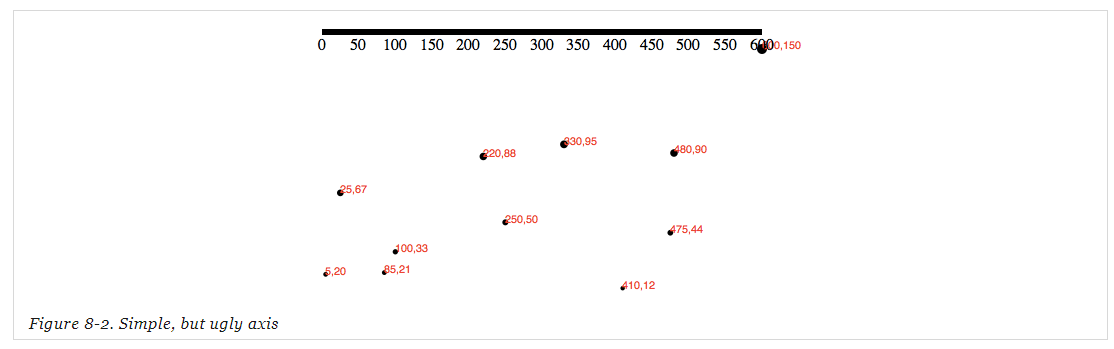
只创建了横纵轴的例子
 var w = ;

 var h = ;

 var padding = ;

 var dataset = [

         [, ], [, ], [, ], [, ], [, ],[, ], [, ], [, ], [, ], [, ],[, ]

 ];

 //create xScale,yScale

 var xScale = d3.scale.linear()

           .domain([, d3.max(dataset, function(d) { return d[]; })])

       .range([padding, w - padding * ]);

 var yScale = d3.scale.linear()

           .domain([, d3.max(dataset, function(d) { return d[]; })])

           .range([h - padding, padding]);

 //define X axis , Y axis

 var xAxis = d3.svg.axis().scale(xScale).orient("bottom");

 var yAxis = d3.svg.axis().scale(yScale).orient("right");

 //Create SVG element

 var svg = d3.select("body")

         .append("svg")

         .attr("width", w)

         .attr("height", h);

 //Create X axis , Y axis

 svg.append("g").call(xAxis);

 svg.append("g").call(yAxis);
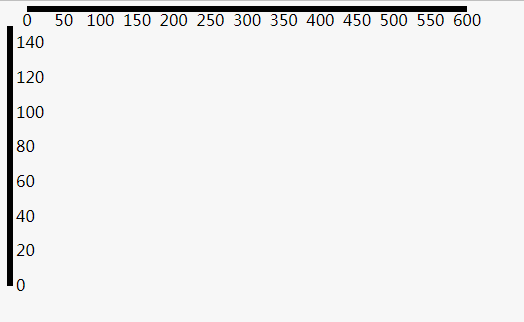
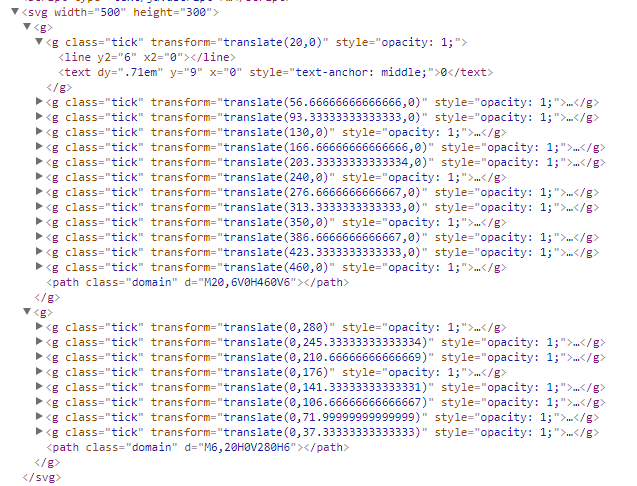
为axes设置样式
svg.append("g")

    .attr("class", "axis") //Assign "axis" class

    .call(xAxis);
// set css style

.axis path,

.axis line {

    fill: none;

    stroke: black;

    shape-rendering: crispEdges;

}

.axis text {

    font-family: sans-serif;

    font-size: 11px;

}
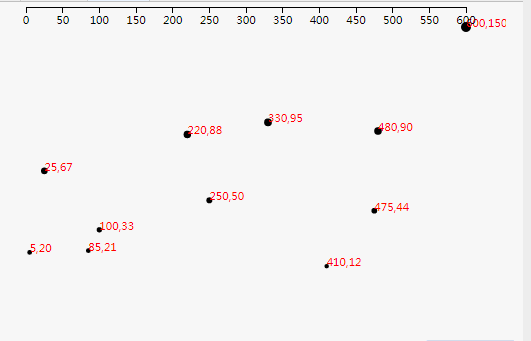
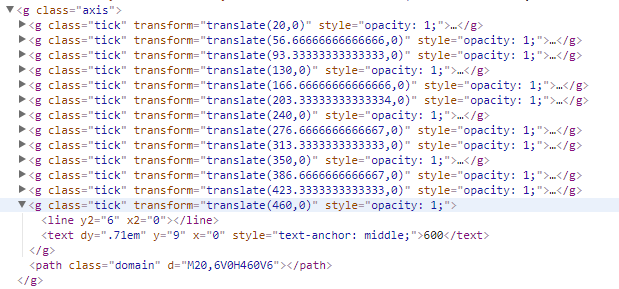
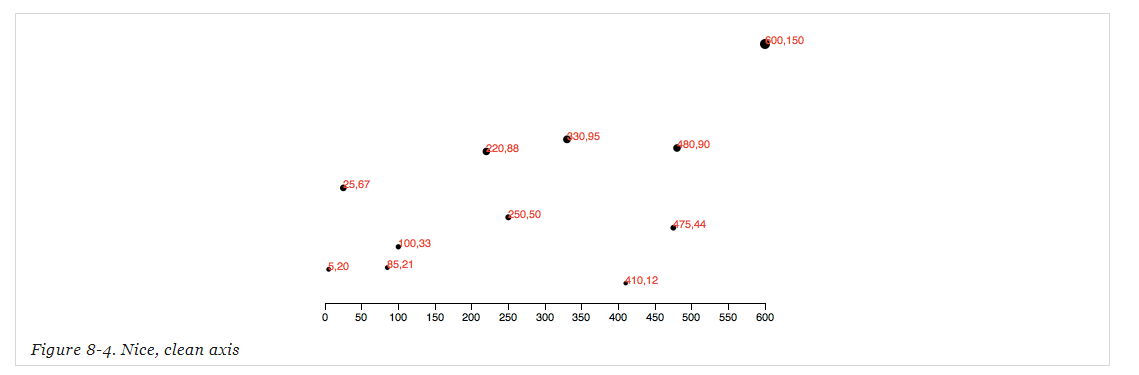
将X axis 向下平移
svg.append("g")

    .attr("class", "axis")

    .attr("transform", "translate(0," + (h - padding) + ")")

    .call(xAxis);
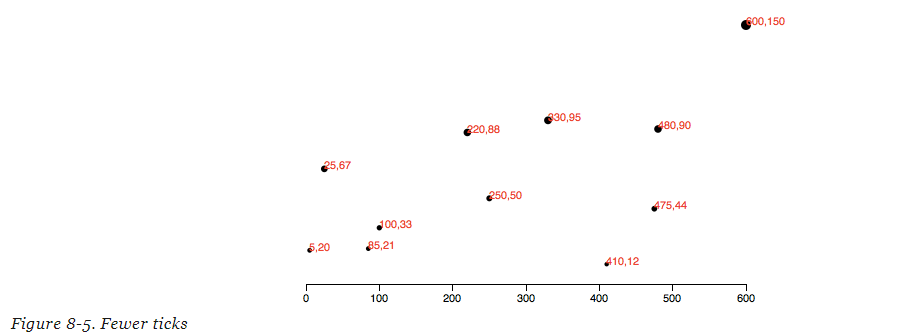
上面的例子中我们并没有指定坐标轴的ticks个数,如果没有特别指定,D3会根据我们的scale (eg: xScale)和其他信息自动为我们设置合适个数的ticks。
设置ticks个数:
var xAxis = d3.svg.axis()

                  .scale(xScale)

                  .orient("bottom")

                  .ticks();  //Set rough # of ticks
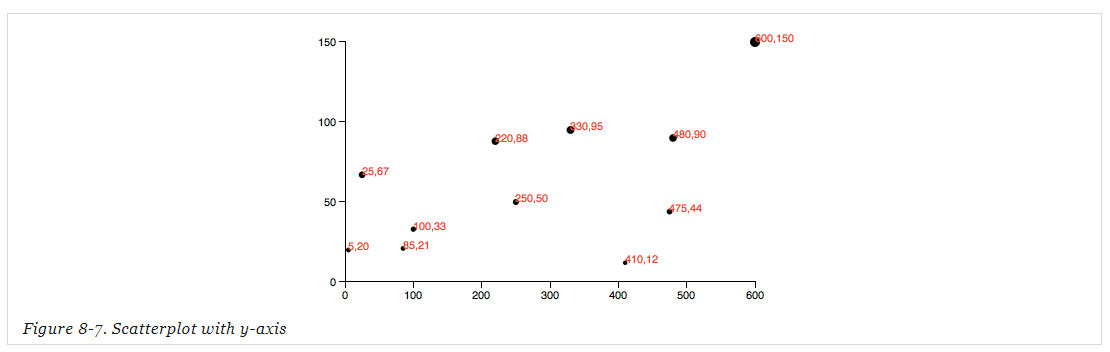
添加上Y axis:
//reset padding= 30;

var padding = ;

//Define Y axis

var yAxis = d3.svg.axis()

                  .scale(yScale)

                  .orient("left")

                  .ticks();

//Create Y axis

svg.append("g")

    .attr("class", "axis")

    .attr("transform", "translate(" + padding + ",0)")

    .call(yAxis);
Formatting Tick Labels
var formatAsPercentage = d3.format(".1%");

xAxis.tickFormat(formatAsPercentage);

formatAsPercentage(.);     //"36.5%"

formatAsPercentage(1.2);       //"120.0%"

formatAsPercentage(-.);       //"-50.0%"
D3——Axes的更多相关文章
- [D3] Create Chart Axes with D3 v4
Most charts aren’t complete without axes to provide context and labeling for the graphical elements ...
- [D3] 10. Creating Axes with D3
<!DOCTYPE html> <html> <head lang="en"> <meta charset="UTF-8&quo ...
- D3.js学习(七)
上一节中我们学会了如何旋转x轴标签以及自定义标签内容,在这一节中,我们将接触动画(transition) 首先,我们要在页面上添加一个按钮,当我们点击这个按钮时,调用我们的动画.所以,我们还需要在原来 ...
- D3 learning notes
D3 https://d3js.org/ 数据驱动文档显示, 利用 SVG HTML CSS技术. D3.js is a JavaScript library for manipulating doc ...
- D3、EChart、HighChart绘图demol
1.echarts: <!DOCTYPE html> <html> <head> <meta charset="utf-8" ...
- d3浅谈
d3是一个及其庞大的库,有20个模块,大小也达到了216kb,是JQ1.x的2倍多,JQ3.x的3倍多,JQ本来就挺笨重的一个库,d3更是如此,但是它的功能确实很强悍~ d3的定位是一个科学计算库,并 ...
- D3.js 入门学习(二) V4的改动
//d3.scan /* 新的d3.scan方法对数组进行线性扫描,并根据指定的比较函数返回至少一个元素的索引. 这个方法有点类似于d3.min和d3.max. 而d3.scan可以得到极值的索引而不 ...
- 软件项目技术点(1)——d3.interpolateZoom-在两个点之间平滑地缩放平移
AxeSlide软件项目梳理 canvas绘图系列知识点整理 软件参考d3的知识点 我们在软件中主要用到d3.js的核心函数d3.interpolateZoom - 在两个点之间平滑地缩放平移.请 ...
- 【D3 API 中文手冊】
[D3 API 中文手冊] 声明:本文仅供学习所用,未经作者同意严禁转载和演绎 <D3 API 中文手冊>是D3官方API文档的中文翻译. 始于2014-3-23日,基于VisualCre ...
随机推荐
- height百分比失效
heigh:100%失效 解决方案: 第一种 html, body { height: 100%; } 第二种 div { height: 100%; position: absolute; } 非定 ...
- CUBA-Platform将全面助力中国开发者
关注CUBA的伙伴们,你们好! 今天我们有新的进展告诉大家. 九月十五日到十六日CUBA平台事业部负责人(同时也是Haulmont公司合伙人)专程来到中国与CUBA中国团队进行了两天时间的交流.讨论. ...
- 删除Panl控件中窗体的方法
//删除窗体方法 private void CloseFrm() { foreach (Control item in panel1.Controls) { if (item is Form) //判 ...
- C#Winform实时更新数据库信息Demo(使用Scoket)
最近在贴吧上看到有个提问就是关于怎么在Winform上实时的更新数据 提问者提到的是利用Timer去轮询,但最后经过网上查了下资料,感觉Socket也是可行的, 于是就写了这个Demo 这个Demo的 ...
- ORB-SLAM2实现(kinect V1/ROS)
实验室电脑环境ubuntu14.04和ROS indigo已经装好. 1. 构建工作空间[非常重要的一步] mkdir -p ~/catkin_ws/src cd ~/catkin_ws/ catki ...
- 【SSH网上商城项目实战20】在线支付平台的介绍
转自:https://blog.csdn.net/eson_15/article/details/51441431 之前已经完成了首页的显示,用户添加购物车,确认订单等功能,下面就是支付功能的开发了. ...
- 系统每隔一段时间自动pull代码
#!/bin/bash while true;do dd=$( date -u ) echo $dd,"start pull wmsinventoryapiwms6.2" cd / ...
- 基于easyUI实现登录界面
此文章是基于 EasyUI+Knockout实现经典表单的查看.编辑 一. 准备工作 1. 点击此下载相关文件,并把文件放到 ims 工程对应的文件夹下 二. 相关文件介绍 1. login.jsp: ...
- Spring与MyBatis整合上_Mapper动态代理方式
将MyBatis与Spring进行整合,主要解决的问题就是将SqlSessionFactory对象交由Spring来管理..所以该整合,只需将SQLSessionFactory的对象生成器S ...
- eclipse 更改背景颜色字体
原文 切一个自己的图: 废话不说,直接入题. 方式一:替换Eclipse的配置文件 其实Eclipse的各种配置都是在文件设置里的,因此只要用一个配置好的模版来替换默认的配置文件,即可将所有配置克隆到 ...