
仿制shazzam的简单功能,将hlsl转换为WPF中的ShaderEffect
(此文章只是在对WPF的Effect产生兴趣才稍微研究了一点后面的知识;需要了解更多可参考https://archive.codeplex.com/?p=shazzam的源代码以及WPF基础知识)
1.之前一直使用blend里自带的几个特效,突然有一天比较好奇这些特效是怎么来的。
然后就听说了shazzam并看到更多的特效
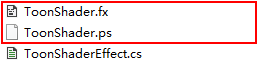
2.在参考网址下载了shazzam的代码来研究研究,只抽取出里面【如何将.fx文件编译为.ps,再产生一个调用.ps文件的.cs文件,然后就可以像正常使用其它自带Effect一样使用了】这一过程
3.HLSL语法网上有很多教程啊,目前就直接拿一些写好的来用就行,一个简单的ToonShader.fx
/// <description>An effect that applies cartoon-like shading (posterization).</description>

sampler2D inputSampler : register(S0);

//-----------------------------------------------------------------------------------------

// Shader constant register mappings (scalars - float, double, Point, Color, Point3D, etc.)

//-----------------------------------------------------------------------------------------

/// <summary>The number of color levels to use.</summary>

/// <minValue></minValue>

/// <maxValue></maxValue>

/// <defaultValue></defaultValue>

float Levels : register(C0);

float4 main(float2 uv : TEXCOORD) : COLOR

{

    float4 color = tex2D( inputSampler, uv );

    color.rgb /= color.a;

    int levels = floor(Levels);

    color.rgb *= levels;

    color.rgb = floor(color.rgb);

    color.rgb /= levels;

    color.rgb *= color.a;

    return color;

}
ToonShader
4.ShaderCompiler:利用dxd的D3DXCompileShader将.fx文件转换为.ps文件
    public void Compile(string codeText, string output, string fxName, ShaderProfile shaderProfile = ShaderProfile.ps_2_0)

    {

        IsCompiled = false;

        string path = output;

        IntPtr defines = IntPtr.Zero;

        IntPtr includes = IntPtr.Zero;

        IntPtr ppConstantTable = IntPtr.Zero;

        string methodName = "main";

        string targetProfile2 = "ps_2_0";

        targetProfile2 = ((shaderProfile != ShaderProfile.ps_3_0) ? "ps_2_0" : "ps_3_0");

        bool useDx10 = false;

        int hr2 = ;

        ID3DXBuffer ppShader2;

        ID3DXBuffer ppErrorMsgs2;

        if (!useDx10)

        {

            hr2 = ((IntPtr.Size != ) ?

                DxHelper.D3DXCompileShader(codeText, codeText.Length, defines, includes, methodName, targetProfile2, , out ppShader2, out ppErrorMsgs2, out ppConstantTable)

                :

                DxHelper.D3DXCompileShader64Bit(codeText, codeText.Length, defines, includes, methodName, targetProfile2, , out ppShader2, out ppErrorMsgs2, out ppConstantTable));

        }

        else

        {

            int pHr = ;

            hr2 = DxHelper.D3DX10CompileFromMemory(codeText, codeText.Length, string.Empty, IntPtr.Zero, IntPtr.Zero, methodName, targetProfile2, , , IntPtr.Zero, out ppShader2, out ppErrorMsgs2, ref pHr);

        }

        if (hr2 != )

        {

            IntPtr errors = ppErrorMsgs2.GetBufferPointer();

            ppErrorMsgs2.GetBufferSize();

            ErrorText = Marshal.PtrToStringAnsi(errors);

            IsCompiled = false;

        }

        else

        {

            ErrorText = "";

            IsCompiled = true;

            string psPath = path + fxName;

            IntPtr pCompiledPs = ppShader2.GetBufferPointer();

            int compiledPsSize = ppShader2.GetBufferSize();

            byte[] compiledPs = new byte[compiledPsSize];

            Marshal.Copy(pCompiledPs, compiledPs, , compiledPs.Length);

            using (FileStream psFile = File.Open(psPath, FileMode.Create, FileAccess.Write))

            {

                psFile.Write(compiledPs, , compiledPs.Length);

            }

        }

        if (ppShader2 != null)

        {

            Marshal.ReleaseComObject(ppShader2);

        }

        ppShader2 = null;

        if (ppErrorMsgs2 != null)

        {

            Marshal.ReleaseComObject(ppErrorMsgs2);

        }

        ppErrorMsgs2 = null;

        CompileFinished();

    }
Compile(string codeText, string output, string fxName, ShaderProfile shaderProfile)
5.CodeGenerator:生成引用.ps文件的effect.cs文件
private static string GenerateCode(CodeDomProvider provider, CodeCompileUnit compileUnit)

    {

        // Generate source code using the code generator.

        using (StringWriter writer = new StringWriter())

        {

            string indentString = IndentUsingTabs ? "\t" : String.Format("{0," + IndentSpaces.ToString() + "}", " ");

            CodeGeneratorOptions options = new CodeGeneratorOptions { IndentString = indentString, BlankLinesBetweenMembers = true, BracingStyle = "C" };

            provider.GenerateCodeFromCompileUnit(compileUnit, writer, options);

            string text = writer.ToString();

            // Fix up code: make static DP fields readonly, and use triple-slash or triple-quote comments for XML doc comments.

            if (provider.FileExtension == "cs")

            {

                text = text.Replace("public static DependencyProperty", "public static readonly DependencyProperty");

                text = Regex.Replace(text, @"// <(?!/?auto-generated)", @"/// <");

            }

            else

                if (provider.FileExtension == "vb")

            {

                text = text.Replace("Public Shared ", "Public Shared ReadOnly ");

                text = text.Replace("'<", "'''<");

            }

            return text;

        }

    }
GenerateCode(CodeDomProvider provider, CodeCompileUnit compileUnit)
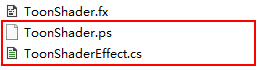
生成的cs文件内容如下:
//------------------------------------------------------------------------------

// <auto-generated>

//     此代码由工具生成。

//     运行时版本:4.0.30319.42000

//

//     对此文件的更改可能会导致不正确的行为,并且如果

//     重新生成代码,这些更改将会丢失。

// </auto-generated>

//------------------------------------------------------------------------------

using System;

using System.ComponentModel;

using System.Windows;

using System.Windows.Media;

using System.Windows.Media.Effects;

using System.Windows.Media.Media3D;

namespace ShaderPan

{

    /// <summary>An effect that applies cartoon-like shading (posterization).</summary>

    public class ToonShaderEffect : ShaderEffect

    {

        public static readonly DependencyProperty InputProperty = ShaderEffect.RegisterPixelShaderSamplerProperty("Input", typeof(ToonShaderEffect), );

        public static readonly DependencyProperty LevelsProperty = DependencyProperty.Register("Levels", typeof(double), typeof(ToonShaderEffect), new UIPropertyMetadata(((double)(5D)), PixelShaderConstantCallback()));

        public ToonShaderEffect()

        {

            PixelShader pixelShader = new PixelShader();

            pixelShader.UriSource = new Uri("C:\\Users\\Administrator\\Desktop\\WpfTPL\\shader\\ToonShader.ps", UriKind.Absolute);

            this.PixelShader = pixelShader;

            this.UpdateShaderValue(InputProperty);

            this.UpdateShaderValue(LevelsProperty);

        }

        public Brush Input

        {

            get

            {

                return ((Brush)(this.GetValue(InputProperty)));

            }

            set

            {

                this.SetValue(InputProperty, value);

            }

        }

        /// <summary>The number of color levels to use.</summary>

        public double Levels

        {

            get

            {

                return ((double)(this.GetValue(LevelsProperty)));

            }

            set

            {

                this.SetValue(LevelsProperty, value);

            }

        }

    }

}
ToonShaderEffect : ShaderEffect
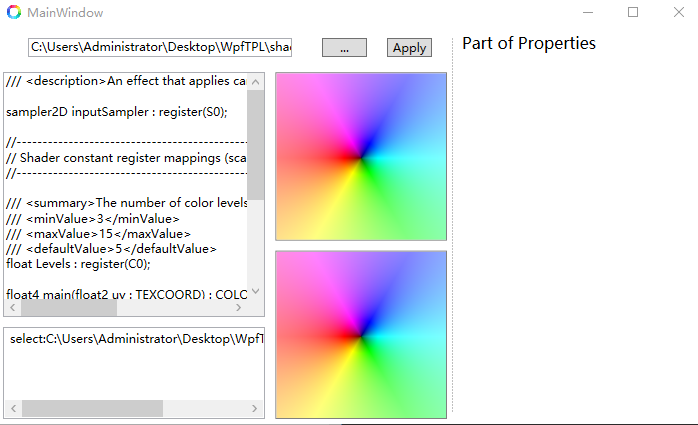
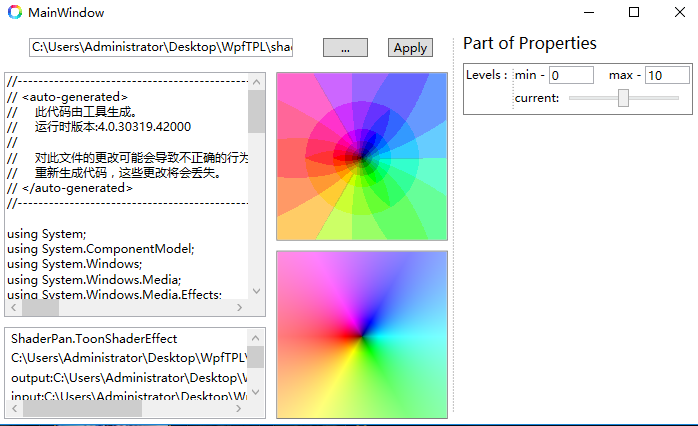
6.ShaderPanTest:测试功能--运用C#动态编译生成来使用Effect
 public static Assembly CompileInMemory(string code)

    {

        var provider = new CSharpCodeProvider(new Dictionary<string, string>() { { "CompilerVersion", "v4.0" } });

        CompilerParameters options = new CompilerParameters();

        options.ReferencedAssemblies.Add("System.dll");

        options.ReferencedAssemblies.Add("System.Core.dll");

        options.ReferencedAssemblies.Add("WindowsBase.dll");

        options.ReferencedAssemblies.Add("PresentationFramework.dll");

        options.ReferencedAssemblies.Add("PresentationCore.dll");

        options.IncludeDebugInformation = false;

        options.GenerateExecutable = false;

        options.GenerateInMemory = true;

        CompilerResults results = provider.CompileAssemblyFromSource(options, code);

        provider.Dispose();

        if (results.Errors.Count == )

            return results.CompiledAssembly;

        else

            return null;

    }
CompileInMemory(string code)
7.源码: https://github.com/lenkasetGitHub/Song_WPF_PixelShader (exe图标来自easyicon)
https://gitee.com/github-19276270/Song_WPF_PixelShader
仿制shazzam的简单功能,将hlsl转换为WPF中的ShaderEffect的更多相关文章
- 【 VS 插件开发 】三、Vs插件简单功能的实现
[ VS 插件开发 ]三.Vs插件简单功能的实现
- 零元学Expression Blend 4 - Chapter 29 ListBox与Button结合运用的简单功能
原文:零元学Expression Blend 4 - Chapter 29 ListBox与Button结合运用的简单功能 本章所讲的是运用ListBox.TextBox与Button,做出简单的列表 ...
- python库的tkinter带你进入GUI世界(计算器简单功能)
前言 文的文字及图片来源于网络,仅供学习.交流使用,不具有任何商业用途,版权归原作者所有,如有问题请及时联系我们以作处理. 作者: 一个处女座的程序猿 PS:如有需要Python学习资料的小伙伴可以加 ...
- ? 原创: 铲子哥 搜狗测试 今天 shell编程的时候,往往不会把所有功能都写在一个脚本中,这样不太好维护,需要多个脚本文件协同工作。那么问题来了,在一个脚本中怎么调用其他的脚本呢?有三种方式,分别是fork、source和exec。 1. fork 即通过sh 脚本名进行执行脚本的方式。下面通过一个简单的例子来讲解下它的特性。 创建father.sh,内容如下: #!/bin/bas
? 原创: 铲子哥 搜狗测试 今天 shell编程的时候,往往不会把所有功能都写在一个脚本中,这样不太好维护,需要多个脚本文件协同工作.那么问题来了,在一个脚本中怎么调用其他的脚本呢?有三种方式,分别 ...
- 博途V13 仿真S7-300PLC 与HMI 的以太网通讯。实现简单功能 HMI 型号是TP900
本项目仅完成S7-300 PLC 型号为 315-2DP/PN HMI的型号是 智慧面板TP900 通过以太网进行连接.通过网络及连接 进行组态 PLC的程序 功能一 完成电动机的启动与停机 功能二 ...
- WPF中的触发器简单总结
原文 http://blog.sina.com.cn/s/blog_5f2ed5cb0100p3ab.html 触发器,从某种意义上来说它也是一种Style,因为它包含有一个Setter集合,并根据一 ...
- C:函数:功能:实现字符数组中所有字母的倒序存放并输出
前两天小测碰到一道题,建立一个函数,功能:实现字符数组中所有字母的倒序存放并输出,一开始觉得简单跟数字数组差不多,运行一下发现很多格式错误,这些是不必要的错误,现在就来说下,先说一下代码思路:定义一个 ...
- WPF中的简单水动画
原文 https://stuff.seans.com/2008/08/21/simple-water-animation-in-wpf/ 很多年前(80年代中期),我在一家拥有Silicon Grap ...
- WPF中使用MVVM模式进行简单的数据绑定
计划慢慢整理自己在WPF学习和工作应用中的一些心得和想法,先从一个简单的用法说起 在WPF中,XAML标记语言中绑定数据,而数据源就是指定为ViewModel类,而非界面本身的逻辑代码类 这样一定程度 ...
随机推荐
- JavaScript规定了几种语言类型?
JavaScript中的每一个值都有它自己的类型,JavaScript规定了七种语言类型: 1.Undefined 2.Null 3.Boolean 4.String 5.Number 6.Symbo ...
- 常用Linux网络命令
TCP状态统计: netstat -anp TCP各个状态的连接数:netstat -n | awk '/^tcp/ {++S[$NF]} END {for(a in S) print a, S[a] ...
- spring boot 2.x 系列 —— spring boot 整合 RabbitMQ
文章目录 一. 项目结构说明 二.关键依赖 三.公共模块(rabbitmq-common) 四.服务消费者(rabbitmq-consumer) 4.1 消息消费者配置 4.2 使用注解@Rabbit ...
- 大流量下的 ElasticSearch 搜索演进
这是泥瓦匠(bysocket.com)的第27篇精华分享 ES (ElasticSearch)是分布式搜索引擎.引擎太晦涩,其实类似一个 MySQL ,一个存储.方便提供下面功能: 近实时搜索 全文检 ...
- spark 源码分析之十二 -- Spark内置RPC机制剖析之八Spark RPC总结
在spark 源码分析之五 -- Spark内置RPC机制剖析之一创建NettyRpcEnv中,剖析了NettyRpcEnv的创建过程. Dispatcher.NettyStreamManager.T ...
- HDU XXXX:求[L,R]的素数数量(数位DP)
Problem G Time Limit : 2000/1000ms (Java/Other) Memory Limit : 131072/131072K (Java/Other) Total S ...
- java获取config下文件
private static final String keystore="keystore.jks"; InputStream is=Thread.currentThread() ...
- ffmpeg+nginx将rtsp转为rtmp
一.安装ffmpeg 1.http://ffmpeg.org/download.html下载地址,选择合适的操作系统版本下载,因为我的操作系统是centos7,所以下面的安装都是命令都是针对cento ...
- fiddler无法抓取chrome浏览器请求的解决方案之关闭代理软件
最近安装fiddler后,按照通用设置后依然无法抓取到chrome的请求,经检查,我本地的chrome安装了代理管理的插件Switchy,无论选择直接连接还是选择使用代理连接,插件都会屏蔽fiddle ...
- JVM中有哪些内存区域,分别是用来干什么的
前言 之前我们探讨过一个.class文件是如何被加载到jvm中的.但是jvm内又是如何划分内存的呢?这个内被加载到了那一块内存中?jvm内存划分也是面试当中必被问到的一个面试题. 什么是jvm内存区域 ...