
C# Windows服务创建安装卸载
一、创建Windows服务
使用VS创建一个新的windows服务应用程序
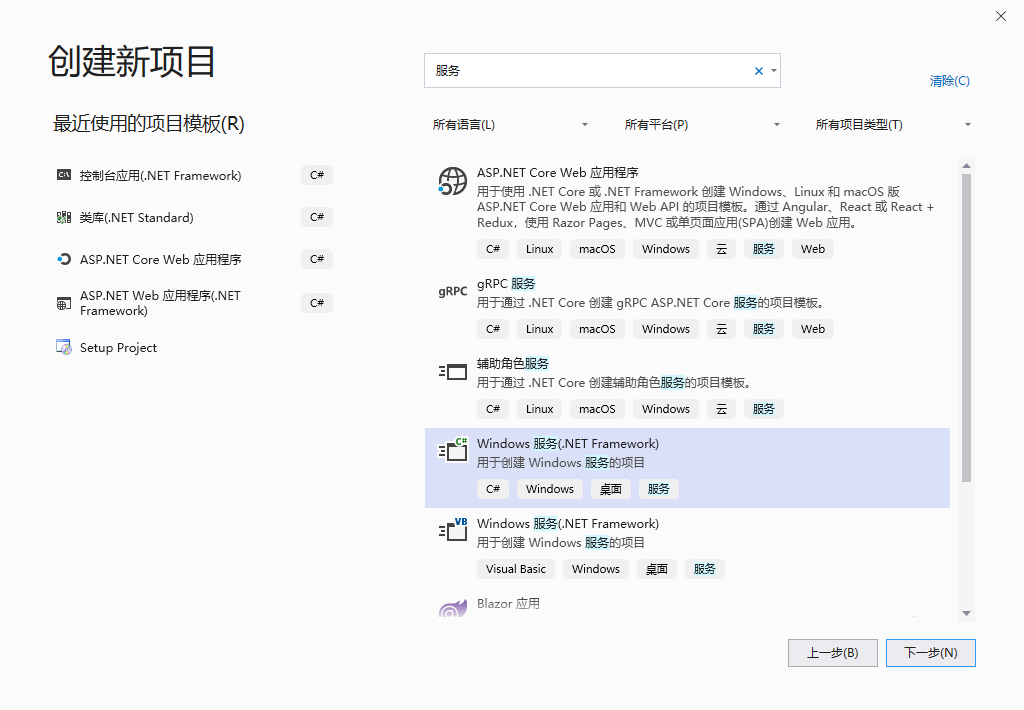
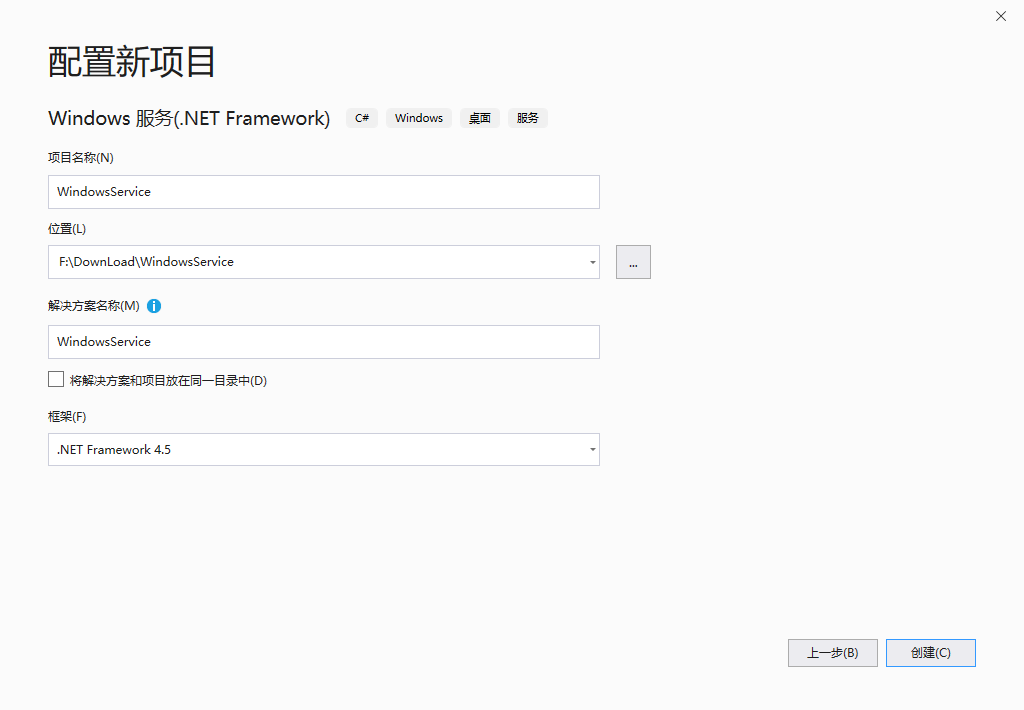
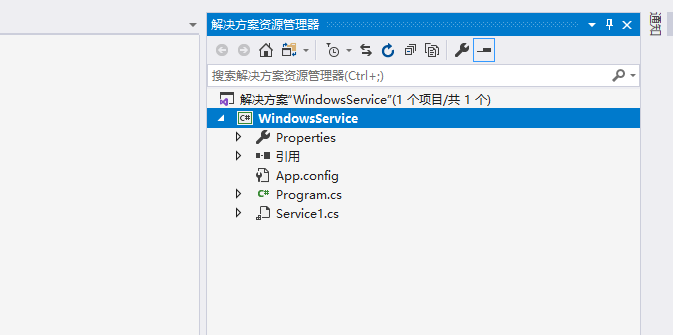
创建完成之后
二、相关配置
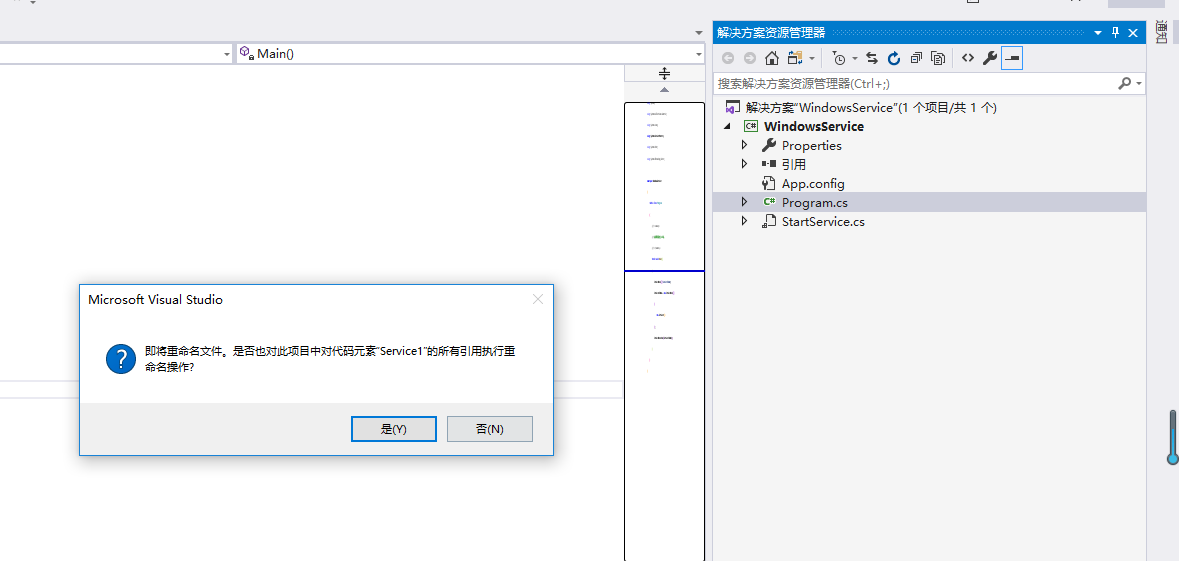
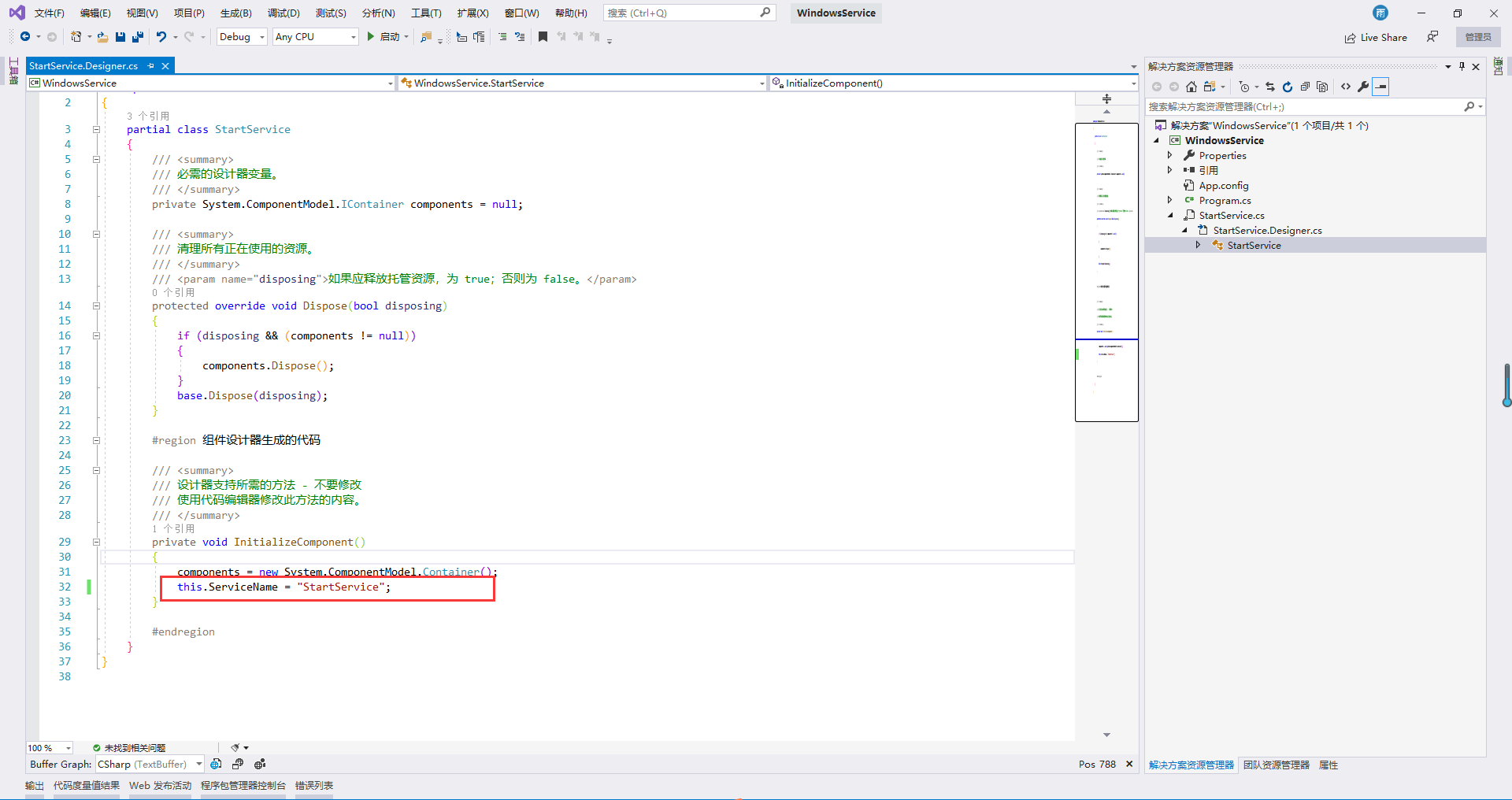
修改Service1名称为StartService(可以不改,自行选择)
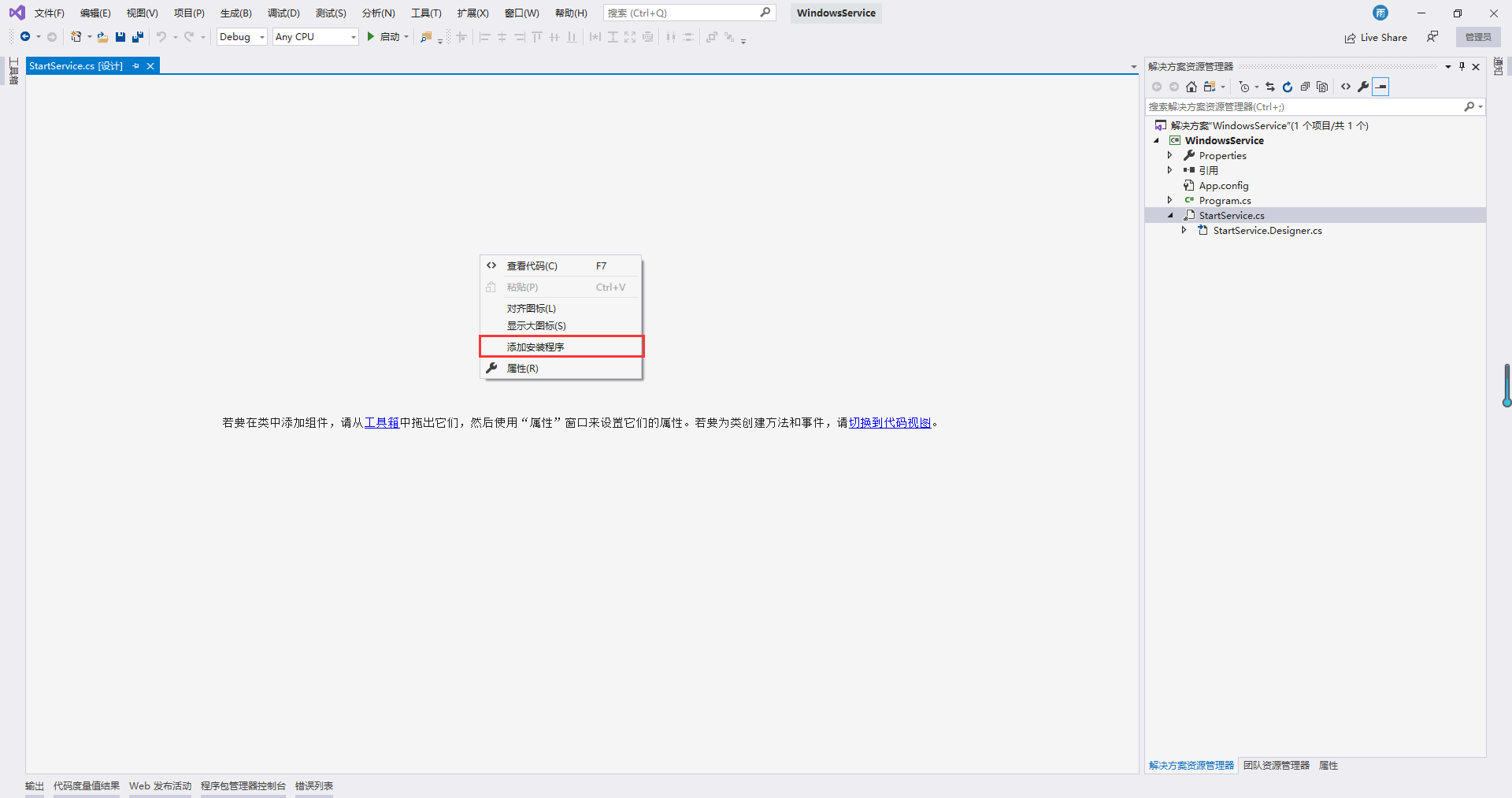
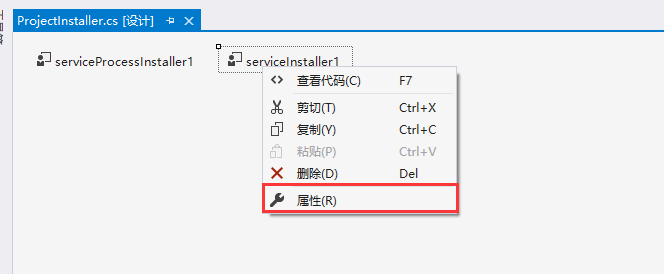
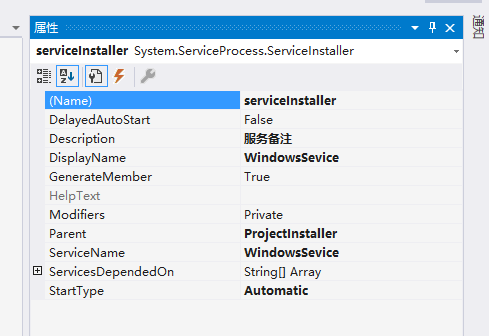
添加安装程序并修改配置
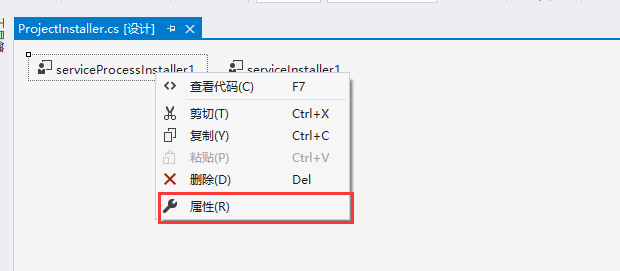
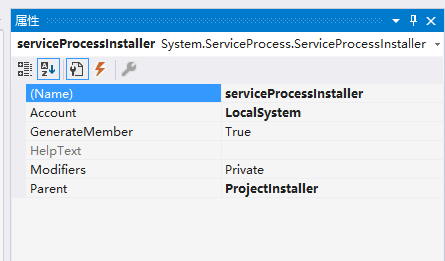
安装完成之后,源码中会出现一个ProjectInstaller程序集,双击进入页面修改相关属性
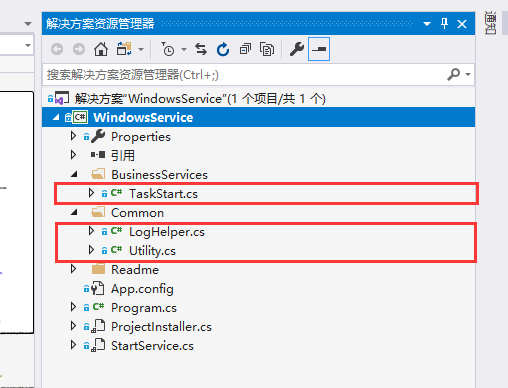
添加文件夹和实体类
LogHelper.cs
 using System;

 using System.Collections.Generic;

 using System.IO;

 using System.Linq;

 using System.Reflection;

 using System.Text;

 using System.Threading.Tasks;

 namespace WindowsService.Common

 {

     public class LogHelper

     {

         /// <summary>

         /// 获取程序异常信息

         /// </summary>

         /// <param name="methodBase"></param>

         /// <param name="exception"></param>

         /// <param name="message"></param>

         /// <returns></returns>

         public static string GetExceptionMessage(MethodBase methodBase, Exception exception, string message)

         {

             string fullName = methodBase.ReflectedType.FullName;

             string name = methodBase.Name;

             string str = $"\r\n异常综合信息(类:{fullName};函数名称:{name};):\r\n";

             str += "-----------\r\n";

             str += ".Net异常信息:\r\n";

             if (exception == null)

             {

                 str += "   无异常对象,也无堆栈信息(exception == null)\r\n";

             }

             else

             {

                 str += $"   {exception.Message}\r\n";

                 str += $".Net堆栈信息:\r\n{exception.StackTrace}\r\n";

             }

             str += "-----------\r\n";

             if (message != null && message.Trim().Length > )

             {

                 str += "===========\r\n";

                 str += $"自定义信息:\r\n   {message}\r\n";

                 str += "===========\r\n";

             }

             return str;

         }

         /// <summary>

         /// 写出日志信息 目录地址:string logPath = AppDomain.CurrentDomain.BaseDirectory + "00_Log\\";

         /// </summary>

         /// <param name="folderName"></param>

         /// <param name="message"></param>

         public static void Write(string folderName, string message)

         {

             string text = AppDomain.CurrentDomain.BaseDirectory + "00_Log\\";

             if (folderName != null && folderName.Trim().Length > )

             {

                 text += folderName;

             }

             WritingLogs(text, message);

         }

         /// <summary>

         ///  写出异常日志(.txt)

         /// </summary>

         /// <param name="strPath"></param>

         /// <param name="strContent"></param>

         public static void WritingLogs(string strPath, string strContent)

         {

             FileStream fileStream = null;

             StreamWriter streamWriter = null;

             try

             {

                 if (!Directory.Exists(strPath))

                 {

                     Directory.CreateDirectory(strPath);

                 }

                 strPath = string.Format("{0}\\{1}{2}", strPath, DateTime.Now.ToString("yyyy-MM-dd"), ".txt");

                 fileStream = new FileStream(strPath, FileMode.OpenOrCreate, FileAccess.Write);

                 streamWriter = new StreamWriter(fileStream);

                 streamWriter.BaseStream.Seek(0L, SeekOrigin.End);

                 streamWriter.WriteLine(strContent + "\r\n\r\n--------------------------------------------------------" + DateTime.Now.ToString() + "--------------------------------------------------------\r\n");

                 streamWriter.Flush();

                 streamWriter.Close();

                 fileStream.Close();

             }

             finally

             {

                 streamWriter.Close();

                 fileStream.Close();

             }

         }

     }

 }
LogHelper
Utility.cs
 using System;

 using System.Collections.Generic;

 using System.Linq;

 using System.Text;

 using System.Threading.Tasks;

 namespace WindowsService.Common

 {

     public class Utility

     {

         /// <summary>

         /// 是否到时间进行执行

         /// </summary>

         /// <param name="hour">当前时间(小时)</param>

         /// <returns>true:时间已到;false:时间未到;</returns>

         public static bool TimeOut(string hour)

         {

             string times = "14|20|01";

             if (times == null || times.Trim().Length <= )

             {

                 return false;

             }

             if (times.IndexOf('|') > )

             {

                 foreach (string t in times.Split('|'))

                 {

                     if (t == hour)

                     {

                         return true;

                     }

                 }

             }

             else if (times == hour)

             {

                 return true;

             }

             return false;

         }

     }

 }
Utility
TaskStart.cs
 using System;

 using System.Collections.Generic;

 using System.Linq;

 using System.Reflection;

 using System.ServiceProcess;

 using System.Text;

 using System.Threading;

 using System.Threading.Tasks;

 using WindowsService.Common;

 namespace WindowsService.BusinessServices

 {

     public class TaskStart

     {

         /// <summary>

         /// 业务开始运行

         /// </summary>

         public void TaskProcessing()

         {

             LogHelper.Write("Start", ".....服务正式运行.....");

             Thread.Sleep( *  * ); //在20秒内进行附加进程

             try

             {

                 bool isRun = false; //默认不执行

                 while (true)

                 {

                     string hour = DateTime.Now.ToString("HH"); //获得当前的时间

                     isRun = Utility.TimeOut(hour) ? true : false;

                     if (isRun)//判断服务是否运行

                     {

                         #region 具体业务

                         LogHelper.Write("具体业务", LogHelper.GetExceptionMessage(MethodBase.GetCurrentMethod(), null, Guid.NewGuid().ToString()));

                         #endregion

                         isRun = false; //已经操作一次

                         Thread.Sleep( *  * );   //休眠 62 分钟  //必须要超过 一个 小时

                     }

                     else

                     {

                         //睡眠两分钟

                         Thread.Sleep( *  * );  //停止设定时间,精确度比Sleep高

                     }

                 }

             }

             catch (Exception ce)

             {

                 LogHelper.Write("Operation", LogHelper.GetExceptionMessage(MethodBase.GetCurrentMethod(), ce, "\r\n\r\n.....服务异常.....\r\n\r\n"));

                 ServiceController service = new ServiceController(new StartService().ServiceName);

                 service.Stop(); //停止服务

                 //service.Pause();//暂停服务

                 //service.Start();//开始服务

             }

         }

     }

 }
TaskStart(具体业务)
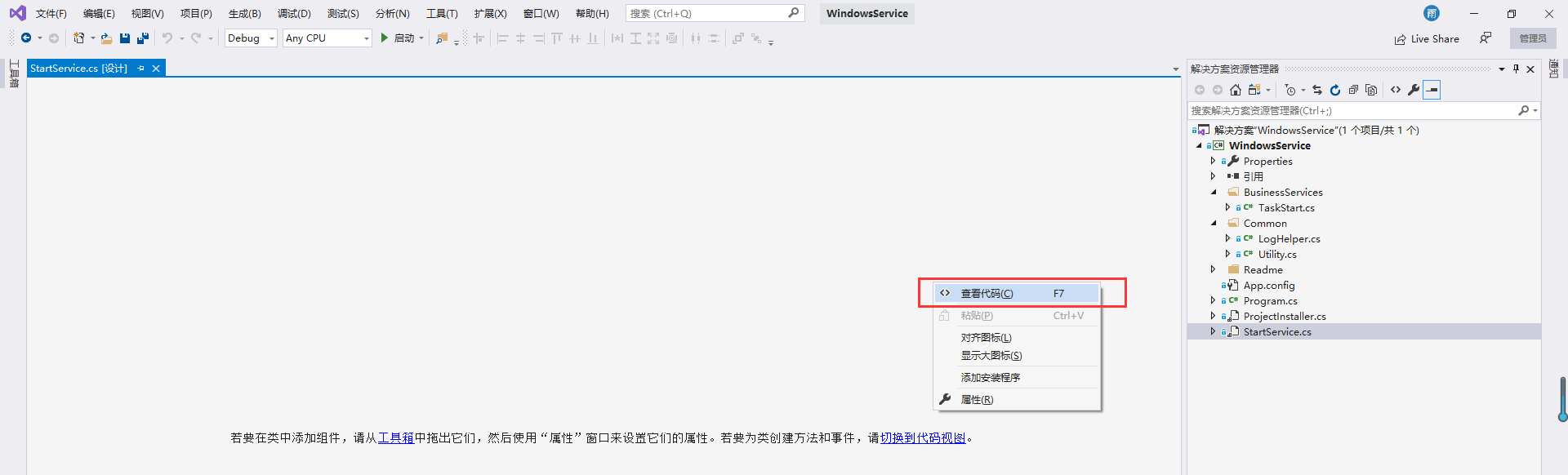
修改启动服务代码
 using System;

 using System.Collections.Generic;

 using System.ComponentModel;

 using System.Data;

 using System.Diagnostics;

 using System.Linq;

 using System.Reflection;

 using System.ServiceProcess;

 using System.Text;

 using System.Threading;

 using System.Threading.Tasks;

 using WindowsService.BusinessServices;

 using WindowsService.Common;

 namespace WindowsService

 {

     public partial class StartService : ServiceBase

     {

         /// <summary>

         /// 当前服务是否停止(默认时flase)

         /// </summary>

         private bool isStop = false;

         /// <summary>

         /// 启动服务

         /// </summary>

         public StartService()

         {

             InitializeComponent();

             this.CanPauseAndContinue = true;

             this.CanStop = true;

             isStop = false;

         }

         ///<summary>

         ///暂停服务

         ///</summary>

         protected override void OnPause()

         {

             LogHelper.Write("Operation", LogHelper.GetExceptionMessage(MethodBase.GetCurrentMethod(), null, "\r\n\r\n.....暂停服务.....\r\n\r\n"));

             isStop = true;  //服务暂停

         }

         ///<summary>

         ///恢复服务

         ///</summary>

         protected override void OnContinue()

         {

             LogHelper.Write("Operation", LogHelper.GetExceptionMessage(MethodBase.GetCurrentMethod(), null, "\r\n\r\n.....继续服务.....\r\n\r\n"));

             isStop = false; //继续服务

         }

         /// <summary>

         /// 服务停止

         /// </summary>

         protected override void OnStop()

         {

             LogHelper.Write("Operation", LogHelper.GetExceptionMessage(MethodBase.GetCurrentMethod(), null, "\r\n\r\n.....停止服务.....\r\n\r\n"));

             isStop = true;  //服务停止

         }

         /// <summary>

         /// 服务开始运行

         /// </summary>

         /// <param name="args"></param>

         protected override void OnStart(string[] args)

         {

             try

             {

                 //当服务没有停止时,开始具体业务

                 if (isStop == false)

                 {

                     Thread thread = new Thread(new ThreadStart(new TaskStart().TaskProcessing));

                     thread.Start();

                 }

             }

             catch (Exception ce)

             {

                 LogHelper.Write("Error", LogHelper.GetExceptionMessage(MethodBase.GetCurrentMethod(), ce, "\r\n\r\n.....停止服务.....\r\n\r\n"));

             }

         }

     }

 }
StartService
三、服务安装
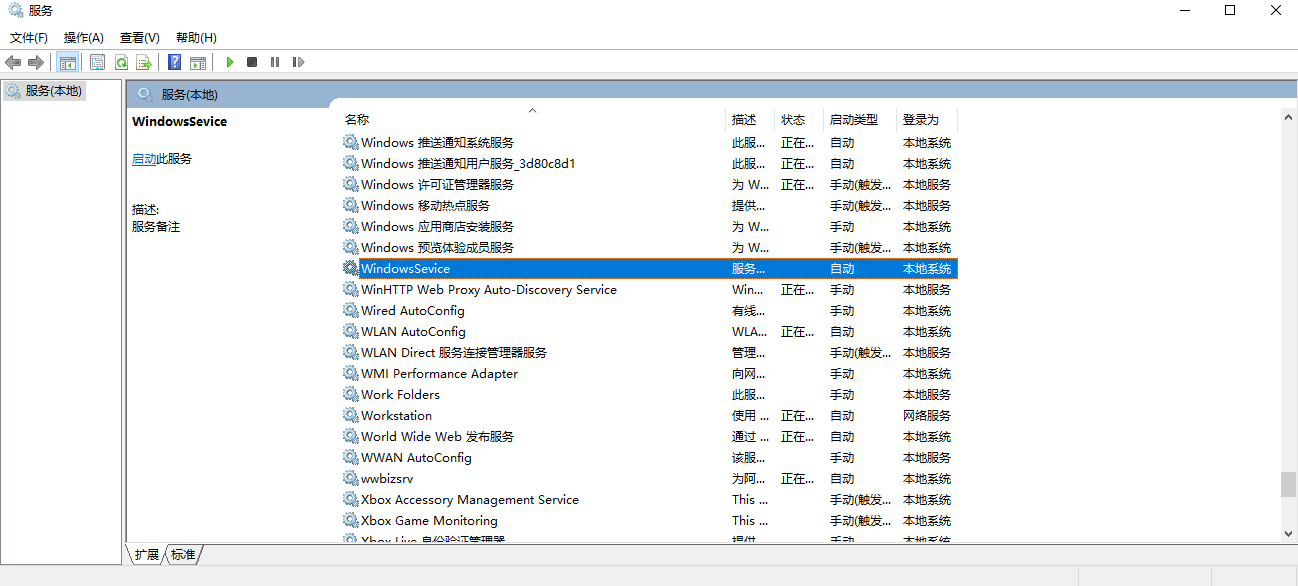
新建一个txt文本,输入以下内容,这里的WindowsService.exe 是程序路径,前面的路径是固定的,后面可变。修改txt文件名称为bat批处理文件,新建文本文档.txt——install.bat 。 然后右击 以管理员身份运行 这个批处理文件。这样服务就安装成功了。最后别忘记手动启动下这个服务。
C:\WINDOWS\Microsoft.NET\Framework\v4.0.30319\InstallUtil.exe  F:\DownLoad\WindowsService\WindowsService\WindowsService\bin\Debug\WindowsService.exe

pause


三、服务卸载
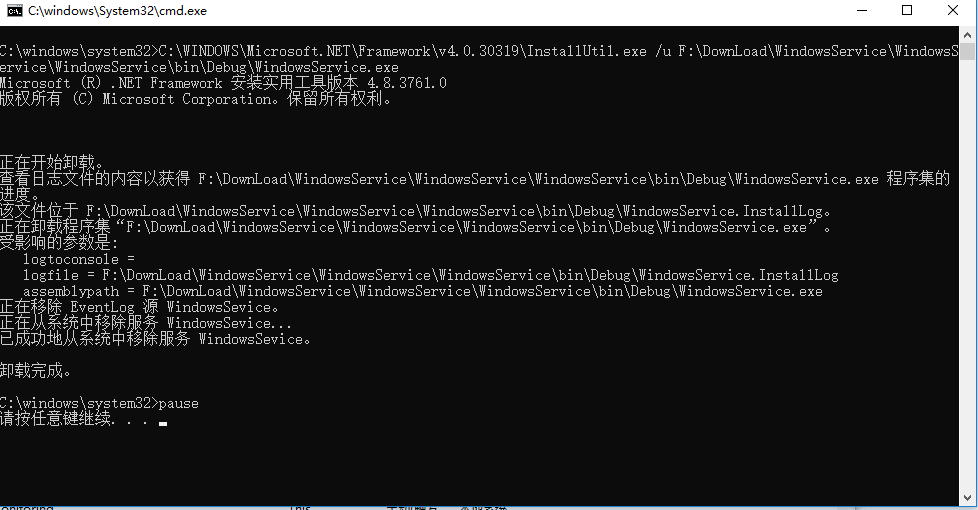
和服务安装步骤一样,输入以下内容。然后 以管理员身份运行 即可。
C:\WINDOWS\Microsoft.NET\Framework\v4.0.30319\InstallUtil.exe /u F:\DownLoad\WindowsService\WindowsService\WindowsService\bin\Debug\WindowsService.exe

pause
四、调试
源码地址:https://github.com/RainFate/WindowsServiceDemo/tree/master/WindowsService
C# Windows服务创建安装卸载的更多相关文章
- Windows服务的安装卸载及错误查找
@echo off echo 清理原有服务项. . . %SystemRoot%\Microsoft.NET\Framework\v4.0.30319\installutil /U D:\abc\te ...
- WCF 下的windows服务的安装卸载
安装:启动vs2010(如果是win2008要以管理员来启动)命令:installutil demo.exe 卸载:先在服务里停止这个服务,然后启动vs2010(如果是win2008要以管理员来启动) ...
- 通过批处理进行Windows服务的安装/卸载&启动/停止
安装服务 @echo off set checked=2 set PATHS=%~sdp0 echo 按任意键执行安装……? pause>nul if %checked% EQU 2 ( %PA ...
- .net windows 服务创建、安装、卸载和调试
原文:http://blog.csdn.net/angle860123/article/details/17375895 windows服务应用程序是一种长期运行在操作系统后台的程序,它对于服务器环境 ...
- Windows服务一:新建Windows服务、安装、卸载服务
Windows 服务(即,以前的 NT 服务)使您能够创建在它们自己的 Windows 会话中可长时间运行的可执行应用程序.这些服务可以在计算机启动时自动启动,可以暂停和重新启动而且不显示任何用户界面 ...
- Windows服务创建及安装
Windows服务创建及安装http://www.cnblogs.com/tuyile006/archive/2006/11/27/573654.html
- C#操作windows服务,安装、卸载、停止、启动
public class ServiceUtil { private string _ServiceName = string.Empty; private string _AppName = str ...
- 使用InstallUtil对Windows服务进行安装与卸载
关于Visual Studio 2012中使用InstallUtil对Windows服务进行安装与卸载的文章,在MSDN中的http://msdn.microsoft.com/en-us/librar ...
- windows服务创建与管理
安装windows 服务 C:\Users\chensimin>cd \ C:\>cd C:\Windows\Microsoft.NET\Framework\v4.0.30319 C:\W ...
随机推荐
- 解决问题:Red Hat Enterprise Linux 7 64 位 虚拟机安装后无法启动图形化
原因: 1.系统在创建时,没有安装图形化 2.系统在安装后,有降低内存的操作,内存过低无法启动桌面,以及其他 就原因一进行图形化安装: 1.VMware挂载Red Hat Enterprise Lin ...
- win7 架设php环境运行H5游戏的坑坑坑坑
解决办法: 修改php.ini 文件 session.save_path = "D:/H5_Game" 指向所用的根目录 环境 windows7 x64 + php7.0.8
- electron内监控目标网站cookie的变化,查找指定的cookie
let cookieInstance = win.webContents.session.cookies; cookieInstance.on('changed', (e, cookie, cause ...
- centos--该虚拟机似乎正在使用中。 如果该虚拟机未在使用,请按“获取所有权(T)”按钮获取它的所有权。否则,请按“取消(C)”按钮以防损坏。
centos非正常关机,导致无法正常启动的问题 该虚拟机似乎正在使用中. 如果该虚拟机未在使用,请按“获取所有权(T)”按钮获取它的所有权.否则,请按“取消(C)”按钮以防损坏. 解决方案: 1. 找 ...
- HTTP 响应的分块传输
Transfer-Encoding 响应头用于告诉客户端服务器发送内容的编码格式. 其可选值有: chunked:数据分块发送.此时应缺省 Content-Length 响应头. compress:使 ...
- dictionary vs Hashtables
DictionaryDictionary is generic type Dictionary<TKey,TValue>Dictionary class is a strong type ...
- selenium设置user-agent以及对于是否是浏览器内核进行反爬
(Session info: chrome=75.0.3770.90),不同版本方法可能会有些不同 推荐查资料网站必应可以避开一堆广告 一.user-agent设置 from selenium imp ...
- 异步和多线程Thread
刚接触线程的时候,感觉这个东西好神奇.虽然不是很明白,就感觉它很牛逼. 参考了一些大佬写的文章: https://www.cnblogs.com/yilezhu/p/10555849.html这个大佬 ...
- SpringBoot源码解析系列文章汇总
相信我,你会收藏这篇文章的 本篇文章是这段时间撸出来的SpringBoot源码解析系列文章的汇总,当你使用SpringBoot不仅仅满足于基本使用时.或者出去面试被面试官虐了时.或者说想要深入了解一下 ...
- crm-全总结
1.什么是crm 客户关系管理系统 ,以客户数据为中心建立一个信息收集.管理.分析和利用的信息系统 2.业务逻辑相关使用crm-app完成 1)路由项目分发到crm-app (别名 传参 命名空间) ...