
react-native 学习之Image篇
/**

 * Sample React Native App

 * https://github.com/facebook/react-native

 */

'use strict';

import React, {

  AppRegistry,

  Component,

  StyleSheet,

  Text,

  View,

  Image

} from 'react-native';

class machaoProject extends Component {

  render() {

    return (

      <View style={styles.container}>

        <View style={ styles.topBgView}>

        <View style={styles.unitView} >

            <Image

                source={require('./Images/001.png')}

                style={styles.imageStyle}

                />

             <Text style = {styles.textStyle}>

             美食

             </Text>

        </View>

        <View style={styles.unitView} >

            <Image

                source={require('./Images/002.png')}

                style={styles.imageStyle}

                />

             <Text style = {styles.textStyle}>

             电影

             </Text>

        </View>

        <View style={styles.unitView} >

            <Image

                source={require('./Images/003.png')}

                style={styles.imageStyle}

                />

             <Text style = {styles.textStyle}>

             酒店

             </Text>

        </View>

        <View style={styles.unitView} >

            <Image

                source={require('./Images/004.png')}

                style={styles.imageStyle}

                />

             <Text style = {styles.textStyle}>

             KTV

             </Text>

        </View>

        </View>

        <View style = {styles.topBgView}>

        <View style={styles.unitView} >

            <Image

                source={require('./Images/005.png')}

                style={styles.imageStyle}

                />

             <Text style = {styles.textStyle}>

             外卖

             </Text>

        </View>

         <View style={styles.unitView} >

            <Image

                source={require('./Images/006.png')}

                style={styles.imageStyle}

                />

             <Text style = {styles.textStyle}>

             优惠买单

             </Text>

        </View>

         <View style={styles.unitView} >

            <Image

                source={require('./Images/007.png')}

                style={styles.imageStyle}

                />

             <Text style = {styles.textStyle}>

             你说呢

             </Text>

        </View>

        </View>

      </View>

    );

  }

}

const styles = StyleSheet.create({

  container: {

    marginLeft: 5,

    marginTop: 20,

    marginRight: 5,

  },

  topBgView: {

    flexDirection: 'row',

    backgroundColor: 'red',

    marginTop: 10,

  },

  unitView: {

      width: 70 ,

  },

  imageStyle: {

     alignSelf: 'center',

     width: 45,

     height: 45,

  },

  textStyle: {

      marginTop: 0,

      textAlign: 'center',

      fontSize: 15,

      color: '#555555'

  }

});

AppRegistry.registerComponent('machaoProject', () => machaoProject);
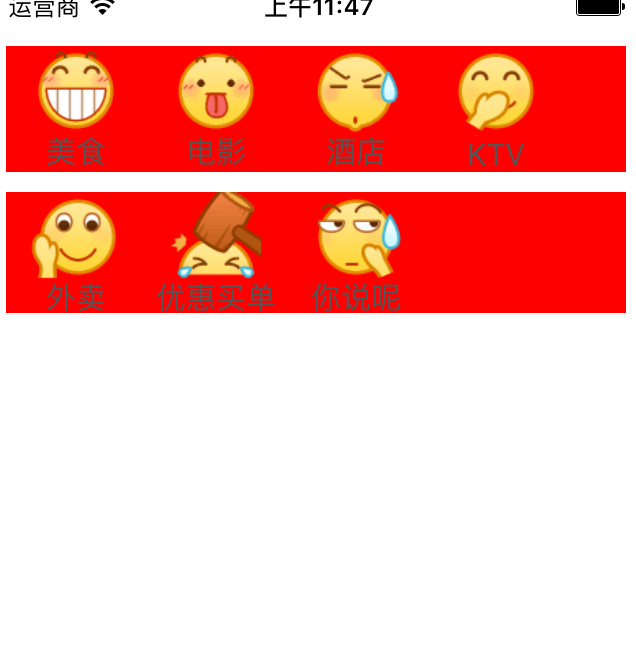
react-native 学习之Image篇的更多相关文章
- React Native 学习-01
React Native 学习 (学习版本 0.39) 一.环境配置 二.IDE选择 webstorm 1.webstorm配置 ①.首先是可以选择使用汉化包汉化.eu68 ②.安装插件和外部库. 由 ...
- react native 学习一(环境搭配和常见错误的解决)
react native 学习一(环境搭配) 首页,按照http://reactnative.cn/docs/0.30/getting-started.html#content上的介绍,下载安装pyt ...
- React Native 学习资料
React Native 学习资料 学习资料 网址 React Native中文网 https://reactnative.cn/
- React Native 学习(三)之 FlexBox 布局
React Native 学习(三)之 FlexBox 布局
- React Native 学习笔记--进阶(二)--动画
React Native 进阶(二)–动画 动画 流畅.有意义的动画对于移动应用用户体验来说是非常必要的.我们可以联合使用两个互补的系统:用于全局的布局动画LayoutAnimation,和用于创建更 ...
- react native 学习资料整理
入门教程 深入浅出 React Native:使用 JavaScript 构建原生应用 http://www.appcoda.com/react-native-introduction/ 中文版 h ...
- iOS 写给iOS开发者的React Native学习路线(转)
我是一名iOS开发者,断断续续一年前开始接触React Native,最近由于工作需要,专职学习React Native也有一个多月了.网络上知识资源非常的多,但能让人豁然开朗.迅速学习的还是少数,我 ...
- React Native学习方法论
这是我技术公众号的第一篇文章,也是React Native系列文章的第一篇,对我的文章感兴趣的可以加我微信16230091进行关注. 本文表面上讲React Native(以下简称RN),实际上对于学 ...
- react native学习资料
一:基础学习: react-native中文文档(react native中文网,人工翻译,官网完全同步)http://react-native.cn/docs/getting-started.htm ...
- 写给iOS开发者的React Native学习路线(转)
我是一名iOS开发者,断断续续一年前开始接触React Native,最近由于工作需要,专职学习React Native也有一个多月了.网络上知识资源非常的多,但能让人豁然开朗.迅速学习的还是少数,我 ...
随机推荐
- 一键保存Feedly里的文章到有道笔记
写在之前:今天升级了有道笔记3.5,发现有道笔记支持发邮件保存笔记了,所以就分享一下怎么通过IFTTT保存到有道笔记.因为IFTTT是外国货,所以一直没有有道笔记的频道,不过有了发邮件保存笔记的功能, ...
- sublime下安装ctags
sublime下安装ctags 标签: sublime 当我们阅读代码时, 会遇到很多不明确的函数名, 此时, 我们需要查看这个函数的定义的地方, 在sublime下我们需要安装一个插件, Cta ...
- POJ 2519
又是一个水题?? 不过还是弄是很久... 在蒟蒻的路上越走越远 , 好了讲题 新生晚会 Time Limit: 2000/1000 MS (Java/Others) Memory Limit: ...
- #iOS问题记录# 关于UITableViewcel的分割线去掉问题
十分清楚的记得以前在使用的时候,通过[_mTableView setSeparatorStyle:UITableViewCellSeparatorStyleNone];这一句话来达到效果的. 这次怎么 ...
- 部署Thomas Kyte 的 runstats 工具
runstats是由Thomas Kyte开发的脚本,该脚本能对做同一件事的两个不同方法进行比较,得出孰优孰劣的结果. 1.授权 SQL> grant select on v_$statname ...
- mysql如何在一个字段后面加个字符?
update city set 字段=concat(字段,'内容');
- 常用的一些复杂SQL语句
1.根据表中的birthday统计年龄段人数: //以下代码表示查询出来后的结果集添加一列字段 cast('20以下' as char) as age SELECT COUNT((DATE_FORMA ...
- 控制TextField的内容长度
参考如下代码(下例是控制设置交易密码,控制6位): - (void)viewWillAppear:(BOOL)animated { [super viewWillAppear:animated]; [ ...
- MongoDB 聚合管道(Aggregation Pipeline)
管道概念 POSIX多线程的使用方式中, 有一种很重要的方式-----流水线(亦称为"管道")方式,"数据元素"流串行地被一组线程按顺序执行.它的使用架构可参考 ...
- Microsoft .NET Framework 4.0.3版下载
适用于 Microsoft .NET Framework 4 的更新 4.0.3,其中包含一系列新增功能,用于满足高端客户的功能需求和重要 .NET Framework 方案的需求. http://w ...