
react-native 学习之Image篇
/**

 * Sample React Native App

 * https://github.com/facebook/react-native

 */

'use strict';

import React, {

  AppRegistry,

  Component,

  StyleSheet,

  Text,

  View,

  Image

} from 'react-native';

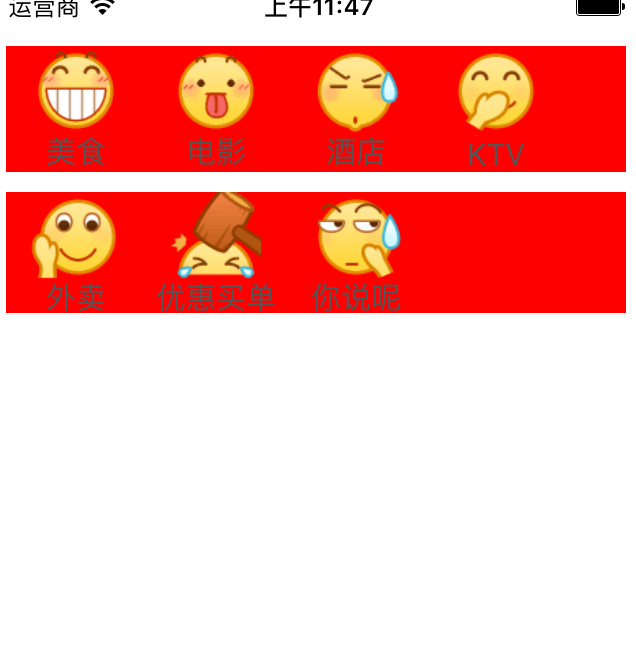
class machaoProject extends Component {

  render() {

    return (

      <View style={styles.container}>

        <View style={ styles.topBgView}>

        <View style={styles.unitView} >

            <Image

                source={require('./Images/001.png')}

                style={styles.imageStyle}

                />

             <Text style = {styles.textStyle}>

             美食

             </Text>

        </View>

        <View style={styles.unitView} >

            <Image

                source={require('./Images/002.png')}

                style={styles.imageStyle}

                />

             <Text style = {styles.textStyle}>

             电影

             </Text>

        </View>

        <View style={styles.unitView} >

            <Image

                source={require('./Images/003.png')}

                style={styles.imageStyle}

                />

             <Text style = {styles.textStyle}>

             酒店

             </Text>

        </View>

        <View style={styles.unitView} >

            <Image

                source={require('./Images/004.png')}

                style={styles.imageStyle}

                />

             <Text style = {styles.textStyle}>

             KTV

             </Text>

        </View>

        </View>

        <View style = {styles.topBgView}>

        <View style={styles.unitView} >

            <Image

                source={require('./Images/005.png')}

                style={styles.imageStyle}

                />

             <Text style = {styles.textStyle}>

             外卖

             </Text>

        </View>

         <View style={styles.unitView} >

            <Image

                source={require('./Images/006.png')}

                style={styles.imageStyle}

                />

             <Text style = {styles.textStyle}>

             优惠买单

             </Text>

        </View>

         <View style={styles.unitView} >

            <Image

                source={require('./Images/007.png')}

                style={styles.imageStyle}

                />

             <Text style = {styles.textStyle}>

             你说呢

             </Text>

        </View>

        </View>

      </View>

    );

  }

}

const styles = StyleSheet.create({

  container: {

    marginLeft: 5,

    marginTop: 20,

    marginRight: 5,

  },

  topBgView: {

    flexDirection: 'row',

    backgroundColor: 'red',

    marginTop: 10,

  },

  unitView: {

      width: 70 ,

  },

  imageStyle: {

     alignSelf: 'center',

     width: 45,

     height: 45,

  },

  textStyle: {

      marginTop: 0,

      textAlign: 'center',

      fontSize: 15,

      color: '#555555'

  }

});

AppRegistry.registerComponent('machaoProject', () => machaoProject);
react-native 学习之Image篇的更多相关文章
- React Native 学习-01
React Native 学习 (学习版本 0.39) 一.环境配置 二.IDE选择 webstorm 1.webstorm配置 ①.首先是可以选择使用汉化包汉化.eu68 ②.安装插件和外部库. 由 ...
- react native 学习一(环境搭配和常见错误的解决)
react native 学习一(环境搭配) 首页,按照http://reactnative.cn/docs/0.30/getting-started.html#content上的介绍,下载安装pyt ...
- React Native 学习资料
React Native 学习资料 学习资料 网址 React Native中文网 https://reactnative.cn/
- React Native 学习(三)之 FlexBox 布局
React Native 学习(三)之 FlexBox 布局
- React Native 学习笔记--进阶(二)--动画
React Native 进阶(二)–动画 动画 流畅.有意义的动画对于移动应用用户体验来说是非常必要的.我们可以联合使用两个互补的系统:用于全局的布局动画LayoutAnimation,和用于创建更 ...
- react native 学习资料整理
入门教程 深入浅出 React Native:使用 JavaScript 构建原生应用 http://www.appcoda.com/react-native-introduction/ 中文版 h ...
- iOS 写给iOS开发者的React Native学习路线(转)
我是一名iOS开发者,断断续续一年前开始接触React Native,最近由于工作需要,专职学习React Native也有一个多月了.网络上知识资源非常的多,但能让人豁然开朗.迅速学习的还是少数,我 ...
- React Native学习方法论
这是我技术公众号的第一篇文章,也是React Native系列文章的第一篇,对我的文章感兴趣的可以加我微信16230091进行关注. 本文表面上讲React Native(以下简称RN),实际上对于学 ...
- react native学习资料
一:基础学习: react-native中文文档(react native中文网,人工翻译,官网完全同步)http://react-native.cn/docs/getting-started.htm ...
- 写给iOS开发者的React Native学习路线(转)
我是一名iOS开发者,断断续续一年前开始接触React Native,最近由于工作需要,专职学习React Native也有一个多月了.网络上知识资源非常的多,但能让人豁然开朗.迅速学习的还是少数,我 ...
随机推荐
- android shape的使用(转)
shape用于设定形状,可以在selector,layout等里面使用,有6个子标签,各属性如下: <?xml version="1.0" encoding="ut ...
- pythonchallenge 解谜 Level 1
得到第一关地址后可以进行第一关的解析了. 看起来好神秘的样子.但是也就是把字母 k 变成 m , o 变成 q ,e 变成 g.将字母对应的ASCII的值+2就行了. #-*- coding:utf- ...
- QQ表情的发送与接收
我想大家对QQ表情一定不会陌生,一个个小头像极大丰富了聊天的乐趣,使得聊天不再是简单的文字叙述,还能够配上喜.怒.哀.乐等表达人物心情的小图片.本文重点要介绍的内容就是如何在微信公众平台使用QQ表情, ...
- 【转】Web测试方法
看到好文章,拿过来给大家分享分享! 一.输入框 1.字符型输入框: (1)字符型输入框:英文全角.英文半角.数字.空或者空格.特殊字符“~!@#¥%……&*?[]{}”特别要注意单引号和&am ...
- 安卓初級教程(5):TabHost的思考
package com.myhost; import android.os.Bundle; import android.view.LayoutInflater; import android.wid ...
- <2048>调查报告心得与体会
老师这次给我们布置了一个任务,就是让我们写一份属于自己的调查报告,针对这个任务,我们小组的六个人通过积极的讨论,提出了一些关于我们产品的问题,当然这些问题并不是很全面,因为我们是从自己的角度出发,无法 ...
- 达梦7的试用 与SQLSERVER的简单技术对比
达梦7的试用 与SQLSERVER的简单技术对比 达梦数据库公司推出了他们的数据库服务管理平台,可以在该平台使用达梦数据库而无须安装达梦7数据库 地址:http://online.dameng.com ...
- MyISAM和InnoDB
MyISAM和InnoDB MyISAM MyISAM使用B+tree作为索引结构,叶节点存放的是数据地址. MyISAM不支持事务和外键. MyISAM是表锁,对数据库写操作时会锁住整个表,效率低. ...
- 几个毫无节操纯属恶搞的JavaScript插件
fartscroll.js,为放屁而生 你知道么,有了这个js库,你的页面就可以——————————放屁勒! 打开下面的演示地址,然后滚动页面. 在线演示:http://theonion.github ...
- oracle中查询、禁用、启用、删除表外键
1.查询所有表的外键的: select table_name, constraint_name from user_constraints where constraint_type = 'R'; ...