
.Net 通过设置Access-Control-Allow-Origin来实现跨域访问
- # 前言
- # 为每个API接口单独添加响应头
- # 封装一个拦截器,便于应用到控制器及接口上
- 1、针对 ASP.NET MVC 项目的Controllers
- 2、针对 ASP.NET Web API项目
- 3、针对 ASP.NET Web API 2 还可以使用库:Microsoft.AspNet.WebApi.Cors
- 3.1 使用nuget安装Microsoft.AspNet.WebApi.Cors
- 3.2 打开App_Start/WebApiConfig.cs文件,在WebApiConfig.Register方法中配置WebApi.Cors
- 3.3 在Controller上添加[EnableCors]属性
- 3.3 在Controller中的action上添加[EnableCors]属性
- 3.4 如果想应用到所有的api controller上,在WebApiConfig.Register方法中进行如下配置
- 3.5 设置origins、HTTP methods、request headers示例
- 3.6 Pass credentials in cross-origin requests
- 3.7 浏览器支持情况
- # 低版本IE实现跨域
- # 参考
# 前言
.Net 通过设置Access-Control-Allow-Origin来实现跨域访问,具体哪里可以设置Access-Control-Allow-Origin呢?
- web.config中可以设置;
- 在IIS服务器站点的功能视图中设置HTTP响应标头;
- 通过nginx代理服务器进行设置;
- 在每个api接口上添加响应头;
- 写一个拦截器,应用到所有控制器上,在拦截器里控制来访域名,动态设置Access-Control-Allow-Origin的值;
本文主要详细说下第四种和第五种方式,第五种方式也是对第四种方式的一种封装;
# 为每个API接口单独添加响应头
1、针对 ASP.NET MVC 项目的Controllers
public class Default1Controller : Controller

{

    public ActionResult Test()

    {

        ControllerContext.HttpContext.Response.Headers.Add("Access-Control-Allow-Origin", "*");

        /*

            --Your code

        */

        return Json("hello");

    }

}
2、针对 ASP.NET Web API项目的Controllers
public class TestController : ApiController

{

    public HttpResponseMessage Get(int id)

    {

        var response = Request.CreateResponse(HttpStatusCode.OK, new {Name="lily",age=10});

        response.Headers.Add("Access-Control-Allow-Origin", "*");

        //response.Headers.Add("X-Pagination", "TestHeader");

        //response.Headers.Add("Access-Control-Expose-Headers", "X-Pagination");

        return response;

    }

}
3、针对ASP.NET Web Forms项目中的处理程序
public class TestHandler : IHttpHandler

{

    public void ProcessRequest(HttpContext context)

    {

        context.Response.AddHeader("Access-Control-Allow-Origin", "http://example.com");

        context.Response.AddHeader("Access-Control-Allow-Headers", "*");

        context.Response.AddHeader("Access-Control-Allow-Methods", "GET, POST, OPTIONS");

        context.Response.AddHeader("Access-Control-Allow-Credentials", "true");

        //context.Response.AddHeader("TestHeaderToExpose", "test");

        //context.Response.AddHeader("Access-Control-Expose-Headers", "TestHeaderToExpose");

        context.Response.ContentType = "text/plain";

        context.Response.Write("Hello World");

    }

    public bool IsReusable

    {

        get

        {

            return false;

        }

    }

}
# 封装一个拦截器,便于应用到控制器及接口上
1、针对 ASP.NET MVC 项目的Controllers
创建一个attribute:
using System.Web.Mvc;

namespace AllowCross.App_Code

{

    public class AllowCrossSiteJsonAttribute : ActionFilterAttribute

    {

        public override void OnActionExecuting(ActionExecutingContext filterContext)

        {

            filterContext.RequestContext.HttpContext.Response.AddHeader("Access-Control-Allow-Origin", "*");

            //actionExecutedContext.Response.Headers.Add("Access-Control-Allow-Methods", "GET, POST, OPTIONS");

            //actionExecutedContext.Response.Headers.Add("Access-Control-Allow-Headers", "*");

            //actionExecutedContext.Response.Headers.Add("Access-Control-Allow-Credentials", "true");

            //context.Response.AddHeader("TestHeader", "test");

            //actionExecutedContext.Response.Headers.Add("Access-Control-Expose-Headers", "TestHeader");

            base.OnActionExecuting(filterContext);

        }

    }

}
将该attribute添加到action上:
using AllowCross.App_Code;

namespace AllowCross.Controllers

{

    public class Default1Controller : Controller

    {

        [AllowCrossSiteJson]

        public ActionResult Test()

        {

            return Json("hello");

        }

    }

}
2、针对 ASP.NET Web API项目
创建一个attribute:
using System.Web.Http.Filters;

namespace WepApiTest.App_Code

{

    public class AllowCrossSiteJsonAttribute : ActionFilterAttribute

    {

        public override void OnActionExecuted(HttpActionExecutedContext actionExecutedContext)

        {

            if (actionExecutedContext.Response != null)

            {

                actionExecutedContext.Response.Headers.Add("Access-Control-Allow-Origin", "*");

            	//actionExecutedContext.Response.Headers.Add("Access-Control-Allow-Methods", "GET, POST, OPTIONS");

            	//actionExecutedContext.Response.Headers.Add("Access-Control-Allow-Headers", "*");

            	//actionExecutedContext.Response.Headers.Add("Access-Control-Allow-Credentials", "true");

            	//context.Response.AddHeader("TestHeader", "test");

            	//actionExecutedContext.Response.Headers.Add("Access-Control-Expose-Headers", "TestHeader");

            }

            base.OnActionExecuted(actionExecutedContext);

        }

    }

}
将该attribute添加到acion上:
using WepApiTest.App_Code;

namespace WepApiTest.Controllers

{

    public class DefaultController : ApiController

    {

        [AllowCrossSiteJson]

        public IEnumerable<string> Get()

        {

            return new string[] { "value1", "value2" };

        }

    }

}
也可以将该attribute添加到整个controller上:
using WepApiTest.App_Code;

namespace WepApiTest.Controllers

{

    [AllowCrossSiteJson]

    public class DefaultController : ApiController

    {

        public IEnumerable<string> Get()

        {

            return new string[] { "value1", "value2" };

        }

    }

}
3、针对 ASP.NET Web API 2 还可以使用库:Microsoft.AspNet.WebApi.Cors
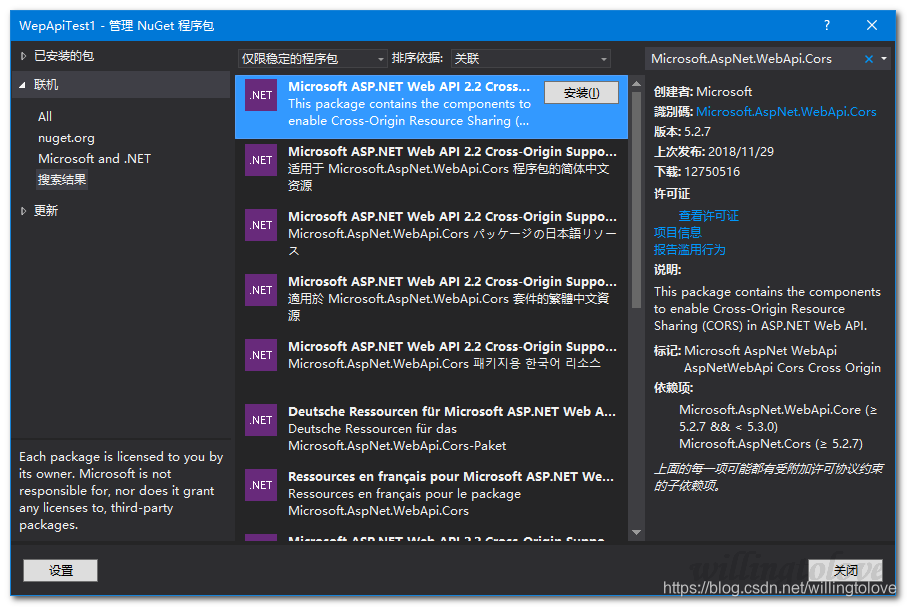
3.1 使用nuget安装Microsoft.AspNet.WebApi.Cors
使用命令:
Install-Package Microsoft.AspNet.WebApi.Cors
使用管理器:
3.2 打开App_Start/WebApiConfig.cs文件,在WebApiConfig.Register方法中配置WebApi.Cors
public static class WebApiConfig

{

    public static void Register(HttpConfiguration config)

    {

        //配置WebApi.Cors

        config.EnableCors();

        config.MapHttpAttributeRoutes();

        config.Routes.MapHttpRoute(

            name: "DefaultApi",

            routeTemplate: "api/{controller}/{id}",

            defaults: new { id = RouteParameter.Optional }

        );

    }

}
3.3 在Controller上添加[EnableCors]属性
using System.Web.Http;

using System.Web.Http.Cors;

namespace WepApiTest.Controllers

{

    [EnableCors(origins: "http://WepApiTest.com", headers: "*", methods: "*")]

    public class TestController : ApiController

    {

        // GET: api/Test

        public IEnumerable<string> Get()

        {

            return new string[] { "value1", "value2" };

        }

    }

}
3.3 在Controller中的action上添加[EnableCors]属性
using System.Web.Http;

using System.Web.Http.Cors;

namespace WepApiTest.Controllers

{

    public class TestController : ApiController

    {

        // GET: api/Test

        [EnableCors(origins: "http://WepApiTest.com", headers: "*", methods: "*")]

        public IEnumerable<string> Get()

        {

            return new string[] { "value1", "value2" };

        }

    }

}
3.4 如果想应用到所有的api controller上,在WebApiConfig.Register方法中进行如下配置
using System.Web.Http;

using System.Web.Http.Cors;

namespace WebApplication2

{

    public static class WebApiConfig

    {

        public static void Register(HttpConfiguration config)

        {

            //配置WebApi.Cors

            var cors = new EnableCorsAttribute("www.example.com", "*", "*");

            config.EnableCors(cors);

            config.MapHttpAttributeRoutes();

            config.Routes.MapHttpRoute(

                name: "DefaultApi",

                routeTemplate: "api/{controller}/{id}",

                defaults: new { id = RouteParameter.Optional }

            );

        }

    }

}
3.5 设置origins、HTTP methods、request headers示例
// Allow CORS for all origins. (Caution!)

[EnableCors(origins: "*", headers: "*", methods: "*")]
[EnableCors(origins: "http://www.justsoso.com,http://www.example.com",

    headers: "*", methods: "*")]
[EnableCors(origins: "http://www.example.com", headers: "*", methods: "get,post")]
[EnableCors(origins: "http://example.com",

    headers: "accept,content-type,origin,x-my-header", methods: "*")]
3.6 Pass credentials in cross-origin requests
Credentials require special handling in a CORS request. By default, the browser does not send any credentials with a cross-origin request. Credentials include cookies as well as HTTP authentication schemes. To send credentials with a cross-origin request, the client must set XMLHttpRequest.withCredentials to true.
Using XMLHttpRequest directly:
var xhr = new XMLHttpRequest();

xhr.open('get', 'http://www.example.com/api/test');

xhr.withCredentials = true;
In jQuery:
$.ajax({

    type: 'get',

    url: 'http://www.example.com/api/test',

    xhrFields: {

        withCredentials: true

    }
In addition, the server must allow the credentials. To allow cross-origin credentials in Web API, set the SupportsCredentials property to true on the [EnableCors] attribute:
[EnableCors(origins: "http://myclient.azurewebsites.net", headers: "*",

    methods: "*", SupportsCredentials = true)]
If this property is true, the HTTP response will include an Access-Control-Allow-Credentials header. This header tells the browser that the server allows credentials for a cross-origin request.
If the browser sends credentials, but the response does not include a valid Access-Control-Allow-Credentials header, the browser will not expose the response to the application, and the AJAX request fails.
Be careful about setting SupportsCredentials to true, because it means a website at another domain can send a logged-in user's credentials to your Web API on the user's behalf, without the user being aware. The CORS spec also states that setting origins to "*" is invalid if SupportsCredentials is true.
3.7 浏览器支持情况
库Web API CORS是服务端的处理方法,还必须要求客户端支持CORS,支持情况请查看该地址:
https://caniuse.com/#feat=cors
# 低版本IE实现跨域
参考:Cross-Domain AJAX for IE8 and IE9
# 参考
Setting Access-Control-Allow-Origin in ASP.Net MVC - simplest possible method
Microsoft.AspNet.WebApi.Cors
跨域资源共享 CORS 详解
——————————————————————————————————————————————
.Net 通过设置Access-Control-Allow-Origin来实现跨域访问的更多相关文章
- 【转载】ASP.NET MVC设置允许跨域访问
默认情况下,浏览器端发送Ajax请求一般被禁止跨域访问,如A域名网站访问B域名网站的请求会被终止,在ASP.NET MVC项目中,我们可以配置相应的设置项,允许网站的接口跨域访问,主要需要设置Acce ...
- Access control allow origin 简单请求和复杂请求
原文地址:http://blog.csdn.net/wangjun5159/article/details/49096445 错误信息: XMLHttpRequest cannot load http ...
- [转] Chrome - 浏览器跨域访问设置(附:新老版本两种设置方法)
[From] http://www.hangge.com/blog/cache/detail_1703.html 在进行前后分离的 webapp 开发,或者 H5 移动 App 开发时,我们会使用 P ...
- ajax 设置Access-Control-Allow-Origin实现跨域访问
ajax跨域访问是一个老问题了,解决方法很多,比较常用的是JSONP方法,JSONP方法是一种非官方方法,而且这种方法只支持GET方式,不如POST方式安全. 即使使用jquery的jsonp方法,t ...
- ajax设置Access-Control-Allow-Origin实现跨域访问
ajax跨域访问 1.jsonp方法,jsonp方法是一种非官方方法,这种方法只支持GET方式, 不如POST方式安全.(即使使用jquery的jsonp方法,type设为POST, 也会自动变为GE ...
- PHP 通过设置P3P头来实现跨域访问COOKIE
CentOS的系统(Linux 内核) 编辑HOST vi /etc/hosts 加入127.0.0.1 www.a.com127.0.0.1 www.b.com 首先:创建 a_setcookie. ...
- 通过设置P3P头来实现跨域访问COOKIE
通过设置P3P头来实现跨域访问COOKIE 实际工作中,类似这样的要求很多,比如说,我们有两个域名,我们想实现在一个域名登录后,能自动完成另一个域名的登录,也就是PASSPORT的功能. 我只写一个大 ...
- java后台设计简单的json数据接口,设置可跨域访问,前端ajax获取json数据
在开发的过程中,有时候我们需要设计一个数据接口.有时候呢,数据接口和Web服务器又不在一起,所以就有跨域访问的问题. 第一步:简单的设计一个数据接口. 数据接口,听起来高大上,其实呢就是一个简单的Se ...
- Java Web中实现设置多个域名跨域访问
添加以下设置可允许所有域名跨域访问: response.setHeader("Access-Control-Allow-Origin","*"); 但在实际应用 ...
随机推荐
- WPF实现选项卡效果(2)——动态添加AvalonDock选项卡
原文:WPF实现选项卡效果(2)--动态添加AvalonDock选项卡 简介 在前面一篇文章里面,我们使用AvalonDock实现了类似于VS的选项卡(或者浏览器的选项卡)效果.但是我们是通过xaml ...
- Win8 Metro(C#)数字图像处理--2.61哈哈镜效果
原文:Win8 Metro(C#)数字图像处理--2.61哈哈镜效果 [函数名称] 哈哈镜效果函数 WriteableBitmap DistortingMirrorProcess(Writea ...
- C/C++网络编程时注意的问题小结
1.网络编程在自己定义结构体实现协议的时候,一定要注意字节对齐这个问题.否则sizeof和强制转换指针的时候都会出现很难发现的bug. 什么是字节对齐自行百度. #pragma pack (1)//字 ...
- Qt 5.9对Mac的图形显示有许多改进
We have some platform specific improvements as well as support for new platforms and compilers comin ...
- UWP入门(十一)--使用选取器打开文件和文件夹
原文:UWP入门(十一)--使用选取器打开文件和文件夹 很漂亮的功能,很有趣 重要的 API FileOpenPicker FolderPicker StorageFile 通过让用户与选取器交互来访 ...
- DELPHI美化界面(2009开始TPanel增加了ParentBackGround)
1.透明问题. 要重新调整界面确实很麻烦,以前用DELPHI开发的界面都很土,和WEB真是没办法比.(我以前用的是DELPHI7),现在回想起来,DELPHI难做的原因是:没有透明控件.所有控件都是不 ...
- xen学习(一)
添加镜像源 [root@xen xen]# cat /etc/yum.repos.d/xen.repo [xen] name=xenserver baseurl=http://mirrors.163. ...
- vim文本编辑器的基本使用方法
前言 命令模式与编辑模式 内置命令 参考资料注明 前言 vi命令是UNIX操作系统和类UNIX操作系统中最通用的全屏幕纯文本编辑器.Linux中的vi编辑器叫vim,它是vi的增强版(vi Impro ...
- 用C实现OOP面向对象编程(1)
如摘要所说,C语言不支持OOP(面向对象的编程).并这不意味着我们就不能对C进行面向对象的开发,只是过程要复杂许多.原来以C++的许多工作,在C语言中需我们手动去完成. 博主将与大家一起研究一下如下用 ...
- 修改zookeeper jvm参数
在zkServer.sh中,增加以下参数: start) echo -n "Starting zookeeper ... " if [ -f $ZOOPIDFILE ...